


- Posts: 180
- Thank you received: 52
3 Post Moderation Rule for New Boarders (25 Jan 2021)
New boarders will have their posts moderated - Don't worry if you cannot see your post immediately.
MacBook Pro: Real3D Motion model
14 Mar 2016 21:34 - 15 Mar 2016 06:54 #74322
by Pielle
MacBook Pro: Real3D Motion model was created by Pielle
And now for Best Supporting Actor in “A world within a world” my MacBook Pro.
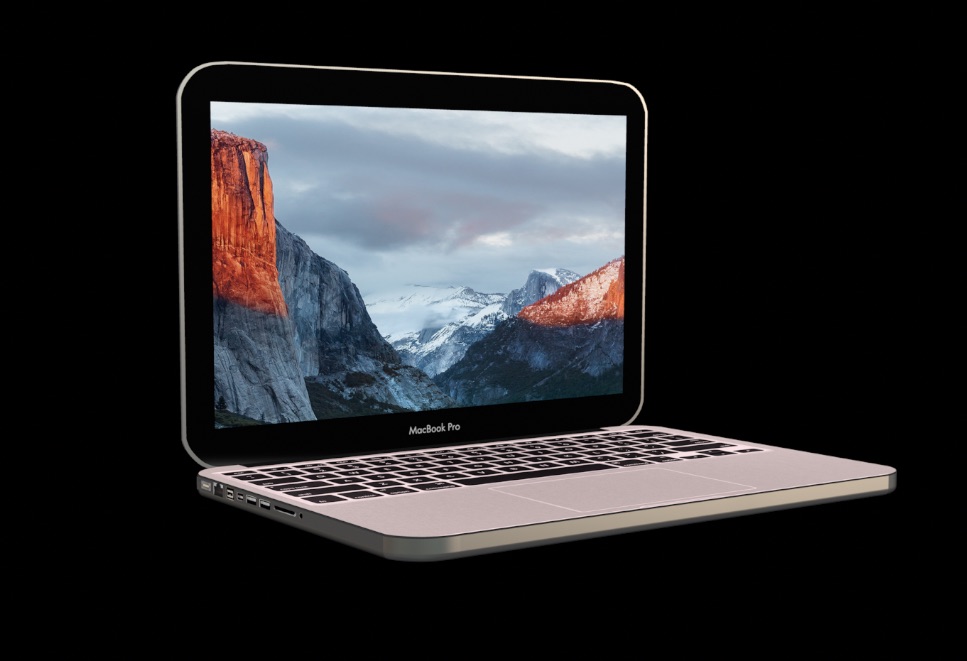
I hope you like it. It’s a little bit aged but with more ram and an SSD it looks younger.
You can change
A ) the opening of the cover
B ) the brightness of the screen and of the apple logo on the back
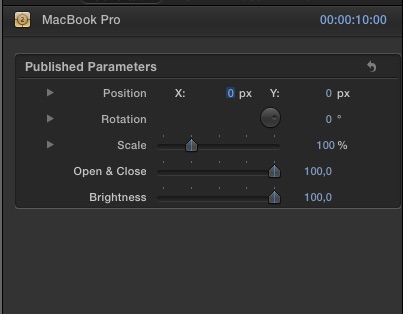
Unzip the attachment and put the folder “ MacBook Pro “ in User/ Your name/ Movies/Motion/Generators/Pielle
Video link vimeo.com/158976109
have good fun !
I hope you like it. It’s a little bit aged but with more ram and an SSD it looks younger.
You can change
A ) the opening of the cover
B ) the brightness of the screen and of the apple logo on the back
Unzip the attachment and put the folder “ MacBook Pro “ in User/ Your name/ Movies/Motion/Generators/Pielle
Video link vimeo.com/158976109
have good fun !
Last edit: 15 Mar 2016 06:54 by Pielle.
Please Log in to join the conversation.

15 Mar 2016 03:30 #74333
by BenB
Replied by BenB on topic MacBook Pro: Real3D Motion model
Attachment?
Yeah, this is something I have some use for. Thanks tons!
Yeah, this is something I have some use for. Thanks tons!
Please Log in to join the conversation.
- Karsten Schlüter
-

- Offline
- Moderator
-

Less
More
- Posts: 3790
- Thank you received: 718
15 Mar 2016 05:49 #74338
by Karsten Schlüter
Replied by Karsten Schlüter on topic MacBook Pro: Real3D Motion model
I'm more and more flabergasted, what grade of perfection and imagination you reach with each new post, Pielle ... :silly:
I have to pinch myself, to remind me:
this is 'letters', a slightly abused title generator!!
Just to feed my curiosity:
How many hours/days do you need for such a detailed object? ...
And, can you share us how to 'bend' forms? say, a half, hollow ball, how would you do that?
I have to pinch myself, to remind me:
this is 'letters', a slightly abused title generator!!
Just to feed my curiosity:
How many hours/days do you need for such a detailed object? ...
And, can you share us how to 'bend' forms? say, a half, hollow ball, how would you do that?
Please Log in to join the conversation.
15 Mar 2016 07:53 - 15 Mar 2016 07:56 #74339
by Pielle
Replied by Pielle on topic MacBook Pro: Real3D Motion model
Sorry ! The attachment now is on.
Karsten what do you mean?. Something like that, in attachment?. Including open and save Motion about 2 minutes.
what it took longer for the MacBook Pro was to find and fix images to use as textures. To model the computer (which is simple) 2 approximately 3 hours. The iPhone was built while I was doing the MacBook to try some aesthetic solutions. If also you Karsten, whom I respect very competent have trouble figuring out how I do these things is perhaps time for make a tutorial as was suggested by Deyson. Anyway I'll try to do it.
with friendship Pielle
Karsten what do you mean?. Something like that, in attachment?. Including open and save Motion about 2 minutes.
what it took longer for the MacBook Pro was to find and fix images to use as textures. To model the computer (which is simple) 2 approximately 3 hours. The iPhone was built while I was doing the MacBook to try some aesthetic solutions. If also you Karsten, whom I respect very competent have trouble figuring out how I do these things is perhaps time for make a tutorial as was suggested by Deyson. Anyway I'll try to do it.
with friendship Pielle
Last edit: 15 Mar 2016 07:56 by Pielle.
Please Log in to join the conversation.
- Karsten Schlüter
-
- Offline
- Moderator
-
Less
More
- Posts: 3790
- Thank you received: 718
17 Mar 2016 09:56 #74421
by Karsten Schlüter
Hi Pielle,
yep, your skills are lightyears ahead of the average Motion5 user whne it comes to 3D design.... I'm aware of the (very9 general workflow: create 'shapes' in a vector format; transcode that into a font; 'type' your object in M5....
but....
as an example, I just opened the MacBook template in M5; the body is an 'E' in your octocopter-font.... but it gave me in a new M5 project just a softedged rectangle.... BECAUSE I'M not aware, you can project own textures onto 3D fonts... basics, but I don't know, have to find out the hard way....
2nd example:
No, not a half solid, but a half HOLLOW ball, how's that?
Or, in general, any 'bend' objects.
I can imagine to extrude 2D shapes... but bending?
Imagine a traditional soccer ball, pentagons and hexagons... but not 'flat' but bended... how do you do that??
The corners of your MacBook look very … 3D-ish… is that just an extruded 'letter' with some soft edge from Motion??
Conc. a tutorial:
would be nice a Making-Of of that MacBook.... how did you 'split' that object into parts'? What app sdid you use to 'paint' it? What tools did you use for making it a font? How did you engineered the 'letters' in Motion (you are arranging 'titles' or single 3D letters in 3D space... not easy...)
Don't spend too much time into answering my Qs, being actually busy with other things... but I'm really keen how you did it...
Replied by Karsten Schlüter on topic MacBook Pro: Real3D Motion model
Pielle wrote: … If also you Karsten,… have trouble figuring out how I do these things is perhaps time for make a tutorial as was suggested by Deyson. Anyway I'll try to do it. …
Hi Pielle,
yep, your skills are lightyears ahead of the average Motion5 user whne it comes to 3D design.... I'm aware of the (very9 general workflow: create 'shapes' in a vector format; transcode that into a font; 'type' your object in M5....
but....
as an example, I just opened the MacBook template in M5; the body is an 'E' in your octocopter-font.... but it gave me in a new M5 project just a softedged rectangle.... BECAUSE I'M not aware, you can project own textures onto 3D fonts... basics, but I don't know, have to find out the hard way....
2nd example:
No, not a half solid, but a half HOLLOW ball, how's that?
Or, in general, any 'bend' objects.
I can imagine to extrude 2D shapes... but bending?
Imagine a traditional soccer ball, pentagons and hexagons... but not 'flat' but bended... how do you do that??
The corners of your MacBook look very … 3D-ish… is that just an extruded 'letter' with some soft edge from Motion??
Conc. a tutorial:
would be nice a Making-Of of that MacBook.... how did you 'split' that object into parts'? What app sdid you use to 'paint' it? What tools did you use for making it a font? How did you engineered the 'letters' in Motion (you are arranging 'titles' or single 3D letters in 3D space... not easy...)
Don't spend too much time into answering my Qs, being actually busy with other things... but I'm really keen how you did it...
Please Log in to join the conversation.
17 Mar 2016 11:32 #74425
by Pielle
Replied by Pielle on topic MacBook Pro: Real3D Motion model
Sorry Karsten when I answered you in the other topic, I had not seen that you had written to me in this.
No an hollow is not possible to do. all objects are made with the extrusion, but there are other instruments in 3D palette. The possibility to change the shape of the anterior or posterior in an indipendent manner.Please note that you can create a compound object, using a word and work on individual glyphs. I'll try to make some tutorials "how to" starting from simple things. Let me know what you think about it and if I can count on you any help.
Your Pielle
No an hollow is not possible to do. all objects are made with the extrusion, but there are other instruments in 3D palette. The possibility to change the shape of the anterior or posterior in an indipendent manner.Please note that you can create a compound object, using a word and work on individual glyphs. I'll try to make some tutorials "how to" starting from simple things. Let me know what you think about it and if I can count on you any help.
Your Pielle
Please Log in to join the conversation.
17 Mar 2016 13:34 - 17 Mar 2016 13:52 #74428
by Pielle
Replied by Pielle on topic MacBook Pro: Real3D Motion model
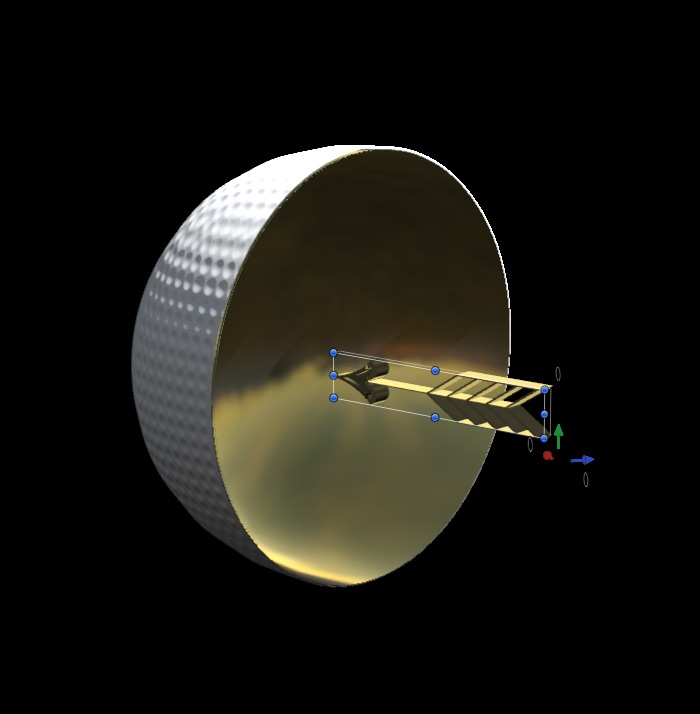
Karsten after I gave you the answer, I was reminded of something so I went to test it in motion, and what I said before is not true I am attaching a dome created in two and a half minutes. See if you like it

Last edit: 17 Mar 2016 13:52 by Pielle.
Please Log in to join the conversation.
- Karsten Schlüter
-
- Offline
- Moderator
-
Less
More
- Posts: 3790
- Thank you received: 718
18 Mar 2016 10:47 #74443
by Karsten Schlüter
Replied by Karsten Schlüter on topic MacBook Pro: Real3D Motion model
Ciao, maestro ...
… thought "hmm, a computer display is for MOVING content" - can I replace the ElCap pic by some dropzone?
Had two attemps, both failed, but gave me some intersting observations:
a) replacing the 'texture' creates only stills, no 'moving images'
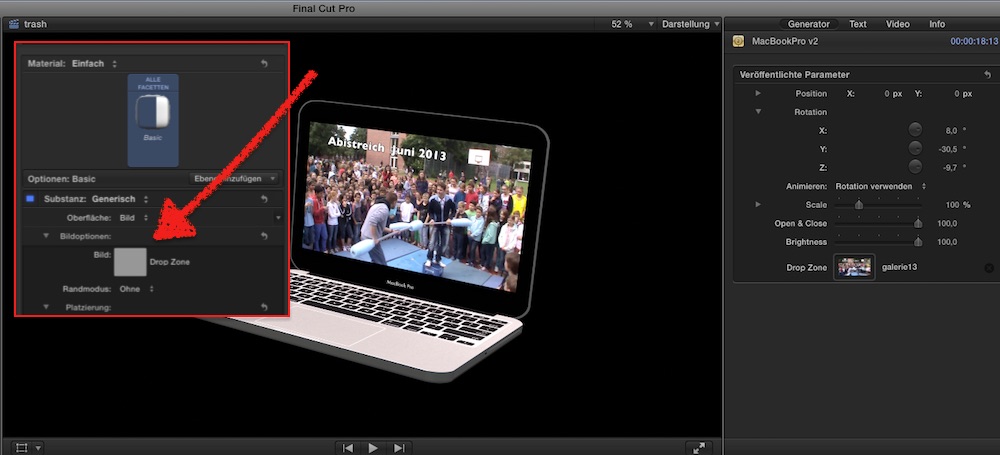
see? I can drag some clip onto it, but the 3D font texture only grabs the first frame....
b) trying to add a dropzone to the Top Cover layer didn't work either: by no means, I'm able to put thredropzone 'in front' of the other content; varying layer order, nor z-depth - it allways 'kills' the blackframe/UpShell = the video is on the outside too - LOL!!!
..... no, that 3D-thingie is not my business.... :whistle:
… thought "hmm, a computer display is for MOVING content" - can I replace the ElCap pic by some dropzone?
Had two attemps, both failed, but gave me some intersting observations:
a) replacing the 'texture' creates only stills, no 'moving images'
see? I can drag some clip onto it, but the 3D font texture only grabs the first frame....
b) trying to add a dropzone to the Top Cover layer didn't work either: by no means, I'm able to put thredropzone 'in front' of the other content; varying layer order, nor z-depth - it allways 'kills' the blackframe/UpShell = the video is on the outside too - LOL!!!
..... no, that 3D-thingie is not my business.... :whistle:
Please Log in to join the conversation.
19 Mar 2016 17:55 #74481
by Pielle
Replied by Pielle on topic MacBook Pro: Real3D Motion model
Ciao Cristiano ! Belle domande !!
A )Font Texture woks only with still images you're wrong, drop zone is a strange animal, it is an half way , works between 2D and 3D, as do the geometric shapes that designs in vector in Motion. they are 2D in a 3D space. I've noticed one thing, when you put in the well a movie appears a menu frame, and you can choose the number of the frame. I am not clear what changes with the function (Hold frame) is checked. I wanted to experiment it .... and the frame number indicates where the movie starts and hold frame locks the frame you have chosen.You can easily see it, use my model "Framed Pictures" and a light film for example, a PAL resolution. Select Project, Put the movie in the well then open the Pictures group and select Frame, Inspector, Text, Apparence, select material, front and under the drop zone there is "Frame". To see the screen movement uses the old final cut trick: hold down the right arrow on the keyboard; so you will force the computer to render frame by frame and you will see the image move.
b ) 3d object respect only the level order. The fact that you see behind the drop zone is normal in Motion. all objects are built with a front face and a rear where the textures are projected backwards. If you build a cylinder and put a picture on the outer surface there is reversed on the inner surface. There are various tricks to keep her from seeing. A 'last thing, the interior of objects is empty (such as those built with Google Sketch up) and you can enter in it with a camera and see inside. The dome has been obtained by making transparent the base wall. It was something I did in one of my first models, "Cube neon light" had taken off (made transparent) the top face of the cube to insert the golden grid.
Keep calm and do not be discouraged. Look at how many things you can do with this cheap jewel of the program. We must learn to know it.
Anyway I built for the tutorial a model of the iPad Air, and now beginning to do the script.



Do you like it ?
with friendship Pielle
A )Font Texture woks only with still images you're wrong, drop zone is a strange animal, it is an half way , works between 2D and 3D, as do the geometric shapes that designs in vector in Motion. they are 2D in a 3D space. I've noticed one thing, when you put in the well a movie appears a menu frame, and you can choose the number of the frame. I am not clear what changes with the function (Hold frame) is checked. I wanted to experiment it .... and the frame number indicates where the movie starts and hold frame locks the frame you have chosen.You can easily see it, use my model "Framed Pictures" and a light film for example, a PAL resolution. Select Project, Put the movie in the well then open the Pictures group and select Frame, Inspector, Text, Apparence, select material, front and under the drop zone there is "Frame". To see the screen movement uses the old final cut trick: hold down the right arrow on the keyboard; so you will force the computer to render frame by frame and you will see the image move.
b ) 3d object respect only the level order. The fact that you see behind the drop zone is normal in Motion. all objects are built with a front face and a rear where the textures are projected backwards. If you build a cylinder and put a picture on the outer surface there is reversed on the inner surface. There are various tricks to keep her from seeing. A 'last thing, the interior of objects is empty (such as those built with Google Sketch up) and you can enter in it with a camera and see inside. The dome has been obtained by making transparent the base wall. It was something I did in one of my first models, "Cube neon light" had taken off (made transparent) the top face of the cube to insert the golden grid.
Keep calm and do not be discouraged. Look at how many things you can do with this cheap jewel of the program. We must learn to know it.
Anyway I built for the tutorial a model of the iPad Air, and now beginning to do the script.
Do you like it ?
with friendship Pielle
Please Log in to join the conversation.
- Karsten Schlüter
-
- Offline
- Moderator
-
Less
More
- Posts: 3790
- Thank you received: 718
21 Mar 2016 15:38 #74519
by Karsten Schlüter
Replied by Karsten Schlüter on topic MacBook Pro: Real3D Motion model
ciao, Pielle,
wow ... need some time to swallow that - thank you at first, excellent info, but to be honest: that 3D/2D dropzone thing is ... not my thing! :woohoo:
'til now, for any of my M5 projects and plugins, Dropzones worked as expected.
But I wasn't surprised, that a font (a font!) does not accept a video as 'texture' ...
Will have a look at your 'Frame', still impressed from your latest, the iPad.... you have a prioductivity which makes me breathless!
My 3D-creations are still 'boxes', right now added SCRBBL to fcp.co list of plugins:
www.fcp.co/forum/generators/25138-scrbbl...ssword-experts#74517
...
and, again: those nasty 3D letters ... they have depth, but I don't get it, where front and back are located.. esp. in that weird Motion5 world, with universal coordinates, and locally ones, and 'add -.5 to make it zero' and ... stuff.
Probably I should keep things simple .... had alone half a dozen attemps within two years to learn Blender (hey, hey heyy, real 3D!!) - no, end of my brain, memory overflow, nada zil zero ... no way.
To know your limits is a first step to wisdom ... HAHAHA!! :silly:
... not this week, but soon, I'll try to follow your excellent discription.
ciao to Italy, from Monaco di Bavaria ...
k.
wow ... need some time to swallow that - thank you at first, excellent info, but to be honest: that 3D/2D dropzone thing is ... not my thing! :woohoo:
'til now, for any of my M5 projects and plugins, Dropzones worked as expected.
But I wasn't surprised, that a font (a font!) does not accept a video as 'texture' ...
Will have a look at your 'Frame', still impressed from your latest, the iPad.... you have a prioductivity which makes me breathless!
My 3D-creations are still 'boxes', right now added SCRBBL to fcp.co list of plugins:
www.fcp.co/forum/generators/25138-scrbbl...ssword-experts#74517
...
and, again: those nasty 3D letters ... they have depth, but I don't get it, where front and back are located.. esp. in that weird Motion5 world, with universal coordinates, and locally ones, and 'add -.5 to make it zero' and ... stuff.
Probably I should keep things simple .... had alone half a dozen attemps within two years to learn Blender (hey, hey heyy, real 3D!!) - no, end of my brain, memory overflow, nada zil zero ... no way.
To know your limits is a first step to wisdom ... HAHAHA!! :silly:
... not this week, but soon, I'll try to follow your excellent discription.
ciao to Italy, from Monaco di Bavaria ...
k.
Please Log in to join the conversation.
16 Nov 2016 19:45 #82857
by Pielle
Replied by Pielle on topic MacBook Pro-Update: Real3D Motion model
Following the changes introduced in Apple Motion 5.3, the MacBook Pro model does not work very well anymore. In attachment the compliant update.
Enjoy Pielle
Enjoy Pielle
Please Log in to join the conversation.
