


- Posts: 8
- Thank you received: 0
3 Post Moderation Rule for New Boarders (25 Jan 2021)
New boarders will have their posts moderated - Don't worry if you cannot see your post immediately.
Switch iMac systems mid-project? Yes, no, maybe?
- photowords
-
 Topic Author
- Offline
- New Member
-

Less
More
07 Oct 2014 18:22 #53769
by photowords
Switch iMac systems mid-project? Yes, no, maybe? was created by photowords
I'm a filmmaker about halfway through a full-length documentary, working with a late-2009 iMac 27". I'm starting to see the spinning ball way too often in FCPX, and the longer the film gets the slower my iMac is working with it. So, I'm ready to upgrade to a newer iMac, but have some concerns about switching systems mid-edit.
I'd love to hear from some of you folks who are experienced iMac with FCPX, about if and how I can best make this transition. Thanks in advance, and here are some details:
Present system:
iMac 27” late 2009 11,1
running 10.6.8 Snow Leopard
2.8 Ghz Intel Core i7 1 processor, 4 cores
16gb RAM 1067MHz DDR3
ATI Radeon HD 4850 VRAM (Total): 512 MB
1tb internal drive
Data is on three 4tb external firewire drives, daisy linked into one firewire port on the iMac.
NOTE: I'm running FCPX 10.0.9 and I don't want to update because I'm mid-project and have everything organized with this filing system and for this version. I'll update to the newest version when I finish this film project, in about 8 months.
Here's the system I'd like to get:
2014 iMax 27":
It will come with 10.9 Mavericks or 10.10 Yosemite.
3.5GHz Quad-core Intel Core i7, Turbo Boost up to 3.9GHz
32GB 1600MHz DDR3 SDRAM - 4X8GB
NVIDIA GeForce GTX 780M 4GB GDDR5
3TB Fusion Drive
I'll still keep my data on the three 4tb firewire drives, unless that runs too slow and I have to upgrade the drives to Thunderbolt.
My dilemma and questions: Because I'm mid-project, I'd like to have the new iMac's system be as close as possible to what I have now. All I need is more processing power and speed, and anything else that changes will only complicate the edit for this film.
1) Can I get the 2014 iMac with Snow Leopard? If I get Maverick, will it allow me to continue with FCPX 10.0.9, since any newer version of FCPX has a much different filing system? Will Snow Leopard, if I can get/keep it, even run the new iMac?
2) If I do have to upgrade my FCP from 10.0.9 to the most recent version in order for it to run on the new iMac, will the change in the filing system just happen automatically when I open up the Events and Projects from my 10.0.9 work, or do I have to struggle with reorganizing everything? In other words, how smooth will the transition be from 10.0.9 upwards?
3) Will the new iMac -- which seems much faster and more powerful -- really make a difference, or might the slow point in my system be the three 4tb daisy chained firewire drives? (I don't think so, since after having FCP X up and working for a while I can see my available RAM drop to the floor, and that seems to be at least part of the spinning ball problem with my present setup.)
Mostly, I fear that an upgrade to the newer iMac will take so much of my time getting everything to work correctly that I'll lose more time than just working on my old, slower machine.
I'd love to hear what the members of this forum think about this. And, THANKS!!
Lonny
www.photowords.com
I'd love to hear from some of you folks who are experienced iMac with FCPX, about if and how I can best make this transition. Thanks in advance, and here are some details:
Present system:
iMac 27” late 2009 11,1
running 10.6.8 Snow Leopard
2.8 Ghz Intel Core i7 1 processor, 4 cores
16gb RAM 1067MHz DDR3
ATI Radeon HD 4850 VRAM (Total): 512 MB
1tb internal drive
Data is on three 4tb external firewire drives, daisy linked into one firewire port on the iMac.
NOTE: I'm running FCPX 10.0.9 and I don't want to update because I'm mid-project and have everything organized with this filing system and for this version. I'll update to the newest version when I finish this film project, in about 8 months.
Here's the system I'd like to get:
2014 iMax 27":
It will come with 10.9 Mavericks or 10.10 Yosemite.
3.5GHz Quad-core Intel Core i7, Turbo Boost up to 3.9GHz
32GB 1600MHz DDR3 SDRAM - 4X8GB
NVIDIA GeForce GTX 780M 4GB GDDR5
3TB Fusion Drive
I'll still keep my data on the three 4tb firewire drives, unless that runs too slow and I have to upgrade the drives to Thunderbolt.
My dilemma and questions: Because I'm mid-project, I'd like to have the new iMac's system be as close as possible to what I have now. All I need is more processing power and speed, and anything else that changes will only complicate the edit for this film.
1) Can I get the 2014 iMac with Snow Leopard? If I get Maverick, will it allow me to continue with FCPX 10.0.9, since any newer version of FCPX has a much different filing system? Will Snow Leopard, if I can get/keep it, even run the new iMac?
2) If I do have to upgrade my FCP from 10.0.9 to the most recent version in order for it to run on the new iMac, will the change in the filing system just happen automatically when I open up the Events and Projects from my 10.0.9 work, or do I have to struggle with reorganizing everything? In other words, how smooth will the transition be from 10.0.9 upwards?
3) Will the new iMac -- which seems much faster and more powerful -- really make a difference, or might the slow point in my system be the three 4tb daisy chained firewire drives? (I don't think so, since after having FCP X up and working for a while I can see my available RAM drop to the floor, and that seems to be at least part of the spinning ball problem with my present setup.)
Mostly, I fear that an upgrade to the newer iMac will take so much of my time getting everything to work correctly that I'll lose more time than just working on my old, slower machine.
I'd love to hear what the members of this forum think about this. And, THANKS!!
Lonny
www.photowords.com
Please Log in to join the conversation.

08 Oct 2014 02:15 #53783
by BenB
Replied by BenB on topic Switch iMac systems mid-project? Yes, no, maybe?
1) No. No, but the newest FCPX will update your old projects and events just fine. No, you won't run SL on the newest Macs, and you won't want to.
2) Pretty much painless, but read up on things first.
www.macprovideo.com/hub/final-cut/fcp-x-...-to-libraries-part-1
3) Screw FW drives, move to USB 3.0 or Thunderbolt for a new Mac. They don't even have FW ports on them. Move forward, or don't.
2) Pretty much painless, but read up on things first.
www.macprovideo.com/hub/final-cut/fcp-x-...-to-libraries-part-1
3) Screw FW drives, move to USB 3.0 or Thunderbolt for a new Mac. They don't even have FW ports on them. Move forward, or don't.
Please Log in to join the conversation.
- photowords
-
Topic Author
- Offline
- New Member
-
Less
More
- Posts: 8
- Thank you received: 0
08 Oct 2014 04:06 #53786
by photowords
Replied by photowords on topic Switch iMac systems mid-project? Yes, no, maybe?
Thanks! That's really helpful. It looks like I'll need to spring for new external drives (TB or USB3) as part of the deal.
Thanks for your thoughtful reply.
Lonny
Thanks for your thoughtful reply.
Lonny
Please Log in to join the conversation.

09 Oct 2014 15:39 #53869
by VidGreg
Replied by VidGreg on topic Switch iMac systems mid-project? Yes, no, maybe?
Lonny,
I mostly agree with Ben. A new iMac will come with the latest OS at time of factory build, currently Mavericks. You can not downgrade.
Likewise FCPX will be the latest version if downloaded from App Store. There is a, however, if you use Migration Assistant the older version of FCPX will be installed. I personally do not like to use MA as it is an all or nothing program and it will bring a lot of crud with it. Whenever I upgrade computers I always like to do a clean install and manually migrate documents, apps etc… This really helps to avoid compatibility problems and crashes.
FCPX 10.1.3 latest version is heads and shoulders better than older versions, so it is worth the extra time to convert and learn the new ins and outs, IMHO. I would spend the time to look at training videos, plan the transition before moving over. Note that FCP has had several changes in media management between 10.0.9/10.1.0/10.1.2 so how Libraries are structured is different for each version. As you research, make sure it is about the latest version.
Fcpx.tv has links to some great vids… fcpx.tv
I agree with Ben, time to ditch FW. Assuming you have them in separate enclosures, I would pop them open and install the bare drives in a multi bay enclosure, preferably TB2 if you can spend the $$.
Finally, you might want to delay your purchase of a new iMac until after Oct 16th. Apple is holding a media event and there are rumors that new iMacs may be announced, including possibly retina display(4or5K) versions. Even if you decide to still get the older computer, they may go on sale.
Hope this helps, Greg
I mostly agree with Ben. A new iMac will come with the latest OS at time of factory build, currently Mavericks. You can not downgrade.
Likewise FCPX will be the latest version if downloaded from App Store. There is a, however, if you use Migration Assistant the older version of FCPX will be installed. I personally do not like to use MA as it is an all or nothing program and it will bring a lot of crud with it. Whenever I upgrade computers I always like to do a clean install and manually migrate documents, apps etc… This really helps to avoid compatibility problems and crashes.
FCPX 10.1.3 latest version is heads and shoulders better than older versions, so it is worth the extra time to convert and learn the new ins and outs, IMHO. I would spend the time to look at training videos, plan the transition before moving over. Note that FCP has had several changes in media management between 10.0.9/10.1.0/10.1.2 so how Libraries are structured is different for each version. As you research, make sure it is about the latest version.
Fcpx.tv has links to some great vids… fcpx.tv
I agree with Ben, time to ditch FW. Assuming you have them in separate enclosures, I would pop them open and install the bare drives in a multi bay enclosure, preferably TB2 if you can spend the $$.
Finally, you might want to delay your purchase of a new iMac until after Oct 16th. Apple is holding a media event and there are rumors that new iMacs may be announced, including possibly retina display(4or5K) versions. Even if you decide to still get the older computer, they may go on sale.
Hope this helps, Greg
Please Log in to join the conversation.
- photowords
-
Topic Author
- Offline
- New Member
-
Less
More
- Posts: 8
- Thank you received: 0
10 Oct 2014 02:16 #53937
by photowords
Replied by photowords on topic Switch iMac systems mid-project? Yes, no, maybe?
Thanks!! for that great reply. After the reassurances and ideas from you two, the upgrade seems feasible and worth doing -- as well as changing the drives.
I'll also wait until after the new announcements from Apple.
Thanks again!!
Lonny
www.photowords.com
I'll also wait until after the new announcements from Apple.
Thanks again!!
Lonny
www.photowords.com
Please Log in to join the conversation.
- Don Rumsey
-
- Offline
- Elite Member
-

Less
More
- Posts: 220
- Thank you received: 17
29 Oct 2014 03:35 #55060
by Don Rumsey
Replied by Don Rumsey on topic Switch iMac systems mid-project? Yes, no, maybe?
Hey Lonny... So you're saying I could take the bare drives out of my, My Studio WD FW drives out and put them in a Thunderbolt enclosure. That the TB tech is just how it gets to your computer...that TB drives are essentially regular ol hard drives with fancier pipeline?Basically I'm in the same boat as the OP however I have upgraded through the versions but my 2009 is still just to dang slow. I'm doing several things in the timeline, effects, filters, masks, and to see playback everything has to be rendered and just takes to long.
Please Log in to join the conversation.
29 Oct 2014 11:33 #55082
by BenB
Replied by BenB on topic Switch iMac systems mid-project? Yes, no, maybe?
Yes, a TB RAID is only a normal RAID enclosure, with normal drives in it, and a controller card that has the TB chipset on it. Back up that data first, because creating that RAID will wipe those drives clean.
Please Log in to join the conversation.
- photowords
-
Topic Author
- Offline
- New Member
-
Less
More
- Posts: 8
- Thank you received: 0
31 Oct 2014 00:09 #55250
by photowords
Replied by photowords on topic Switch iMac systems mid-project? Yes, no, maybe?
Well, that's the way I understand it. The drives don't change for Thunderbolt, just the connection to the computer. The rate-limiting-step for external drives has always been the connection, not the drives. For example, I have a couple of drives that each are both USB2 and Firewire in the same housing. Same drive, different speeds into the computer.
That said, I haven't tried to make the upgrade yet. But when I go from my 2009 iMac to the new one, I'm going to try to keep the same external drives and just upgrade the housing to USB 3.0. I'll believe it when I do it and it works!
Thoughts?
Thanks!
Lonny
That said, I haven't tried to make the upgrade yet. But when I go from my 2009 iMac to the new one, I'm going to try to keep the same external drives and just upgrade the housing to USB 3.0. I'll believe it when I do it and it works!
Thoughts?
Thanks!
Lonny
Please Log in to join the conversation.
31 Oct 2014 02:02 #55257
by VidGreg
Replied by VidGreg on topic Switch iMac systems mid-project? Yes, no, maybe?
Lonny (and Don)
In looking over your current system, you might think about just upgrading the ram to 32GB if you are seeing lots of page swaps.
Also upgrading to the FCPX10.1.3 would also speed up your system.
Since your current computer is an i7, the increase in a new iMac may not be as great as you think. You would gain speed with the faster CPU, and newer GPU, but it won't be drastic. You can go to sites like
Barefeats…http://www.barefeats.com
or Diglloyd's Mac Performance Guide…http://macperformanceguide.com
to see test results for various configurations of computers.
As to the external drives, yes USB3 or TB connections would provide much faster throughput, but only up to the speed that the drive(s) are capable of. There are 3 different SATA drive specifications, each ~ doubling speed of previous generation. It actually depends on various factors as to where a bottleneck occurs. Drastic speed loss for full drives for example. A ssd is ~ 4X faster than a hdd, but in a FW800 enclosure, it would be the essentially same speed as a hdd.
Here is a pretty good article by Larry Jordan explaining data speed throughput.
www.larryjordan.biz/app_bin/wordpress/archives/2559
Truthfully, if you are experiencing lots of page swaps, using lots of effects, large projects, you may gain the speed you need by increasing ram, or maybe not. Depends on how responsive you need your computer to be. If you are going to a RAID set-up, then a faster I/O port is mandatory. USB2 is a total non starter for video work.
Not trying to talk you out of a new computer, just trying to explain what to expect.
Hope this helps, Greg
In looking over your current system, you might think about just upgrading the ram to 32GB if you are seeing lots of page swaps.
Also upgrading to the FCPX10.1.3 would also speed up your system.
Since your current computer is an i7, the increase in a new iMac may not be as great as you think. You would gain speed with the faster CPU, and newer GPU, but it won't be drastic. You can go to sites like
Barefeats…http://www.barefeats.com
or Diglloyd's Mac Performance Guide…http://macperformanceguide.com
to see test results for various configurations of computers.
As to the external drives, yes USB3 or TB connections would provide much faster throughput, but only up to the speed that the drive(s) are capable of. There are 3 different SATA drive specifications, each ~ doubling speed of previous generation. It actually depends on various factors as to where a bottleneck occurs. Drastic speed loss for full drives for example. A ssd is ~ 4X faster than a hdd, but in a FW800 enclosure, it would be the essentially same speed as a hdd.
Here is a pretty good article by Larry Jordan explaining data speed throughput.
www.larryjordan.biz/app_bin/wordpress/archives/2559
Truthfully, if you are experiencing lots of page swaps, using lots of effects, large projects, you may gain the speed you need by increasing ram, or maybe not. Depends on how responsive you need your computer to be. If you are going to a RAID set-up, then a faster I/O port is mandatory. USB2 is a total non starter for video work.
Not trying to talk you out of a new computer, just trying to explain what to expect.
Hope this helps, Greg
Please Log in to join the conversation.
- photowords
-
Topic Author
- Offline
- New Member
-
Less
More
- Posts: 8
- Thank you received: 0
31 Oct 2014 03:17 #55261
by photowords
Replied by photowords on topic Switch iMac systems mid-project? Yes, no, maybe?
Greg,
That's fantastic information -- thanks very much.
The problem with the late 2009 iMac is that it maxes out RAM at 16gb -- so I'm already there.
There are many slow parts of my work flow -- at times I'll make simple changes like adjusting color balance and the ball spins for 5 to 10 seconds before I can see what moving the slider did. This is crazy making. Also, exporting large projects (I'm working on a 90 minute film) is terribly slow.
Some of this will be helped by more RAM, I'm sure (and that will require a new computer). And some will probably improve with faster communication with my external drives -- presumably USB3.0 or TB will be better than my 3 daisy chained 4tb drives.
I really appreciate your thoughts, though, on where the bottlenecks are -- and that will guide me in getting the new system. If I could just add RAM to what I've got, that would be worth a try. But no go.
Thanks!!
Lonny
That's fantastic information -- thanks very much.
The problem with the late 2009 iMac is that it maxes out RAM at 16gb -- so I'm already there.
There are many slow parts of my work flow -- at times I'll make simple changes like adjusting color balance and the ball spins for 5 to 10 seconds before I can see what moving the slider did. This is crazy making. Also, exporting large projects (I'm working on a 90 minute film) is terribly slow.
Some of this will be helped by more RAM, I'm sure (and that will require a new computer). And some will probably improve with faster communication with my external drives -- presumably USB3.0 or TB will be better than my 3 daisy chained 4tb drives.
I really appreciate your thoughts, though, on where the bottlenecks are -- and that will guide me in getting the new system. If I could just add RAM to what I've got, that would be worth a try. But no go.
Thanks!!
Lonny
Please Log in to join the conversation.
31 Oct 2014 03:40 #55262
by VidGreg
Replied by VidGreg on topic Switch iMac systems mid-project? Yes, no, maybe?
Lonny
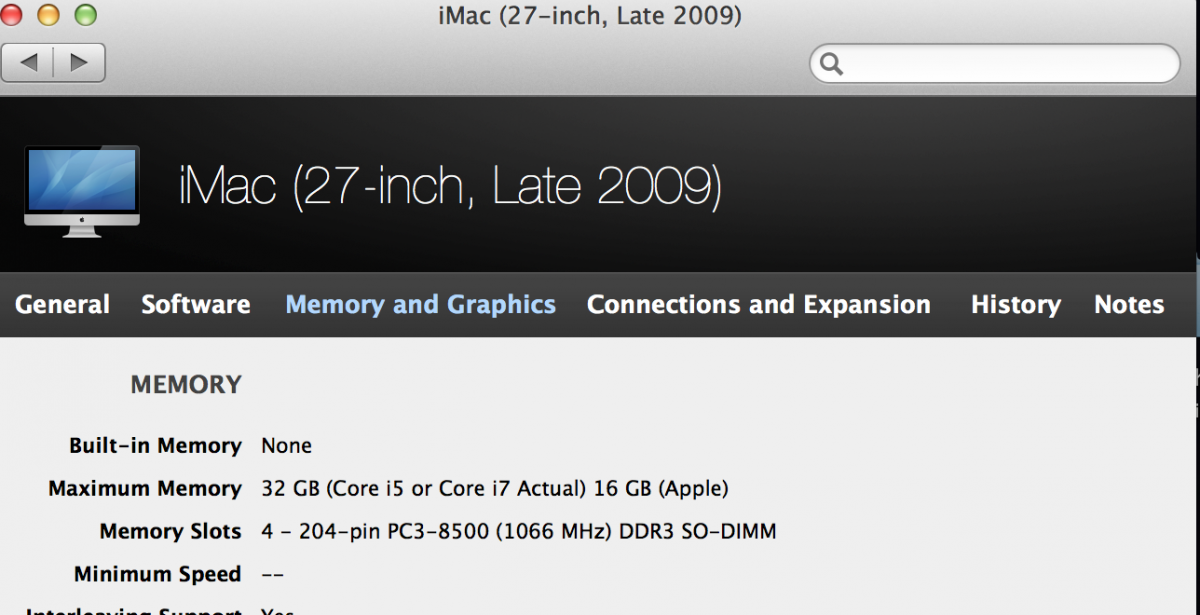
Pretty sure that model will recognize 32GB even though Apple says only 16.
Check OWC.
Hope this helps, Greg
Pretty sure that model will recognize 32GB even though Apple says only 16.
Check OWC.
Hope this helps, Greg
Please Log in to join the conversation.
- photowords
-
Topic Author
- Offline
- New Member
-
Less
More
- Posts: 8
- Thank you received: 0
31 Oct 2014 04:36 #55263
by photowords
Replied by photowords on topic Switch iMac systems mid-project? Yes, no, maybe?
Please Log in to join the conversation.
31 Oct 2014 05:13 #55265
by VidGreg
Replied by VidGreg on topic Switch iMac systems mid-project? Yes, no, maybe?
Yes
eshop.macsales.com/item/Other%20World%20Computing/8566DDR3S32S/
MacTracker
While Apple often does not officially support, doesn't mean it can't happen. AFIK all i7 Haswell CPUs can support 32GB
Hope this helps, Greg
eshop.macsales.com/item/Other%20World%20Computing/8566DDR3S32S/
MacTracker
While Apple often does not officially support, doesn't mean it can't happen. AFIK all i7 Haswell CPUs can support 32GB
Hope this helps, Greg
Please Log in to join the conversation.

31 Oct 2014 17:42 - 31 Oct 2014 17:43 #55322
by joema
Short answer: a newer iMac, pref. a 4Ghz retina iMac would be vastly faster, assuming your I/O is handled properly. The i7 "Lynnfield" CPU in your 2009 iMac does not have Quick Sync which can accelerate single-pass H.264 exports by five times or more: en.wikipedia.org/wiki/Intel_Quick_Sync_Video
If you can't afford a top-spec retina iMac, then a factory refurbished top-spec 2013 iMac 27 would be a big improvement also. If you get that, make sure you select either Fusion Drive or (preferably) SSD.
USB 2.0 is way, way too slow for video editing. I don't know how you have USB2 and FW drives in the same housing, unless that's just a rack.
You also need to consider age of your hard drives. They have finite operational life. Statistics vary, but I've seen studies showing after 3-4 years, there can be a 20% chance of failure per year.
Re drive configurations on a new iMac, there are too many options and tradeoffs to discuss in a single post, but the bottom line is a new iMac with upgraded drives would be hugely faster.
Replied by joema on topic Switch iMac systems mid-project? Yes, no, maybe?
photowords wrote: ...have a couple of drives that each are both USB2 and Firewire in the same housing...late 2009 iMac....simple changes like adjusting color balance and the ball spins for 5 to 10 seconds before I can see what moving the slider did....Also, exporting large projects (I'm working on a 90 minute film) is terribly slow...
Short answer: a newer iMac, pref. a 4Ghz retina iMac would be vastly faster, assuming your I/O is handled properly. The i7 "Lynnfield" CPU in your 2009 iMac does not have Quick Sync which can accelerate single-pass H.264 exports by five times or more: en.wikipedia.org/wiki/Intel_Quick_Sync_Video
If you can't afford a top-spec retina iMac, then a factory refurbished top-spec 2013 iMac 27 would be a big improvement also. If you get that, make sure you select either Fusion Drive or (preferably) SSD.
USB 2.0 is way, way too slow for video editing. I don't know how you have USB2 and FW drives in the same housing, unless that's just a rack.
You also need to consider age of your hard drives. They have finite operational life. Statistics vary, but I've seen studies showing after 3-4 years, there can be a 20% chance of failure per year.
Re drive configurations on a new iMac, there are too many options and tradeoffs to discuss in a single post, but the bottom line is a new iMac with upgraded drives would be hugely faster.
Last edit: 31 Oct 2014 17:43 by joema.
Please Log in to join the conversation.
- photowords
-
Topic Author
- Offline
- New Member
-
Less
More
- Posts: 8
- Thank you received: 0
31 Oct 2014 17:56 #55324
by photowords
Replied by photowords on topic Switch iMac systems mid-project? Yes, no, maybe?
Thanks! I am on my way to the new retina iMac, fully loaded, just waiting for the right time in my work flow to make the switch. Once I have it, I'll work out the external drive questions depending on speed and need.
Thanks, all! Really helpful discussion.
Thanks, all! Really helpful discussion.
Please Log in to join the conversation.
- Don Rumsey
-
- Offline
- Elite Member
-
Less
More
- Posts: 220
- Thank you received: 17
31 Oct 2014 18:05 #55325
by Don Rumsey
Replied by Don Rumsey on topic Switch iMac systems mid-project? Yes, no, maybe?
Hey Greg,
Thanks for all the info however I miss read. I don't have the same chip as him. I just have the 2.66 i5. I had heard you could put 32 gig RAM in these however I'm not sure about the i5. Otherwise. i'm not all that dissapointed with final render time but more with timeline render. Once i get several things involved with the clips it seems to take to long with render. Especially if its stabalization and optical flow. Which I know take a little longer but geez.
Thanks for all the info however I miss read. I don't have the same chip as him. I just have the 2.66 i5. I had heard you could put 32 gig RAM in these however I'm not sure about the i5. Otherwise. i'm not all that dissapointed with final render time but more with timeline render. Once i get several things involved with the clips it seems to take to long with render. Especially if its stabalization and optical flow. Which I know take a little longer but geez.
Please Log in to join the conversation.

31 Oct 2014 20:45 #55331
by Bobbyco
Replied by Bobbyco on topic Switch iMac systems mid-project? Yes, no, maybe?
I think your problem is the i5, much lower performance than an i7, plus i5 systems lack powerful discrete graphics. RAM would help Though in terms of timeline render, if it can be added.
Please Log in to join the conversation.
31 Oct 2014 22:18 #55334
by joema
I think his 2009 iMac has a 2.6Ghz i5-750 ("Lynnfield"). I think that iMac had two discrete graphics options: ATI Radeon HD 4670 or HD4850. Depending on which one, a contemporary iMac with GTX-780m or M295X GPU is probably 5-8 times faster, just from a GPU standpoint.
Another problem is the Lynnfield i5 did not have Quick Sync which can accelerate single-pass H.265 by at least five times.
I wouldn't bother with upgrading it. A retina i7 iMac would be the ideal choice. Less expensive but still very good is a factory refurbished 2013 iMac 27. Even that is vastly faster than what he has, esp. if it has the 780m GPU and either SSD or Fusion Drive.
Replied by joema on topic Switch iMac systems mid-project? Yes, no, maybe?
Bobbyco wrote: I think your problem is the i5, much lower performance than an i7, plus i5 systems lack powerful discrete graphics...
I think his 2009 iMac has a 2.6Ghz i5-750 ("Lynnfield"). I think that iMac had two discrete graphics options: ATI Radeon HD 4670 or HD4850. Depending on which one, a contemporary iMac with GTX-780m or M295X GPU is probably 5-8 times faster, just from a GPU standpoint.
Another problem is the Lynnfield i5 did not have Quick Sync which can accelerate single-pass H.265 by at least five times.
I wouldn't bother with upgrading it. A retina i7 iMac would be the ideal choice. Less expensive but still very good is a factory refurbished 2013 iMac 27. Even that is vastly faster than what he has, esp. if it has the 780m GPU and either SSD or Fusion Drive.
Please Log in to join the conversation.
- photowords
-
Topic Author
- Offline
- New Member
-
Less
More
- Posts: 8
- Thank you received: 0
31 Oct 2014 23:09 #55336
by photowords
Replied by photowords on topic Switch iMac systems mid-project? Yes, no, maybe?
Here's what's in my late 2009:
2.8 Ghz Intel Core i7
16gb 1067 Mhz DDR3
ATI Radeon HD 4850
I'll let you all know when the new retina iMac comes in.
Thanks to all for help and encouragement.
Lonny
2.8 Ghz Intel Core i7
16gb 1067 Mhz DDR3
ATI Radeon HD 4850
I'll let you all know when the new retina iMac comes in.
Thanks to all for help and encouragement.
Lonny
Please Log in to join the conversation.
