


- Posts: 3790
- Thank you received: 718
3 Post Moderation Rule for New Boarders (25 Jan 2021)
New boarders will have their posts moderated - Don't worry if you cannot see your post immediately.
Motion Blur / Adjustment Layers to add blur in FCPX
- Karsten Schlüter
-
 Topic Author
- Offline
- Moderator
-

Less
More
28 Jun 2016 15:28 #78205
by Karsten Schlüter
Just a quick'n dirty one:
after dl and unzip, drag the folder into ~/Movies/Motion Templates/Titles
yes, although an effect into titles, 'cause it is an Adjustment Layer.
In FCPX you'll find in the Titles Tab a new category, Motion Blur Adj. Layers:
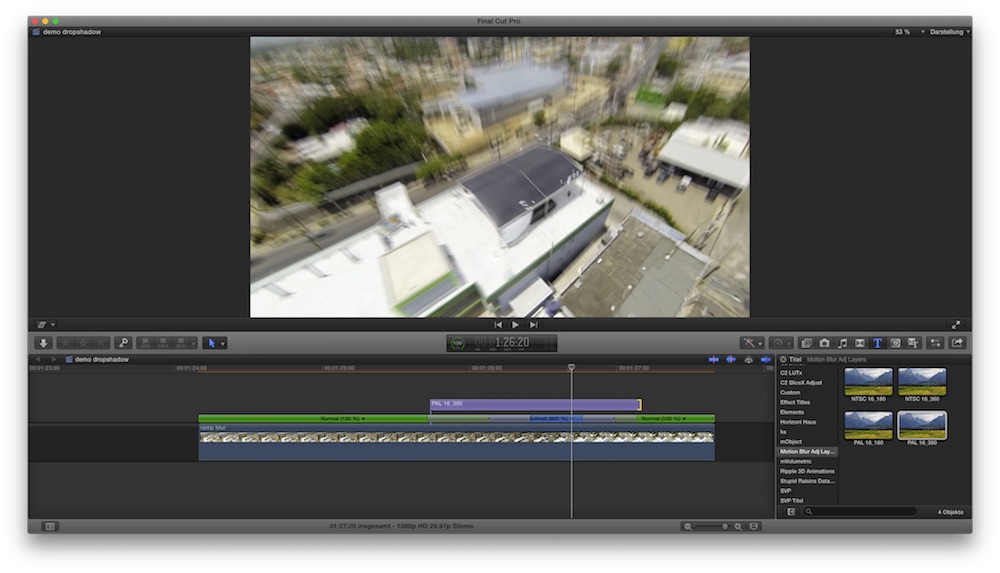
There are 4 ALs, for 25fps and 29.97, with 360° shutter (lots of blur) and 180° shutter (less blur)
Because it's an AL, drag it OVER the clip you like to blur, not onto it!
Lengthen or shorten, as you like, has no effect on amount of blur.
after dl and unzip, drag the folder into ~/Movies/Motion Templates/Titles
yes, although an effect into titles, 'cause it is an Adjustment Layer.
In FCPX you'll find in the Titles Tab a new category, Motion Blur Adj. Layers:
There are 4 ALs, for 25fps and 29.97, with 360° shutter (lots of blur) and 180° shutter (less blur)
Because it's an AL, drag it OVER the clip you like to blur, not onto it!
Lengthen or shorten, as you like, has no effect on amount of blur.
Please Log in to join the conversation.
- dominicanpiano.joel
-

- Offline
- New Member
-

Less
More
- Posts: 3
- Thank you received: 0
28 Jun 2016 17:33 #78215
by dominicanpiano.joel
 thank you karsten!!!!!
i will do it right now.
Replied by dominicanpiano.joel on topic Motion Blur / Adjustment Layers to add blur in FCPX
thank you karsten!!!!!i will do it right now.
Please Log in to join the conversation.
- kurtulus.burkay
-
- Offline
- New Member
-
Less
More
- Posts: 1
- Thank you received: 0
22 Nov 2016 21:48 #83114
by kurtulus.burkay
Replied by kurtulus.burkay on topic Motion Blur / Adjustment Layers to add blur in FCPX
thank you very much 
Please Log in to join the conversation.
