


- Posts: 1049
- Thank you received: 404
3 Post Moderation Rule for New Boarders (25 Jan 2021)
New boarders will have their posts moderated - Don't worry if you cannot see your post immediately.
Only start a new post here if you are uploading a free plugin or direct linking to a plugin or the page that the plugin can be downloaded from.
All other new posts will be deleted.
All other new posts will be deleted.
Free Final Cut Pro X FCPX Generator: CoverFlow
- peteramwiggins
-
 Topic Author
- Offline
- Administrator
-

- The Administrator :)
Less
More
10 Apr 2012 01:52 - 14 Aug 2012 12:03 #6724
by peteramwiggins
Administrator
Free Final Cut Pro X FCPX Generator: CoverFlow was created by peteramwiggins
All,
FxMahoney has posted an 8 image well CoverFlow effect template
Download Free FCPX CoverFlow Template Effect
If you are wondering where the free CoverFlux plugin that is mentioned that can handle more than 8 images then you will find it on the Idustrial Revolution CoverFlux page
FxMahoney has posted an 8 image well CoverFlow effect template
Download Free FCPX CoverFlow Template Effect
If you are wondering where the free CoverFlux plugin that is mentioned that can handle more than 8 images then you will find it on the Idustrial Revolution CoverFlux page
Administrator
Last edit: 14 Aug 2012 12:03 by peteramwiggins.
Please Log in to join the conversation.
10 Apr 2012 22:26 #6749
by moonmike
Replied by moonmike on topic Re: Free Final Cut Pro X FCPX Generator: CoverFlow
good work. thanks for sharing!
I´ve tried it yesterday, with perfect results.
I loved the possibility to play with the height, and the angle of the cam.
real nice.
It only needs a lot of time for rendering, or a better mac than mine..
At the Idustrial Revolution page i´ve found the notice:
"not for FCPX" ??? something changed meanwhile?
But you´ve a done a great job!!
thanks a lot!
thanks for sharing!I´ve tried it yesterday, with perfect results.
I loved the possibility to play with the height, and the angle of the cam.
real nice.
It only needs a lot of time for rendering, or a better mac than mine..
At the Idustrial Revolution page i´ve found the notice:
"not for FCPX" ??? something changed meanwhile?
But you´ve a done a great job!!
thanks a lot!
Please Log in to join the conversation.
- peteramwiggins
-
Topic Author
- Offline
- Administrator
-
- The Administrator :)
Less
More
- Posts: 1049
- Thank you received: 404
11 Apr 2012 16:28 #6810
by peteramwiggins
Administrator
Replied by peteramwiggins on topic Re: Free Final Cut Pro X FCPX Generator: CoverFlow
Coverflux won't work in FCPX yet as there isn't a limit on how many images it will display and you would have to have a dropzone for each as file choosers are not supported.
Administrator
Please Log in to join the conversation.
- Karsten Schlüter
-

- Offline
- Moderator
-

Less
More
- Posts: 3790
- Thank you received: 718
12 Jul 2012 14:41 #11409
by Karsten Schlüter
Replied by Karsten Schlüter on topic Re: Free Final Cut Pro X FCPX Generator: CoverFlow
Hi Peter,
my first post here and starting with 'issues':
COVERFLOW is awesome - aside, it makes my videos in the dropzone(s) square.
I tried opening your generator in Motion5 - the Drop Zone placeholder.tiff is square (600x600), but adding a Drop Zone in any other Motion5 project makes it 16:9 (I'm working in 1280x720).
The complexity of your generator doesn't allow me to fix the aspect ratio my own.
Where is the 'knob' I have to turn to make the dropzone/the dropped pictures, videos 16:9?
Thanks in advance! I'm a busy reader here for about a year ... happy to be part of the community! (maybe some others in the hobbyist league know my contributions at Apple Support etc ...)
my first post here and starting with 'issues':
COVERFLOW is awesome - aside, it makes my videos in the dropzone(s) square.
I tried opening your generator in Motion5 - the Drop Zone placeholder.tiff is square (600x600), but adding a Drop Zone in any other Motion5 project makes it 16:9 (I'm working in 1280x720).
The complexity of your generator doesn't allow me to fix the aspect ratio my own.
Where is the 'knob' I have to turn to make the dropzone/the dropped pictures, videos 16:9?
Thanks in advance! I'm a busy reader here for about a year ... happy to be part of the community! (maybe some others in the hobbyist league know my contributions at Apple Support etc ...)
Please Log in to join the conversation.
- peteramwiggins
-
Topic Author
- Offline
- Administrator
-
- The Administrator :)
Less
More
- Posts: 1049
- Thank you received: 404
12 Jul 2012 21:47 #11435
by peteramwiggins
Administrator
Replied by peteramwiggins on topic Re: Free Final Cut Pro X FCPX Generator: CoverFlow
Are you using the file chooser to load images? Aspect ratio isn't an issue
Administrator
Please Log in to join the conversation.
- Karsten Schlüter
-
- Offline
- Moderator
-
Less
More
- Posts: 3790
- Thank you received: 718
13 Jul 2012 06:12 - 13 Jul 2012 06:13 #11456
by Karsten Schlüter
Replied by Karsten Schlüter on topic Re: Free Final Cut Pro X FCPX Generator: CoverFlow
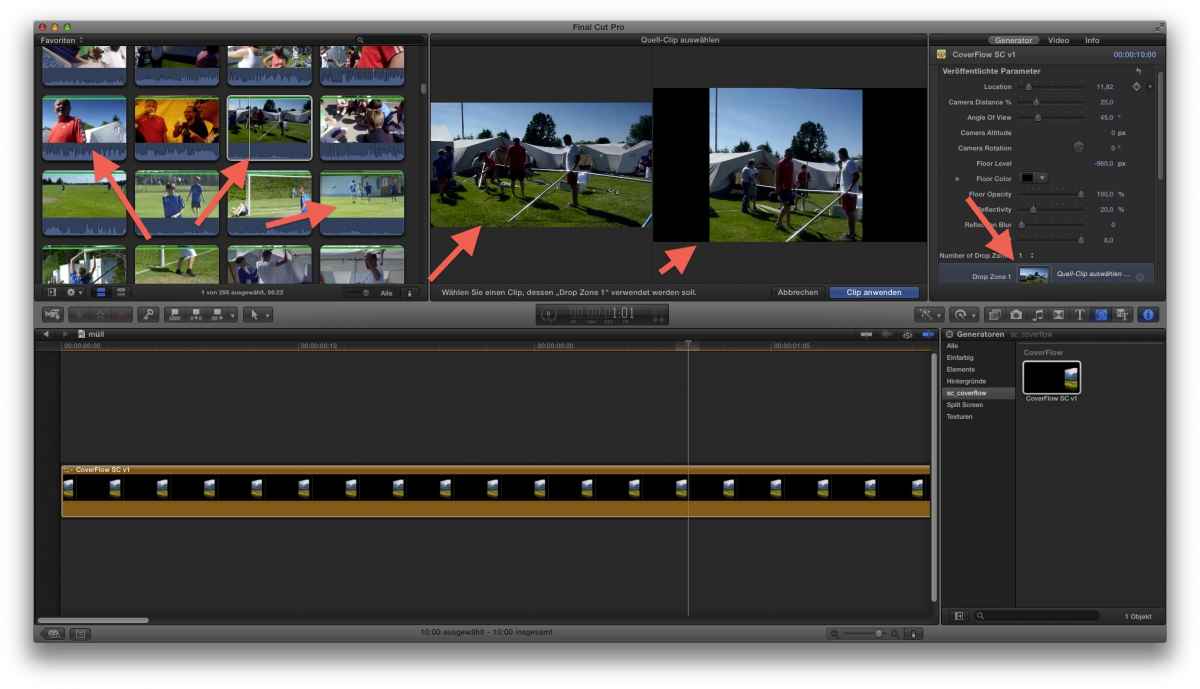
ok, perhaps a pic is more worth than a 1000 pidgin words ...
in attached screenshot you see:
• my sources are all 16:9 (720p)
• the placeholder of the plugin appears square
• using the file chooser shows 16;9 source but 'clipped' drop zone
I tried various sources, tried drag'n drop or the file chooser, tried various Project setting (25, 30, 1080, 720) ... no luck.
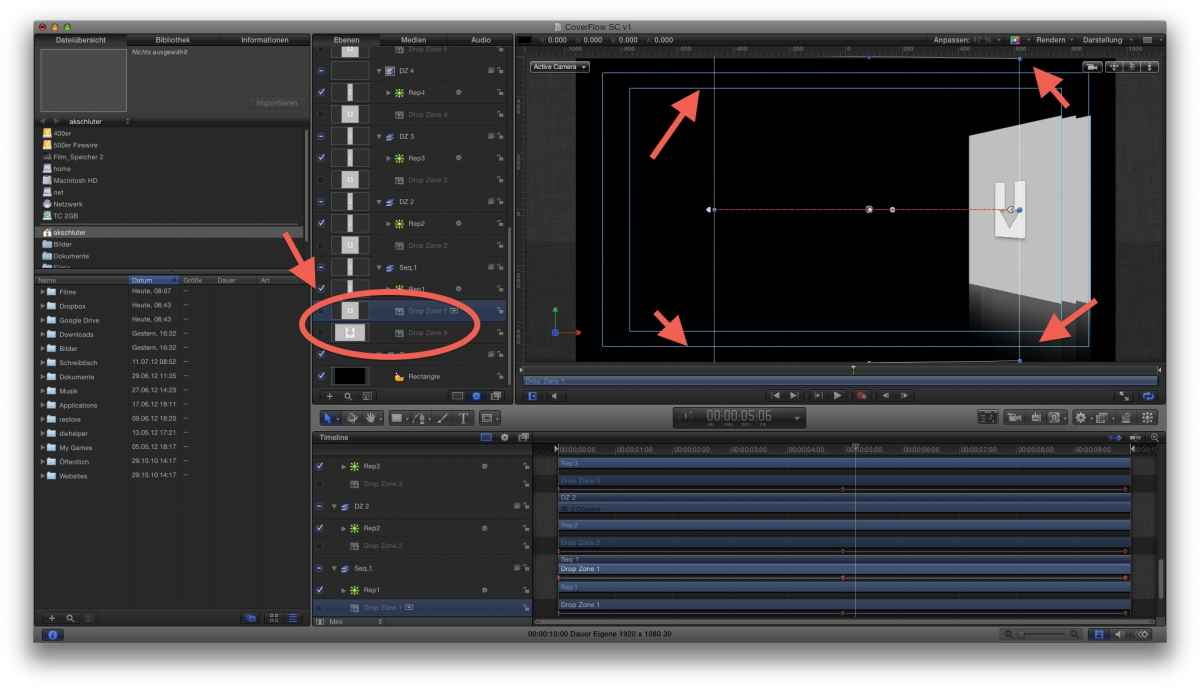
opening your plug-in in Motion (2nd attachment) you notice: 'your' dropzones are square.
but..
when I add a 9th drop zone my own (red oval) to your plugin, it is 16:9!! !!
... I assume, there's something kaputt ... :lol:
=edit= misnamed the second attachment - cover- not screenflow ...
in attached screenshot you see:
• my sources are all 16:9 (720p)
• the placeholder of the plugin appears square
• using the file chooser shows 16;9 source but 'clipped' drop zone
I tried various sources, tried drag'n drop or the file chooser, tried various Project setting (25, 30, 1080, 720) ... no luck.
opening your plug-in in Motion (2nd attachment) you notice: 'your' dropzones are square.
but..
when I add a 9th drop zone my own (red oval) to your plugin, it is 16:9!! !!
... I assume, there's something kaputt ... :lol:
=edit= misnamed the second attachment - cover- not screenflow ...
Last edit: 13 Jul 2012 06:13 by Karsten Schlüter.
Please Log in to join the conversation.
13 Jul 2012 20:08 #11487
by marchyman
Karsten, you've made an error that many others have made. Peter is NOT the author of that effect. As he wrote in the original post "FxMahoney has posted...".
Perhaps you should ask these questions of the author, Fox Mahoney. I don't know if he is a member here. Check out his youtube channel at www.youtube.com/fxmah or check out his web page at sight-creations.com/
Replied by marchyman on topic Re: Free Final Cut Pro X FCPX Generator: CoverFlow
Karsten Schlüter wrote: opening your plug-in in Motion (2nd attachment) you notice: 'your' dropzones are square.
Karsten, you've made an error that many others have made. Peter is NOT the author of that effect. As he wrote in the original post "FxMahoney has posted...".
Perhaps you should ask these questions of the author, Fox Mahoney. I don't know if he is a member here. Check out his youtube channel at www.youtube.com/fxmah or check out his web page at sight-creations.com/
Please Log in to join the conversation.
- Karsten Schlüter
-
- Offline
- Moderator
-
Less
More
- Posts: 3790
- Thank you received: 718
14 Jul 2012 05:44 - 14 Jul 2012 05:44 #11520
by Karsten Schlüter
ooops! indeed!!
thanks, marchyman, for correcting me - ..... and I did wonder, how many plugins Peter did produce over the last months...
I wrote fox_m an email, hopefully he finds the time to dig into my problem.
greetings from rainy Munich/Germany!
k.
Replied by Karsten Schlüter on topic Re: Free Final Cut Pro X FCPX Generator: CoverFlow
marchyman wrote: … Karsten, you've made an error that many others have made. Peter is NOT the author of that effect. As he wrote in the original post "FxMahoney has posted...". …
ooops! indeed!!
thanks, marchyman, for correcting me - ..... and I did wonder, how many plugins Peter did produce over the last months...
I wrote fox_m an email, hopefully he finds the time to dig into my problem.
greetings from rainy Munich/Germany!
k.
Last edit: 14 Jul 2012 05:44 by Karsten Schlüter.
Please Log in to join the conversation.
- Karsten Schlüter
-
- Offline
- Moderator
-
Less
More
- Posts: 3790
- Thank you received: 718
14 Jul 2012 18:10 #11543
by Karsten Schlüter
Replied by Karsten Schlüter on topic Re: Free Final Cut Pro X FCPX Generator: CoverFlow
based upon marchyman's recommendation, I contacted fox - and within hours, he send me a vers 1a of his plugin which now respects my aspect ratio.
thanks to everyone, esp. fox for his super-fast solution!
k.
thanks to everyone, esp. fox for his super-fast solution!
k.
Please Log in to join the conversation.
- Scott Markowitz
-

- Offline
- Elite Member
-

Less
More
- Posts: 161
- Thank you received: 31
30 Jul 2012 19:24 #12369
by Scott Markowitz
Replied by Scott Markowitz on topic Re: Free Final Cut Pro X FCPX Generator: CoverFlow
Great Generator! Thank you, Mr. FxMahoney.
This is sure to come in handy.
Scott M
This is sure to come in handy.
Scott M
Please Log in to join the conversation.
- predator916
-
- Offline
- New Member
-

Less
More
- Posts: 1
- Thank you received: 0
08 Aug 2012 08:58 #12764
by predator916
Replied by predator916 on topic Re: Free Final Cut Pro X FCPX Generator: CoverFlow
Hi,
can you tell me how to use ? ... i already create a folder and it already show in FCPX . but when i drag it to storyboard then fcpx quite immediately . if i open in motion 5, it say must be open with Motion 5.2 .... but i can't find any update to 5.2 on internet.
please help...
thanks everybody.
pd916
can you tell me how to use ? ... i already create a folder and it already show in FCPX . but when i drag it to storyboard then fcpx quite immediately . if i open in motion 5, it say must be open with Motion 5.2 .... but i can't find any update to 5.2 on internet.
please help...
thanks everybody.
pd916
Please Log in to join the conversation.
