


- Posts: 350
- Thank you received: 337
3 Post Moderation Rule for New Boarders (25 Jan 2021)
New boarders will have their posts moderated - Don't worry if you cannot see your post immediately.
Only start a new post here if you are uploading a free plugin or direct linking to a plugin or the page that the plugin can be downloaded from.
All other new posts will be deleted.
All other new posts will be deleted.
TKY FCPX Flicker Flash Transition Effect
- Simon Ubsdell
-
 Topic Author
- Offline
- Platinum Member
-

Less
More
30 Jul 2011 02:39 - 01 Aug 2011 23:56 #642
by Simon Ubsdell
TKY FCPX Flicker Flash Transition Effect was created by Simon Ubsdell
This is an effect that I am liking quite a lot - but it would be great to get some feedback as to how to improve it or add additional controls. (Yet again posted in the wrong bit of the forum, sorry!)
Essentially what you've got is a transition that "randomly" changes the opacity of the transition layers as they mix between each other, with an added "random" luminance flicker and an optional color overlay flicker for which the default is black.
There are controls for:
- Flash frequency;
- Brightness level;
- Color Flash On/Off and amoubnt;
- Color selector (defaults to black).
Any input on this much appreciated. Note that it works best with short transitions around the 12 frame mark and the color effect requires tweaking of the other parameters depending on the luminance value of the color selected.
I should add that it was originally inspired by Luca's really interesting flash transitions for earlier versions of FCP - thanks, Luca.
lucavisualfx.com/
Essentially what you've got is a transition that "randomly" changes the opacity of the transition layers as they mix between each other, with an added "random" luminance flicker and an optional color overlay flicker for which the default is black.
There are controls for:
- Flash frequency;
- Brightness level;
- Color Flash On/Off and amoubnt;
- Color selector (defaults to black).
Any input on this much appreciated. Note that it works best with short transitions around the 12 frame mark and the color effect requires tweaking of the other parameters depending on the luminance value of the color selected.
I should add that it was originally inspired by Luca's really interesting flash transitions for earlier versions of FCP - thanks, Luca.
lucavisualfx.com/
Last edit: 01 Aug 2011 23:56 by Simon Ubsdell.
Please Log in to join the conversation.
- Simon Ubsdell
-
Topic Author
- Offline
- Platinum Member
-
Less
More
- Posts: 350
- Thank you received: 337
01 Aug 2011 22:46 #663
by Simon Ubsdell
Replied by Simon Ubsdell on topic Re: TKY FCPX Flicker Flash Transition Effect
Now with video!
Please Log in to join the conversation.

02 Aug 2011 00:16 - 02 Aug 2011 00:19 #664
by Vader
Replied by Vader on topic Re: TKY FCPX Flicker Flash Transition Effect
yes posting videos for your work is a must.
Thanks for that
BTW once again you posted at the wrong place :ohmy:
it should be there
> www.fcp.co/forum/9-free-fcpx-plugins-and-templates
Thanks for that
BTW once again you posted at the wrong place :ohmy:
it should be there
> www.fcp.co/forum/9-free-fcpx-plugins-and-templates
Last edit: 02 Aug 2011 00:19 by Vader.
Please Log in to join the conversation.
- Simon Ubsdell
-
Topic Author
- Offline
- Platinum Member
-
Less
More
- Posts: 350
- Thank you received: 337
02 Aug 2011 00:22 #665
by Simon Ubsdell
Replied by Simon Ubsdell on topic Re: TKY FCPX Flicker Flash Transition Effect
Yeah, I figured people probably looked at these posts and wondered whether it was worth the effort to download them!
Then I just end up posting in the wrong place and ruin it all.
BTW, please do suggest any new ideas for effects that you might have.
Thanks.
S.
Then I just end up posting in the wrong place and ruin it all.
BTW, please do suggest any new ideas for effects that you might have.
Thanks.
S.
Please Log in to join the conversation.
02 Aug 2011 00:47 #666
by Vader
Replied by Vader on topic Re: TKY FCPX Flicker Flash Transition Effect
yes, but i don't think it is because people is lazy to download, i though it is just like when you are going to the cinema, you like to watch the trailer before 
All of us are your fans here like with Alex, both give us the best of the best day after day, thanks for that.
A wish and hope a common suggest will be to get a very nice glow transition where you will be able to set the positions of the glow start and glow end...also the possibility with it to adjust the glow force from 0 to 100, where 100 will be a white full image.good challenge no ? :evil:
All of us are your fans here like with Alex, both give us the best of the best day after day, thanks for that.
A wish and hope a common suggest will be to get a very nice glow transition where you will be able to set the positions of the glow start and glow end...also the possibility with it to adjust the glow force from 0 to 100, where 100 will be a white full image.good challenge no ? :evil:
Please Log in to join the conversation.
- Simon Ubsdell
-
Topic Author
- Offline
- Platinum Member
-
Less
More
- Posts: 350
- Thank you received: 337
02 Aug 2011 01:06 #668
by Simon Ubsdell
Replied by Simon Ubsdell on topic Re: TKY FCPX Flicker Flash Transition Effect
Sounds like an interesting idea - I'm not quite sure what you mean by the glow start and end positions. Could you explain a bit more?
Please Log in to join the conversation.
02 Aug 2011 01:22 - 02 Aug 2011 01:32 #669
by Vader
Replied by Vader on topic Re: TKY FCPX Flicker Flash Transition Effect
Gonna try to be more clear :blush:
Transition is A/B
For "A" a possibility to set the position (x,y,z) of the glow
For "B" same thing
Exemple of the result:
Set the glow start at the left corner "A" and set the glow "B" at the bottom right.So you will see the glow running from the left side to the right inside the whole transition....and glow size should be adjusted from o to 100%.
It is hard to explain with my words, do not hesitate please to tell me if it is not clear enough, i will make you a short video of what is in my mind
Thanks
PS:forget, it will be better if we can choose the glow color
Transition is A/B
For "A" a possibility to set the position (x,y,z) of the glow
For "B" same thing
Exemple of the result:
Set the glow start at the left corner "A" and set the glow "B" at the bottom right.So you will see the glow running from the left side to the right inside the whole transition....and glow size should be adjusted from o to 100%.
It is hard to explain with my words, do not hesitate please to tell me if it is not clear enough, i will make you a short video of what is in my mind
Thanks
PS:forget, it will be better if we can choose the glow color
Last edit: 02 Aug 2011 01:32 by Vader.
Please Log in to join the conversation.
- Simon Ubsdell
-
Topic Author
- Offline
- Platinum Member
-
Less
More
- Posts: 350
- Thank you received: 337
02 Aug 2011 01:41 #670
by Simon Ubsdell
Replied by Simon Ubsdell on topic Re: TKY FCPX Flicker Flash Transition Effect
I think I understand 
You want the glow to grow across the screen from two different directions, is that right?
If so, do you want a straight (soft) edge to the glow or a more rounded effect?
Also do you want it to be from all four corners - or for every possible direction?
You want the glow to grow across the screen from two different directions, is that right?
If so, do you want a straight (soft) edge to the glow or a more rounded effect?
Also do you want it to be from all four corners - or for every possible direction?
Please Log in to join the conversation.
02 Aug 2011 01:50 - 02 Aug 2011 01:52 #671
by Vader
Replied by Vader on topic Re: TKY FCPX Flicker Flash Transition Effect
yes you got it (thanks for using your decoder for my bad english lol)
-You want the glow to grow across the screen from two different directions, is that right? YES
-every positions possible (be able to set exactly the glow)
why ?
From clip A, you will make the glow starting in the center of the bulb
then to finish with the clip B in the right corner where is the moon for exemple.
-Of course other possibilities are welcome like "straight" to "Rounded"
-You want the glow to grow across the screen from two different directions, is that right? YES
-every positions possible (be able to set exactly the glow)
why ?
From clip A, you will make the glow starting in the center of the bulb
then to finish with the clip B in the right corner where is the moon for exemple.
-Of course other possibilities are welcome like "straight" to "Rounded"
Last edit: 02 Aug 2011 01:52 by Vader.
Please Log in to join the conversation.
- Simon Ubsdell
-
Topic Author
- Offline
- Platinum Member
-
Less
More
- Posts: 350
- Thank you received: 337
02 Aug 2011 15:28 - 02 Aug 2011 17:03 #673
by Simon Ubsdell
Replied by Simon Ubsdell on topic Re: TKY FCPX Flicker Flash Transition Effect
Here's my first attempt at your Focal Glow Transition - not for general public sharing just yet, but if you want to have a look and see whether it's going in the right direction I can refine it and post it properly.
There are only controls for position and scale of the two focal glow zones so far, and an overall glow boost. Obviously I can add in a lot more control once you're happy.
There are only controls for position and scale of the two focal glow zones so far, and an overall glow boost. Obviously I can add in a lot more control once you're happy.
Last edit: 02 Aug 2011 17:03 by Simon Ubsdell.
Please Log in to join the conversation.
02 Aug 2011 17:26 - 02 Aug 2011 17:57 #677
by Vader
Replied by Vader on topic Re: TKY FCPX Flicker Flash Transition Effect
God you did it! Congratulations for this awesome work!!!
And you made it so fast...are you human ? for sure you are far to be a newbie.
Only 3 points could be adjusted if it is possible of course.
1) "A".Possibility to choose the glow color or "B". use the default light scene like it is possible now.
2)The Main glow boost doesn't increase enough the light when you are at 0%...with some highlights clip it is nice to increase more again the glow light as we can do now.
3)

this is the hardest part to explain but certainly the most important.
With the parameters "Mask.A.Scale" you can adjust the source of the glow and it is perfect...but the rest of the image got an other glow that you can't increase or adjust.
It will be great if we can have what we have now + glow adjustments for the non mask area---> intensity from 0% to 100% and the possibility to use or not (check box) this non mask area.
So we will be able to use the glow mask+ image glow or just the glow mask.
Imagine the possibilities if you are successful with the transition...you will be able to built the same thing for an Effect plugin too...amazing...i'm very happy.
Ufff you have 5 minutes from now....:woohoo:
You're the king of FX
And you made it so fast...are you human ? for sure you are far to be a newbie.
Only 3 points could be adjusted if it is possible of course.
1) "A".Possibility to choose the glow color or "B". use the default light scene like it is possible now.
2)The Main glow boost doesn't increase enough the light when you are at 0%...with some highlights clip it is nice to increase more again the glow light as we can do now.
3)
this is the hardest part to explain but certainly the most important.
With the parameters "Mask.A.Scale" you can adjust the source of the glow and it is perfect...but the rest of the image got an other glow that you can't increase or adjust.
It will be great if we can have what we have now + glow adjustments for the non mask area---> intensity from 0% to 100% and the possibility to use or not (check box) this non mask area.
So we will be able to use the glow mask+ image glow or just the glow mask.
Imagine the possibilities if you are successful with the transition...you will be able to built the same thing for an Effect plugin too...amazing...i'm very happy.
Ufff you have 5 minutes from now....:woohoo:
You're the king of FX
Last edit: 02 Aug 2011 17:57 by Vader.
Please Log in to join the conversation.
- Simon Ubsdell
-
Topic Author
- Offline
- Platinum Member
-
Less
More
- Posts: 350
- Thank you received: 337
02 Aug 2011 21:11 #681
by Simon Ubsdell
Replied by Simon Ubsdell on topic Re: TKY FCPX Flicker Flash Transition Effect
I hope I have understood your notes properly - here is a new version to have a look at.
Let me know what you think.
Let me know what you think.
Please Log in to join the conversation.
03 Aug 2011 01:06 #684
by Vader
Replied by Vader on topic Re: TKY FCPX Flicker Flash Transition Effect
How can i say it...it is awkward
V1 gave a better glow quality than V2 :blush:
With V2 the Glow quality is more like a transparent white mask.
I've spent one hour to play with all parameters...i'm close to be pefect, but i still have better quality and pro result with V1 and in 2 minutes only.
So what i could suggest if i can, will be to let people decide and choose between V1 and V2.
For me both are 100% useful and you did a very professional plugins.
If it is not too long the best of the best to close the ring will be to get V1 as effect :oops:
V1 gave a better glow quality than V2 :blush:
With V2 the Glow quality is more like a transparent white mask.
I've spent one hour to play with all parameters...i'm close to be pefect, but i still have better quality and pro result with V1 and in 2 minutes only.
So what i could suggest if i can, will be to let people decide and choose between V1 and V2.
For me both are 100% useful and you did a very professional plugins.
If it is not too long the best of the best to close the ring will be to get V1 as effect :oops:
Please Log in to join the conversation.
- Simon Ubsdell
-
Topic Author
- Offline
- Platinum Member
-
Less
More
- Posts: 350
- Thank you received: 337
03 Aug 2011 01:38 #685
by Simon Ubsdell
Replied by Simon Ubsdell on topic Re: TKY FCPX Flicker Flash Transition Effect
Yes, you're right the glow quality wasn't as good as it should have been - I was trying to simplify things a bit but it didn't work 
Here's another revision with a better approach to the glow.
Not sure what you mean by turning this into an Effect?
Here's another revision with a better approach to the glow.
Not sure what you mean by turning this into an Effect?
Please Log in to join the conversation.
03 Aug 2011 02:02 #686
by Vader
Replied by Vader on topic Re: TKY FCPX Flicker Flash Transition Effect
God ! working 5 minutes with this new V3 and i can tell that you fixed very well the quality...we are at 90% of the V1 now (V1 is still the perfect reference for me) i don't know if you can make it better again or not...MAY THE FORCE BE WITH YOU
What i mean with "effect" is; instead of making V1 as a transition it will be great to make V1 as an effect plugins...or maybe V4 :woohoo:
V1+V3 are the perfection...problem is to fuse them, i can understand that it should be very hard when you add more parameters (i guess it is why we are loosing the glow quality with V2,V3)
What i mean with "effect" is; instead of making V1 as a transition it will be great to make V1 as an effect plugins...or maybe V4 :woohoo:
V1+V3 are the perfection...problem is to fuse them, i can understand that it should be very hard when you add more parameters (i guess it is why we are loosing the glow quality with V2,V3)
Please Log in to join the conversation.
- Simon Ubsdell
-
Topic Author
- Offline
- Platinum Member
-
Less
More
- Posts: 350
- Thank you received: 337
03 Aug 2011 02:17 #687
by Simon Ubsdell
Replied by Simon Ubsdell on topic Re: TKY FCPX Flicker Flash Transition Effect
Here's a new version with the glow as close as possible to the look of V1 - you now have an added control for focal glow softness which might be useful.
I'll see if it is possible to make an effect version, but I'm not quite sure what the use for it would be?
I'll see if it is possible to make an effect version, but I'm not quite sure what the use for it would be?
Please Log in to join the conversation.
- Simon Ubsdell
-
Topic Author
- Offline
- Platinum Member
-
Less
More
- Posts: 350
- Thank you received: 337
03 Aug 2011 14:42 - 03 Aug 2011 15:04 #699
by Simon Ubsdell
Replied by Simon Ubsdell on topic Re: TKY FCPX Flicker Flash Transition Effect
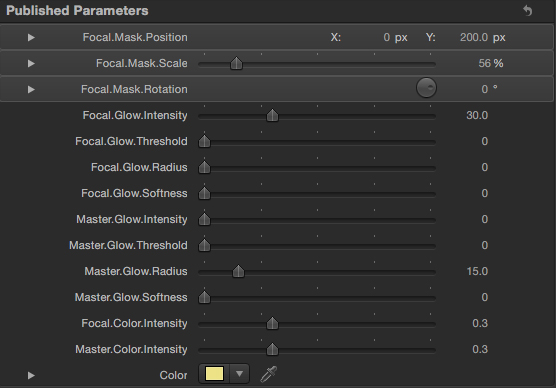
And here's your Effect version.
Hope it's of some use.
Let me know if you're happy with these and I will finalize them for general consumption

Hope it's of some use.
Let me know if you're happy with these and I will finalize them for general consumption
Last edit: 03 Aug 2011 15:04 by Simon Ubsdell.
Please Log in to join the conversation.
03 Aug 2011 17:07 - 03 Aug 2011 17:10 #701
by Vader
Replied by Vader on topic Re: TKY FCPX Flicker Flash Transition Effect
Simon, great job for both (Transition V4 and Effect V1 are perfects)
There is only a last point to fix, dunno if it is a bug or if it is normal.
For the transition only:
It is hard to explain...you have a strange frame jump when you are 2 or 3 steps after the middle of the transition...CLip A appears again after the middle of the transition...so when Clip A is at his maximum glow light (whole screen) the clip A appears again during 2 or 3 frames when you are on the beginning of the B part.
Maybe it could be solved with a dissolve and maybe this is why now big products provide only "glow dissolve" in their catalog.
Glow transition or glow effect are far to be a gadget for editors and i'm sure it is an headache to built even for high artist and technical guy like you...but at the end other works will be a piece of cake to do
Hope you don't hate me now and i hope you will have a lot of thanks at the end...and not only 600 article views or 600 downloads, but with nice comments from others----> please people, don't be lazy to push the thanks button for the great work of Simon...it's free don't forget.
There is only a last point to fix, dunno if it is a bug or if it is normal.
For the transition only:
It is hard to explain...you have a strange frame jump when you are 2 or 3 steps after the middle of the transition...CLip A appears again after the middle of the transition...so when Clip A is at his maximum glow light (whole screen) the clip A appears again during 2 or 3 frames when you are on the beginning of the B part.
Maybe it could be solved with a dissolve and maybe this is why now big products provide only "glow dissolve" in their catalog.
Glow transition or glow effect are far to be a gadget for editors and i'm sure it is an headache to built even for high artist and technical guy like you...but at the end other works will be a piece of cake to do
Hope you don't hate me now
and i hope you will have a lot of thanks at the end...and not only 600 article views or 600 downloads, but with nice comments from others----> please people, don't be lazy to push the thanks button for the great work of Simon...it's free don't forget.
Last edit: 03 Aug 2011 17:10 by Vader.
Please Log in to join the conversation.
- Simon Ubsdell
-
Topic Author
- Offline
- Platinum Member
-
Less
More
- Posts: 350
- Thank you received: 337
03 Aug 2011 23:51 #708
by Simon Ubsdell
Replied by Simon Ubsdell on topic Re: TKY FCPX Flicker Flash Transition Effect
It would be really helpful if you could post me a couple of sample images that you are trying to work with - the difficulty about designing a "universal" effect like this is that it's hard to predict all the different kinds of material that people might want to use with it. But you are right, in the latest version I did try to construct a small dissolve at the centre of the transition, which I thought would be helpful, but I was working a it too fast and missed a vital keyframe!
Please Log in to join the conversation.
- Simon Ubsdell
-
Topic Author
- Offline
- Platinum Member
-
Less
More
- Posts: 350
- Thank you received: 337
04 Aug 2011 01:50 #709
by Simon Ubsdell
Replied by Simon Ubsdell on topic Re: TKY FCPX Flicker Flash Transition Effect
Here's another revision of the transition effect. I think this is probably as far as I can take it for now:
Hope it sorts out most of your problems - if you're wanting to try and use this without using the master controls it's going to be pretty impossible to achieve a seamless transition, which is one of the reasons why I implented this control. Even if you keyframe it in for the last few frames of your transition it will smooth out any issues. I have removed the dissolve component as I think this is just causing further unnecessary problems.
Thanks for offering up the challenge
Hope it sorts out most of your problems - if you're wanting to try and use this without using the master controls it's going to be pretty impossible to achieve a seamless transition, which is one of the reasons why I implented this control. Even if you keyframe it in for the last few frames of your transition it will smooth out any issues. I have removed the dissolve component as I think this is just causing further unnecessary problems.
Thanks for offering up the challenge
Please Log in to join the conversation.
