


- Posts: 350
- Thank you received: 337
3 Post Moderation Rule for New Boarders (25 Jan 2021)
New boarders will have their posts moderated - Don't worry if you cannot see your post immediately.
Only start a new post here if you are uploading a free plugin or direct linking to a plugin or the page that the plugin can be downloaded from.
All other new posts will be deleted.
All other new posts will be deleted.
TKY FCPX Exotic Multi-Shape Mask Effect - V1..1
- Simon Ubsdell
-
 Topic Author
- Offline
- Platinum Member
-

Less
More
29 Jul 2011 16:19 - 05 Apr 2012 01:36 #634
by Simon Ubsdell
TKY FCPX Exotic Multi-Shape Mask Effect - V1..1 was created by Simon Ubsdell
Because it's Friday, here's a kind of fun effect that could even be quite useful 
One effect that allows for a whole number of different image masks including:
Quote Bubble, Heart, Circle, Ellipse, Square, Diamond, Triangle, Arrow, Pill, Pentagon, Hexagon, Octagon, 5-sided star, 6-sided star.
WITHDRAWN
With controls for:
- Shape selection (from the above list);
- Mask Scale, Position and Rotation;
- Source Scale and Position;
- Background On/Off and Color;
- Border Color and Width and On/Off;
- Drop Shadow Opacity, Blur, Distance, Angle and Fixed Source.
Install in Motion Templates/Effects.
As always please let me know if there are any refinements you would like to see and of course any issues that you might detect.
One effect that allows for a whole number of different image masks including:
Quote Bubble, Heart, Circle, Ellipse, Square, Diamond, Triangle, Arrow, Pill, Pentagon, Hexagon, Octagon, 5-sided star, 6-sided star.
WITHDRAWN
With controls for:
- Shape selection (from the above list);
- Mask Scale, Position and Rotation;
- Source Scale and Position;
- Background On/Off and Color;
- Border Color and Width and On/Off;
- Drop Shadow Opacity, Blur, Distance, Angle and Fixed Source.
Attachment not found
Install in Motion Templates/Effects.
As always please let me know if there are any refinements you would like to see and of course any issues that you might detect.
Last edit: 05 Apr 2012 01:36 by Simon Ubsdell.
Please Log in to join the conversation.

15 Aug 2011 17:42 #819
by labalbi
Replied by labalbi on topic Re: TKY FCPX Exotic Multi-Shape Mask Effect!!!
Cant express my gratitude . Thanks for all of your efforts in this growing community ...
Please Log in to join the conversation.

27 Jan 2012 09:43 - 27 Jan 2012 09:45 #3490
by ultrabob
Replied by ultrabob on topic Re: TKY FCPX Exotic Multi-Shape Mask Effect!!!
Hi, this is really great, but I'm having an issue with it, and I've noticed one more thing that isn't causing problems for me but might for others. I'm using the frame to show a speaker in a little ellipse in the corner of the video temporarily while we show what he is talking about over the full screen. I've keyframed it so it starts and ends with the mask scale large enough that the mask is effectively not applied, and the mask is fully applied and positioned as desired 15 frames from the beginning and end. The problem I see is that about 4 frames from being back to full size I see a white square, circle, and ellipse border show up.
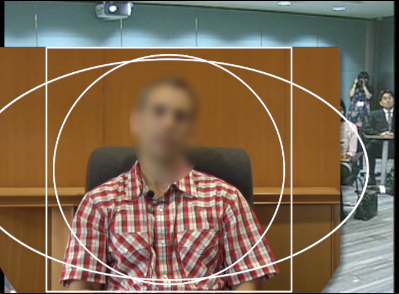
The other thing I noticed is that if I turn on the border (I have a border width of 0 set), the border that shows up is for the speech bubble, not the ellipse as was selected. I would include a screenshot of that as well, but I went into motion and removed the layer that was causing that issue, so I can't reproduce it now. I'm in 10.0.2 and Motion 5.0.1.
Any help would be greatly appreciated. I'm going to have to get this figured out one way or another today. I'll try tinkering with the effect a little longer and if that doesn't work I'll probably just go with fcpx's 4 point mask for this project since the deadline is too tight for me to get as up to speed on motion 5 as I need to to fix this or create my own effect.
Thanks so much for your work on this, it is so close to being just what I needed!
The other thing I noticed is that if I turn on the border (I have a border width of 0 set), the border that shows up is for the speech bubble, not the ellipse as was selected. I would include a screenshot of that as well, but I went into motion and removed the layer that was causing that issue, so I can't reproduce it now. I'm in 10.0.2 and Motion 5.0.1.
Any help would be greatly appreciated. I'm going to have to get this figured out one way or another today. I'll try tinkering with the effect a little longer and if that doesn't work I'll probably just go with fcpx's 4 point mask for this project since the deadline is too tight for me to get as up to speed on motion 5 as I need to to fix this or create my own effect.
Thanks so much for your work on this, it is so close to being just what I needed!
Last edit: 27 Jan 2012 09:45 by ultrabob.
Please Log in to join the conversation.
27 Jan 2012 10:30 #3491
by ultrabob
Replied by ultrabob on topic Re: TKY FCPX Exotic Multi-Shape Mask Effect!!!
I found a quick fix just for my own needs for this particular project by opening in motion and turning off the Borders group altogether.
Please Log in to join the conversation.
- Simon Ubsdell
-
Topic Author
- Offline
- Platinum Member
-
Less
More
- Posts: 350
- Thank you received: 337
04 Feb 2012 21:31 - 04 Feb 2012 21:35 #3857
by Simon Ubsdell
Replied by Simon Ubsdell on topic Re: TKY FCPX Exotic Multi-Shape Mask Effect!!!
Thanks for pointing that out - this is now fixed in the original post.
You also now have a toggle for turning off the Border. Also the background defaults to Off.
You also now have a toggle for turning off the Border. Also the background defaults to Off.
Last edit: 04 Feb 2012 21:35 by Simon Ubsdell.
Please Log in to join the conversation.
