


- Posts: 483
- Thank you received: 256
3 Post Moderation Rule for New Boarders (25 Jan 2021)
New boarders will have their posts moderated - Don't worry if you cannot see your post immediately.
Edit and export timelines of any pixel dimensions and frame rate
14 Jun 2012 00:18 #9764
by alex4D

"The trick: Create the timeline in a composite clip stored in an event.
Final Cut Pro X can open any QuickTime clip in its own timeline. Once you add effects, clips, transitions and titles, you can use the share menu to export the timeline as a QuickTime movie."
Find out more on my blog:
alex4d.wordpress.com/2012/06/13/fcpx-tim...tion-and-frame-rate/
"The trick: Create the timeline in a composite clip stored in an event.
Final Cut Pro X can open any QuickTime clip in its own timeline. Once you add effects, clips, transitions and titles, you can use the share menu to export the timeline as a QuickTime movie."
Find out more on my blog:
alex4d.wordpress.com/2012/06/13/fcpx-tim...tion-and-frame-rate/
Please Log in to join the conversation.


19 Jun 2012 22:49 #10016
by BenB
Replied by BenB on topic Re: Edit and export timelines of any pixel dimensions and frame rate
Very nice technique!
Please Log in to join the conversation.

31 Oct 2012 05:53 - 01 Nov 2012 00:35 #16275
by bendermac
Replied by bendermac on topic Edit and export timelines of any pixel dimensions and frame rate
update for creating compund clips in fcpx 10.0.6 with custom framesizes and/or framerates
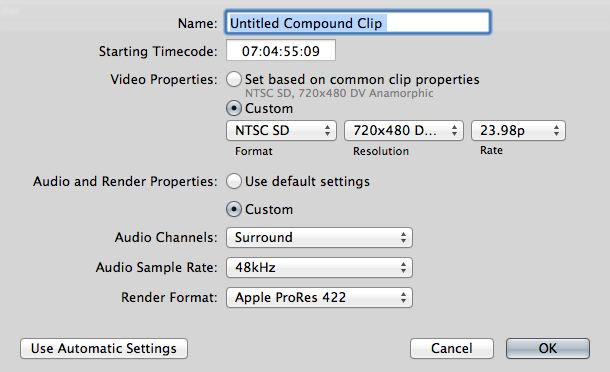
when you do this as alex described above, it will still work in fcpx 10.0.6. however, you wont get a compound clip after you changed something in the clip. if you select the clip with the custom framerate/size and you want to create a cc out of, fcpx will only give you an option to standard formats (see screenshot below)
though, you still can do "open in timeline" and edit you clip in the custom framerate/size but it wont be a cc.
to create a cc with custom framerate/size do the following after you've imported that custom clip into fcpx
1. select the clip, right click it and select "open in timeline"
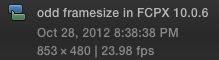
2. in the opened clip-timeline press option + g and fcpx will create a cc with your custom framerate/size
3. rename it if needed
now you have nicely working cc
when you do this as alex described above, it will still work in fcpx 10.0.6. however, you wont get a compound clip after you changed something in the clip. if you select the clip with the custom framerate/size and you want to create a cc out of, fcpx will only give you an option to standard formats (see screenshot below)
though, you still can do "open in timeline" and edit you clip in the custom framerate/size but it wont be a cc.
to create a cc with custom framerate/size do the following after you've imported that custom clip into fcpx
1. select the clip, right click it and select "open in timeline"
2. in the opened clip-timeline press option + g and fcpx will create a cc with your custom framerate/size
3. rename it if needed
now you have nicely working cc
Last edit: 01 Nov 2012 00:35 by bendermac.
Please Log in to join the conversation.
- ronny courtens
-

- Offline
- Moderator
-

Less
More
- Posts: 4455
- Thank you received: 962
31 Oct 2012 09:38 #16283
by ronny courtens
Replied by ronny courtens on topic Edit and export timelines of any pixel dimensions and frame rate
All great info. Thank you, gentlemen!
Please Log in to join the conversation.
