


- Posts: 24
- Thank you received: 1
3 Post Moderation Rule for New Boarders (25 Jan 2021)
New boarders will have their posts moderated - Don't worry if you cannot see your post immediately.
FCPX Chroma Key Question
- retepnikrap
-
 Topic Author
- Offline
- Junior Member
-

Less
More
21 Jun 2016 14:46 #77991
by retepnikrap
FCPX Chroma Key Question was created by retepnikrap
Hello
pretty new to FCP, have spent alot of time watching tutorials and I am pretty much upto speed with the basics but do need help with a keying/green screen challenge I have.
I want to key out just the top two thirds only as the lower third has elements of green which I don't want removing, I have attached a screen grab to show what I mean. The plan is to decorate everything above the border on the back wall with a still image, there will be moving images which occasionally appear in the top two thirds but nothing green. I am wanting to select just the top two thirds to key and not the full scene, what is the easiest way to do this?
thank you

pretty new to FCP, have spent alot of time watching tutorials and I am pretty much upto speed with the basics but do need help with a keying/green screen challenge I have.
I want to key out just the top two thirds only as the lower third has elements of green which I don't want removing, I have attached a screen grab to show what I mean. The plan is to decorate everything above the border on the back wall with a still image, there will be moving images which occasionally appear in the top two thirds but nothing green. I am wanting to select just the top two thirds to key and not the full scene, what is the easiest way to do this?
thank you
Please Log in to join the conversation.


21 Jun 2016 20:23 - 21 Jun 2016 20:38 #78008
by rjvddoes
Replied by rjvddoes on topic FCPX Chroma Key Question
Hi Peter,
Drag a copy of your greenscreen clip above the source greenscreen clip in the primary storyline (press and hold the option key, while dragging the clip up).
Have the keyer only applied to the lower clip
Be sure you don't have the keyer applied to the top clip
In the inspector for the top clip go to the "Crop" controls, set the "Type" to "Trim" and drag the "Top" slider to the right as far as needed.
Be careful though with the settings for spill suppression in the bottom clip. You might end up with a difference in the yellow colors when used too agressively.
Robbert-Jan
Drag a copy of your greenscreen clip above the source greenscreen clip in the primary storyline (press and hold the option key, while dragging the clip up).
Have the keyer only applied to the lower clip
Be sure you don't have the keyer applied to the top clip
In the inspector for the top clip go to the "Crop" controls, set the "Type" to "Trim" and drag the "Top" slider to the right as far as needed.
Be careful though with the settings for spill suppression in the bottom clip. You might end up with a difference in the yellow colors when used too agressively.
Robbert-Jan
Last edit: 21 Jun 2016 20:38 by rjvddoes.
Please Log in to join the conversation.

22 Jun 2016 02:22 #78014
by BenB
Replied by BenB on topic FCPX Chroma Key Question
As stated, simple "Keyer" effect, and put your wall replacement below the clip. Everything you need to know is in the user manual, found here.
help.apple.com/finalcutpro/mac/10.2/#/ver40b0069e
help.apple.com/finalcutpro/mac/10.2/#/ver40b0069e
Please Log in to join the conversation.
- retepnikrap
-
Topic Author
- Offline
- Junior Member
-
Less
More
- Posts: 24
- Thank you received: 1
22 Jun 2016 09:05 #78022
by retepnikrap
Replied by retepnikrap on topic FCPX Chroma Key Question
Perfect, thanks guys just what I needed to know.
Please Log in to join the conversation.
22 Jun 2016 14:11 #78030
by bogiesan
Replied by bogiesan on topic FCPX Chroma Key Question
And fire your set designer.
Please Log in to join the conversation.
- retepnikrap
-
Topic Author
- Offline
- Junior Member
-
Less
More
- Posts: 24
- Thank you received: 1
22 Jun 2016 15:17 #78036
by retepnikrap
Lol! You're not wrong fella!
Replied by retepnikrap on topic FCPX Chroma Key Question
bogiesan wrote: And fire your set designer.
Lol! You're not wrong fella!
Please Log in to join the conversation.
- Karsten Schlüter
-

- Offline
- Moderator
-

Less
More
- Posts: 3790
- Thank you received: 718
23 Jun 2016 06:19 #78055
by Karsten Schlüter
Overall design, I guess for a kiddie show, Return of The Teletubbies? Why not?
Ok, using green objects in a green-screen-set is indeed... questionable.
I would fire the DoP/Rigger for setting such an uneven light :
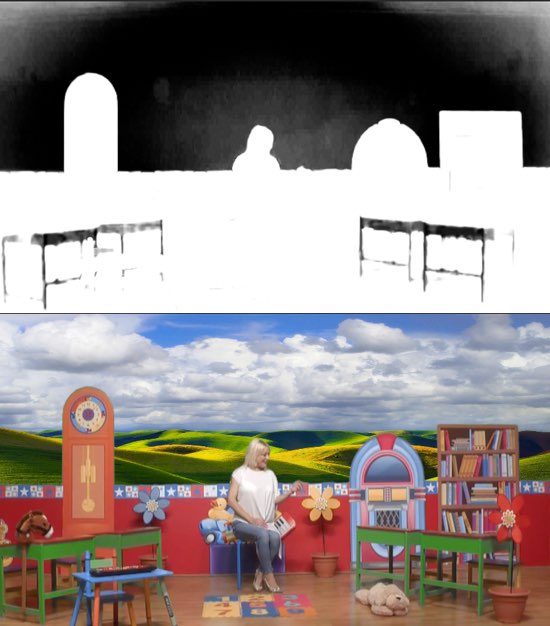
but FCPX is very forgiven ...
Replied by Karsten Schlüter on topic FCPX Chroma Key Question
bogiesan wrote: And fire your set designer.
Overall design, I guess for a kiddie show, Return of The Teletubbies? Why not?
Ok, using green objects in a green-screen-set is indeed... questionable.
I would fire the DoP/Rigger for setting such an uneven light :
but FCPX is very forgiven ...
Please Log in to join the conversation.
23 Jun 2016 12:36 #78065
by BenB
Replied by BenB on topic FCPX Chroma Key Question
Garbage Mask
Aside from being technically a very bad idea (as Karsten points out), the green desks get hidden, should be yellow or better red to stand out in that scene. All in all, not to shabby for a kids show. Designer needs to learn to stick to a color palette, though.
Aside from being technically a very bad idea (as Karsten points out), the green desks get hidden, should be yellow or better red to stand out in that scene. All in all, not to shabby for a kids show. Designer needs to learn to stick to a color palette, though.
Please Log in to join the conversation.
