


- Posts: 14
- Thank you received: 0
3 Post Moderation Rule for New Boarders (25 Jan 2021)
New boarders will have their posts moderated - Don't worry if you cannot see your post immediately.
Change a Motion 5 Template from 20 seconds to 4min
27 Mar 2016 11:20 #74687
by tedblight
Change a Motion 5 Template from 20 seconds to 4min was created by tedblight
Hi,
I'm a bit of a novice.
I have purchased a template, with 8 drop zones in it. It is originally 20 seconds long.
I want to slow this down so that the whole clip last 4mins.
I have changed the project time to 4min but all the elements stay as they where.
Is there a quick way of changing the length without having to adjust each and every element?
Thanks
I'm a bit of a novice.
I have purchased a template, with 8 drop zones in it. It is originally 20 seconds long.
I want to slow this down so that the whole clip last 4mins.
I have changed the project time to 4min but all the elements stay as they where.
Is there a quick way of changing the length without having to adjust each and every element?
Thanks
Please Log in to join the conversation.

27 Mar 2016 12:22 - 27 Mar 2016 12:23 #74690
by BenB
Replied by BenB on topic Change a Motion 5 Template from 20 seconds to 4min
Changing the duration of your project, effects none of the elements in it, for good reason. You'd end up with things "stretched" out in ways that would not achieve what you think.
You have to extend the elements (layer content) to the durations you wish to have. Simply grab the tail of something in the Timeline, and drag it to the right. Just like you would in FCPX. Or grab the center of it to move it without changing duration.
But even more simply, inside FCPX, increase the duration of the generator clip in the Timeline there. That should make it last longer, also. Select it, Control-D, type in "4.." and hit Enter. Or grab its tail and stretch it out. I'm assuming there's nothing in the generator that would prevent its duration from being modified.
You have to extend the elements (layer content) to the durations you wish to have. Simply grab the tail of something in the Timeline, and drag it to the right. Just like you would in FCPX. Or grab the center of it to move it without changing duration.
But even more simply, inside FCPX, increase the duration of the generator clip in the Timeline there. That should make it last longer, also. Select it, Control-D, type in "4.." and hit Enter. Or grab its tail and stretch it out. I'm assuming there's nothing in the generator that would prevent its duration from being modified.
Last edit: 27 Mar 2016 12:23 by BenB.
Please Log in to join the conversation.
27 Mar 2016 12:32 #74691
by tedblight
Replied by tedblight on topic Change a Motion 5 Template from 20 seconds to 4min
Thanks for the reply.
I did think about putting it into FCPX and just dragging to increase the length. But this would slow down the videos with the drop zone at the same rate?
Looks like I've got to increase each element in motion 5... Grrrrr
Thanks again
I did think about putting it into FCPX and just dragging to increase the length. But this would slow down the videos with the drop zone at the same rate?
Looks like I've got to increase each element in motion 5... Grrrrr
Thanks again
Please Log in to join the conversation.
28 Mar 2016 02:29 #74702
by BenB
Replied by BenB on topic Change a Motion 5 Template from 20 seconds to 4min
Yes, by making the clip in FCPX have a longer duration, you increase the amount of time each drop zone shows on screen. But you're doing the same thing by changing their durations in the Motion project, right? I don't see the difference.
Have you TRIED it in FCPX, yet? I'd just do that and test it first.
Have you TRIED it in FCPX, yet? I'd just do that and test it first.
Please Log in to join the conversation.
- Steve McGarrigle
-

- Offline
- Premium Member
-

28 Mar 2016 20:49 #74725
by Steve McGarrigle
Replied by Steve McGarrigle on topic Change a Motion 5 Template from 20 seconds to 4min
Hey Ted,
In Motion, after changing the duration of the sequence you will then need to stretch out all of the sequence contents to fit that length. ( and possibly move the end locator as well. ) If there are a lot of tracks you can 'Select all' and put them into a single group. Stretching the template out on the timeline will show a longer duration for each of your drop zones. While some of the animation and transitional elements of the template may be slowed down, the speed of the clips in your drop zones will remain intact - you will just see more of the clip rather than the portion of the clip you originally had becoming slowed down to fit.
As Ben mentioned this is probably quicker and easier to do in FCPX unless we are missing something as the grouped elements in Motion pretty much behave the same as the template on the FCPX timeline.
Steve.
In Motion, after changing the duration of the sequence you will then need to stretch out all of the sequence contents to fit that length. ( and possibly move the end locator as well. ) If there are a lot of tracks you can 'Select all' and put them into a single group. Stretching the template out on the timeline will show a longer duration for each of your drop zones. While some of the animation and transitional elements of the template may be slowed down, the speed of the clips in your drop zones will remain intact - you will just see more of the clip rather than the portion of the clip you originally had becoming slowed down to fit.
As Ben mentioned this is probably quicker and easier to do in FCPX unless we are missing something as the grouped elements in Motion pretty much behave the same as the template on the FCPX timeline.
Steve.
Please Log in to join the conversation.
29 Mar 2016 05:27 #74738
by tedblight
Replied by tedblight on topic Change a Motion 5 Template from 20 seconds to 4min
Thanks guys. I was making a music video I think the template moves to fast, I would have liked to have slowed it down, but that would have affected the timing of the instruments within the drop zone. As I say I'm a bit of a novice but it still works so i'm quite pleased with it.
Thanks again
Thanks again
Please Log in to join the conversation.
- Steve McGarrigle
-
- Offline
- Premium Member
-
29 Mar 2016 10:56 #74739
by Steve McGarrigle
Replied by Steve McGarrigle on topic Change a Motion 5 Template from 20 seconds to 4min
Jeff Lynne - what a legend. Seems such a down to earth bloke from the documentary I saw about him a while back, working in his home studio.
ELO are the soundtrack to my childhood. 'Mr. Blue Sky'', 'Turn to Stone...classics!
It can be hard making templates exactly fit your vision but harder still making it from scratch if your not really into motion graphics. In the end, I think the timing looked ok but it's more interesting watching you play all the instruments anyway. ,
,
ELO are the soundtrack to my childhood. 'Mr. Blue Sky'', 'Turn to Stone...classics!
It can be hard making templates exactly fit your vision but harder still making it from scratch if your not really into motion graphics. In the end, I think the timing looked ok but it's more interesting watching you play all the instruments anyway.
, Please Log in to join the conversation.
- Karsten Schlüter
-

- Offline
- Moderator
-

Less
More
- Posts: 3790
- Thank you received: 718
29 Mar 2016 11:21 #74740
by Karsten Schlüter
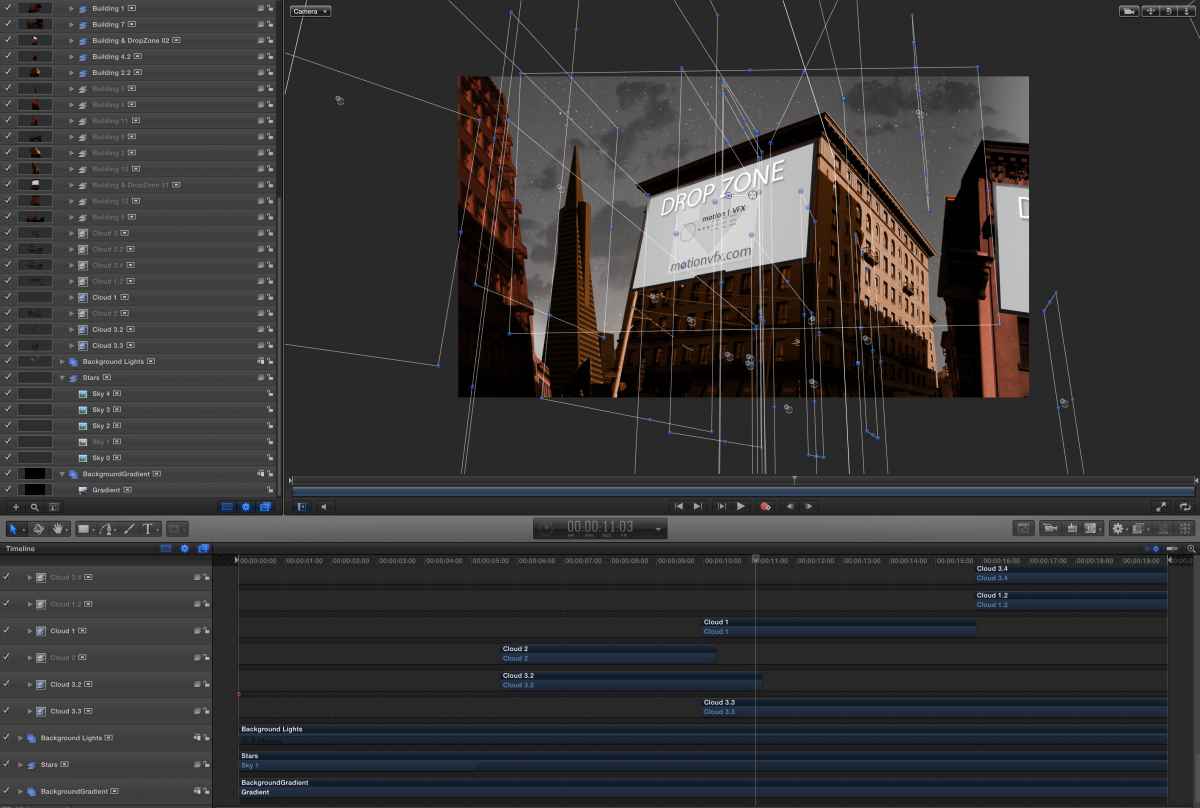
no... not as far as I can see from your screenshot ...
apply your template to your project.
stretch it to your wanted length.
Then fill dropzones...
In M5, you can set markers which define 'keep timing' or not - don't see any markers.
So …
stretching the template will not only make the dropzones longer but all the movements too!
... and, btw: how does 'billboards' connect to 'mission' ... (??)
Replied by Karsten Schlüter on topic Change a Motion 5 Template from 20 seconds to 4min
tedblight wrote: … But this would slow down the videos ....
no... not as far as I can see from your screenshot ...
apply your template to your project.
stretch it to your wanted length.
Then fill dropzones...
In M5, you can set markers which define 'keep timing' or not - don't see any markers.
So …
stretching the template will not only make the dropzones longer but all the movements too!
... and, btw: how does 'billboards' connect to 'mission' ... (??)
Please Log in to join the conversation.
29 Mar 2016 17:32 #74751
by tedblight
Thanks. Yep, he is a under rated legend. I was lucky enough to meet him last year at a private gig in London.
Replied by tedblight on topic Change a Motion 5 Template from 20 seconds to 4min
Steve McGarrigle wrote: Jeff Lynne - what a legend. Seems such a down to earth bloke from the documentary I saw about him a while back, working in his home studio.
ELO are the soundtrack to my childhood. 'Mr. Blue Sky'', 'Turn to Stone...classics!
It can be hard making templates exactly fit your vision but harder still making it from scratch if your not really into motion graphics. In the end, I think the timing looked ok but it's more interesting watching you play all the instruments anyway.
Thanks. Yep, he is a under rated legend. I was lucky enough to meet him last year at a private gig in London.
Please Log in to join the conversation.
29 Mar 2016 17:37 - 29 Mar 2016 17:38 #74752
by tedblight
Thanks for the reply, this is only my 2nd video using M5 so it's all very new to me....
The opening shot is a parody of the album cover 'A New World Record' which has a sky line on it, which transitions into the city quite nicely. The billboards also come in on the line 'Theres a building on a corner, in the city...'
So that my weak attempt at justifying it.... haha.
I would have loved to have placed myself in a space station looking out of a window at earth.... But thats far beyond me.
Replied by tedblight on topic Change a Motion 5 Template from 20 seconds to 4min
Karsten Schlüter wrote:
tedblight wrote: … But this would slow down the videos ....
no... not as far as I can see from your screenshot ...
apply your template to your project.
stretch it to your wanted length.
Then fill dropzones...
In M5, you can set markers which define 'keep timing' or not - don't see any markers.
So …
stretching the template will not only make the dropzones longer but all the movements too!
... and, btw: how does 'billboards' connect to 'mission' ... (??)
Thanks for the reply, this is only my 2nd video using M5 so it's all very new to me....
The opening shot is a parody of the album cover 'A New World Record' which has a sky line on it, which transitions into the city quite nicely. The billboards also come in on the line 'Theres a building on a corner, in the city...'
So that my weak attempt at justifying it.... haha.
I would have loved to have placed myself in a space station looking out of a window at earth.... But thats far beyond me.
Last edit: 29 Mar 2016 17:38 by tedblight.
Please Log in to join the conversation.
