


- Posts: 29
- Thank you received: 1
3 Post Moderation Rule for New Boarders (25 Jan 2021)
New boarders will have their posts moderated - Don't worry if you cannot see your post immediately.
export to motion
24 Jul 2015 04:26 #66791
by kclark
export to motion was created by kclark
I am using FCPX 10.2.1 and Motion 5.2.1. How do I export to Motion from FCP?
I am doing a music video project for a youth group and they need the lyrics to show throughout the video. I was looking at an older tutorial about adding lyrics and it said the easiest way was to make markers in the video where you need a new lyric line put in and then export to Motion and put the lyrics in the way you want them. But I can't "Send to Motion" as that is not a Menu option like "Send to Compressor". I have also tried to Export XML from FCP, which I have done so successfully, but I can't get it to Import into Motion.
What do I need to do to get lyrics in the video?
I am doing a music video project for a youth group and they need the lyrics to show throughout the video. I was looking at an older tutorial about adding lyrics and it said the easiest way was to make markers in the video where you need a new lyric line put in and then export to Motion and put the lyrics in the way you want them. But I can't "Send to Motion" as that is not a Menu option like "Send to Compressor". I have also tried to Export XML from FCP, which I have done so successfully, but I can't get it to Import into Motion.
What do I need to do to get lyrics in the video?
Please Log in to join the conversation.

24 Jul 2015 05:26 #66792
by BenB
Replied by BenB on topic export to motion
Make your markers, if you want, then just add the text inside of FCPX. There is no need at all to go to Motion to do text work.
Please Log in to join the conversation.
- ronny courtens
-

- Offline
- Moderator
-

Less
More
- Posts: 4455
- Thank you received: 962
24 Jul 2015 05:59 #66795
by ronny courtens
Replied by ronny courtens on topic export to motion
Hey Kevin,
You don't need to send your timeline to Motion to add lyrics to your video. That may have been advised with classic FCP, which only has a basic title tool, but FCP X has much more advanced tools right inside the application. So you can add your lyrics straight on the FCP X timeline.
How you do this pretty much depends on what kind of lyrics you want to add. If you want the lyrics lines to fade in and out following the song, this will be pretty easy to do. If you want complex karaoke-style lyrics this will take a (very) long time, even with a dedicated karaoke title plugin. So what exactly do you need to do?
- Ronny
You don't need to send your timeline to Motion to add lyrics to your video. That may have been advised with classic FCP, which only has a basic title tool, but FCP X has much more advanced tools right inside the application. So you can add your lyrics straight on the FCP X timeline.
How you do this pretty much depends on what kind of lyrics you want to add. If you want the lyrics lines to fade in and out following the song, this will be pretty easy to do. If you want complex karaoke-style lyrics this will take a (very) long time, even with a dedicated karaoke title plugin. So what exactly do you need to do?
- Ronny
Please Log in to join the conversation.
24 Jul 2015 12:45 #66805
by kclark
Replied by kclark on topic export to motion
I just want simple text to show up for the lyrics at this time as I don't have a lot of time to get this project done.
I have created chapter markers and changed the name from chapter # to the right text but I can't get it to show on the video.
I have created chapter markers and changed the name from chapter # to the right text but I can't get it to show on the video.
Please Log in to join the conversation.

24 Jul 2015 13:05 #66807
by lichinho
Replied by lichinho on topic export to motion
Markers are very useful to set the place where you want to do something (in this case where you want the text), but markers themselves do not appear in the video.
Copy the text you entered into the marker, hit control-shift-T to add a lower-thirds title, and paste the text.
Copy the text you entered into the marker, hit control-shift-T to add a lower-thirds title, and paste the text.
Please Log in to join the conversation.
24 Jul 2015 17:35 #66816
by kclark
Replied by kclark on topic export to motion
Okay thanks for clearing that up. I have most of the lyrics already done. I have to change the color of them, but is there a way to make sure that all of them or selected lyrics are the same color. I don't see where I can manual put in RGB color numbers.
Please Log in to join the conversation.
25 Jul 2015 03:41 - 25 Jul 2015 04:03 #66821
by BenB
Replied by BenB on topic export to motion
Very easy, place the color you want into the Apple Color Picker samples. AND you can select RGB values in it, also.
OK, so for the Face color value, click the color square, not the arrow. That brings up the Color Picker. Go to the Value section. You can select between various sets of values, just use the menu to select RGB. Then enter the numbers you want.
Once you have the color you need, click and drag the color square next to the eye dropper into one of the blank squares at the bottom. Then you can select this same color in any application at any time.
I'd post a screen shot, but the El Capitan beta version of the Color Picker is a bit different look than the public release of Yosemite. Maybe someone else could post screen shots of it for me.
Then there is the "Appearance Attributes" presets you can save it to in the Text section of the Inspector. Very top you'll see "Normal", which is actually a menu.
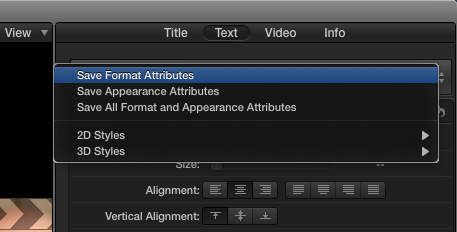
OK, so for the Face color value, click the color square, not the arrow. That brings up the Color Picker. Go to the Value section. You can select between various sets of values, just use the menu to select RGB. Then enter the numbers you want.
Once you have the color you need, click and drag the color square next to the eye dropper into one of the blank squares at the bottom. Then you can select this same color in any application at any time.
I'd post a screen shot, but the El Capitan beta version of the Color Picker is a bit different look than the public release of Yosemite. Maybe someone else could post screen shots of it for me.
Then there is the "Appearance Attributes" presets you can save it to in the Text section of the Inspector. Very top you'll see "Normal", which is actually a menu.
Last edit: 25 Jul 2015 04:03 by BenB.
Please Log in to join the conversation.
25 Jul 2015 05:17 #66823
by kclark
Replied by kclark on topic export to motion
Thanks for the help, I have all of the colors matching.
Now is there a way to put in the coordinates for the position of each without moving each one and trying to get the numbers to be right. I mean is there a way to select it and then just put the X & Y position of each in so I know that it is exactly where I want them?
Now is there a way to put in the coordinates for the position of each without moving each one and trying to get the numbers to be right. I mean is there a way to select it and then just put the X & Y position of each in so I know that it is exactly where I want them?
Please Log in to join the conversation.
