


- Posts: 17
- Thank you received: 0
3 Post Moderation Rule for New Boarders (25 Jan 2021)
New boarders will have their posts moderated - Don't worry if you cannot see your post immediately.
Making a "callout" line that follows the action?
12 Jul 2015 17:30 #66408
by JungleNYC
Making a "callout" line that follows the action? was created by JungleNYC
I've actually exhausted all of my tutorial vids, and even YouTube…I can't seem to figure out how to do this correctly!
I have a video of my nephew's 100m race. It's a wide shot, he runs from right to left, and I'd like to do something (seemingly) simple:
Put his name at the top in simple text, and then have a line pointing from that title down to him at the starting gate, then, as he runs across the screen, have the line follow him, but stay "anchored" to the same point at the text up top. And have a smooth "pro" motion to it.
So far I've made a really skinny rectangle (that looks like a line) added keyframes, and rotated it several times to "follow" him, but it's really wonky. I figure I could add some masks to help it look like it's on a 'plane" top and bottom (because it's currently bobbing up and down quite a bit), but the movement would still be weird.
This seems like a simple thing to do. Am i over-thinking it? …or is this a "motion" thing?
tia
e
I have a video of my nephew's 100m race. It's a wide shot, he runs from right to left, and I'd like to do something (seemingly) simple:
Put his name at the top in simple text, and then have a line pointing from that title down to him at the starting gate, then, as he runs across the screen, have the line follow him, but stay "anchored" to the same point at the text up top. And have a smooth "pro" motion to it.
So far I've made a really skinny rectangle (that looks like a line) added keyframes, and rotated it several times to "follow" him, but it's really wonky. I figure I could add some masks to help it look like it's on a 'plane" top and bottom (because it's currently bobbing up and down quite a bit), but the movement would still be weird.
This seems like a simple thing to do. Am i over-thinking it? …or is this a "motion" thing?
tia
e
Please Log in to join the conversation.


16 Jul 2015 14:31 #66548
by dgwvideo
Creating history....one edit at a time !
Replied by dgwvideo on topic Making a "callout" line that follows the action?
There are a number of ways to do this. If you purchase Coremelt's TrackX, you can easily use the plugin to track the line movement precisely to the runner. If you are familiar with Motion, you can use the motion tracker behavior to also accomplish this. Finally, you can key frame the motion (as you did) but it would be smoother to key frame the start point and then advance your play head to the end point and apply the second key frame. FCPX will interpolate the interim movement and the result will be smoother than if you generate multiple key frames at periodic locations.
Creating history....one edit at a time !
Please Log in to join the conversation.

16 Jul 2015 21:32 #66573
by BenB
Replied by BenB on topic Making a "callout" line that follows the action?
Here's the tutorial you need, Creating Targeted Lines That Track Movement In Motion:
www.macprovideo.com/hub/motion/creating-...ck-objects-in-motion
www.macprovideo.com/hub/motion/creating-...ck-objects-in-motion
Please Log in to join the conversation.
- Karsten Schlüter
-

- Offline
- Moderator
-

Less
More
- Posts: 3790
- Thank you received: 718
17 Jul 2015 05:53 - 17 Jul 2015 05:55 #66580
by Karsten Schlüter
Replied by Karsten Schlüter on topic Making a "callout" line that follows the action?
May I suggest my own <cough> generator, DotLineDot?
you get it here, for free, in the PlugIn Section of tis board:
www.fcp.co/forum/generators/23254-callout-dotlinedot
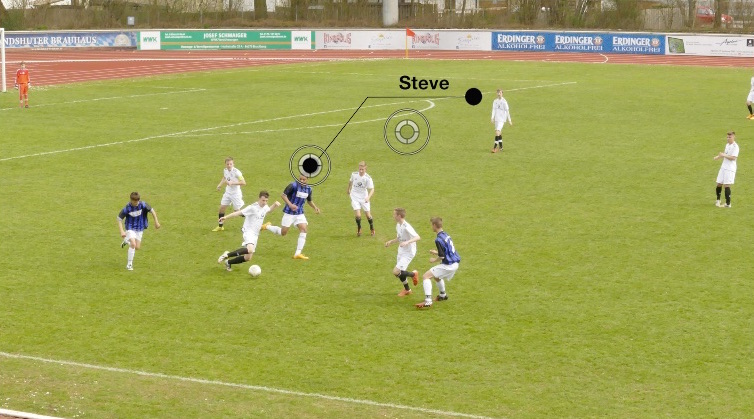
It offers two OnScreenControls, both keyframe-able, so let the Dot with the name stay at any position and keyframe the end of the line to your nephews position.
A Running contest is easy to keyframe - track is a straight line, and most of the time a sprinter has the same speed.
No Motion nor $$ plug in needed. :ohmy:
... although, I would use TrackX too ....
you get it here, for free, in the PlugIn Section of tis board:
www.fcp.co/forum/generators/23254-callout-dotlinedot
It offers two OnScreenControls, both keyframe-able, so let the Dot with the name stay at any position and keyframe the end of the line to your nephews position.
A Running contest is easy to keyframe - track is a straight line, and most of the time a sprinter has the same speed.
No Motion nor $$ plug in needed. :ohmy:
... although, I would use TrackX too ....
Last edit: 17 Jul 2015 05:55 by Karsten Schlüter.
Please Log in to join the conversation.
17 Jul 2015 17:23 #66601
by JungleNYC
Replied by JungleNYC on topic Making a "callout" line that follows the action?
This is great! I'll give it a try this weekend.
PS, thanks for all the other replies, I wasn't sure if I needed Motion, or to buy another plugin.
This is one of those things that a newbie kind of ASSUMED FCPX does natively. But I guess it doesn't. But the good news is there are options out there!
PS, thanks for all the other replies, I wasn't sure if I needed Motion, or to buy another plugin.
This is one of those things that a newbie kind of ASSUMED FCPX does natively. But I guess it doesn't. But the good news is there are options out there!
Please Log in to join the conversation.
20 Aug 2015 18:54 #67610
by JungleNYC
I would really like to thank you for this. Really helped. I didn't need the underline, or the "dots" so I just masked them out. It's simple, and perfect.
Thanks!
Replied by JungleNYC on topic Making a "callout" line that follows the action?
Karsten Schlüter wrote: May I suggest my own <cough> generator, DotLineDot?
you get it here, for free, in the PlugIn Section of tis board:
www.fcp.co/forum/generators/23254-callout-dotlinedot
It offers two OnScreenControls, both keyframe-able, so let the Dot with the name stay at any position and keyframe the end of the line to your nephews position.
A Running contest is easy to keyframe - track is a straight line, and most of the time a sprinter has the same speed.
No Motion nor $$ plug in needed. :ohmy:
... although, I would use TrackX too ....
I would really like to thank you for this. Really helped. I didn't need the underline, or the "dots" so I just masked them out. It's simple, and perfect.
Thanks!
Please Log in to join the conversation.
- Karsten Schlüter
-
- Offline
- Moderator
-
Less
More
- Posts: 3790
- Thank you received: 718
21 Aug 2015 10:44 - 21 Aug 2015 10:44 #67629
by Karsten Schlüter
btw: although I use it [strike]daily[/strike] [strike]weekly[/strike] from time to time, that feature to open effects/titles/transitions in Motion5 and to give'm your personal touch is awesome! Reminds me of the days of iDVD, which allowed by simple drag'n drop customizing designs ....
Have fun movie-making!
Replied by Karsten Schlüter on topic Making a "callout" line that follows the action?
Feel free to customize to your needs!so I just masked them out. It's simple, and perfect.
btw: although I use it [strike]daily[/strike] [strike]weekly[/strike] from time to time, that feature to open effects/titles/transitions in Motion5 and to give'm your personal touch is awesome! Reminds me of the days of iDVD, which allowed by simple drag'n drop customizing designs ....
Have fun movie-making!
Last edit: 21 Aug 2015 10:44 by Karsten Schlüter.
Please Log in to join the conversation.
