


3 Post Moderation Rule for New Boarders (25 Jan 2021)
New boarders will have their posts moderated - Don't worry if you cannot see your post immediately.
RED Epic-X 5K Anamorphic shows squeezed to 4:3

24 Sep 2014 03:25 - 24 Sep 2014 12:13 #53126
by canelson
--
Matias Canelson
www.canelson.us
RED Epic-X 5K Anamorphic shows squeezed to 4:3 was created by canelson
Hello Everyone!
I received a hard drive with footage recorded with a RED Epic-X as 5K Anamorphic. The footage in RedCine-X shows up fine. Here are the settings...
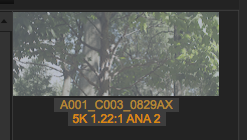
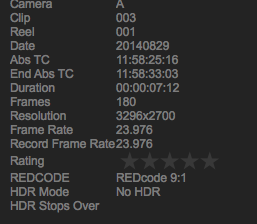
But when I import the media to FCPX it gets squeezed to 4:3 by default, I checked all the aspect ratio settings but I can't change anything. The only weird thing I found is that the aspect ratio in RedCine-X Pro is 1.22 and in FCPX it shows as 2,44. BTW, I tried opening some old RED files I had in an old hard drive and they display fine in FCPX (browser and timeline).
I´m using FCP 10.1.3, RedCine-X Pro 31, Red Drivers for FCPX 4.1
Here is a screenshot of how a clip looks like in a 1920x1080 timeline. And the spatial conform is set by default at FIT. Any ideas on how to display the footage in the correct aspect ratio by default? Here is a test file if any of you want to test it > www.dropbox.com/s/mvgs2s6afog1u9v/R3D_5K_ANA.zip?dl=0
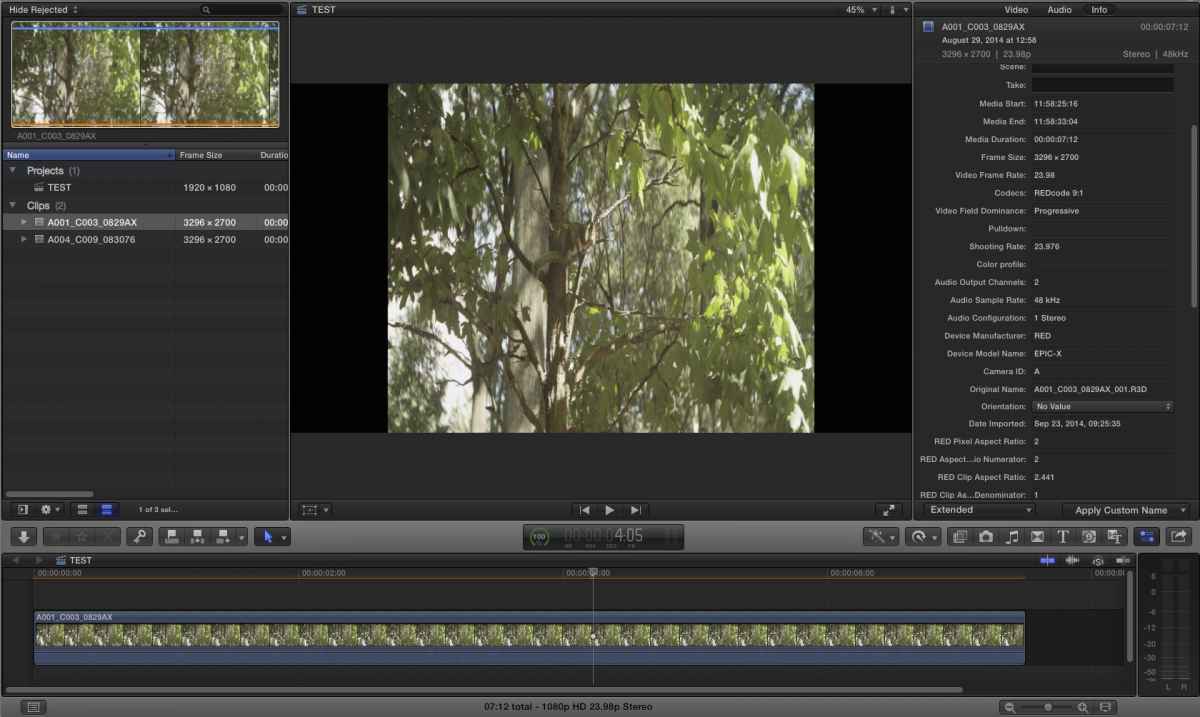
THANKS!
I received a hard drive with footage recorded with a RED Epic-X as 5K Anamorphic. The footage in RedCine-X shows up fine. Here are the settings...
But when I import the media to FCPX it gets squeezed to 4:3 by default, I checked all the aspect ratio settings but I can't change anything. The only weird thing I found is that the aspect ratio in RedCine-X Pro is 1.22 and in FCPX it shows as 2,44. BTW, I tried opening some old RED files I had in an old hard drive and they display fine in FCPX (browser and timeline).
I´m using FCP 10.1.3, RedCine-X Pro 31, Red Drivers for FCPX 4.1
Here is a screenshot of how a clip looks like in a 1920x1080 timeline. And the spatial conform is set by default at FIT. Any ideas on how to display the footage in the correct aspect ratio by default? Here is a test file if any of you want to test it > www.dropbox.com/s/mvgs2s6afog1u9v/R3D_5K_ANA.zip?dl=0
THANKS!
--
Matias Canelson
www.canelson.us
Last edit: 24 Sep 2014 12:13 by canelson. Reason: Added Red Epic model
Please Log in to join the conversation.
- JPM Editor
-

- Offline
- Premium Member
-

24 Sep 2014 10:27 #53134
by JPM Editor
Jesús Pérez-Miranda
Cut People CEO & Founder
www.cutpeople.es
Replied by JPM Editor on topic RED Epic 5K Anamorphic shows squeezed to 4:3
Hi Matias,
I downloaded your test file and here are my thoughts:
If you select all your clips in the Browser and then open the Inspector, you can set the "Spatial Conform" to "Fill" for all your clips.
Then, when you edit the clips into the project, they will display in the correct aspect ratio, filling the frame as expected.
The problem with Final Cut Pro X not interpreting the footage correctly is that, in the Browser, the clips still display in 4:3 aspect ratio, which is far from ideal. So this only solves your problem partially.
I find very annoying that settings like "Anamorphic Override" don't show up in the Inspector always, no matter what type of footage you are inspecting. This prevents us from forcing a setting into a clip when interpretation problems appear, which they do occasionally. I would like to have more control in this regard.
Well, I hope this was helpful to you.
Good luck with the project!
I downloaded your test file and here are my thoughts:
If you select all your clips in the Browser and then open the Inspector, you can set the "Spatial Conform" to "Fill" for all your clips.
Then, when you edit the clips into the project, they will display in the correct aspect ratio, filling the frame as expected.
The problem with Final Cut Pro X not interpreting the footage correctly is that, in the Browser, the clips still display in 4:3 aspect ratio, which is far from ideal. So this only solves your problem partially.
I find very annoying that settings like "Anamorphic Override" don't show up in the Inspector always, no matter what type of footage you are inspecting. This prevents us from forcing a setting into a clip when interpretation problems appear, which they do occasionally. I would like to have more control in this regard.
Well, I hope this was helpful to you.
Good luck with the project!
Jesús Pérez-Miranda
Cut People CEO & Founder
www.cutpeople.es
Please Log in to join the conversation.
29 Sep 2014 20:43 #53406
by canelson
--
Matias Canelson
www.canelson.us
Replied by canelson on topic RED Epic 5K Anamorphic shows squeezed to 4:3
Thanks JPM Editor. I ended creating all the proxies using RedCineX-Pro. I sent a mail to RED Support about this issue and they told me the problem is with FCPX not with their software/codecs/drivers, so the best solution to have the video in its correct aspect ratio in the browser and in the timeline was to create the proxies outside. A real shame, I'll have to send some feedback to Apple about this.
--
Matias Canelson
www.canelson.us
Please Log in to join the conversation.
- JPM Editor
-
- Offline
- Premium Member
-
30 Sep 2014 10:14 #53425
by JPM Editor
Jesús Pérez-Miranda
Cut People CEO & Founder
www.cutpeople.es
Replied by JPM Editor on topic RED Epic 5K Anamorphic shows squeezed to 4:3
I'm sorry that you have to go through all that to fix the aspect ratio issue. It should have worked flawlessly inside FCPX.
Like I said, interpretation problems wouldn't be so decisive if we could force FCPX to interpret any kind of footage the way it's supposed to.
The "Settings" metadata view in the Inspector should always show properties like "Anamorphic override", "Log processing", etc. But with some footage these parameters don't show up for a strange reason, even if they are checked in the metadata view...
Anyway, thanks for sending Apple feedback about this. I hope they fix it in future updates!
Like I said, interpretation problems wouldn't be so decisive if we could force FCPX to interpret any kind of footage the way it's supposed to.
The "Settings" metadata view in the Inspector should always show properties like "Anamorphic override", "Log processing", etc. But with some footage these parameters don't show up for a strange reason, even if they are checked in the metadata view...
Anyway, thanks for sending Apple feedback about this. I hope they fix it in future updates!
Jesús Pérez-Miranda
Cut People CEO & Founder
www.cutpeople.es
Please Log in to join the conversation.


29 Nov 2015 01:00 #71011
by alex4D
Replied by alex4D on topic RED Epic-X 5K Anamorphic shows squeezed to 4:3
You have two options with dealing with this footage - keep editing in its non-square pixel mode, or create a square pixel project to edit it in.
As we don't yet have a way of creating non-SD anamorphic projects (where the pixels are designed to be shown so that they are wider than they are tall), the trick is to get yourself an anamorphic timeline by opening up a clip in its timeline (Clip:Open in Timeline) and then editing the other clips into that timeline. Once you do that, you have a compound clip you can treat as a normal Final Cut project.
Alternatively, to edit in a square pixel timeline you could create a custom sized project 6592 wide by 2700 high.
The aspect ratio of the screen is 2.441:1, the aspect ratio of the pixels is 2:1.
@Alex4D
PS: when you generate proxies for that kind of RED footage they are 3296x1350
As we don't yet have a way of creating non-SD anamorphic projects (where the pixels are designed to be shown so that they are wider than they are tall), the trick is to get yourself an anamorphic timeline by opening up a clip in its timeline (Clip:Open in Timeline) and then editing the other clips into that timeline. Once you do that, you have a compound clip you can treat as a normal Final Cut project.
Alternatively, to edit in a square pixel timeline you could create a custom sized project 6592 wide by 2700 high.
The aspect ratio of the screen is 2.441:1, the aspect ratio of the pixels is 2:1.
@Alex4D
PS: when you generate proxies for that kind of RED footage they are 3296x1350
Please Log in to join the conversation.
