


- Posts: 10
- Thank you received: 0
3 Post Moderation Rule for New Boarders (25 Jan 2021)
New boarders will have their posts moderated - Don't worry if you cannot see your post immediately.
Motion 5 effect
- estoyaqui54
-
 Topic Author
- Offline
- New Member
-

Less
More
13 Dec 2013 03:28 #35758
by estoyaqui54
Motion 5 effect was created by estoyaqui54
Im a beginner in Motion 5 and final cut pro x and would like to know how to create these colored bubble effects in your videos. In the video below, you can see these bubbled effects throughout the video. Thanks.
Please Log in to join the conversation.

13 Dec 2013 13:16 - 13 Dec 2013 13:18 #35798
by BenB
Replied by BenB on topic Motion 5 effect
I think some folks refer to those as Bokeh Lights. I'd start with a plain white circle shape (hit C, hold shift while click-drag in Canvas). Then make it a Replicator (circle with random fill). Play with the Replicate Seed's Generator button to change up the pattern.
Color Mode set to "Over Pattern" and adjust to taste. I'd also play with the "Color Repetitions" control, maybe apply a Randomize parameter behavior to it, and turn it down a bit.
The Scale parameter in the Cell Controls section of the Replicator will help control how large/small the lights are. Perhaps play with the Scale Randomness setting, too.
A simple Gaussian filter will blur it.
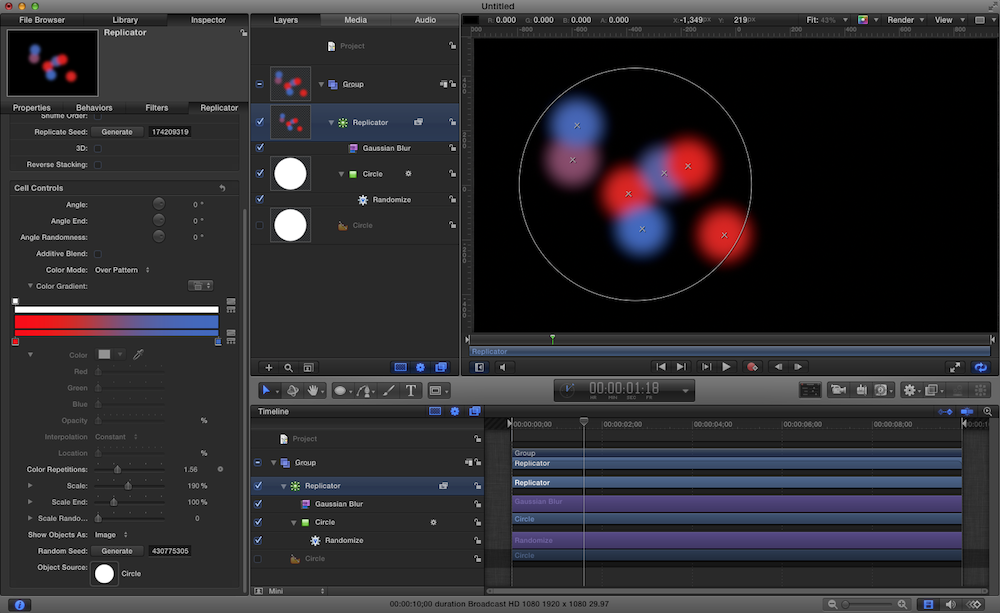
Color Mode set to "Over Pattern" and adjust to taste. I'd also play with the "Color Repetitions" control, maybe apply a Randomize parameter behavior to it, and turn it down a bit.
The Scale parameter in the Cell Controls section of the Replicator will help control how large/small the lights are. Perhaps play with the Scale Randomness setting, too.
A simple Gaussian filter will blur it.
Last edit: 13 Dec 2013 13:18 by BenB.
Please Log in to join the conversation.
11 Feb 2014 08:01 #40941
by Jani Far
Replied by Jani Far on topic Motion 5 effect
I am new also and most helpful your suggestion great for me. Can you help me to know that which software I have to use.
Please Log in to join the conversation.
