


3 Post Moderation Rule for New Boarders (25 Jan 2021)
New boarders will have their posts moderated - Don't worry if you cannot see your post immediately.
Adding Thickness In Apple Motion 5


13 Nov 2013 14:11 #34130
by BenB
Adding Thickness In Apple Motion 5 was created by BenB
Adding Thickness In Apple Motion 5
Motion is a 3D space application, not a 3D modeling application. But if you need to give a 2D layer object depth and thickness, there are two ways to achieve this effect easily. Either use an Extrude filter or create a Replicator. Replication uses more system power, but allows for circling around the object freely. Extrusion uses less system power but has limited rotation view ability. Each technique has its own visual quality, also. Let’s look briefly at creating one of each in an educational experiment you can easily follow along with.
Click here for the full article.
Motion is a 3D space application, not a 3D modeling application. But if you need to give a 2D layer object depth and thickness, there are two ways to achieve this effect easily. Either use an Extrude filter or create a Replicator. Replication uses more system power, but allows for circling around the object freely. Extrusion uses less system power but has limited rotation view ability. Each technique has its own visual quality, also. Let’s look briefly at creating one of each in an educational experiment you can easily follow along with.
Click here for the full article.
Please Log in to join the conversation.
- Karsten Schlüter
-

- Offline
- Moderator
-

Less
More
- Posts: 3790
- Thank you received: 718
13 Nov 2013 16:46 #34133
by Karsten Schlüter
Replied by Karsten Schlüter on topic Adding Thickness In Apple Motion 5
Excellent description! Thanks for sharing, Ben.-
Since I get aware of this 'trick', about a year ago (some YT tutorial - … not rippletraining… hmm?), I'm using it in my weekly sport-reports for my lil' soccer-kids:
I made me an 'empty' project, containing our logo, the animation, the lights - but without opponents logo content:
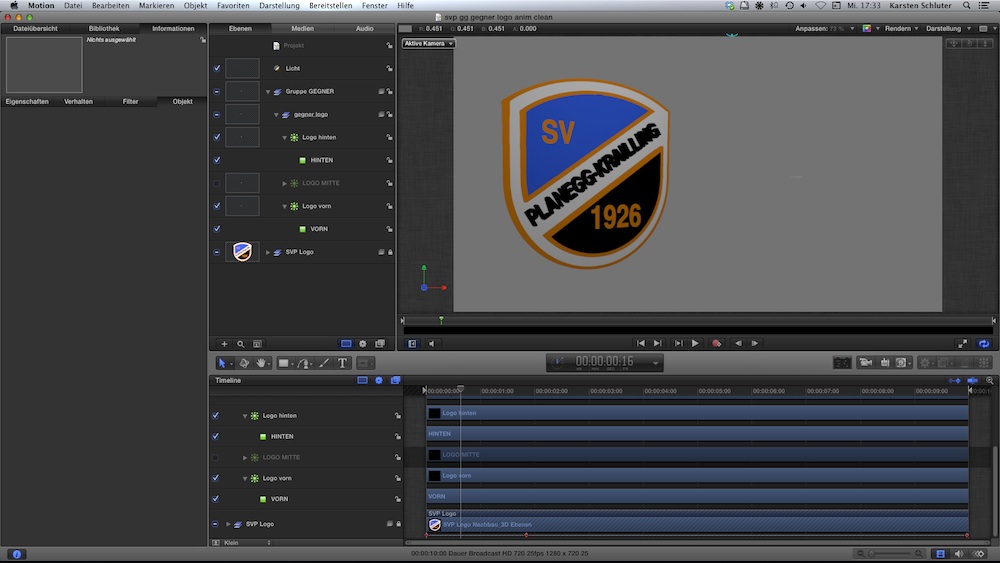
Now, in Pixelmator, I make a very basic extraction, in most cases elements as front and some back, in rae cases a 'middle'-section, save it as psd, drag it with all layers into my Motion-template …
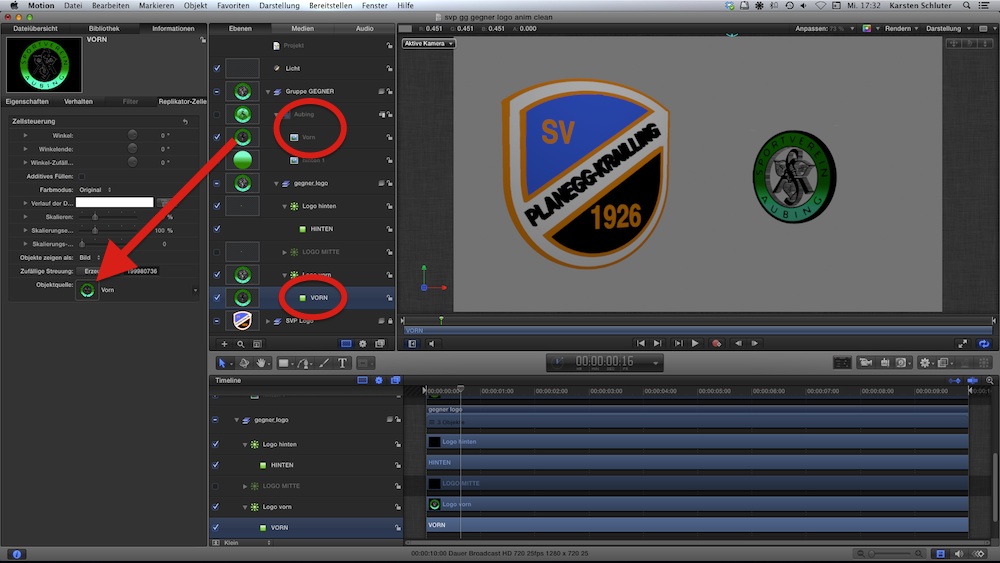
drag'n drop of front/back (German. vorn/hinten) - boom! done in less than a minute! … ok, plus Pixelmator (in many cases, the opponents team logo is just some google-find, 150pix gif ) plus render times…
for my basic needs - nice!
but, I'm keen on that mObjects, Disproportionate Pictures reported frequently of ... :woohoo:
Since I get aware of this 'trick', about a year ago (some YT tutorial - … not rippletraining… hmm?), I'm using it in my weekly sport-reports for my lil' soccer-kids:
I made me an 'empty' project, containing our logo, the animation, the lights - but without opponents logo content:
Now, in Pixelmator, I make a very basic extraction, in most cases elements as front and some back, in rae cases a 'middle'-section, save it as psd, drag it with all layers into my Motion-template …
drag'n drop of front/back (German. vorn/hinten) - boom! done in less than a minute! … ok, plus Pixelmator (in many cases, the opponents team logo is just some google-find, 150pix gif
) plus render times… for my basic needs - nice!
but, I'm keen on that mObjects, Disproportionate Pictures reported frequently of ... :woohoo:
Please Log in to join the conversation.
13 Nov 2013 17:41 #34135
by BenB
Replied by BenB on topic Adding Thickness In Apple Motion 5
Yes, mObjects is going to be a very nice addition to FCP X and Motion. Seems they are taking it well beyond what it was originally intended for.
Please Log in to join the conversation.
