


- Posts: 39
- Thank you received: 4
3 Post Moderation Rule for New Boarders (25 Jan 2021)
New boarders will have their posts moderated - Don't worry if you cannot see your post immediately.
Mark/highlight used clips in timeline
- Andreas85ct
-
 Topic Author
- Offline
- Junior Member
-

Less
More
18 Sep 2012 15:26 #14166
by Andreas85ct
Mark/highlight used clips in timeline was created by Andreas85ct
Hi, does anybody know how to highlight used clips? i already know about the index, but it's really annoying because a lot of times i work with 3 huge clips so it would be easier if the event browser marked the used clips directly!
Please Log in to join the conversation.

18 Sep 2012 15:48 #14168
by NocoDave
Replied by NocoDave on topic Re: Mark/highlight used clips in timeline
You cant do that, what you can do is select a clip in the timeline and hit "Shift F" to do a match frame. This sets a range on the relevant clip in the Event Browser but only for individual clips at a time.
Perhaps a work flow could be found in setting favourite ranges as used clips, but it seems like a lot of potential mess.
Perhaps a work flow could be found in setting favourite ranges as used clips, but it seems like a lot of potential mess.
Please Log in to join the conversation.
- Andreas85ct
-
Topic Author
- Offline
- Junior Member
-
Less
More
- Posts: 39
- Thank you received: 4
19 Sep 2012 15:11 #14200
by Andreas85ct
Replied by Andreas85ct on topic Re: Mark/highlight used clips in timeline
thanks for the info!  i still can't believe something this important is missing in final cut! IMOVIE has this! i work mostly with weddings and many times i don't follow a chronological order and i also use alot of flashbacks so it's really frustating to Shift F everything! i hope they do something about this in the next update!
i still can't believe something this important is missing in final cut! IMOVIE has this! i work mostly with weddings and many times i don't follow a chronological order and i also use alot of flashbacks so it's really frustating to Shift F everything! i hope they do something about this in the next update! Please Log in to join the conversation.
19 Sep 2012 15:24 #14201
by NocoDave
Replied by NocoDave on topic Re: Mark/highlight used clips in timeline
I was thinking about this since I replied to your post. At first it seemed like it would be simple for them to add a new coloured bar across sections of clips in the event browser marking used clips. These would need to update automatically when trimming, making changes. Or that they could automatically apply a "used" keyword for displaying used/unused keyword collections, these of course would need to update automatically with trimming too.
But I think it could get complex as clips in events can be used across a number of projects.
I'd imagine they'll come up with something and I'm curious as to what. But I'm glad it's not my responsibility to find a solution.
But I think it could get complex as clips in events can be used across a number of projects.
I'd imagine they'll come up with something and I'm curious as to what. But I'm glad it's not my responsibility to find a solution.
Please Log in to join the conversation.
23 Sep 2013 17:21 #31445
by 12am
Replied by 12am on topic Re: Mark/highlight used clips in timeline
was browsing through the same topic and suddendly found a way to do it.
i created a separate event for used clips and simply dragged used clips into this event.
hope this works for you
i created a separate event for used clips and simply dragged used clips into this event.
hope this works for you
Please Log in to join the conversation.

28 Sep 2016 18:45 #80361
by Schnurr
Replied by Schnurr on topic Re: Mark/highlight used clips in timeline
The information is from 2012... as such is this still the case that this feature is missing in the media window??? Can't believe it.
Thanks
Tobias
Thanks
Tobias
Please Log in to join the conversation.
- brian.seegmiller
-
- Offline
- New Member
-

Less
More
- Posts: 17
- Thank you received: 1
28 Sep 2016 19:20 #80362
by brian.seegmiller
Replied by brian.seegmiller on topic Re: Mark/highlight used clips in timeline
You can select show used media and it will show a orange bar at the bottom of the clip of the area being used in the story line. Or create a Smart Collection that shows used media.
Please Log in to join the conversation.
- brian.seegmiller
-
- Offline
- New Member
-
Less
More
- Posts: 17
- Thank you received: 1
28 Sep 2016 19:21 #80363
by brian.seegmiller
Replied by brian.seegmiller on topic Mark/highlight used clips in timeline
Like this.

Please Log in to join the conversation.
- brian.seegmiller
-
- Offline
- New Member
-
Less
More
- Posts: 17
- Thank you received: 1
28 Sep 2016 19:25 #80364
by brian.seegmiller
Replied by brian.seegmiller on topic Mark/highlight used clips in timeline
Create a Smart Collection of used media
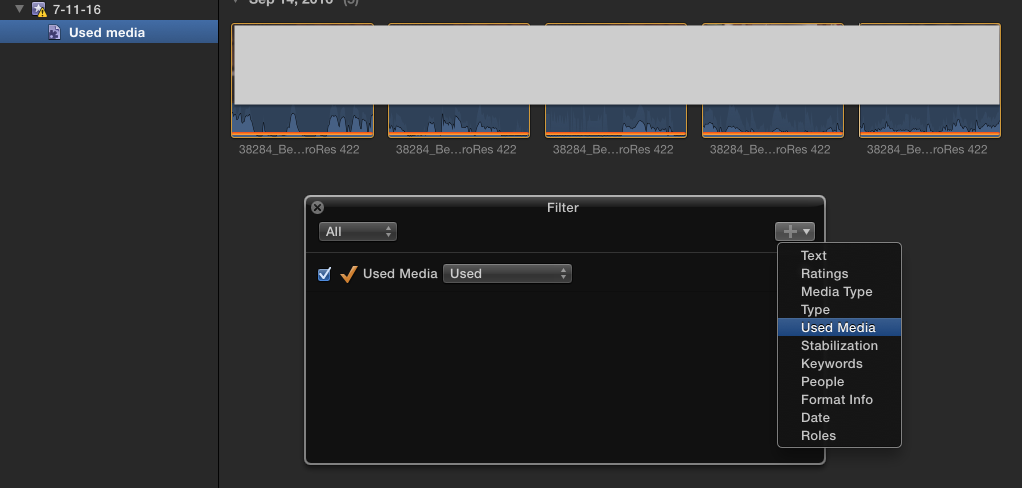
Please Log in to join the conversation.
29 Sep 2016 13:53 #80377
by Schnurr
Replied by Schnurr on topic Re: Mark/highlight used clips in timeline
Hi Brian,
thanks. View > Show used media. great Thought that this would only exist in iMovie
thanks. View > Show used media. great
Thought that this would only exist in iMovie Please Log in to join the conversation.
