


- Posts: 33
- Thank you received: 0
3 Post Moderation Rule for New Boarders (25 Jan 2021)
New boarders will have their posts moderated - Don't worry if you cannot see your post immediately.
split clip?
25 Feb 2012 02:29 - 25 Feb 2012 02:31 #4838
by picture
split clip? was created by picture
When I import 1080 jpgs for a time lapse, Motion splits the clip into two layers,
one above the other, making half the clip invisible.
How do I stop this, or move the bottom layer so it starts where the top layer ends?
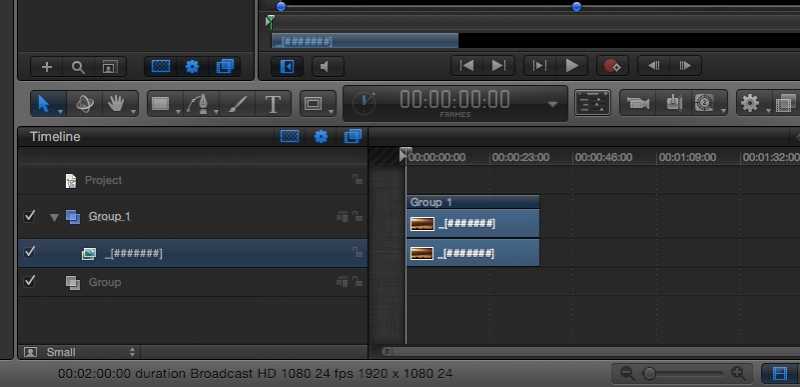
one above the other, making half the clip invisible.
How do I stop this, or move the bottom layer so it starts where the top layer ends?
Last edit: 25 Feb 2012 02:31 by picture. Reason: accuracy
Please Log in to join the conversation.
25 Feb 2012 12:37 #4843
by marchyman
Replied by marchyman on topic Re: split clip?
Two layers? I see an empty group and a group containing the image sequence. The group always shows the visible content of its member items. It isn't a duplication.
If you are not seeing all of the images in your sequence make sure there isn't a break in the numbering. if you have img0001 thru img0099 and then img0101 thru img0199 motion will see that as two groups since there is no img0100.
If you are not seeing all of the images in your sequence make sure there isn't a break in the numbering. if you have img0001 thru img0099 and then img0101 thru img0199 motion will see that as two groups since there is no img0100.
Please Log in to join the conversation.
- Mikeybouchereau
-

- Offline
- Elite Member
-

Less
More
- Posts: 201
- Thank you received: 81
25 Feb 2012 20:20 #4856
by Mikeybouchereau
Replied by Mikeybouchereau on topic Re: split clip?
If you are missing a number, use automator to rename all the photos, with a numbered sequence so there are no gaps. Also depending on your project settings, please make sure your frame size is at least somewhat near what you are going to output your video to. So if you are using 1920x1080 for video make sure your photos are not 5184 × 3456, scale them first then import them in. IT will make your computer run better when working.
Please Log in to join the conversation.
25 Feb 2012 20:27 #4857
by picture
Replied by picture on topic Re: split clip?
Thanks Guys, I thought I’d covered those points, but I’ll double check.
Please Log in to join the conversation.
25 Feb 2012 22:36 #4859
by picture
Replied by picture on topic Re: split clip?
Well, I just counted through 2,000 photo’s, nothing out of order!
But I renamed anyway, and it solved the problem.
Thanks again.
But I renamed anyway, and it solved the problem.
Thanks again.
Please Log in to join the conversation.
