


- Posts: 33
- Thank you received: 0
3 Post Moderation Rule for New Boarders (25 Jan 2021)
New boarders will have their posts moderated - Don't worry if you cannot see your post immediately.
Motion time lapse artefacts
24 Feb 2012 07:43 - 25 Feb 2012 00:24 #4797
by picture
Motion time lapse artefacts was created by picture
Re Motion time lapse
Input 4K JPG’s, output 1080 ProRes.
I’m getting some lovely digital artworks appearing in my footage,
they look great and I’m going to keep them, but I don’t want them in my time lapse, they spoil the mood.
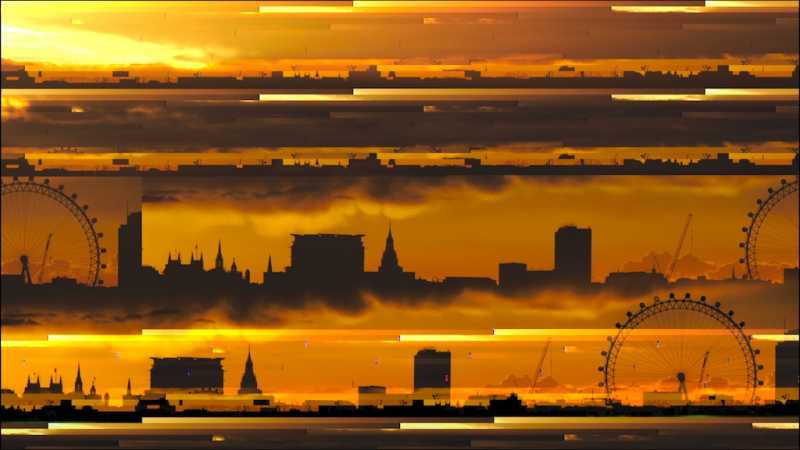
Any explanations/suggestions?
Ps I only get them with the large JPGs, 1920 x 1080 JPGs are OK.
MacBook Pro, 10.6.8, 2.3 GHz, 4GB 1333 MHz DDR3.
Input 4K JPG’s, output 1080 ProRes.
I’m getting some lovely digital artworks appearing in my footage,
they look great and I’m going to keep them, but I don’t want them in my time lapse, they spoil the mood.
Any explanations/suggestions?
Ps I only get them with the large JPGs, 1920 x 1080 JPGs are OK.
MacBook Pro, 10.6.8, 2.3 GHz, 4GB 1333 MHz DDR3.
Last edit: 25 Feb 2012 00:24 by picture.
Please Log in to join the conversation.
- ronny courtens
-

- Offline
- Moderator
-

Less
More
- Posts: 4455
- Thank you received: 962
24 Feb 2012 20:21 #4812
by ronny courtens
Replied by ronny courtens on topic Re: Motion time lapse artifacts
These lovely artifacts are due to your RAM and graphics card choking up on your timelapse. With your system setup and if your final output is 1080 I would convert the 4K media to 1080 prior to ingesting in FCP10.
Please Log in to join the conversation.

24 Feb 2012 20:51 #4817
by BenB
Replied by BenB on topic Re: Motion time lapse artifacts
Bump up that RAM to 8GB, seriously. And be sure you're Events and Projects are on an external FW800 drive that's 7200rpm.
Please Log in to join the conversation.
25 Feb 2012 00:23 #4837
by picture
Replied by picture on topic Re: Motion time lapse artifacts
Ben - RAM, yes. 8GB is only $50! Much much cheaper than I thought it would be.
Graphics card - I’m on a 13” MBP, so am I right in thinking I can’t change the card?
All my external drives are FireWire 400 (6-Pin) - discontinued, so I have to use USB.
I do everything on my laptop and then delete the projects and events once I’ve exported to a ProRes.mov.
Would installing 8GB ram alone solve my Motion 4K problem?
Ronny - I need the 4K for panning etc.
4K works OK in AE CS4 though. Which strikes me as a bit odd,
it’s old and way too bloated for my basic needs, but it works “as is” on my laptop!?
I might just use Motion as an automatic artwork generator.
Only joking! I haven’t given up on Motion. I like it and I want to get it working, so any advice (that doesn’t involve spending lots of money) would be much appreciated.
Workflow: RAW photo’s -> Time lapse & Basic Post -> HD1080 ProRes 422(HQ).mov
Graphics card - I’m on a 13” MBP, so am I right in thinking I can’t change the card?
All my external drives are FireWire 400 (6-Pin) - discontinued, so I have to use USB.
I do everything on my laptop and then delete the projects and events once I’ve exported to a ProRes.mov.
Would installing 8GB ram alone solve my Motion 4K problem?
Ronny - I need the 4K for panning etc.
4K works OK in AE CS4 though. Which strikes me as a bit odd,
it’s old and way too bloated for my basic needs, but it works “as is” on my laptop!?
I might just use Motion as an automatic artwork generator.
Only joking! I haven’t given up on Motion. I like it and I want to get it working, so any advice (that doesn’t involve spending lots of money) would be much appreciated.
Workflow: RAW photo’s -> Time lapse & Basic Post -> HD1080 ProRes 422(HQ).mov
Please Log in to join the conversation.
02 Mar 2012 23:20 - 02 Mar 2012 23:21 #5272
by BenB
Replied by BenB on topic Re: Motion time lapse artefacts
USB will kill you on playback, period. Get a FW400 to FW800 cable if you want to use that old FW dirve. It'll only be FW400 speed, but there you have it.
Also, use PNG files, not RAW, no need for RAW for what you're doing. PNG will give you the same resolution, smaller files, less processing power needed.
4K still is needlessly large. If you make a camera, zoom the camera in to 1080 images, it'll give somewhat better results.
Just how much do you need to zoom in to the photos? 4K means you're zooming right up to really minute detail if it's necessary.
Improve performance by turning off all the things you're not using in the Render menu (Lighting, DOF, Frame Blending, etc), and setting the two resolution settings lower. You can reset these when you need to do a RAM Preview and Export. That MBP is going to be pushed to it's limits with Motion, but it can work with the right tweaks.
Also, use PNG files, not RAW, no need for RAW for what you're doing. PNG will give you the same resolution, smaller files, less processing power needed.
4K still is needlessly large. If you make a camera, zoom the camera in to 1080 images, it'll give somewhat better results.
Just how much do you need to zoom in to the photos? 4K means you're zooming right up to really minute detail if it's necessary.
Improve performance by turning off all the things you're not using in the Render menu (Lighting, DOF, Frame Blending, etc), and setting the two resolution settings lower. You can reset these when you need to do a RAM Preview and Export. That MBP is going to be pushed to it's limits with Motion, but it can work with the right tweaks.
Last edit: 02 Mar 2012 23:21 by BenB.
Please Log in to join the conversation.
03 Mar 2012 09:08 #5296
by picture
Replied by picture on topic Re: Motion time lapse artefacts
performance tweaks - Thanks Ben, that makes a big difference, no more funky frames.
Another tip for beginners on an under-spec’d machine:
Exporting to a .mov is significantly quicker when I save, quit, then re-open and export.
Most of my pans and zooms for my time lapses are quite subtle, so you’re right, 4K is a bit excessive, but I want to establish it as a standard workflow so I can have multiple choices of movement, large or small - and I don’t want to re-size the jpegs every time depending on the movements I want to make.
USB - I never use it for playback, all the work is done on my laptop then I just back up the jpegs, the ProRes.mov and the .motn file to external hard drives (and a low res copy of the ProRes goes to CatDv for reference).
Note to self: GET SOME RAM!
Another tip for beginners on an under-spec’d machine:
Exporting to a .mov is significantly quicker when I save, quit, then re-open and export.
Most of my pans and zooms for my time lapses are quite subtle, so you’re right, 4K is a bit excessive, but I want to establish it as a standard workflow so I can have multiple choices of movement, large or small - and I don’t want to re-size the jpegs every time depending on the movements I want to make.
USB - I never use it for playback, all the work is done on my laptop then I just back up the jpegs, the ProRes.mov and the .motn file to external hard drives (and a low res copy of the ProRes goes to CatDv for reference).
Note to self: GET SOME RAM!
Please Log in to join the conversation.
- Mikeybouchereau
-

- Offline
- Elite Member
-

Less
More
- Posts: 201
- Thank you received: 81
03 Mar 2012 10:24 #5299
by Mikeybouchereau
Replied by Mikeybouchereau on topic Re: Motion time lapse artefacts
What exactly is your workflow now, You can import image sequence into compressor, save out a Prores movie, then go into FCPX to do you subtle zooms and pans.
I find that compressor handles image sequences with ease.
I find that compressor handles image sequences with ease.
Please Log in to join the conversation.
03 Mar 2012 23:12 #5307
by picture
Replied by picture on topic Re: Motion time lapse artefacts
I don’t have (or need?) compressor or FCPX (the trial ran out before I got into it),
at the moment my workflow is:
RAW stills processed in Capture 1, export full size jpegs.
(Convert to 4K footage in Quicktime - sometimes I can’t import the jpegs directly into Motion, sometimes I can?)
Import (footage or jpegs) to Motion for a bit of movement and broadcast safe.
Export to ProRes 422HQ.
(Or occasionally, into AE if I need to do some very basic colour corrections, or give it a subtle S curve - I haven’t had the time to figure these out in Motion without buying a plug-in)
“compressor handles image sequences with ease.”
I’ll look into it, thanks.
at the moment my workflow is:
RAW stills processed in Capture 1, export full size jpegs.
(Convert to 4K footage in Quicktime - sometimes I can’t import the jpegs directly into Motion, sometimes I can?)
Import (footage or jpegs) to Motion for a bit of movement and broadcast safe.
Export to ProRes 422HQ.
(Or occasionally, into AE if I need to do some very basic colour corrections, or give it a subtle S curve - I haven’t had the time to figure these out in Motion without buying a plug-in)
“compressor handles image sequences with ease.”
I’ll look into it, thanks.
Please Log in to join the conversation.
