




- Posts: 119
- Thank you received: 6
3 Post Moderation Rule for New Boarders (25 Jan 2021)
New boarders will have their posts moderated - Don't worry if you cannot see your post immediately.
Resizing graphics makes them jagged
12 Aug 2021 14:31 #115733
by Suzero
Resizing graphics makes them jagged was created by Suzero
I am importing a logo as a transparent PNG to animate it in Motion.
The PNG is 72dpi (I also have 300dpi and tried that, but no difference) and larger than I need.
If I make the logo smaller in Motion, the lines get jagged.
Any tips on how to keep things smooth?
Thanks!
The PNG is 72dpi (I also have 300dpi and tried that, but no difference) and larger than I need.
If I make the logo smaller in Motion, the lines get jagged.
Any tips on how to keep things smooth?
Thanks!


Please Log in to join the conversation.


13 Aug 2021 00:25 #115738
by JoeEditor
Replied by JoeEditor on topic Resizing graphics makes them jagged
Make the logo the size you need, and always 72dpi in video. If you make an image too large or too small, yes, it begins to pixelate. So how small are you shrinking it in Motion?
Please Log in to join the conversation.
- ronny courtens
-

- Offline
- Moderator
-

Less
More
- Posts: 4455
- Thank you received: 962
16 Aug 2021 06:32 #115776
by ronny courtens
Replied by ronny courtens on topic Resizing graphics makes them jagged
Hoi Suzanna,
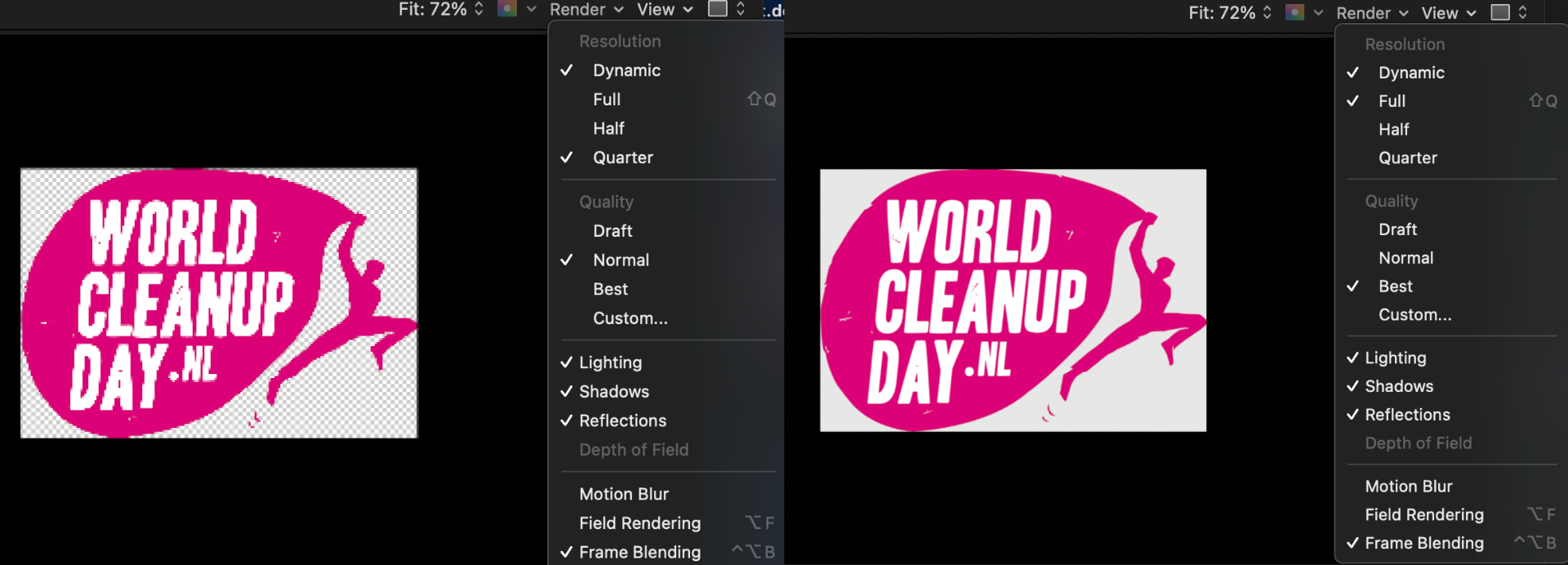
Before you do anything else, check your preview Render settings in Motion. Set Resolution to "Full" and Quality to "Best". That will allow you to see your graphic at full quality, no matter how much you shrink or scale it.
Groetjes,
- Ronny
Before you do anything else, check your preview Render settings in Motion. Set Resolution to "Full" and Quality to "Best". That will allow you to see your graphic at full quality, no matter how much you shrink or scale it.
Groetjes,
- Ronny
Please Log in to join the conversation.
16 Aug 2021 08:35 #115781
by Suzero
Replied by Suzero on topic Resizing graphics makes them jagged
Thanks for that tip, Ronny.
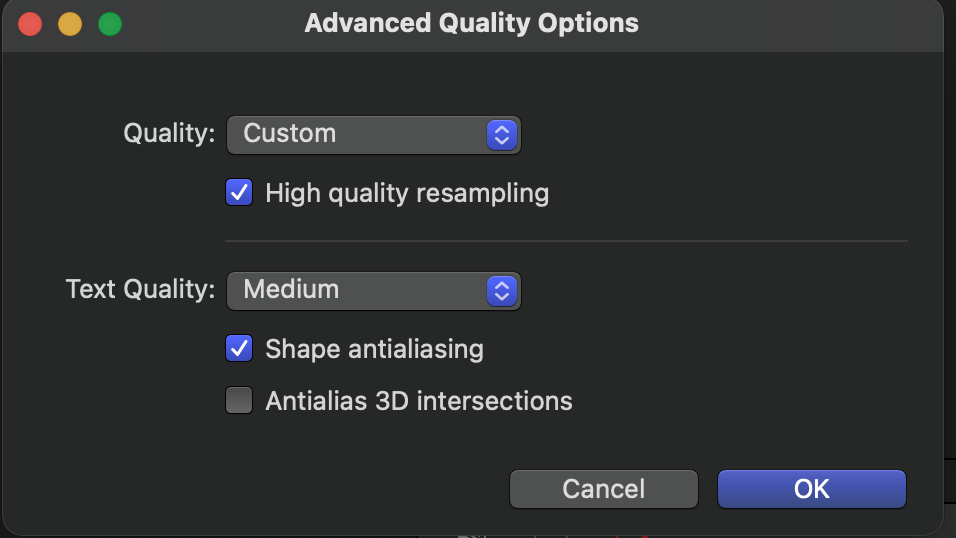
What helped was adjusting render settings upon export and selecting "High quality resampling". It seemed to make it very slightly blurrier, but that shouldn't be a big problem for this particular project.
The strange thing is that Motion doesn't do this with all graphics (even if they are the same size and being resized in the same way). I was wondering if it perhaps had to do with the magenta/white contrast?
What helped was adjusting render settings upon export and selecting "High quality resampling". It seemed to make it very slightly blurrier, but that shouldn't be a big problem for this particular project.
The strange thing is that Motion doesn't do this with all graphics (even if they are the same size and being resized in the same way). I was wondering if it perhaps had to do with the magenta/white contrast?
Please Log in to join the conversation.
- ronny courtens
-
- Offline
- Moderator
-
Less
More
- Posts: 4455
- Thank you received: 962
16 Aug 2021 10:20 - 16 Aug 2021 10:21 #115782
by ronny courtens
Replied by ronny courtens on topic Resizing graphics makes them jagged
Hey Suzanna,
When you set your export render settings to "Best", this automatically enables "High Quality Resampling". You can test this:
- Set render settings in the export menu to "Normal", then choose "Custom". High Quality Resampling will not be checked.
- Set render settings to "Best", then choose "Custom". High Quality Resampling will always be checked.
The easiest way to always get the best render quality is to just click the "Highest Quality" button in the export render Menu. This will set render setting to "Best" and it will automatically activate "High Quality Resampling" for the exported movie.
I cannot explain why this particular graphic gets slightly blurred in the exported video file. I don't think it has anything to do with the colors. One thing you could try is to export the project with Motion Blur and/or Frame Blending disabled to see if this makes any difference.
- Ronny
When you set your export render settings to "Best", this automatically enables "High Quality Resampling". You can test this:
- Set render settings in the export menu to "Normal", then choose "Custom". High Quality Resampling will not be checked.
- Set render settings to "Best", then choose "Custom". High Quality Resampling will always be checked.
The easiest way to always get the best render quality is to just click the "Highest Quality" button in the export render Menu. This will set render setting to "Best" and it will automatically activate "High Quality Resampling" for the exported movie.
I cannot explain why this particular graphic gets slightly blurred in the exported video file. I don't think it has anything to do with the colors. One thing you could try is to export the project with Motion Blur and/or Frame Blending disabled to see if this makes any difference.
- Ronny
Last edit: 16 Aug 2021 10:21 by ronny courtens.
Please Log in to join the conversation.
