


- Posts: 7
- Thank you received: 0
3 Post Moderation Rule for New Boarders (25 Jan 2021)
New boarders will have their posts moderated - Don't worry if you cannot see your post immediately.
adjust angle mid motion path
- wonderings
-
 Topic Author
- Offline
- New Member
-

Less
More
30 Oct 2020 22:34 #110658
by wonderings
adjust angle mid motion path was created by wonderings
It has been a few years since I have used Motion and even then it was pretty basic stuff. I am preparing something for a Christmas Festival production. Basically it is a 10 min intermission video clip that will have some slow gradual moving elements. One of the elements is a silhouette of the wisemen crossing the desert on their camels. Basically the angle works for part of the motion path but when it gets to a higher point and starts heading down the angle of the wisemen is wrong. What I want to do is at one point have the wisemen angle change to look more natural in a downslope movement. I have attached a screen shot which hopefully illustrates my issue and what I want to do.
Anyone know how to accomplish this? I thought about adding a spin to that point and thought I could get a partial spin to change the angle but just ended up with a spinning propeller of camels.
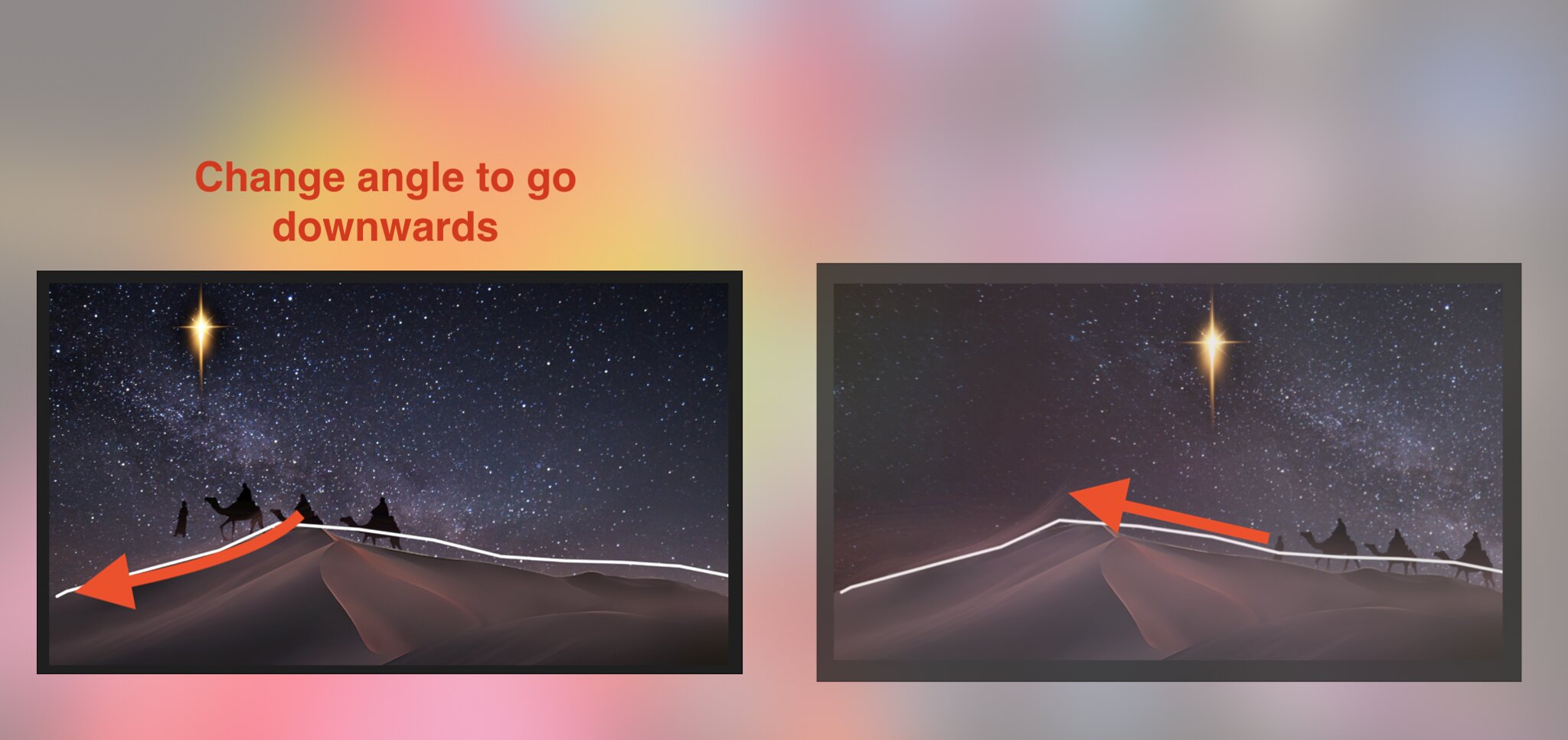 Screen Shot 2020-10-30 at 5.27.01 PM
by
B P
, on Flickr
Screen Shot 2020-10-30 at 5.27.01 PM
by
B P
, on Flickr
Anyone know how to accomplish this? I thought about adding a spin to that point and thought I could get a partial spin to change the angle but just ended up with a spinning propeller of camels.
Please Log in to join the conversation.

31 Oct 2020 14:07 #110662
by JoeEditor
Replied by JoeEditor on topic adjust angle mid motion path
Open that parameter in the Keyframe editor, and adjust the Bezier handles.
Please Log in to join the conversation.
- wonderings
-
Topic Author
- Offline
- New Member
-
Less
More
- Posts: 7
- Thank you received: 0
31 Oct 2020 19:26 #110663
by wonderings
Replied by wonderings on topic adjust angle mid motion path
I have never used the keyframe editor. I assume I should be editing the object itself that I want to rotate. I moved the slider along to the place where I want to adjust the angle. Not sure what I should be adjusting at this point. I tried the transform positions and made huge changes with nothing noticeable. I then tried working on the motion path and adjusting my point where I want it to change and it did change but adjusted the entire path itself. I basically want it midway through to change the angle while still following the same path
 Screen Shot 2020-10-31 at 3.21.24 PM
by
B P
, on Flickr
Screen Shot 2020-10-31 at 3.21.24 PM
by
B P
, on Flickr
Please Log in to join the conversation.
02 Nov 2020 17:40 - 02 Nov 2020 17:43 #110672
by JoeEditor
Replied by JoeEditor on topic adjust angle mid motion path
Ah, you have a behavior controlling things. What behavior is that, and what parameters is it controlling? As long as it's not controlling rotation, you can keyframe rotation. You'll have to create your starting keyframe manually, the rest will create themselves automatically after that first one is made.
Last edit: 02 Nov 2020 17:43 by JoeEditor.
Please Log in to join the conversation.
- wonderings
-
Topic Author
- Offline
- New Member
-
Less
More
- Posts: 7
- Thank you received: 0
07 Nov 2020 12:09 #110749
by wonderings
So I am a real noob when it comes to terminology with Motion, everything I do is self taught from playing and searching online.
Not sure what behaviour. I basically created a motion path that you see the line for. I have the camel caravan following that path. I have the star sky background slowly panning so it looks like it is moving and the star is moving ahead of the camel caravan.
I do not have anything set to control rotation.
I have zero experience with the keyframe editor. I did create a keyframe point but not sure what to do with it from there.
Thanks for the help!
Replied by wonderings on topic adjust angle mid motion path
FCPX.guru wrote: Ah, you have a behavior controlling things. What behavior is that, and what parameters is it controlling? As long as it's not controlling rotation, you can keyframe rotation. You'll have to create your starting keyframe manually, the rest will create themselves automatically after that first one is made.
So I am a real noob when it comes to terminology with Motion, everything I do is self taught from playing and searching online.
Not sure what behaviour. I basically created a motion path that you see the line for. I have the camel caravan following that path. I have the star sky background slowly panning so it looks like it is moving and the star is moving ahead of the camel caravan.
I do not have anything set to control rotation.
I have zero experience with the keyframe editor. I did create a keyframe point but not sure what to do with it from there.
Thanks for the help!
Please Log in to join the conversation.
07 Nov 2020 14:48 #110750
by JoeEditor
Replied by JoeEditor on topic adjust angle mid motion path
Very strongly recommend doing a good Motion tutorial, or you'll miss most of what it can do, and how easily it can do it. Motion can get deep. It'll save you tons of time and headaches.

Please Log in to join the conversation.
- wonderings
-
Topic Author
- Offline
- New Member
-
Less
More
- Posts: 7
- Thank you received: 0
10 Nov 2020 16:46 #110778
by wonderings
Can you recommend a tutorial for this specific function I need? This is barely even a hobby anymore and probably will not touch Motion again till next Christmas and that is a maybe. I have gotten by with the basics for my specific needs, this is the first time I have needed to go a little more in-depth then I could figure out on my own. Thanks!
Replied by wonderings on topic adjust angle mid motion path
FCPX.guru wrote: Very strongly recommend doing a good Motion tutorial, or you'll miss most of what it can do, and how easily it can do it. Motion can get deep. It'll save you tons of time and headaches.
Can you recommend a tutorial for this specific function I need? This is barely even a hobby anymore and probably will not touch Motion again till next Christmas and that is a maybe. I have gotten by with the basics for my specific needs, this is the first time I have needed to go a little more in-depth then I could figure out on my own. Thanks!
Please Log in to join the conversation.
- Carsten Orlt
-

- Offline
- Platinum Member
-

Less
More
- Posts: 422
- Thank you received: 82
10 Nov 2020 21:27 - 10 Nov 2020 21:30 #110780
by Carsten Orlt
Replied by Carsten Orlt on topic adjust angle mid motion path
Instead of the 'Move' behaviour use the 'Motion Path' behaviour.
In the Canvas move the start and end points to the extremes of the distance you want to cover.
Now hold the option key and add keyframes (points) to the motion path while advancing your camel group in time along the timeline to the time you want your group to be at a specific point. They will have bezier handles so you can adjust the curve. These points correspond to a specific time in your composition, so by dragging those keyframes (points) in the timeline back or forward you adjust when your camel group will be at this point.
Last thing to do is to add the 'Snap Aligment to Motion' behaviour and make sure it's set to: Horizontal and the Z axis. This will align your camel group rotation to the path.
Hope this helps
In the Canvas move the start and end points to the extremes of the distance you want to cover.
Now hold the option key and add keyframes (points) to the motion path while advancing your camel group in time along the timeline to the time you want your group to be at a specific point. They will have bezier handles so you can adjust the curve. These points correspond to a specific time in your composition, so by dragging those keyframes (points) in the timeline back or forward you adjust when your camel group will be at this point.
Last thing to do is to add the 'Snap Aligment to Motion' behaviour and make sure it's set to: Horizontal and the Z axis. This will align your camel group rotation to the path.
Hope this helps
Last edit: 10 Nov 2020 21:30 by Carsten Orlt.
Please Log in to join the conversation.
10 Nov 2020 22:51 #110781
by JoeEditor
Replied by JoeEditor on topic adjust angle mid motion path
Please Log in to join the conversation.
- wonderings
-
Topic Author
- Offline
- New Member
-
Less
More
- Posts: 7
- Thank you received: 0
11 Nov 2020 17:02 #110796
by wonderings
I will do some deciphering as a lot of the terms i just do not know but I think that gives me a direction to head down. Thanks!
Replied by wonderings on topic adjust angle mid motion path
cofe wrote: Instead of the 'Move' behaviour use the 'Motion Path' behaviour.
In the Canvas move the start and end points to the extremes of the distance you want to cover.
Now hold the option key and add keyframes (points) to the motion path while advancing your camel group in time along the timeline to the time you want your group to be at a specific point. They will have bezier handles so you can adjust the curve. These points correspond to a specific time in your composition, so by dragging those keyframes (points) in the timeline back or forward you adjust when your camel group will be at this point.
Last thing to do is to add the 'Snap Aligment to Motion' behaviour and make sure it's set to: Horizontal and the Z axis. This will align your camel group rotation to the path.
Hope this helps
I will do some deciphering as a lot of the terms i just do not know but I think that gives me a direction to head down. Thanks!
Please Log in to join the conversation.


20 Nov 2020 23:17 #110958
by sc_fox
Replied by sc_fox on topic adjust angle mid motion path
Break up your 3 wise men image into individuals. You can do that in an external image editor, but I'm lazy so I'd clone the original image 3 times. Use a Bezier mask to separate the individual wise man from the other two. Set the Anchor Point for each to midpoint bottom of image clone. Add a Motion Path and Snap Alignment to Motion behaviors to each. Set up the individual Motion Paths with Custom Speed and keyframe their animation.

HTH
HTH
Please Log in to join the conversation.
