


- Posts: 145
- Thank you received: 1
3 Post Moderation Rule for New Boarders (25 Jan 2021)
New boarders will have their posts moderated - Don't worry if you cannot see your post immediately.
exporting video with tranparent background
16 Jul 2020 13:20 #108729
by owenpga
exporting video with tranparent background was created by owenpga
is there a way to export an animation with transparent background from motion to use in another third party app.
i can get it to work using publish function in fcpx, but i'd like to use it in an app on ipad when i don't have access to my home mac.
thanks
i can get it to work using publish function in fcpx, but i'd like to use it in an app on ipad when i don't have access to my home mac.
thanks
Please Log in to join the conversation.


16 Jul 2020 13:59 #108730
by Deyson
Replied by Deyson on topic exporting video with tranparent background
Hello,
What we can do is export the video as Apple ProRes 4444 with Color + Alpha selected.
Here is a short video explaining what I mean: files.deyson.com/xBXfzl8
Please let me know if you have any questions and have an amazing day! 😊
Also, please be sure to check out my blog post on the best places to find free templates for Final Cut Pro:
motionmastertemplates.com/where-to-find-...l-cut-pro-templates/
Thank you and have an amazing day!
What we can do is export the video as Apple ProRes 4444 with Color + Alpha selected.
Here is a short video explaining what I mean: files.deyson.com/xBXfzl8
Please let me know if you have any questions and have an amazing day! 😊
Also, please be sure to check out my blog post on the best places to find free templates for Final Cut Pro:
motionmastertemplates.com/where-to-find-...l-cut-pro-templates/
Thank you and have an amazing day!
Please Log in to join the conversation.


16 Jul 2020 15:07 - 16 Jul 2020 15:09 #108732
by JoeEditor
Replied by JoeEditor on topic exporting video with tranparent background
You missed one step that trips users up often. I get this from my students more than you'd think.
Select the Project layer, go to the Inspector, make sure that Background is set to Transparent.
Otherwise, no setting in the export window will work.
Did like you said to turn off any background layers. I get that a lot, too. Someone puts a black background or something as a background, and Motion interprets that as a color, not an alpha channel. The alpha channel is where NOTHING exists, not "black". Because a black rectangle as a background is a color, not alpha channel.
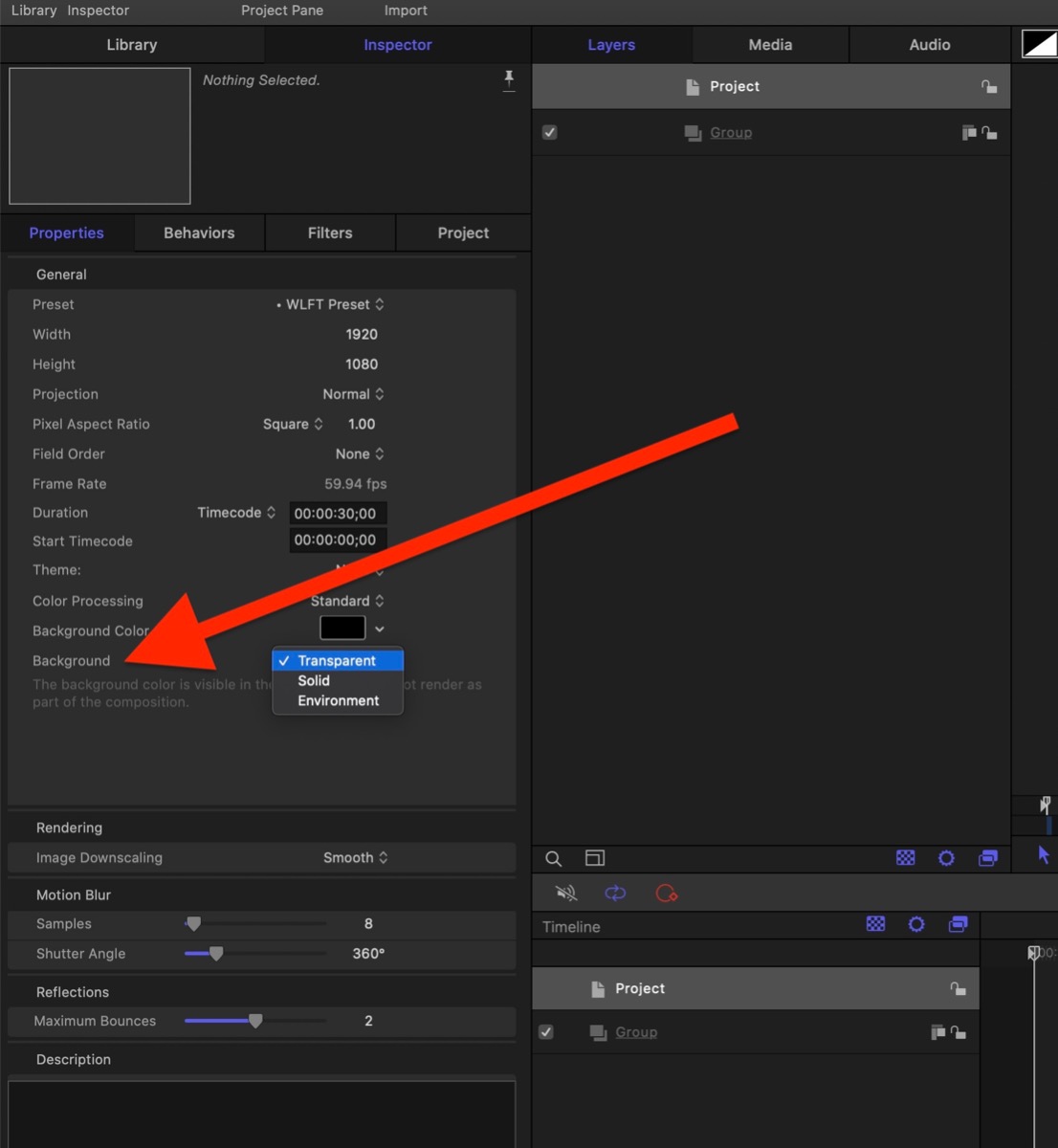
Select the Project layer, go to the Inspector, make sure that Background is set to Transparent.
Otherwise, no setting in the export window will work.
Did like you said to turn off any background layers. I get that a lot, too. Someone puts a black background or something as a background, and Motion interprets that as a color, not an alpha channel. The alpha channel is where NOTHING exists, not "black". Because a black rectangle as a background is a color, not alpha channel.
Last edit: 16 Jul 2020 15:09 by JoeEditor.
Please Log in to join the conversation.
16 Jul 2020 15:19 #108733
by Deyson
Replied by Deyson on topic exporting video with tranparent background
Thank you for the reminder.
From what I understand that is set to transparent as default when we first install Motion. But I could be wrong.
From what I understand that is set to transparent as default when we first install Motion. But I could be wrong.
Please Log in to join the conversation.
17 Jul 2020 10:46 #108751
by JoeEditor
Replied by JoeEditor on topic exporting video with tranparent background
It is set to Transparent by default, but I've been teaching motion for over a decade, and I don't know how but quite often I find folks have changed defaults somehow, and they swear they never touched that parameter, but it's changed. Just years of experience, never assume defaults are in place.
Please Log in to join the conversation.
17 Jul 2020 10:51 #108752
by owenpga
Replied by owenpga on topic exporting video with tranparent background
Thanks Deyson - this works if i'm importing into final cut however it doesn't work when trying to import into lumafusion app on ipad. any ideas if its possible to import transparent vids to lumafusion? thanks Owen
Please Log in to join the conversation.
17 Jul 2020 10:54 #108753
by owenpga
Replied by owenpga on topic exporting video with tranparent background
I actually have that set correctly. The video will import fine in fcpx with transparent background.
I'm trying to get video to import into lumafusion app on ipad. the app is pretty amazing for a mobile app. I may have to reach out to lumafusion to see if they have a work around.
Thank you
I'm trying to get video to import into lumafusion app on ipad. the app is pretty amazing for a mobile app. I may have to reach out to lumafusion to see if they have a work around.
Thank you
Please Log in to join the conversation.
17 Jul 2020 11:04 #108754
by owenpga
Replied by owenpga on topic exporting video with tranparent background
so it looks like lumafusion doesn't support prores yet?
is there any other way to export the file without using prores?
is there any other way to export the file without using prores?
Please Log in to join the conversation.
17 Jul 2020 11:34 #108755
by Deyson
Replied by Deyson on topic exporting video with tranparent background
Does Lumaforge allow you to create masks from Luma Mattes? This way we export 2 videos, one of the animation as is and second of a Luma Matte. Then we create a mask with a Luma Matte.
Please Log in to join the conversation.
17 Jul 2020 11:50 #108756
by owenpga
Replied by owenpga on topic exporting video with tranparent background
I don't know? I'm pretty green with all this stuff.
I'll have to read up on how to do this.
Thanks for the quick response.
I'll have to read up on how to do this.
Thanks for the quick response.
Please Log in to join the conversation.
17 Jul 2020 12:21 #108758
by Deyson
Replied by Deyson on topic exporting video with tranparent background
Hello,
I went to their support page and it seems it can export HEVC Codec. There are instructions there on how to do this as well. If you have any questions, please let us know.
forums.luma-touch.com/viewtopic.php?f=26...44&hilit=transparent
I went to their support page and it seems it can export HEVC Codec. There are instructions there on how to do this as well. If you have any questions, please let us know.
forums.luma-touch.com/viewtopic.php?f=26...44&hilit=transparent
Please Log in to join the conversation.
17 Jul 2020 12:40 - 17 Jul 2020 12:41 #108759
by owenpga
Replied by owenpga on topic exporting video with tranparent background
bummer i have high sierra which doesn't have that option in the converter.
can you think of another program which might be able to export to hevc?
does fcpx? or compressor
can you think of another program which might be able to export to hevc?
does fcpx? or compressor
Last edit: 17 Jul 2020 12:41 by owenpga.
Please Log in to join the conversation.
17 Jul 2020 12:51 #108760
by owenpga
Replied by owenpga on topic exporting video with tranparent background
it looks like compressor will export 4k HEVC. tried it but no luck. i didn't see an option in compressor to preserve transparency. i'm sure there is a solution. thank you.
Please Log in to join the conversation.
17 Jul 2020 12:55 #108761
by Deyson
Replied by Deyson on topic exporting video with tranparent background
Another tool I can think of is Mpeg Stream Clip.
I used to use a while back as it can convert almost anything:
www.squared5.com/svideo/mpeg-streamclip-mac.html
I used to use a while back as it can convert almost anything:
www.squared5.com/svideo/mpeg-streamclip-mac.html
Please Log in to join the conversation.
17 Jul 2020 13:06 #108762
by owenpga
Replied by owenpga on topic exporting video with tranparent background
ill check it out.
thanks for all your help Deyson.
thanks for all your help Deyson.
Please Log in to join the conversation.
