


- Posts: 265
- Thank you received: 7
3 Post Moderation Rule for New Boarders (25 Jan 2021)
New boarders will have their posts moderated - Don't worry if you cannot see your post immediately.
How to Align To an object but disregard the rotation?
- bradywurtz
-
 Topic Author
- Offline
- Elite Member
-

Less
More
29 Apr 2020 21:38 #106687
by bradywurtz
How to Align To an object but disregard the rotation? was created by bradywurtz
So I'm making an animated video, I've got a generic stick figure, and I want him to be doing a Shakespeare play, holding a skull and moving his hand up and down. So I figured I'd use the Align To Behavior and connect it to the arm. I've done that, but the arm is angled, and I'm rotating it on it's anchor point to make it look like it's going up and down. And the skull is angled the same way as the arm. I can't seem to find an easy way to keep the skull attached to the hand and still remain connected to the hand while I rotate the arm, but not have the skill tilting left or right (rotation). I only want the X and Y axis to move. I've attached a video so you can see what I'm talking about.
Please Log in to join the conversation.
30 Apr 2020 08:40 #106695
by arc
Replied by arc on topic How to Align To an object but disregard the rotation?
It look a lot like rigging in 3-D animation software. Can you create a hot point or center point for the skull on which it can rotate?
Please Log in to join the conversation.


30 Apr 2020 09:43 #106704
by JoeEditor
Replied by JoeEditor on topic How to Align To an object but disregard the rotation?
I would have put the hand and skull in a group together, and linked that to the arm. The skull I believe you're simply going to have to manually keyframe its rotation.
Please Log in to join the conversation.
30 Apr 2020 10:21 #106708
by arc
Replied by arc on topic How to Align To an object but disregard the rotation?
I have never tried to create parent and child objects with motion. If Motion can make use of inverse kinematics and forward dynamics you are golden.
Please Log in to join the conversation.
30 Apr 2020 13:54 - 30 Apr 2020 16:22 #106718
by JoeEditor
Replied by JoeEditor on topic How to Align To an object but disregard the rotation?
UPDATE: Easy! Use a Link behavior on the Skull's Rotation Z parameter.
I grouped the arm and skull together and rotated the group, so they're attached at all times, and readjust the anchor point to the required pivot location.
Then Link to the Group's Rotation Z parameter, and used a Scale value of -1.
I grouped the arm and skull together and rotated the group, so they're attached at all times, and readjust the anchor point to the required pivot location.
Then Link to the Group's Rotation Z parameter, and used a Scale value of -1.
Last edit: 30 Apr 2020 16:22 by JoeEditor.
Please Log in to join the conversation.
30 Apr 2020 16:21 #106726
by JoeEditor
Replied by JoeEditor on topic How to Align To an object but disregard the rotation?
Please Log in to join the conversation.
- Karsten Schlüter
-

- Offline
- Moderator
-

Less
More
- Posts: 3790
- Thank you received: 718
02 May 2020 08:56 #106786
by Karsten Schlüter
Replied by Karsten Schlüter on topic How to Align To an object but disregard the rotation?
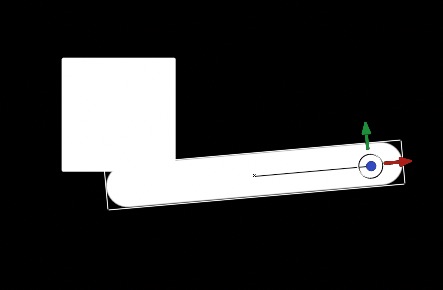
step #1
put all elements (arm, skull) into position, set anchor point of arm
step #2
apply MATCH MOVE behavior to skull (here: rectangle
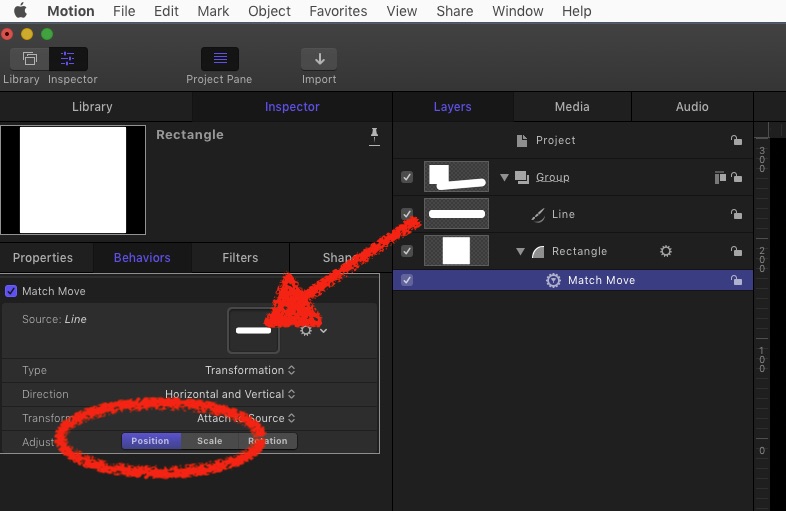
… no step 3…
put all elements (arm, skull) into position, set anchor point of arm
step #2
apply MATCH MOVE behavior to skull (here: rectangle
… no step 3…
Please Log in to join the conversation.
- bradywurtz
-
Topic Author
- Offline
- Elite Member
-
Less
More
- Posts: 265
- Thank you received: 7
02 May 2020 13:12 #106798
by bradywurtz
Replied by bradywurtz on topic How to Align To an object but disregard the rotation?
Ahh! That worked! Idk why I was doing Align To. The title made more sense in my mind for some reason, but this is exactly what I needed. Thanks!!!
Please Log in to join the conversation.
