


- Posts: 7
- Thank you received: 0
3 Post Moderation Rule for New Boarders (25 Jan 2021)
New boarders will have their posts moderated - Don't worry if you cannot see your post immediately.
3D Camera Start and Stop
23 Apr 2020 21:04 #106474
by Hank3rd
3D Camera Start and Stop was created by Hank3rd
I am learning how to use the camera feature. I added an image that I have scale into view for about 2-3 seconds. Then I want to the 3d camera to start and move the image. No matter what I do, the effect starts at the begging of the timeline. I set an in point, I tried adding keyframes, but I think they are applied wrong.
How can I start and stop a movement anywhere in the timeline?
How can I start and stop a movement anywhere in the timeline?
Please Log in to join the conversation.


24 Apr 2020 04:11 #106482
by JoeEditor
Replied by JoeEditor on topic 3D Camera Start and Stop
Not really sure what you want to do. Move the camera or move the image? Either way, you keyframe the item's position parameters. Unless you're using a behavior, then you trim that behavior's start and end in the Timelinue.
Please Log in to join the conversation.
24 Apr 2020 14:31 #106501
by Hank3rd
Replied by Hank3rd on topic 3D Camera Start and Stop
I am trying to get the camera movement to happen a few seconds in. Maybe this screen grab/video will help explain?
www.screencast.com/t/pzEAvb4N2L2
Please Log in to join the conversation.
24 Apr 2020 17:20 #106511
by Hank3rd
Replied by Hank3rd on topic 3D Camera Start and Stop
I figured out if I hit "A" it will add the keyframes I need!
Please Log in to join the conversation.
25 Apr 2020 12:45 - 25 Apr 2020 12:52 #106538
by JoeEditor
Replied by JoeEditor on topic 3D Camera Start and Stop
Yeah, you're making that way more complicated than you need to.
First, you don't need the camera to do that.
Second, make the group a 3D group, not a 2D group.
Third, keyframe the Rotation parameters in the Inspector.
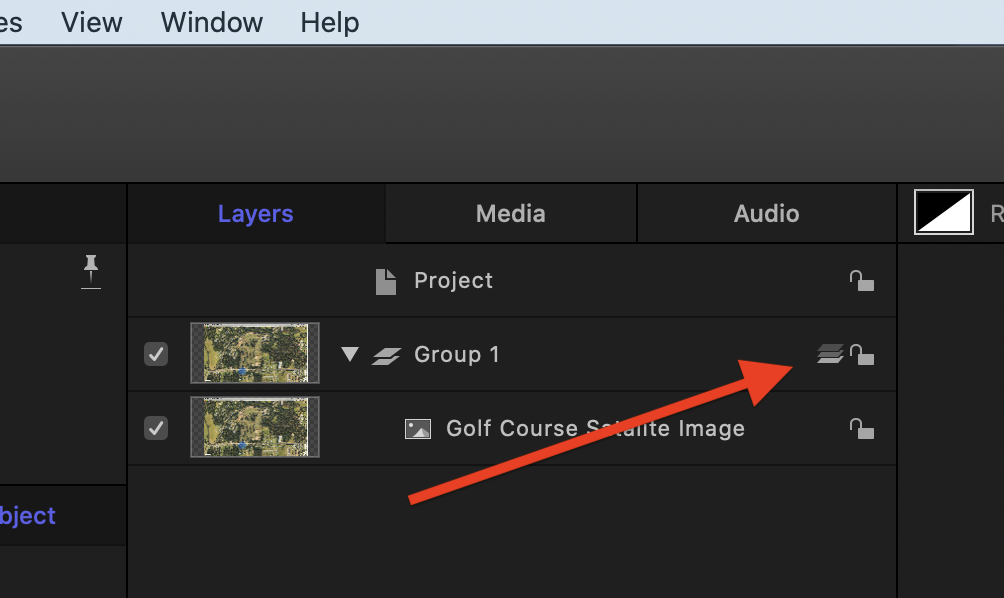
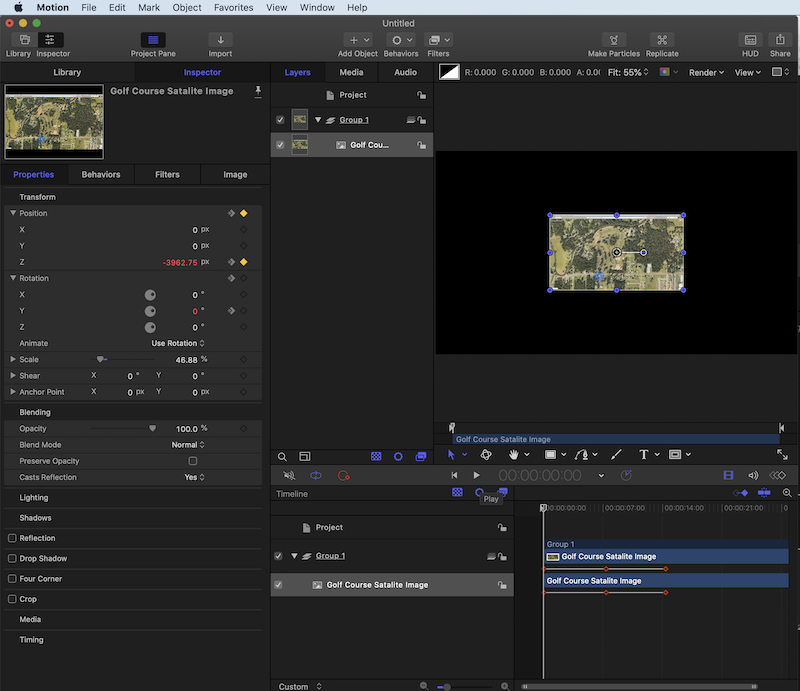
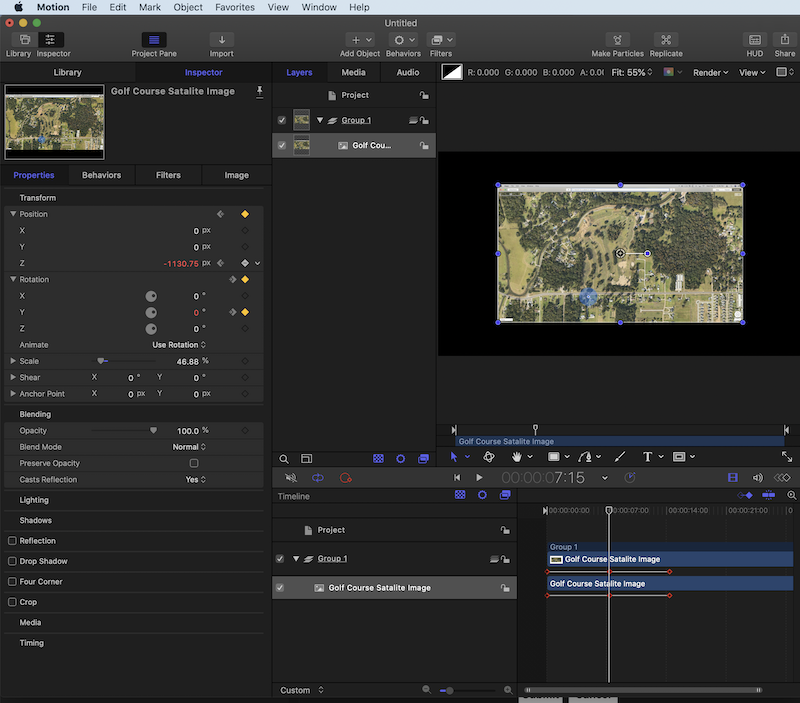
Here's some screenshots to show you how to change a Group from 2D to 3D, and how to then keyframe what you want much more easily.
This is a 2D Group.
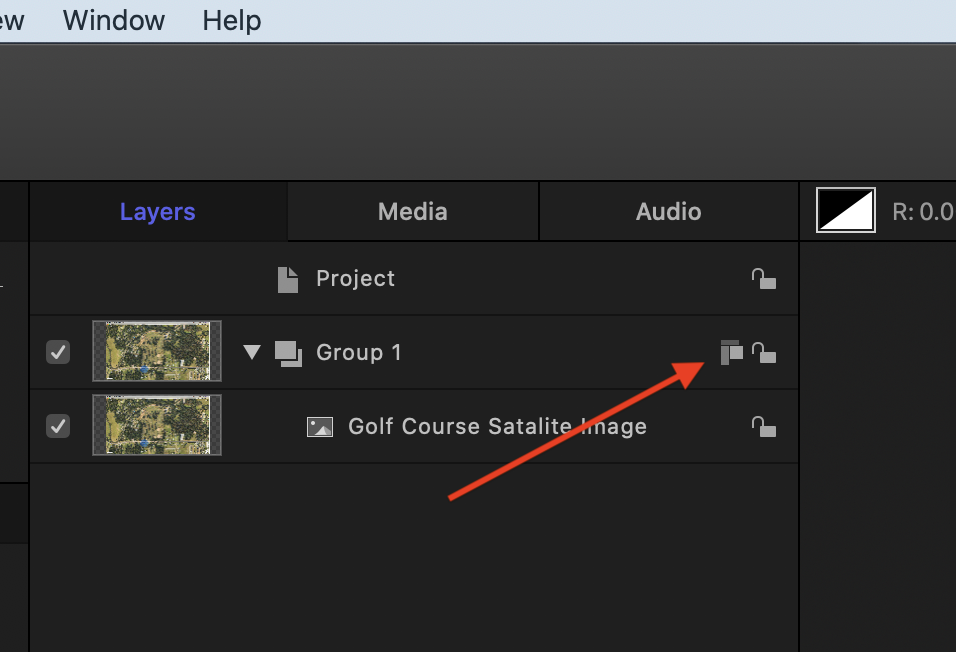
Click that symbol to make it a 3D Group.
The first keyframe (Position Z).
The second set of keyframes (Position Z and Rotation y).
The third keyframe (Rotation y).
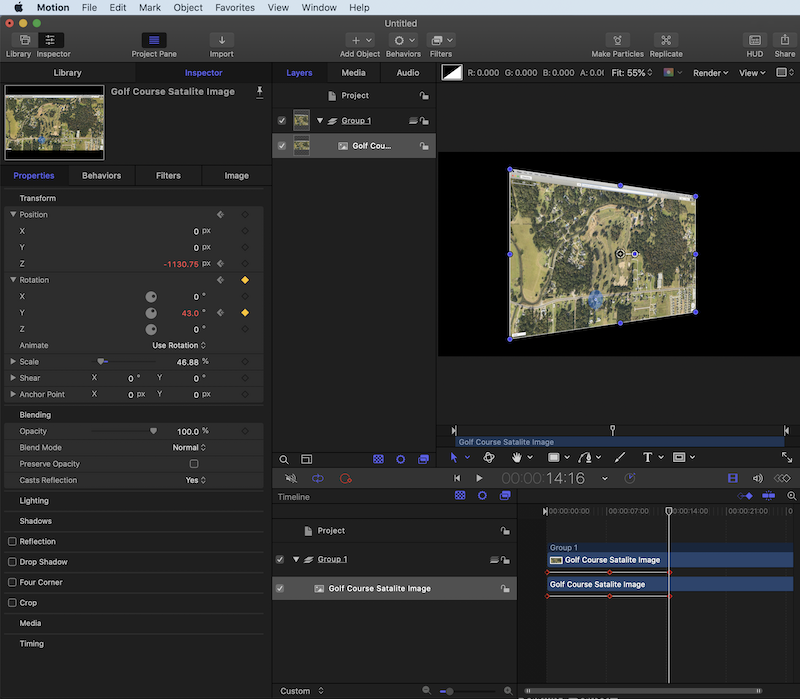
If you wanted to use a camera, you'd keyframe it's Position and Rotation keyframes to achieve the same effect. But I like to keep it simple, fewer elements the better. So I'd recommend not using the camera, use the position and rotation of the object. The only reason I'd use a camera is if I had a complex set built and needed to move around it, jumping from one POV to a different POV quickly. Otherwise, I'd just keyframe the object, or the Group a collection of objects were in.
First, you don't need the camera to do that.
Second, make the group a 3D group, not a 2D group.
Third, keyframe the Rotation parameters in the Inspector.
Here's some screenshots to show you how to change a Group from 2D to 3D, and how to then keyframe what you want much more easily.
This is a 2D Group.
Click that symbol to make it a 3D Group.
The first keyframe (Position Z).
The second set of keyframes (Position Z and Rotation y).
The third keyframe (Rotation y).
If you wanted to use a camera, you'd keyframe it's Position and Rotation keyframes to achieve the same effect. But I like to keep it simple, fewer elements the better. So I'd recommend not using the camera, use the position and rotation of the object. The only reason I'd use a camera is if I had a complex set built and needed to move around it, jumping from one POV to a different POV quickly. Otherwise, I'd just keyframe the object, or the Group a collection of objects were in.
Last edit: 25 Apr 2020 12:52 by JoeEditor.
Please Log in to join the conversation.
25 Apr 2020 13:03 #106544
by Hank3rd
Replied by Hank3rd on topic 3D Camera Start and Stop
That looks way simpler. I will try that out later on. I am just getting started with Motion, so I do not know all the features and workflows yet.
Please Log in to join the conversation.
26 Apr 2020 12:47 - 26 Apr 2020 12:47 #106581
by JoeEditor
Replied by JoeEditor on topic 3D Camera Start and Stop
Here's some references to help you get up and running. Plus, invest in the Ripple Training or macProVideo video tutorials on Motion (I think Ripple does a better job teaching this specific app).
finalcutprox.guru/tutorials/tutorials/mPV_HUB.html
finalcutprox.guru/tutorials/tutorials/mPV_HUB.html
Last edit: 26 Apr 2020 12:47 by JoeEditor.
Please Log in to join the conversation.
28 Apr 2020 12:01 #106638
by Hank3rd
Replied by Hank3rd on topic 3D Camera Start and Stop
Thank you. That was helpful for an image. I am also working with another project where I created an animated graph that has three groups of elements. That one was easier to use the camera. Thank you for the links, I am watching the first YT video now and will check out the others!
Please Log in to join the conversation.
