


- Posts: 15
- Thank you received: 1
3 Post Moderation Rule for New Boarders (25 Jan 2021)
New boarders will have their posts moderated - Don't worry if you cannot see your post immediately.
Using plugins/existing templates on a new template
10 Dec 2019 19:58 - 10 Dec 2019 20:03 #103102
by hawkeye
Using plugins/existing templates on a new template was created by hawkeye
Forgive me as I'm a bit green when it comes to working with Motion, but I am willing to learn.
I'm trying to get video projects ready for the new rugby season when it kicks off in the new year. Last year we started our own version of Sky Sports news on match days to show a previous game along with team/club news on the ticker tape on the bottom of the screen and adverts on the right of the screen.
I created the back ground in Motion and then added the text/adverts in FCPX using existing text/plugins. As I'm looking at updating for the new season, I'm looking at if it may be easier to add all these things into the template. If so, how easy would be be.
Any help is appreciated.
Thanks
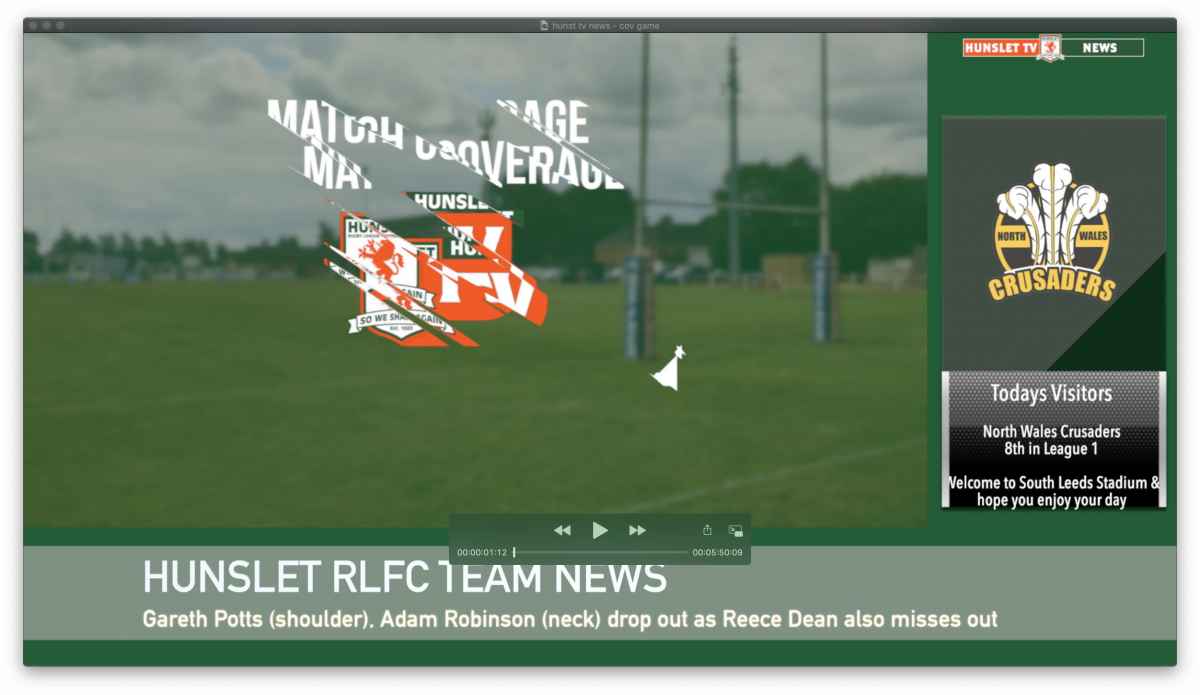
I'm trying to get video projects ready for the new rugby season when it kicks off in the new year. Last year we started our own version of Sky Sports news on match days to show a previous game along with team/club news on the ticker tape on the bottom of the screen and adverts on the right of the screen.
I created the back ground in Motion and then added the text/adverts in FCPX using existing text/plugins. As I'm looking at updating for the new season, I'm looking at if it may be easier to add all these things into the template. If so, how easy would be be.
Any help is appreciated.
Thanks
Last edit: 10 Dec 2019 20:03 by hawkeye.
Please Log in to join the conversation.


11 Dec 2019 13:41 #103128
by Deyson
Replied by Deyson on topic Using plugins/existing templates on a new template
Hi,
It can be done. But depending on the complexity of the original template it may take some work and maybe some rigs may need to be reset.
Another option is to create a project or Event in Final Cut pro and call name it as a template. We can then copy and paste the elements into our new timeline.
Please let me know what you think.
_Deyson
It can be done. But depending on the complexity of the original template it may take some work and maybe some rigs may need to be reset.
Another option is to create a project or Event in Final Cut pro and call name it as a template. We can then copy and paste the elements into our new timeline.
Please let me know what you think.
_Deyson
Please Log in to join the conversation.


