


- Posts: 122
- Thank you received: 2
3 Post Moderation Rule for New Boarders (25 Jan 2021)
New boarders will have their posts moderated - Don't worry if you cannot see your post immediately.
SliceX in Motion
18 Jan 2018 18:37 #93474
by mester
SliceX in Motion was created by mester
I got all SliceX and TrackX in Motion, but dont understand how to draw my blur mask?
I want to use Motion because I got 10 blur masks layers in FCPX and it runs to slow
can't find anything in the manual about Motion
thanks
I want to use Motion because I got 10 blur masks layers in FCPX and it runs to slow
can't find anything in the manual about Motion
thanks
Please Log in to join the conversation.
19 Jan 2018 14:45 #93507
by mester
Replied by mester on topic SliceX in Motion
SliceX dont suport Motion, regardless that the plugin is in there :dry:
Please Log in to join the conversation.


19 Jan 2018 15:21 - 19 Jan 2018 15:22 #93512
by JoeEditor
Replied by JoeEditor on topic SliceX in Motion
Yes, the Coremelt web site states clearly:
"Hosts:
FCPX ONLY"
And it isn't possible for Coremelt to have it not show in Motion.
But I can assure you, Motion won't handle heavy compositing better than FCPX will, they use the same render engine.
"Hosts:
FCPX ONLY"
And it isn't possible for Coremelt to have it not show in Motion.
But I can assure you, Motion won't handle heavy compositing better than FCPX will, they use the same render engine.
Last edit: 19 Jan 2018 15:22 by JoeEditor.
Please Log in to join the conversation.
- Karsten Schlüter
-

- Offline
- Moderator
-

Less
More
- Posts: 3790
- Thank you received: 718
19 Jan 2018 15:50 - 19 Jan 2018 15:51 #93513
by Karsten Schlüter
… thinking about a more effective solution, but am I right? You want to blur 10 parts of the frame and each part individually moves??
because, wouldn't it be easier and less distracting for the audience to 'group' areas of blur? And make bigger areas of blur to minimize movement?
Meant as an example:

… is 'better' than blurring each individual face …
Replied by Karsten Schlüter on topic SliceX in Motion
mester wrote: … I got 10 blur masks layers in FCPX and it runs to slow…
… thinking about a more effective solution, but am I right? You want to blur 10 parts of the frame and each part individually moves??
because, wouldn't it be easier and less distracting for the audience to 'group' areas of blur? And make bigger areas of blur to minimize movement?
Meant as an example:
… is 'better' than blurring each individual face …
Last edit: 19 Jan 2018 15:51 by Karsten Schlüter.
Please Log in to join the conversation.
19 Jan 2018 20:24 #93523
by mester
Replied by mester on topic SliceX in Motion
I did not see that, and just presumed that they did because they where in Motions library
its the same engine for render, but some stuff sometimes is running more smooth in Motion
thanks
its the same engine for render, but some stuff sometimes is running more smooth in Motion
thanks
Please Log in to join the conversation.
19 Jan 2018 20:34 #93525
by mester
Replied by mester on topic SliceX in Motion
sure it would be easier, but can't find out how to make several masks in one, how do I add an extra mask on the same layer?
thanks
thanks
Please Log in to join the conversation.
- Karsten Schlüter
-
- Offline
- Moderator
-
Less
More
- Posts: 3790
- Thank you received: 718
20 Jan 2018 06:24 #93531
by Karsten Schlüter
again, my suggestion is based upon the assumption, no 'tracking' is needed …
then, it's quiet easy:
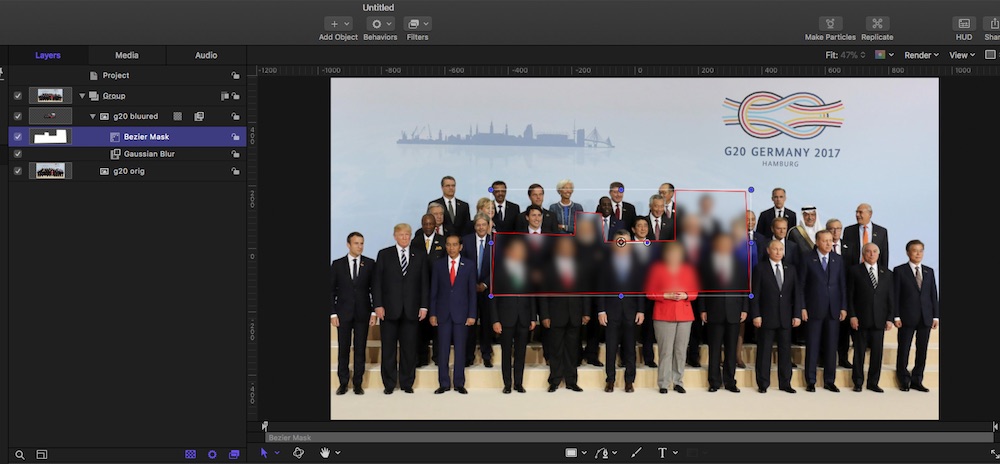
just apply a blur to a clips duplicate, and use the Draw Mask tool to give the blur layer any shape you like … if your blur areas are not cohesive, indeed: each mask is its own layer.
… just suggesting, not to put 10 trackers onto one clip - that is a ton of computation; just trying to make things simpler
Replied by Karsten Schlüter on topic SliceX in Motion
mester wrote: … how to make several masks in one, how do I add an extra mask on the same layer?…
again, my suggestion is based upon the assumption, no 'tracking' is needed …
then, it's quiet easy:
just apply a blur to a clips duplicate, and use the Draw Mask tool to give the blur layer any shape you like … if your blur areas are not cohesive, indeed: each mask is its own layer.
… just suggesting, not to put 10 trackers onto one clip - that is a ton of computation; just trying to make things simpler
Please Log in to join the conversation.
20 Jan 2018 10:37 #93534
by mester
Replied by mester on topic SliceX in Motion
ok, but I need to track 10 points at one shot, so its the hard way
but thanks anyway
but thanks anyway
Please Log in to join the conversation.
20 Jan 2018 13:53 - 20 Jan 2018 13:55 #93536
by JoeEditor
Replied by JoeEditor on topic SliceX in Motion
Tracking 10 points in one shot for 10 different effects is going to be very taxing on any system, FYI. I'd make a few copies on top of each other, mask out sections of each, do a track on each.
Also, drop the Coremelt tech support folks a line and ask if there's an easier way, since they're the experts with SliceX.
Also, drop the Coremelt tech support folks a line and ask if there's an easier way, since they're the experts with SliceX.
Last edit: 20 Jan 2018 13:55 by JoeEditor.
Please Log in to join the conversation.
20 Jan 2018 21:58 #93540
by mester
Replied by mester on topic SliceX in Motion
I already done it, just need to make a lot of adjustment and expected Motion to be more powerfull to work in, and the zoom option is betterFCPX.guru wrote: Tracking 10 points in one shot for 10 different effects is going to be very taxing on any system, FYI. I'd make a few copies on top of each other, mask out sections of each, do a track on each.
Please Log in to join the conversation.
- Karsten Schlüter
-
- Offline
- Moderator
-
Less
More
- Posts: 3790
- Thank you received: 718
21 Jan 2018 07:06 #93554
by Karsten Schlüter
can you feed, please, my curiosity (and limited imagination) and post a screenshot of your scene with 10 individually and to be tracked blur-zones? …
looking … checkered, hm??
Replied by Karsten Schlüter on topic SliceX in Motion
mester wrote: ok, but I need to track 10 points at one shot,…
can you feed, please, my curiosity (and limited imagination) and post a screenshot of your scene with 10 individually and to be tracked blur-zones? …
looking … checkered, hm??
Please Log in to join the conversation.
- Karsten Schlüter
-
- Offline
- Moderator
-
Less
More
- Posts: 3790
- Thank you received: 718
21 Jan 2018 09:49 #93556
by Karsten Schlüter
nope, no pic to see…
note:
reduce size to 1000pix wide and format to jpg…
(this board is mean with storage space LOL)
Replied by Karsten Schlüter on topic SliceX in Motion
mester wrote: here we go, will …
nope, no pic to see…
note:
reduce size to 1000pix wide and format to jpg…
(this board is mean with storage space LOL)
Please Log in to join the conversation.
21 Jan 2018 09:56 #93558
by mester
Replied by mester on topic SliceX in Motion
and how do I delete it now?
Please Log in to join the conversation.
- Karsten Schlüter
-
- Offline
- Moderator
-
Less
More
- Posts: 3790
- Thank you received: 718
21 Jan 2018 10:02 #93559
by Karsten Schlüter
Replied by Karsten Schlüter on topic SliceX in Motion
okayyyyyy....
a few Q:
1) and the cam moves, I guess? Because, if it's a 'still', and Photoshop/Pixelmator et al does a better job
2) re-shot with proper prepped props (say quick 3 times LOL) is no option?
3) … applied with blurs this is frankly spoken insane ugly… I'm an amateur, ok with some decade experience in advertising, but blurring same print-ons is no retouch … it makes it unreadable but catches watcher attention within a split second ("what was there ? Why do they hide?")
4) have you tried with an 'uncensored' pic to create parallax-shifting?
a few Q:
1) and the cam moves, I guess? Because, if it's a 'still', and Photoshop/Pixelmator et al does a better job
2) re-shot with proper prepped props (say quick 3 times LOL) is no option?
3) … applied with blurs this is frankly spoken insane ugly… I'm an amateur, ok with some decade experience in advertising, but blurring same print-ons is no retouch … it makes it unreadable but catches watcher attention within a split second ("what was there ? Why do they hide?")
4) have you tried with an 'uncensored' pic to create parallax-shifting?
Please Log in to join the conversation.
- Karsten Schlüter
-
- Offline
- Moderator
-
Less
More
- Posts: 3790
- Thank you received: 718
21 Jan 2018 10:03 #93560
by Karsten Schlüter
you should see an EDIT button under your post...
if not, I can do for you…
Replied by Karsten Schlüter on topic SliceX in Motion
mester wrote: and how do I delete it now?
you should see an EDIT button under your post...
if not, I can do for you…
Please Log in to join the conversation.
21 Jan 2018 10:08 #93561
by mester
Replied by mester on topic SliceX in Motion
pls dont go there, I am frustrated as it is now, but nothing to do about it...
thanks
thanks
Please Log in to join the conversation.
- Karsten Schlüter
-
- Offline
- Moderator
-
Less
More
- Posts: 3790
- Thank you received: 718
21 Jan 2018 10:24 #93562
by Karsten Schlüter
fully agreed being frustrated, but retouching a still would give 1000% better quality, and, to add motion, adding some minor parallax shift or a simple zoom-in (with blurring the background) is done in less than an hour.
THAT is nothing to be shown in public :evil:
Replied by Karsten Schlüter on topic SliceX in Motion
mester wrote: … I am frustrated as it is now, but nothing to do about it...
fully agreed being frustrated, but retouching a still would give 1000% better quality, and, to add motion, adding some minor parallax shift or a simple zoom-in (with blurring the background) is done in less than an hour.
THAT is nothing to be shown in public :evil:
Please Log in to join the conversation.
