


- Posts: 3790
- Thank you received: 718
3 Post Moderation Rule for New Boarders (25 Jan 2021)
New boarders will have their posts moderated - Don't worry if you cannot see your post immediately.
Join a test? 'background rendering 'in Motion???
- Karsten Schlüter
-
 Topic Author
- Offline
- Moderator
-

Less
More
18 Jan 2018 08:52 - 18 Jan 2018 08:59 #93444
by Karsten Schlüter
Join a test? 'background rendering 'in Motion??? was created by Karsten Schlüter
Hi Motionists,
board member Tobi brought this to my attention:
Open attached Motion project…
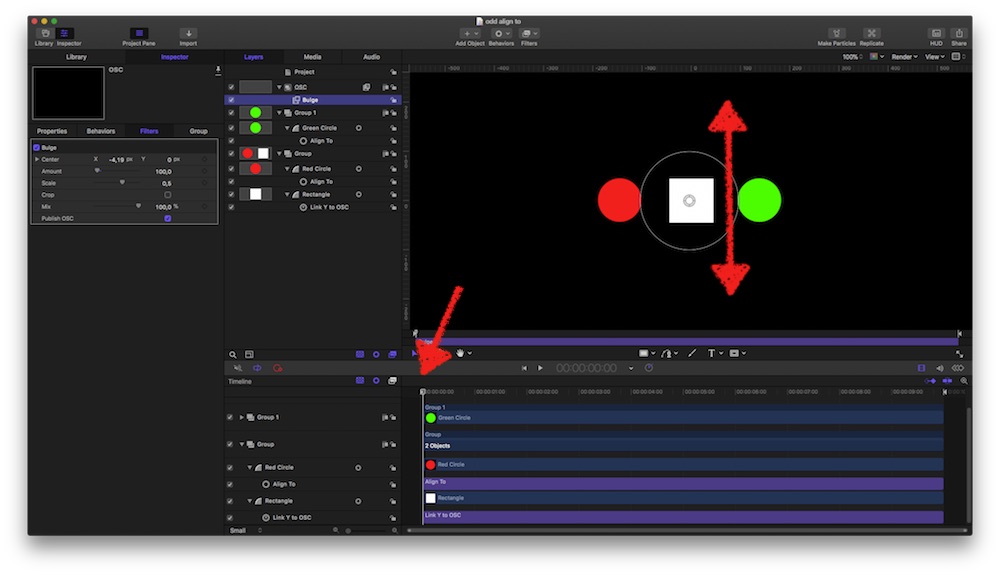
Idea is, that the OSC moves the rectangle vertically, and the Red and the Green Circles follow due to the (in 5.4 improved!) Align-To Behavior.
Low and behold… in the previous version, you were allowed to move the OSC in Motion, and instantly all three parts move. Not so in v5_4:
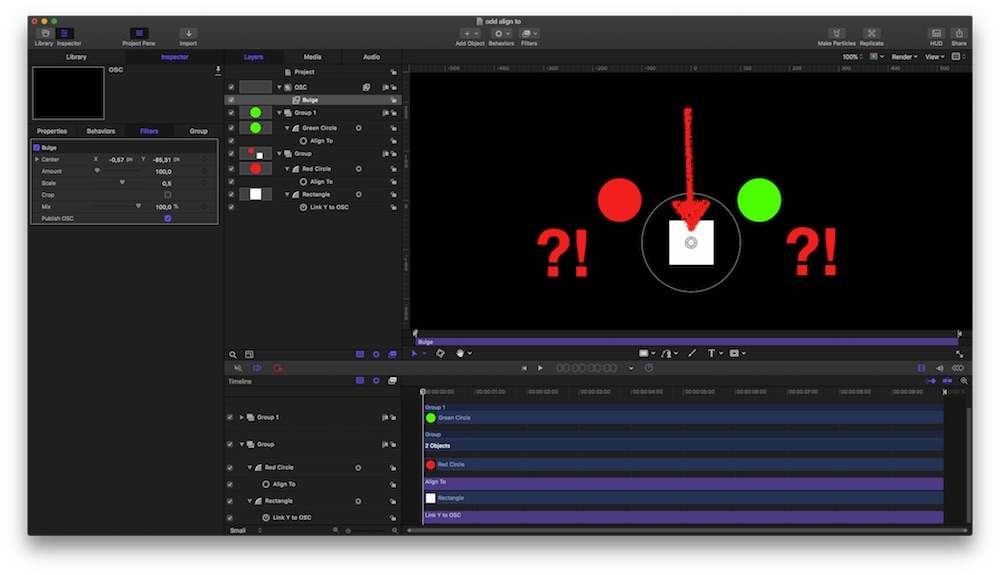
Select the 'Bulge'Filter= OnScreenControlerand move it…
as you can see, the rectangle follows the OSC (good), but the circles don't follow the rectangle (not good).
But…
Hit the Play button for a few frames and tadahh:
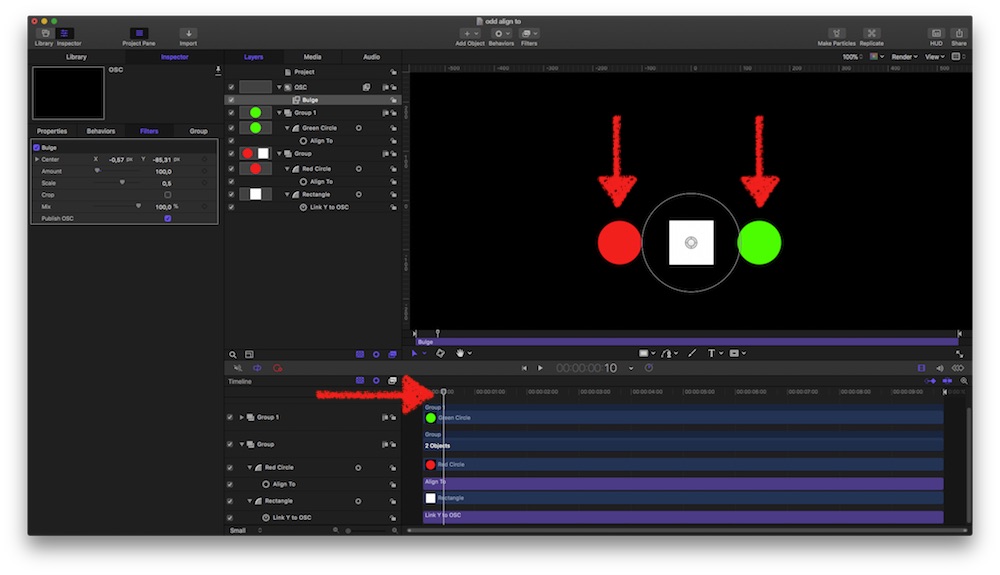
all where it should belong.
Just me (and Tobi) or on other set-ups too (demands Motion 5_4, and I use HS)…??
I vaguely remember a tut from Rippletraining , demoing the TrackPoint Behavior which demanded a manual triggered 'analyse' too…
Did Apple 'improve' the AlignTo by adding some background analysis too???
???
And:
No need to offer me a 'solution' (simply grouping everything into one group and move that …), this is about the odd UI behavior of the AlignTo Behavior…
board member Tobi brought this to my attention:
Open attached Motion project…
Idea is, that the OSC moves the rectangle vertically, and the Red and the Green Circles follow due to the (in 5.4 improved!) Align-To Behavior.
Low and behold… in the previous version, you were allowed to move the OSC in Motion, and instantly all three parts move. Not so in v5_4:
Select the 'Bulge'Filter= OnScreenControlerand move it…
as you can see, the rectangle follows the OSC (good), but the circles don't follow the rectangle (not good).
But…
Hit the Play button for a few frames and tadahh:
all where it should belong.
Just me (and Tobi) or on other set-ups too (demands Motion 5_4, and I use HS)…??
I vaguely remember a tut from Rippletraining , demoing the TrackPoint Behavior which demanded a manual triggered 'analyse' too…
Did Apple 'improve' the AlignTo by adding some background analysis too???
???
And:
No need to offer me a 'solution' (simply grouping everything into one group and move that …), this is about the odd UI behavior of the AlignTo Behavior…
Last edit: 18 Jan 2018 08:59 by Karsten Schlüter.
Please Log in to join the conversation.


18 Jan 2018 09:48 - 18 Jan 2018 09:53 #93445
by Schnurr
Replied by Schnurr on topic Join a test? 'background rendering 'in Motion???
Thanks Karsten,
for having a look into that. Well "simple grouping" isn't in my scenario a real solution as I play with variable text sizes in the users UI and as such need to make use of the align behaviour at least based on my knowledge.
What is even more strange that some elements do move to the new position after hitting the play button in FCPX or M5 but others don't see TC example in the screenshot. Even hitting play the TC remains at the old position and the element is aligned to the blue right box.
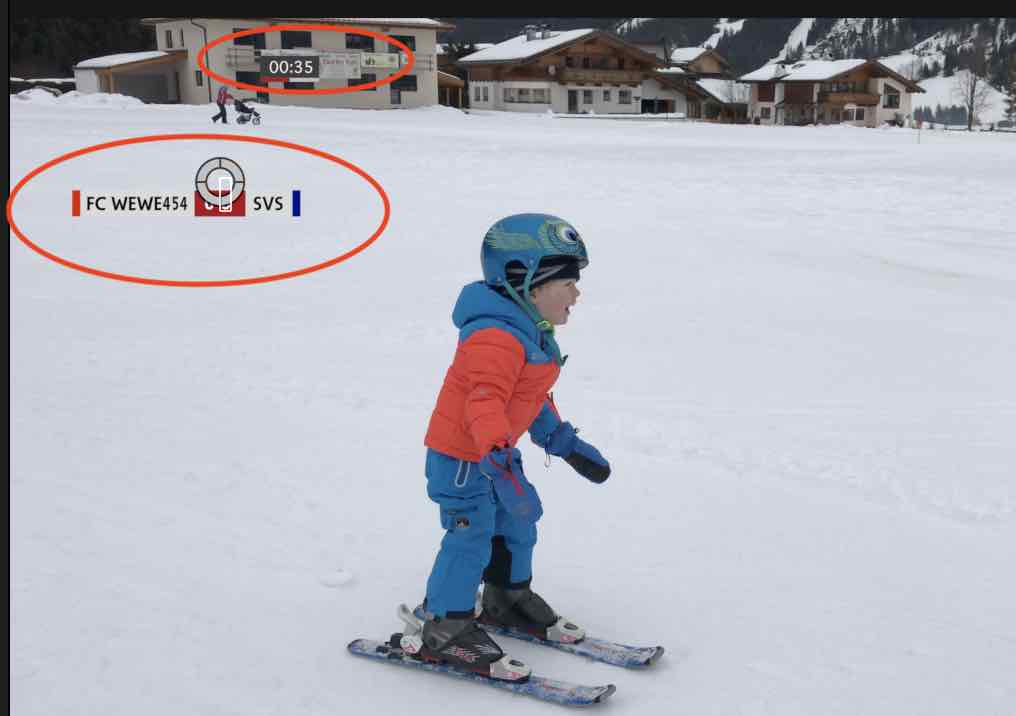
Bevor I did the Motion 5.4 update everything worked fine but now the templates can't be used anymore. In case someone from Apple Dev team reads that feel free to drop me a line and I will provide the motion templates.
for having a look into that. Well "simple grouping" isn't in my scenario a real solution as I play with variable text sizes in the users UI and as such need to make use of the align behaviour at least based on my knowledge.
What is even more strange that some elements do move to the new position after hitting the play button in FCPX or M5 but others don't see TC example in the screenshot. Even hitting play the TC remains at the old position and the element is aligned to the blue right box.
Bevor I did the Motion 5.4 update everything worked fine but now the templates can't be used anymore. In case someone from Apple Dev team reads that feel free to drop me a line and I will provide the motion templates.
Last edit: 18 Jan 2018 09:53 by Schnurr.
Please Log in to join the conversation.


18 Jan 2018 15:39 #93454
by JoeEditor
Replied by JoeEditor on topic Join a test? 'background rendering 'in Motion???
Did your test, Karsten, on the new iMac Pro. If I drag slowly it works fine. If I drag to fast, the side objects stick, don't move. But moving the playhead a single frame they jump to where they belong. Yeah, there's some bugs in this version of Motion.
Please Log in to join the conversation.
- Karsten Schlüter
-
Topic Author
- Offline
- Moderator
-
Less
More
- Posts: 3790
- Thank you received: 718
18 Jan 2018 15:42 #93456
by Karsten Schlüter
… hard to imagine - try the direct connection:
www.apple.com/feedback/motion.html
Replied by Karsten Schlüter on topic Join a test? 'background rendering 'in Motion???
Schnurr wrote: … In case someone from Apple Dev team reads that ….
… hard to imagine - try the direct connection:
www.apple.com/feedback/motion.html
Please Log in to join the conversation.
- Karsten Schlüter
-
Topic Author
- Offline
- Moderator
-
Less
More
- Posts: 3790
- Thank you received: 718
18 Jan 2018 15:51 #93459
by Karsten Schlüter
<getting envy>
THANKS, Chief Ben!
That's indeed interesting – here, the misbehave comes in diff. flavors:
• sometimes, it helps to run the project in its full length
• or, Red/Green follow down, but not up
• … erratic, at last for me
Therefore my assumption, some actually not-known, undocumented 'background rendering' happens - which for sure happens on your Beast faster than on my tiny TupperMac…
Checked the actual version of The Manual - no word of 'hit Play to see/take effect'…
… list of [strike]bugs[/strike] hiccups gets longer and longer … they wanted to go into the Holidays… :silly:
Replied by Karsten Schlüter on topic Join a test? 'background rendering 'in Motion???
FCPX.guru wrote: Did your test, Karsten, on the new iMac Pro. ….
<getting envy>
THANKS, Chief Ben!
That's indeed interesting – here, the misbehave comes in diff. flavors:
• sometimes, it helps to run the project in its full length
• or, Red/Green follow down, but not up
• … erratic, at last for me
Therefore my assumption, some actually not-known, undocumented 'background rendering' happens - which for sure happens on your Beast faster than on my tiny TupperMac…
Checked the actual version of The Manual - no word of 'hit Play to see/take effect'…
… list of [strike]bugs[/strike] hiccups gets longer and longer … they wanted to go into the Holidays… :silly:
Please Log in to join the conversation.
18 Jan 2018 16:37 #93463
by Schnurr
Replied by Schnurr on topic Join a test? 'background rendering 'in Motion???
Karsten,
yes I did send a feedback Bug report let's see whether Apple reacts or not.
At Guru.
feel free to check that one that worked perfectly in 5.3.2 (former version)
drive.google.com/drive/folders/1YNouNkPM...4Ee75jMK?usp=sharing
funny is when you DEselect! the align function (eg the one from the group TC (Timecode) the items get aligned, when you then mark the align function again as active and move the OSC items remain at their position. So the timecode doesn't move at all where at least the Colors do move while pressing the play button to the new position.
I know a bit more complex one but as said worked fine in the former release.
Tobias
yes I did send a feedback Bug report let's see whether Apple reacts or not.
At Guru.
feel free to check that one that worked perfectly in 5.3.2 (former version)
drive.google.com/drive/folders/1YNouNkPM...4Ee75jMK?usp=sharing
funny is when you DEselect! the align function (eg the one from the group TC (Timecode) the items get aligned, when you then mark the align function again as active and move the OSC items remain at their position. So the timecode doesn't move at all where at least the Colors do move while pressing the play button to the new position.
I know a bit more complex one but as said worked fine in the former release.
Tobias
Please Log in to join the conversation.
