




- Posts: 119
- Thank you received: 6
3 Post Moderation Rule for New Boarders (25 Jan 2021)
New boarders will have their posts moderated - Don't worry if you cannot see your post immediately.
Feather one side of a shape?
20 Nov 2017 12:20 - 20 Nov 2017 12:22 #91819
by Suzero
Feather one side of a shape? was created by Suzero
Hi,
I am trying to make a title template with a semi-transparent background rectangle that feathers off into the middle of the screen. So a left-aligned title would have a rectangle underneath it with sharp edges on the left and the edges would fade towards the right side of the title. A right-aligned title would have the opposite.
I want to make the width of the background rectangle adjustable in FCP so that the feather is adjusted along with it (for shorter / longer titles).
Thanks in advance for any tips!
I am trying to make a title template with a semi-transparent background rectangle that feathers off into the middle of the screen. So a left-aligned title would have a rectangle underneath it with sharp edges on the left and the edges would fade towards the right side of the title. A right-aligned title would have the opposite.
I want to make the width of the background rectangle adjustable in FCP so that the feather is adjusted along with it (for shorter / longer titles).
Thanks in advance for any tips!
Last edit: 20 Nov 2017 12:22 by Suzero.
Please Log in to join the conversation.
20 Nov 2017 14:49 #91823
by Suzero
Replied by Suzero on topic Feather one side of a shape?
I already figured this out myself but cannot find where to delete my original question.
Please Log in to join the conversation.
- Karsten Schlüter
-

- Offline
- Moderator
-

Less
More
- Posts: 3790
- Thank you received: 718
21 Nov 2017 05:45 #91828
by Karsten Schlüter
Wot??
in terms of Community = helping each other, share your solution.
Replied by Karsten Schlüter on topic Feather one side of a shape?
Suzero wrote: I already figured this out myself but cannot find where to delete my original question.
Wot??
in terms of Community = helping each other, share your solution.
Please Log in to join the conversation.
21 Nov 2017 08:25 #91831
by Suzero
Replied by Suzero on topic Feather one side of a shape?
Karsten, you're absolutely right. Here is the method I applied.
If it's not the most efficient I am eager to hear suggestions for an easier one.
If it's not the most efficient I am eager to hear suggestions for an easier one.
- Draw a rectangle with a solid black fill. Place it in a group below the text layers.
- Activate the Anchor tool and drag the anchor from the centre to the left border of the rectangle. (This is so that when the X-Scale of the rectangle is adjusted it only adjusts towards the right and doesn't extend left and right from the centre).
- Create another layer in the same group as the rectangle.
- Create a rectangle that fills the screen and fill with a gradient from black to white stretching across the frame left-to-right.
- Add an image mask to the first rectangle.
- Drag the layer with the second rectangle (full screen gradient) to the source parameter (in Inspector > properties of the image mask).
- This should make the solid black background of rectangle 1 fade towards the right.
- Click the GROUP containing all the rectangles and go to Inspector > Properties
- Open up the Scale parameters.
- Right-click on the X and choose Publish.
- This means the rectangle can be made wider or narrower and the gradient will resize with it.
- If you only Scale the rectangle itself, the gradient will remain as is and the fade off won't look as good.
Please Log in to join the conversation.
- Karsten Schlüter
-
- Offline
- Moderator
-
Less
More
- Posts: 3790
- Thank you received: 718
21 Nov 2017 12:00 - 21 Nov 2017 12:02 #91832
by Karsten Schlüter
Replied by Karsten Schlüter on topic Feather one side of a shape?
Hi Su,
… my first reply was a bit too grumpy, even for my standards - sorry for that
To your task:
To create a fade-out rectangle, you simply fill it with a gradient, have a look:
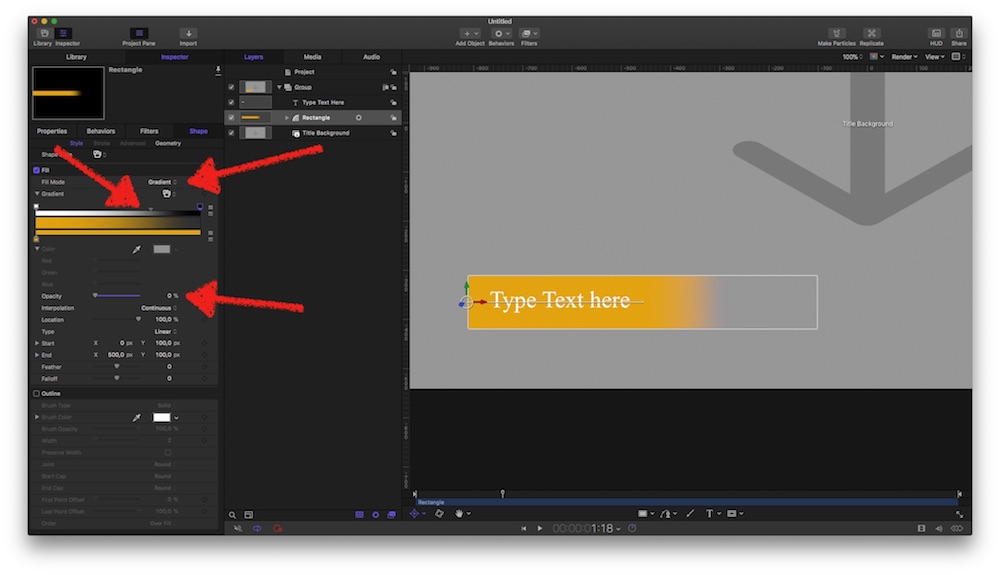
A new 'Title' project, a rectangle 'under' the text. Fill is set to Gradient; now there are 4 (here 3…) handles: below the bar, you define the colors of the gradient, we need just one, so drag'n pull the right one away (it makes POOF and its gone9.
The upper handles define the opacity of each position - left is set to 100%, and on the right, by double-clicking into the bar, I created a second handle, which is set to 0% => fade-out rectangle.
(the third one btw the two defines the 'flow' of the gradient… just try out)
________-
Size/Width
I'm lazy, so I automatize the width of the rectangle (for sure you could 'publish' its Width parameter for manual control)
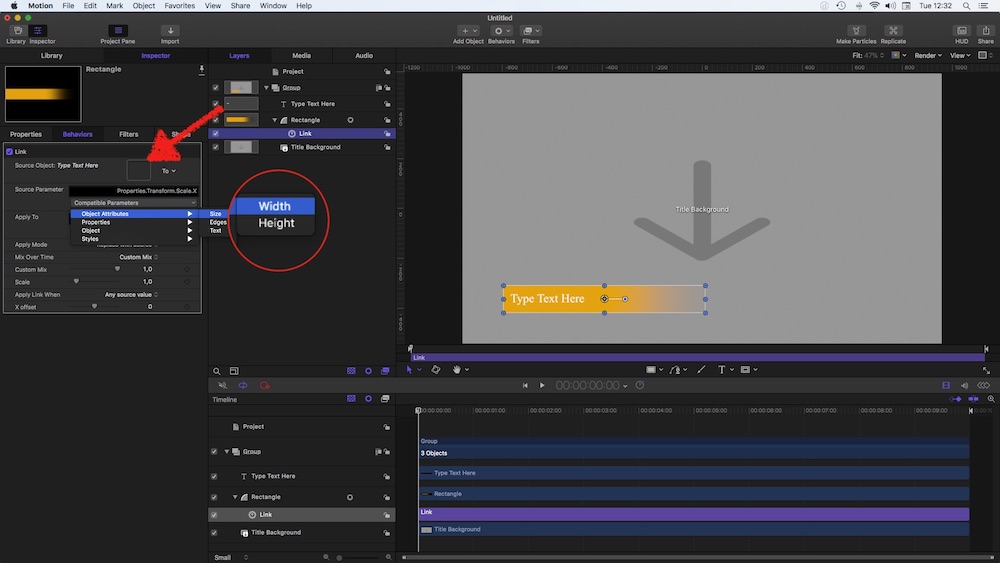
See? I added a Link Behavior to the Rectangles x-scale; drag the Text into the well; select the Width of the text.
Gives… <drumroll> :
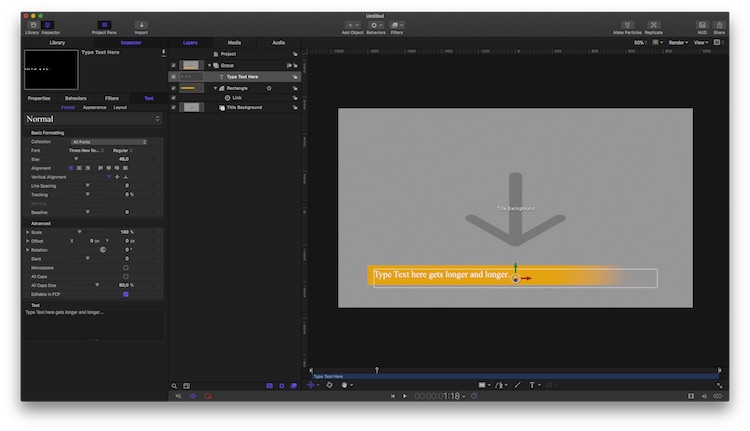
… an auto-adjusting, faded rectangle Title-plugin!
I added my quick'n dirty version, feel free to modify to your needs…
… my first reply was a bit too grumpy, even for my standards - sorry for that
To your task:
To create a fade-out rectangle, you simply fill it with a gradient, have a look:
A new 'Title' project, a rectangle 'under' the text. Fill is set to Gradient; now there are 4 (here 3…) handles: below the bar, you define the colors of the gradient, we need just one, so drag'n pull the right one away (it makes POOF and its gone9.
The upper handles define the opacity of each position - left is set to 100%, and on the right, by double-clicking into the bar, I created a second handle, which is set to 0% => fade-out rectangle.
(the third one btw the two defines the 'flow' of the gradient… just try out)
________-
Size/Width
I'm lazy, so I automatize the width of the rectangle (for sure you could 'publish' its Width parameter for manual control)
See? I added a Link Behavior to the Rectangles x-scale; drag the Text into the well; select the Width of the text.
Gives… <drumroll> :
… an auto-adjusting, faded rectangle Title-plugin!
I added my quick'n dirty version, feel free to modify to your needs…
Last edit: 21 Nov 2017 12:02 by Karsten Schlüter.
Please Log in to join the conversation.
