


- Posts: 479
- Thank you received: 5
3 Post Moderation Rule for New Boarders (25 Jan 2021)
New boarders will have their posts moderated - Don't worry if you cannot see your post immediately.
customizing logos w text
17 Nov 2017 20:04 #91779
by parkerhqj
customizing logos w text was created by parkerhqj
I have a project in FCPX where I reuse a logo over a white background and often change the text. I've been advised to use Motion for this and I'm close to making this happen. I've created a Composition as well as a Generator with the logo fading in and out over the white background. Only the text will change. I'm pretty shaky with Motion so bear with me. What is the best way to go with this? It's a pretty basic set up for should be easy. Will I need to open the Generator or Composition in Motion every time I want to use the template or can I do it somehow in FCPX? Thanks!
Please Log in to join the conversation.

18 Nov 2017 02:40 - 18 Nov 2017 02:42 #91782
by JoeEditor
Replied by JoeEditor on topic customizing logos w text
Don't bother with a Composition, pretty useless element. Make it a Generator (or Title).
Draw a white box as your background.
Put place-holder text such as "Place Text Here" where you need it to be. Size, color, set font, etc.
That by itself will let you change the text inside FCPX. Nothing else needed to do. Here's two example screenshots for you. First is what you'd build in Motion, second is how it shows up in FCPX.
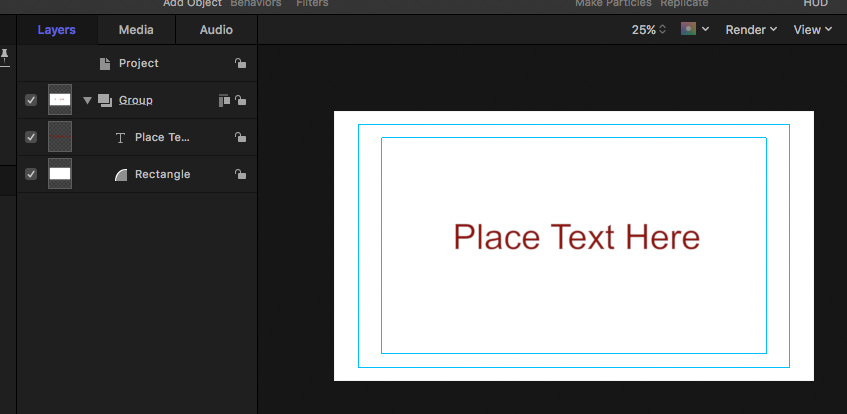
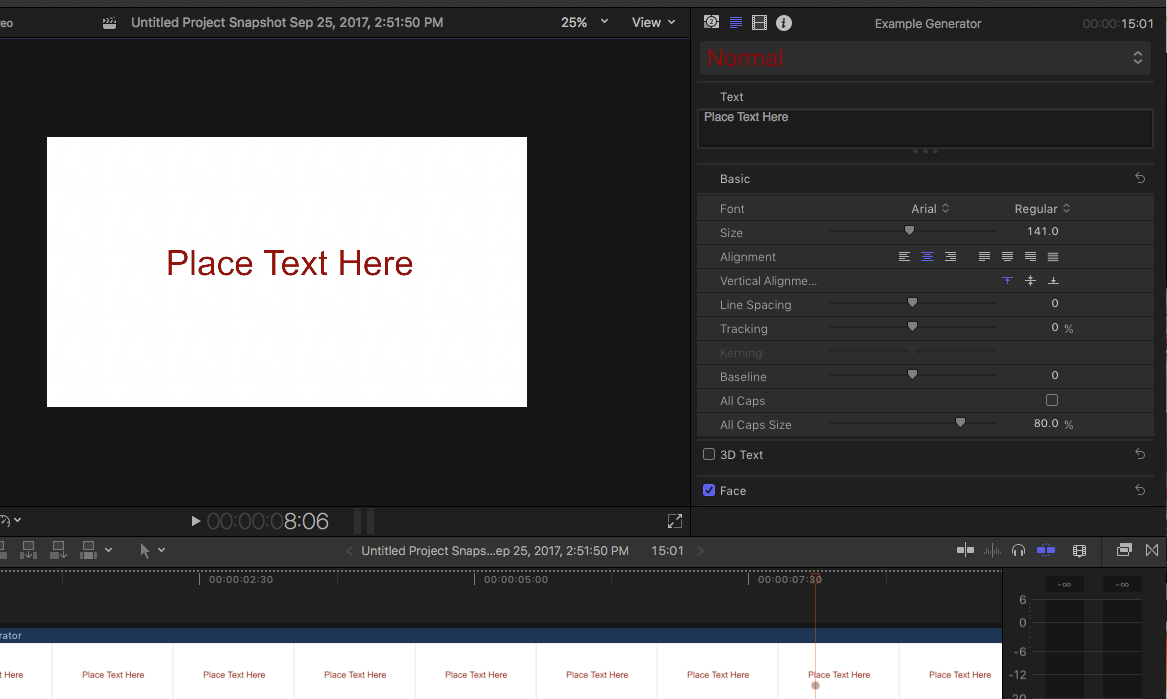
Draw a white box as your background.
Put place-holder text such as "Place Text Here" where you need it to be. Size, color, set font, etc.
That by itself will let you change the text inside FCPX. Nothing else needed to do. Here's two example screenshots for you. First is what you'd build in Motion, second is how it shows up in FCPX.
Last edit: 18 Nov 2017 02:42 by JoeEditor.
Please Log in to join the conversation.
20 Nov 2017 12:44 #91820
by parkerhqj
Replied by parkerhqj on topic customizing logos w text
That's great. So I can also just add my logo to this as well, no? Then all I need to do is open this as a generator in fcp. Thanks - I'll give it a shot.
Please Log in to join the conversation.
20 Nov 2017 13:10 #91821
by parkerhqj
Replied by parkerhqj on topic customizing logos w text
So I tried this and it works great for the text. When I add the logo to the Motion project though, it isn't adjustable in the fcp project. Let's say I need to move or resize the logo, I would need to open the project in Motion, resize the logo and then republish that version of the logo as a separate generator? Thanks.
Please Log in to join the conversation.
- Karsten Schlüter
-

- Offline
- Moderator
-

Less
More
- Posts: 3790
- Thank you received: 718
21 Nov 2017 05:49 - 21 Nov 2017 06:13 #91829
by Karsten Schlüter
No, you simply 'publish' all parameters of the logo, you need in FCPX, such as x/y, scale, rotation.
In an elaborated version of your plugin, you create an OnScreeControler (next semester )
)
to illustrate …
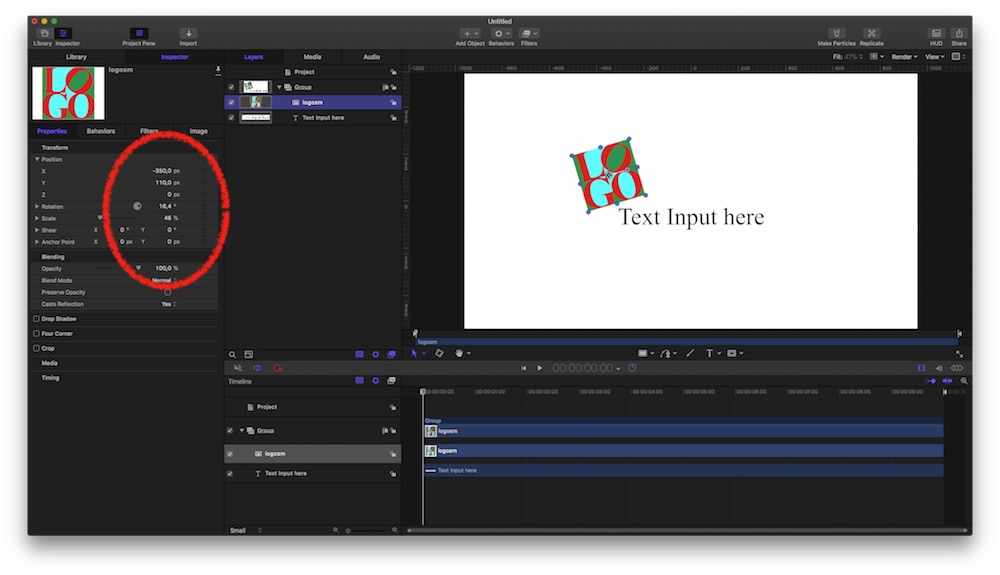
Project in Motion, Logo selected, Inspector lists Properties, Publish any you want available in FCPX.
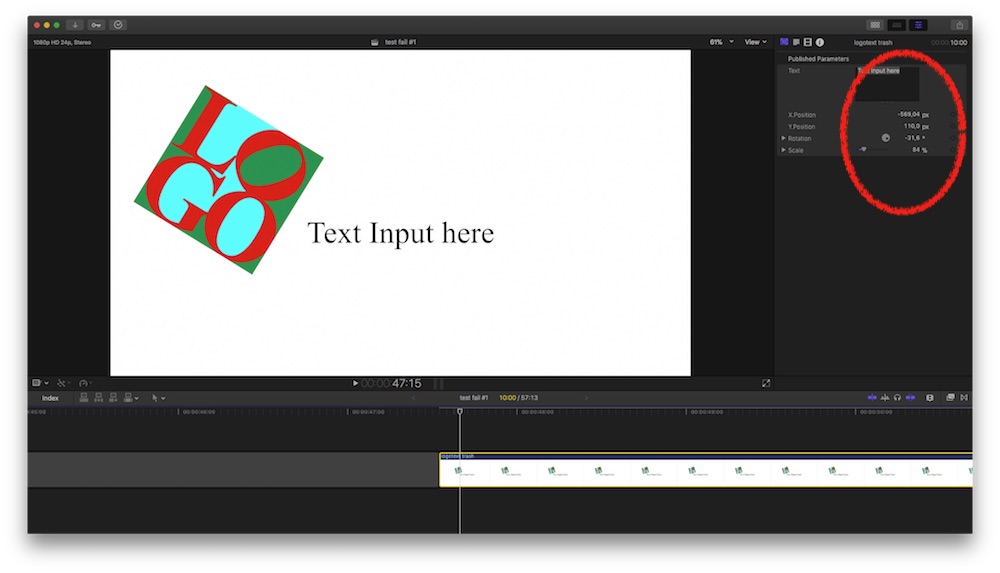
… and in FCPX, those parameters are listed in the Inspector …
… that easy
Replied by Karsten Schlüter on topic customizing logos w text
parkerhqj wrote: … say I need to move or resize the logo, I would need to open the project in Motion, …
No, you simply 'publish' all parameters of the logo, you need in FCPX, such as x/y, scale, rotation.
In an elaborated version of your plugin, you create an OnScreeControler (next semester
)to illustrate …
Project in Motion, Logo selected, Inspector lists Properties, Publish any you want available in FCPX.
… and in FCPX, those parameters are listed in the Inspector …
… that easy
Last edit: 21 Nov 2017 06:13 by Karsten Schlüter.
Please Log in to join the conversation.
21 Nov 2017 15:09 #91839
by parkerhqj
Replied by parkerhqj on topic customizing logos w text
Thanks so much. It seems obvious and easy now. Well worth asking a bunch of dumb questions! It will save me a lot of time going forward - and gives me more ideas for other projects. Cheers.
Please Log in to join the conversation.
