


- Posts: 45
- Thank you received: 1
3 Post Moderation Rule for New Boarders (25 Jan 2021)
New boarders will have their posts moderated - Don't worry if you cannot see your post immediately.
Artefacts using image masks
06 Nov 2017 17:49 - 06 Nov 2017 17:50 #91531
by dorin
Artefacts using image masks was created by dorin
Hi everyone,
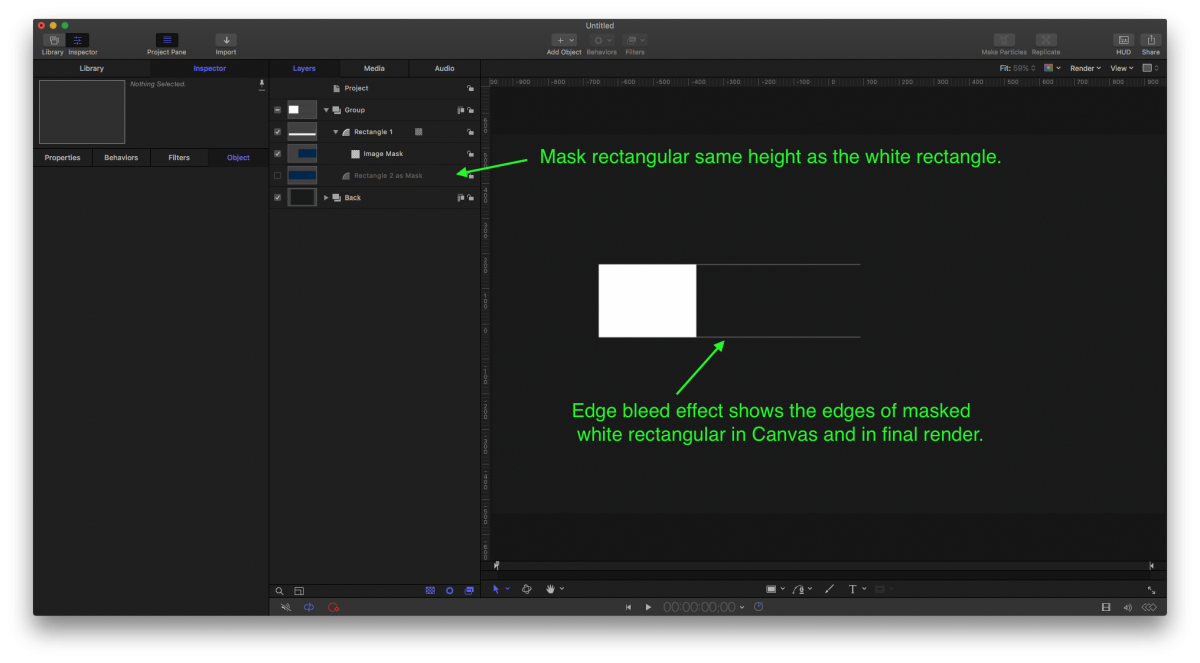
Using image masks in Motion is not working as expected . If two shapes with the same dimensions are overlapped and one is used as a image mask for the other, the masking is not perfect, the shape that is masked out still shows up at the edges 1 pixel. I have attached the Motion project and a screenshot as example. The artifact is present in final rendered video not only in Canvas.
I have tried everything in know to remove those extra un-masked pixels but nothing is working and this problem is starting to drive me crazy. Using regular masks in this case is not an option, I need to do the masking with images. After Effects does not have this problem with Alpha / Luma Mattes.
Any suggestions are welcome.
Using image masks in Motion is not working as expected . If two shapes with the same dimensions are overlapped and one is used as a image mask for the other, the masking is not perfect, the shape that is masked out still shows up at the edges 1 pixel. I have attached the Motion project and a screenshot as example. The artifact is present in final rendered video not only in Canvas.
I have tried everything in know to remove those extra un-masked pixels but nothing is working and this problem is starting to drive me crazy. Using regular masks in this case is not an option, I need to do the masking with images. After Effects does not have this problem with Alpha / Luma Mattes.
Any suggestions are welcome.
Last edit: 06 Nov 2017 17:50 by dorin.
Please Log in to join the conversation.


06 Nov 2017 22:03 #91535
by JoeEditor
Replied by JoeEditor on topic Artefacts using image masks
"Rectangle 2 as mask" shape is not tall enough. Make it taller, works. It is a hair too short and the top/bottom edges are peaking through. Just verified it myself.
Please Log in to join the conversation.
07 Nov 2017 08:37 - 07 Nov 2017 09:05 #91551
by dorin
Replied by dorin on topic Artefacts using image masks
FCPX.guru thank you for your answer.
Yes, making it taller it works but this is not helping me because the graphic used as a mask is used also on another part of the project and needs to have the exact dimensions. I have attached a video example of the problem
This issue can be solved somehow?
Yes, making it taller it works but this is not helping me because the graphic used as a mask is used also on another part of the project and needs to have the exact dimensions. I have attached a video example of the problem
This issue can be solved somehow?
Last edit: 07 Nov 2017 09:05 by dorin.
Please Log in to join the conversation.
- Karsten Schlüter
-

- Offline
- Moderator
-

Less
More
- Posts: 3790
- Thank you received: 718
07 Nov 2017 10:27 - 07 Nov 2017 10:28 #91552
by Karsten Schlüter
Replied by Karsten Schlüter on topic Artefacts using image masks
there's a fix for it:
The naughty one is the FILL Parameter for the shape; somehow, a 0% feather means NOT 0%… :dry:
So, just set It to -0.1% (has no noticeable effect on 'size' of you rectangle), and the ghost-lines are gone:
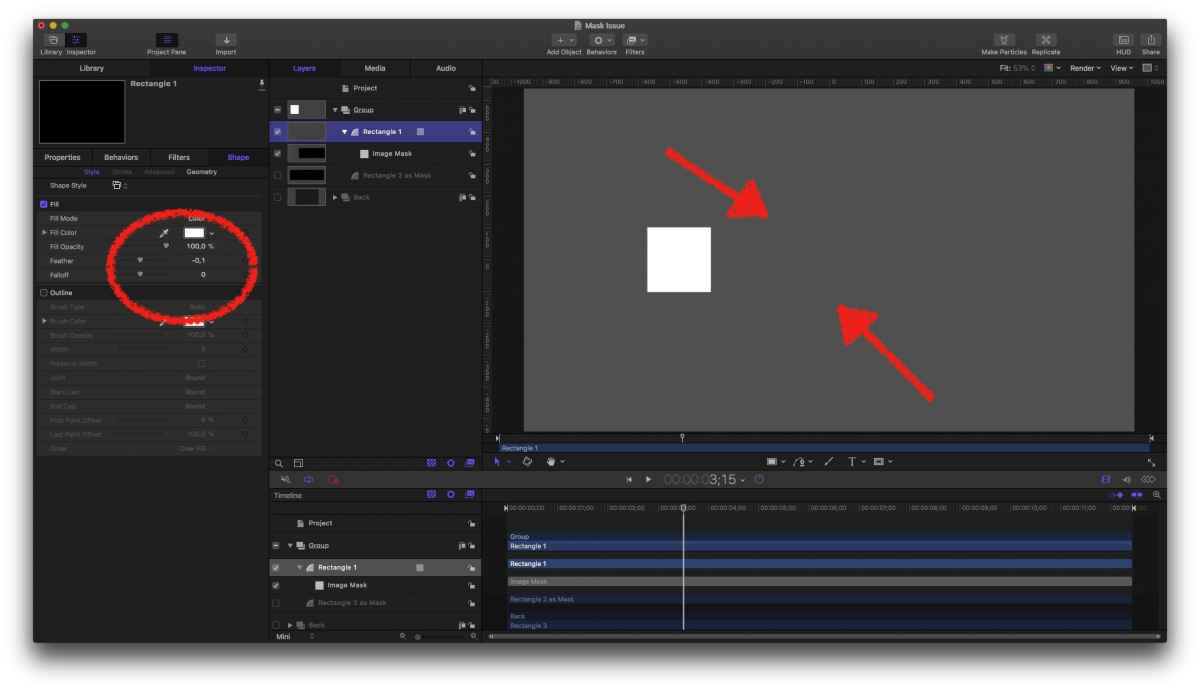
The naughty one is the FILL Parameter for the shape; somehow, a 0% feather means NOT 0%… :dry:
So, just set It to -0.1% (has no noticeable effect on 'size' of you rectangle), and the ghost-lines are gone:
Last edit: 07 Nov 2017 10:28 by Karsten Schlüter.
Please Log in to join the conversation.
07 Nov 2017 11:10 #91553
by dorin
Replied by dorin on topic Artefacts using image masks
Thank you Karsten Schlüter :woohoo:
I have worked on your idea and changing the Falloff for the masking shape to a high number like 1000 or -1000 depending on the situation also fixes the issue on the project I'm working and I don't see any evident visual changes.
I don't think this behavior is normal and should be reported to Apple.
I have worked on your idea and changing the Falloff for the masking shape to a high number like 1000 or -1000 depending on the situation also fixes the issue on the project I'm working and I don't see any evident visual changes.
I don't think this behavior is normal and should be reported to Apple.
Please Log in to join the conversation.
- Karsten Schlüter
-
- Offline
- Moderator
-
Less
More
- Posts: 3790
- Thank you received: 718
08 Nov 2017 04:40 #91570
by Karsten Schlüter
similar flaw can happen in FCPX/using Shape masks…
feel free to report, Apple reads 'em all!
www.apple.com/feedback/motion.html
www.apple.com/feedback/finalcutpro.html
Replied by Karsten Schlüter on topic Artefacts using image masks
dorin wrote: …I don't think this behavior is normal and should be reported to Apple.
similar flaw can happen in FCPX/using Shape masks…
feel free to report, Apple reads 'em all!
www.apple.com/feedback/motion.html
www.apple.com/feedback/finalcutpro.html
Please Log in to join the conversation.
