


- Posts: 6
- Thank you received: 0
3 Post Moderation Rule for New Boarders (25 Jan 2021)
New boarders will have their posts moderated - Don't worry if you cannot see your post immediately.
How to make a ¨Water effect¨
02 Nov 2017 22:52 #91477
by sebass
How to make a ¨Water effect¨ was created by sebass
Does anyone know or have a tutorial on how to make a ¨Water¨ effect, like if you was reflected on a pool?
Thank you very much
Thank you very much
Please Log in to join the conversation.
- Karsten Schlüter
-

- Offline
- Moderator
-

Less
More
- Posts: 3790
- Thank you received: 718
03 Nov 2017 08:41 #91481
by Karsten Schlüter
Replied by Karsten Schlüter on topic How to make a ¨Water effect¨
That is a multi-layered question…
• in Motion, under Content, you find 3 'backgrounds', which create a more or less realistic 'water' surface.
Or, you can create your own, Caustic generator, smart color settings, directional blur…
• a 'wet floor' effect can be done 'manually', rotate a duplicate/clone of your original, apply blur and 'dissolve' it:
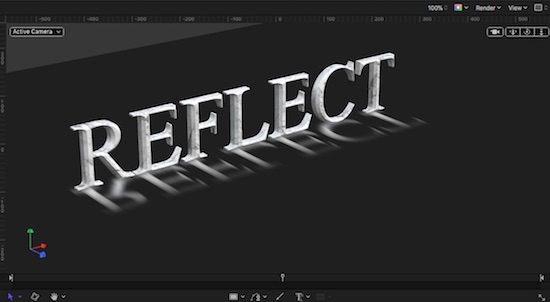
but… to combine an animated water surface AND a reflection… then, you have to work with bump-maps for distortion, and the most tricky part (at last for me…) is the 'food' of the object, which asks for an animated mask, so the waves can cover parts…
Rather complex, no beginners task, …
btw: for wet-floor, there are plugins available … just search for it.
• in Motion, under Content, you find 3 'backgrounds', which create a more or less realistic 'water' surface.
Or, you can create your own, Caustic generator, smart color settings, directional blur…
• a 'wet floor' effect can be done 'manually', rotate a duplicate/clone of your original, apply blur and 'dissolve' it:
but… to combine an animated water surface AND a reflection… then, you have to work with bump-maps for distortion, and the most tricky part (at last for me…) is the 'food' of the object, which asks for an animated mask, so the waves can cover parts…
Rather complex, no beginners task, …
btw: for wet-floor, there are plugins available … just search for it.
Please Log in to join the conversation.

08 Nov 2017 14:39 #91576
by Pielle
Replied by Pielle on topic How to make a ¨Water effect¨
Hi sebass I agree with Karsten is a complex thing. I’ve built up a template to make it as simple as possible, but it's still tricky. Anyway I put it in attachment, and if you dare to built it you can ask some explication
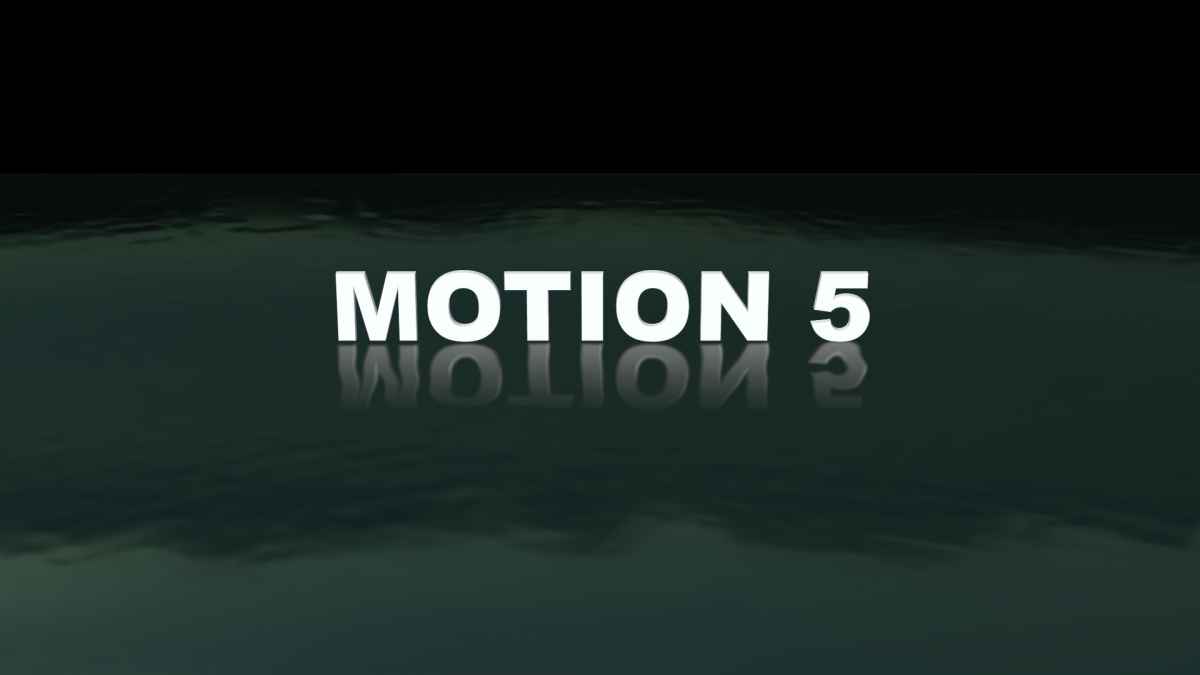
P.S. the template is an animation with running water, so play it.
Enjoy Pielle !
P.S. the template is an animation with running water, so play it.
Enjoy Pielle !
Please Log in to join the conversation.


08 Nov 2017 19:15 #91583
by JoeEditor
Replied by JoeEditor on topic How to make a ¨Water effect¨
THAT is genius, my friend. I'd never have thought of keyframing the actual texture of the glyph. Pure genius, Pielle.
Please Log in to join the conversation.
- Karsten Schlüter
-
- Offline
- Moderator
-
Less
More
- Posts: 3790
- Thank you received: 718
09 Nov 2017 05:20 #91585
by Karsten Schlüter
Replied by Karsten Schlüter on topic How to make a ¨Water effect¨
nice!
two comments from the grumpy Tedesco :
• any reason you 'swapped' the axis?? Y<>Z?
• your text 'hovers ' above the water - would be nice, it could get 'wet feet'; tried that in a mod of your project, by adding a image-mask, which partly covers, with 'waves', the text … hmm, not convincing…
any suggestions?
two comments from the grumpy Tedesco :
• any reason you 'swapped' the axis?? Y<>Z?
• your text 'hovers ' above the water - would be nice, it could get 'wet feet'; tried that in a mod of your project, by adding a image-mask, which partly covers, with 'waves', the text … hmm, not convincing…
any suggestions?
Please Log in to join the conversation.
09 Nov 2017 14:39 #91589
by Pielle
Replied by Pielle on topic How to make a ¨Water effect¨
Thank you Ben, but do not be exaggerated, that is just one of the tricks and not the most important
Karsten! You have a vivid spirit of observation and have captured the essence of the main trick on which the animation is based. the axis position is essential to flatten the group that wraps the water object and thus make the reflection effect otherwise impossible in a 3D object. The background becomes the floor, and in this way the various applied filters that are 2D will not have strange behaviors. N.B. Reflection is applied to the group, not to the water object.
the vision from behind depends on the fact that I did not want to add extra lights (do you remember?: simple as possible) and in this position the ambient light is better. About your question, I've modificated a little your template and if you want more realism change the upper side of the new mask in waves shape and add a horizontal sinusoidal movement.
With friendship Pielle
Karsten! You have a vivid spirit of observation and have captured the essence of the main trick on which the animation is based. the axis position is essential to flatten the group that wraps the water object and thus make the reflection effect otherwise impossible in a 3D object. The background becomes the floor, and in this way the various applied filters that are 2D will not have strange behaviors. N.B. Reflection is applied to the group, not to the water object.
the vision from behind depends on the fact that I did not want to add extra lights (do you remember?: simple as possible) and in this position the ambient light is better. About your question, I've modificated a little your template and if you want more realism change the upper side of the new mask in waves shape and add a horizontal sinusoidal movement.
With friendship Pielle
Please Log in to join the conversation.
12 Nov 2017 17:51 #91630
by Pielle
Replied by Pielle on topic How to make a ¨Water effect¨
Hi Karsten! I reviewed the suggestion I gave you, it's really ugly. This is definitely better. Sorry but I was in a hurry for my job
Please Log in to join the conversation.


14 Nov 2017 05:04 #91655
by sc_fox
Replied by sc_fox on topic How to make a ¨Water effect¨
Here's my take on the project:
It features a 3D reflection (works with animations), an animated water texture, the same texture used to create reflective light across the text. The text reflection is "old school" (copy of original text flipped upside down) with a "fade" used for its appearance. Reflected (2d) surfaces can be accomplished in other ways, but to create a convincing 3d reflection of a 3D Text object, it's much easier to use this old school method.
Project also demos a cheat to create the illusion of the text making contact with the water's surface.
Everything that appears in this project template is created inside Motion.
Fonts used in video changed to Proxima Nova and Apple Symbols to be compatible with everybody's setup.
If you're interested, you can download the project file here:
fcpxtemplates.com/product/watery-reflection-3d/
My 2¢...
HTH
It features a 3D reflection (works with animations), an animated water texture, the same texture used to create reflective light across the text. The text reflection is "old school" (copy of original text flipped upside down) with a "fade" used for its appearance. Reflected (2d) surfaces can be accomplished in other ways, but to create a convincing 3d reflection of a 3D Text object, it's much easier to use this old school method.
Project also demos a cheat to create the illusion of the text making contact with the water's surface.
Everything that appears in this project template is created inside Motion.
Fonts used in video changed to Proxima Nova and Apple Symbols to be compatible with everybody's setup.
If you're interested, you can download the project file here:
fcpxtemplates.com/product/watery-reflection-3d/
My 2¢...
HTH
Please Log in to join the conversation.
- Karsten Schlüter
-
- Offline
- Moderator
-
Less
More
- Posts: 3790
- Thank you received: 718
14 Nov 2017 09:12 #91661
by Karsten Schlüter
Highly interested…!
But, Fox, any chance you share your solution by simply attaching it in a post, and not guiding me thru a registration process, where I have to share to my phone-number, name of first-born and a blood-sample ?
?
Replied by Karsten Schlüter on topic How to make a ¨Water effect¨
sc_fox wrote: …If you're interested, you can download the project file here:
fcpxtemplates.com/product/watery-reflection-3d/ …
Highly interested…!
But, Fox, any chance you share your solution by simply attaching it in a post, and not guiding me thru a registration process, where I have to share to my phone-number, name of first-born and a blood-sample
? Please Log in to join the conversation.
14 Nov 2017 17:12 #91679
by Pielle
Replied by Pielle on topic How to make a ¨Water effect¨
Very well Fox! but if I thought my model was complicated even if I had tried to make it as simple as possible, yours requires a profound knowledge not available to everyone. Anyway Bravo! Once again you prove to be among the best.
P.S. thanks for all the hints and tips about Motion
with friendship Pielle
P.S. thanks for all the hints and tips about Motion
with friendship Pielle
Please Log in to join the conversation.

14 Nov 2017 20:12 #91687
by fox
Replied by fox on topic How to make a ¨Water effect¨
I changed the checkout to require only first and last name and email address [I like to know who's downloading! *] You do not need to register an account - just go through the checkout process as a guest. When you get to the "Checkout" page, there will be a download button for immediate access to the file.
*If you're concerned about giving out an email address, 1) the site is https secure and 2) you can always put in a false email address. (I know where to find you )
*If you're concerned about giving out an email address, 1) the site is https secure and 2) you can always put in a false email address. (I know where to find you
) Please Log in to join the conversation.
14 Nov 2017 20:41 #91689
by fox
Replied by fox on topic How to make a ¨Water effect¨
Hi Pielle,
I think you might find my "solution" to be easier... very "old school". The text is duplicated and flipped upside down. A gradient with transparency applied to give it a fade. Opacity of watery surface turned down to "show through" the flipped text. Other than that, it's just a matter of how to create the "animated texture". There is no one way to do that. The method I used is in the "Depth Texture" Group. Texture groups (in almost *every* case) must be 2D Fixed Resolution. I used an Op Art 3 generator for the "wave action" with an Underwater filter to give it some motion. Since most of the "old" Motion generators are still 8-bit, I use a Gaussian blur filter to smooth out the edges somewhat. There is an Emiiter with the group to create the "wet feet" effect of the text making contact with the water - no animation except Scale Over Life applied to simulate an added wave action. Animation of text with "reflected" text is handled with Link behaviors [one applied to the reflected text and the other (for rotation) applied to a group containing the reflected text. All more or less the same as if this were a 2D effect (not using the reflection property of objects.)
The only "complicated" material here is the texture, its use and determining settings. The same texture is used for the bump map of the water texture [Distress > Custom Bumps @3000%], a Bump Map filter applied to the reflected text to create the refracted appearance, and for the Finish > Custom Specular of the main text to create the effect of light flickering over the text. As the text moves down in the animation, the Intensity goes from 15000% to 100,000%!! Most people probably wouldn't realize that much amplification can be applied to these parameters! Also, the same texture is applied (and synchronized via paramaters) to the Shininess Image and Specular Color Image parameters as well. White levels on both turned down to .2 to .3 range to "amplify" the lighting even more.
For all textures applied to 3D text, attention usually needs to be paid to the Placement > Scale (usually hidden under the disclosure triangle). It is always set to Scale With Font Size (and I ALWAYS have to TURN IT OFF!!) THEN set the scale down to a more normal match with the character size [so be sure to check these settings everywhere there is a texture added... at least in *my* models].
Long story short - this is a basic reflection exercise but with a lot of "light painting" as texture manipulation going on (and most of it experimental for this project especially the reflective light specular effect on the main text).
I think you might find my "solution" to be easier... very "old school". The text is duplicated and flipped upside down. A gradient with transparency applied to give it a fade. Opacity of watery surface turned down to "show through" the flipped text. Other than that, it's just a matter of how to create the "animated texture". There is no one way to do that. The method I used is in the "Depth Texture" Group. Texture groups (in almost *every* case) must be 2D Fixed Resolution. I used an Op Art 3 generator for the "wave action" with an Underwater filter to give it some motion. Since most of the "old" Motion generators are still 8-bit, I use a Gaussian blur filter to smooth out the edges somewhat. There is an Emiiter with the group to create the "wet feet" effect of the text making contact with the water - no animation except Scale Over Life applied to simulate an added wave action. Animation of text with "reflected" text is handled with Link behaviors [one applied to the reflected text and the other (for rotation) applied to a group containing the reflected text. All more or less the same as if this were a 2D effect (not using the reflection property of objects.)
The only "complicated" material here is the texture, its use and determining settings. The same texture is used for the bump map of the water texture [Distress > Custom Bumps @3000%], a Bump Map filter applied to the reflected text to create the refracted appearance, and for the Finish > Custom Specular of the main text to create the effect of light flickering over the text. As the text moves down in the animation, the Intensity goes from 15000% to 100,000%!! Most people probably wouldn't realize that much amplification can be applied to these parameters! Also, the same texture is applied (and synchronized via paramaters) to the Shininess Image and Specular Color Image parameters as well. White levels on both turned down to .2 to .3 range to "amplify" the lighting even more.
For all textures applied to 3D text, attention usually needs to be paid to the Placement > Scale (usually hidden under the disclosure triangle). It is always set to Scale With Font Size (and I ALWAYS have to TURN IT OFF!!) THEN set the scale down to a more normal match with the character size [so be sure to check these settings everywhere there is a texture added... at least in *my* models].
Long story short - this is a basic reflection exercise but with a lot of "light painting" as texture manipulation going on (and most of it experimental for this project
especially the reflective light specular effect on the main text). Please Log in to join the conversation.
14 Nov 2017 22:24 #91695
by sc_fox
Replied by sc_fox on topic How to make a ¨Water effect¨
I would like to keep track of downloads, although I've altered the store checkout page to only require name and email (if you don't want to enter the information, you can simply put fake information in the fields). No phones, addresses, or other info required.
You might get this message twice as I accidentally logged in with Facebook before. That account needs to pass the moderator before publication... <sigh>
You might get this message twice as I accidentally logged in with Facebook before. That account needs to pass the moderator before publication... <sigh>
Please Log in to join the conversation.
14 Nov 2017 23:26 #91697
by sc_fox
Replied by sc_fox on topic How to make a ¨Water effect¨
My project is old school, as simple as possible. Reflection "effect" created by duplicating text and flipping it upside down. A gradient is applied to the Substance to make it appear to "fade". Link behaviors are used to synchronize animated motions (one on the reflected text and one on a group containing the reflected text). The "surface" of the water character ( ▇ ) is set to Substance Generic, Color (water blue) and the Opacity set to 50%. The other faces (Multiple Material) are set to same color with Opacity 100% [check character size and depth parameters].
The only thing that might be considered complicated is how 3D effects are implemented. The texture I built is not only the pattern and bump map, but also the source for the specular lighting of the main text. So, one texture creates the 3D wave effect with "splash" ripples and is used to create the lighting both for the water and the light shining on the text.
In the project that can be downloaded, there is a group called Depth Texture. The water effect is created by using an Op Art 3 generator with an Underwater filter to create "wave action". The settings were purely experimental until I found something I liked. Since most of the old Generators available in Motion are low res 8-bit, a Gaussian blur is applied to smooth out the hard edges. [There is also a "residual" Caustics generator that is turned off, but adding it to the effect by turning it on can create a different look to the water... try it!] An Emitter of a rectangle shape was added to create the effect of the text touching down in the water... simple setup... set up the alignment by looking at the full 3D effect while making adjustments.] Emitter is timed to start with the text touchdown.
Depth Text group is 2D Fixed Resolution (as all 3D textures *should be*). Once the Depth Texture is created (and visibility is turned off) it is simply reused for all the other effects applied to the text. For the water surface character, the texture is applied to a Distress > Custom Bumps with the Gain set to 3000%. As will almost 100% of all texture applications, the Placement > Scale > Scale with Font Size needs to be turned off and the Scale down to a more reasonable *range* (in this project: 205%).
I added a Finish > Custom Specular with Intensity set to 900% to really bring out the wave heights [Shininess set to 48% and Surface Blend set to 93% -- Anisotropic is turned off].
For the Motion reflected text, I added a Filter > Bump Map and applied this same texture to it. I set the direction to 90º and the amount to 0.2. [There is a Refraction filter in the project that is turned off and not used for the final effect.]
For the Motion (main) text, I added a Finish > Custom Specular . This more than anything else requires explanation.
Buried in the Custom Specular option are drop zones for textures: Intensity Image, Shininess Image and Specular Color Image. These are all still somewhat of a mystery to me and so I'm still experimenting. But for this project (and others I've done) I placed the same texture in all the drop zones. Each Placement > Scale and Position settings need to be synchronized to match each other and should match the same (general) settings as those used for the Distress > Custom Bumps. What I set for Intensity is probably the most important point. I set the Intensity parameter to animate from the top position of the animated text (furthest from water surface) to 15000% and animated it to 100000% when the text makes contact with the water surface. The point being: the possibility of using *extreme* settings to make the effect work. Other settings used to "punch up" the effect of the light play across the text were the White Levels of the Shininess Image and Specular Color Image of the this feature.
Long story short -- old school reflection technique and the rest is about how to "paint" the scene. Most of the 3D Text features can be pushed very, very far! (And sometimes that is what is necessary...)
HTH
As with the post I replied to Karsten, there might be another version of this showing up as I accidentally logged in with Facebook earlier...
The only thing that might be considered complicated is how 3D effects are implemented. The texture I built is not only the pattern and bump map, but also the source for the specular lighting of the main text. So, one texture creates the 3D wave effect with "splash" ripples and is used to create the lighting both for the water and the light shining on the text.
In the project that can be downloaded, there is a group called Depth Texture. The water effect is created by using an Op Art 3 generator with an Underwater filter to create "wave action". The settings were purely experimental until I found something I liked. Since most of the old Generators available in Motion are low res 8-bit, a Gaussian blur is applied to smooth out the hard edges. [There is also a "residual" Caustics generator that is turned off, but adding it to the effect by turning it on can create a different look to the water... try it!] An Emitter of a rectangle shape was added to create the effect of the text touching down in the water... simple setup... set up the alignment by looking at the full 3D effect while making adjustments.] Emitter is timed to start with the text touchdown.
Depth Text group is 2D Fixed Resolution (as all 3D textures *should be*). Once the Depth Texture is created (and visibility is turned off) it is simply reused for all the other effects applied to the text. For the water surface character, the texture is applied to a Distress > Custom Bumps with the Gain set to 3000%. As will almost 100% of all texture applications, the Placement > Scale > Scale with Font Size needs to be turned off and the Scale down to a more reasonable *range* (in this project: 205%).
I added a Finish > Custom Specular with Intensity set to 900% to really bring out the wave heights [Shininess set to 48% and Surface Blend set to 93% -- Anisotropic is turned off].
For the Motion reflected text, I added a Filter > Bump Map and applied this same texture to it. I set the direction to 90º and the amount to 0.2. [There is a Refraction filter in the project that is turned off and not used for the final effect.]
For the Motion (main) text, I added a Finish > Custom Specular . This more than anything else requires explanation.
Buried in the Custom Specular option are drop zones for textures: Intensity Image, Shininess Image and Specular Color Image. These are all still somewhat of a mystery to me and so I'm still experimenting. But for this project (and others I've done) I placed the same texture in all the drop zones. Each Placement > Scale and Position settings need to be synchronized to match each other and should match the same (general) settings as those used for the Distress > Custom Bumps. What I set for Intensity is probably the most important point. I set the Intensity parameter to animate from the top position of the animated text (furthest from water surface) to 15000% and animated it to 100000% when the text makes contact with the water surface. The point being: the possibility of using *extreme* settings to make the effect work. Other settings used to "punch up" the effect of the light play across the text were the White Levels of the Shininess Image and Specular Color Image of the this feature.
Long story short -- old school reflection technique and the rest is about how to "paint" the scene. Most of the 3D Text features can be pushed very, very far! (And sometimes that is what is necessary...)
HTH
As with the post I replied to Karsten, there might be another version of this showing up as I accidentally logged in with Facebook earlier...
Please Log in to join the conversation.
- Karsten Schlüter
-
- Offline
- Moderator
-
Less
More
- Posts: 3790
- Thank you received: 718
15 Nov 2017 06:53 #91705
by Karsten Schlüter
Thanks Man With The Many Faces!
Fully understand your interest in what happens to your IP, but I think you understand my concerns either …
Will study your solution … always good to learn from the best …
Replied by Karsten Schlüter on topic How to make a ¨Water effect¨
… I changed the checkout to require only …
Thanks Man With The Many Faces!
Fully understand your interest in what happens to your IP, but I think you understand my concerns either …
Will study your solution … always good to learn from the best …
Please Log in to join the conversation.
15 Nov 2017 10:13 #91709
by Pielle
Replied by Pielle on topic How to make a ¨Water effect¨
Hi Fox, I don't judge the way to reach an objective but the obtained result, and yours is very good. But the discussion is born to give an answer to a fresh boarder's question that I suppose is a newbie about Motion.
The term "complicated" refers to him. Look at how lengthy, and how many references you use to try to describe your work to me, I think someone with limited knowledge of the program will lose after three rows. The funny thing is that Sebass has not given us any answer on this, do you think he is scared? However, I will download an study your template. It doesn't happen often, to see and confront with a work of yours.
With friendship Pielle
The term "complicated" refers to him. Look at how lengthy, and how many references you use to try to describe your work to me, I think someone with limited knowledge of the program will lose after three rows. The funny thing is that Sebass has not given us any answer on this, do you think he is scared? However, I will download an study your template. It doesn't happen often, to see and confront with a work of yours.
With friendship Pielle
Please Log in to join the conversation.
17 Nov 2017 07:19 #91769
by sc_fox
Replied by sc_fox on topic How to make a ¨Water effect¨
Hi Pielle,
The basics are very basic in my project. The rest is just "window dressing". Looking over the thread, we may have all jumped to the wrong conclusion. Perhaps Sebass wasn't even asking about 3D at all. Maybe somebody should have just told him how to turn on reflections in the Properties inspector.
The basics are very basic in my project. The rest is just "window dressing". Looking over the thread, we may have all jumped to the wrong conclusion. Perhaps Sebass wasn't even asking about 3D at all. Maybe somebody should have just told him how to turn on reflections in the Properties inspector.
Please Log in to join the conversation.
