


- Posts: 38
- Thank you received: 3
3 Post Moderation Rule for New Boarders (25 Jan 2021)
New boarders will have their posts moderated - Don't worry if you cannot see your post immediately.
NEWBIE: Background layer misbehaving using Clone Layer for PIP effect.
17 Oct 2017 14:51 - 17 Oct 2017 14:54 #91158
by LesWilson
Long time FCP editor. Biting the bullet and learning Motion. Loving the help I find here.
I want to create an effect that does what I've done manually with SD footage in an HD project. Basically the background layer is the same foreground SD footage but blown up, blurred and desaturated. Foreground is the SD footage at about 80% of the frame size. I started with a Motion Effect project and cloned the Effect Source layer to create a Clone Layer in a Background group on the bottom with the Effect Source on top scaled to 80% in a Foreground group.
The filters for blur and sat work fine. But for some unknown reason, the background group gets cropped to the same width as the foreground. Also, setting up rigging to adjust the crop of either the foreground group or the Effect Source DOES NOTHING. I feel like I'm trying to do something not allowed with Effect Source, Clones and Groups [insert sound of scratching head].
ATTACHMENT #1: This is the SD footage as it is imported onto a white HD canvas. The black letter boxing is in the footage.
ATTACHMENT #2: This is what it looks like after applying my "VideoBox" Effect. Note how the background is cropped left and right revealing the white canvas
ATTACHMENT #3: This is a screenshot of the Motion project.
Any ideas how to do this properly in Motion? TIA
Footage imported onto white canvas

Footage with effect applied

Motion 5 Project

I want to create an effect that does what I've done manually with SD footage in an HD project. Basically the background layer is the same foreground SD footage but blown up, blurred and desaturated. Foreground is the SD footage at about 80% of the frame size. I started with a Motion Effect project and cloned the Effect Source layer to create a Clone Layer in a Background group on the bottom with the Effect Source on top scaled to 80% in a Foreground group.
The filters for blur and sat work fine. But for some unknown reason, the background group gets cropped to the same width as the foreground. Also, setting up rigging to adjust the crop of either the foreground group or the Effect Source DOES NOTHING. I feel like I'm trying to do something not allowed with Effect Source, Clones and Groups [insert sound of scratching head].
ATTACHMENT #1: This is the SD footage as it is imported onto a white HD canvas. The black letter boxing is in the footage.
ATTACHMENT #2: This is what it looks like after applying my "VideoBox" Effect. Note how the background is cropped left and right revealing the white canvas
ATTACHMENT #3: This is a screenshot of the Motion project.
Any ideas how to do this properly in Motion? TIA
Footage imported onto white canvas
Footage with effect applied
Motion 5 Project
Last edit: 17 Oct 2017 14:54 by LesWilson. Reason: update with screenshot
Please Log in to join the conversation.
17 Oct 2017 18:22 #91160
by LesWilson
Replied by LesWilson on topic NEWBIE: Background layer misbehaving using Clone Layer for PIP effect.
FWIW, I experimented and found the effect formats fine with 1080p footage but has the above described effect with an SD Quicktime file. Something about it is causing the cloned source to get clipped at the place were the footage is without the effect applied.
Please Log in to join the conversation.

17 Oct 2017 18:30 #91161
by Overturf
Replied by Overturf on topic NEWBIE: Background layer misbehaving using Clone Layer for PIP effect.
I guess it‘s dead simple and you just need to blow the background layer up some more. If the source is 4:3 it has to be blown up so much that the left and right border reach to the sides of the canvas.
You seem to have optimized it for 16:9.
Could rig that scale to a checkbox „4:3“ for example.
Hope this helps, not sure if I got you 100% right!
You seem to have optimized it for 16:9.
Could rig that scale to a checkbox „4:3“ for example.
Hope this helps, not sure if I got you 100% right!
Please Log in to join the conversation.
17 Oct 2017 18:46 - 17 Oct 2017 18:57 #91162
by LesWilson
Replied by LesWilson on topic NEWBIE: Background layer misbehaving using Clone Layer for PIP effect.
Blowing up the scale was the first thing I tried but that doesn't work It keeps getting clipped at the pillar box points no matter how large I scale the background.
I think it's possibly a problem in FCP. The Motion canvas looks correct when the background is blown up to 400%. But in FCP, on 4x3 clip, the entire Motion Canvas gets pillar boxed (both foreground and background layers.
I think it's possibly a problem in FCP. The Motion canvas looks correct when the background is blown up to 400%. But in FCP, on 4x3 clip, the entire Motion Canvas gets pillar boxed (both foreground and background layers.
Last edit: 17 Oct 2017 18:57 by LesWilson.
Please Log in to join the conversation.
17 Oct 2017 19:28 - 17 Oct 2017 19:31 #91164
by LesWilson
Replied by LesWilson on topic NEWBIE: Background layer misbehaving using Clone Layer for PIP effect.
EPILOG
Once I thought about the issue being in FCP not Motion, it makes sense that the FCP clip transform defines the window on which the Motion Effect is applied and that scaling the Effect Source in Motion does not scale the clip in FCP. That could be Works as Intended or a bug.
My workaround is the manually scale the 4x3 clip in FCP so that it doesn't pillarbox. Applying the effect then works. :S

Once I thought about the issue being in FCP not Motion, it makes sense that the FCP clip transform defines the window on which the Motion Effect is applied and that scaling the Effect Source in Motion does not scale the clip in FCP. That could be Works as Intended or a bug.
My workaround is the manually scale the 4x3 clip in FCP so that it doesn't pillarbox. Applying the effect then works. :S
Last edit: 17 Oct 2017 19:31 by LesWilson.
Please Log in to join the conversation.
- Karsten Schlüter
-

- Offline
- Moderator
-

Less
More
- Posts: 3790
- Thank you received: 718
18 Oct 2017 15:09 #91175
by Karsten Schlüter
Replied by Karsten Schlüter on topic NEWBIE: Background layer misbehaving using Clone Layer for PIP effect.
Hi Les,
your project reminds me a bit of my VerticalVideoFixer …
I'd dare to say, you make it way too difficult (what are those 4 crops for??)

this is how I would accomplish it.
notice: I zoom the whole BG group.
and here the effect at work, a 4:3/PAL-clip in a 16:9/HD project:

attached the plugin, dl/unzip/install in Movies/Motion Templates/Effects,
or open the unzipped file with Motion to modify to your needs (I would add an OSC for positioning, drop-shadow, etc etc etc - like with my VVF)
feel free to modify
your project reminds me a bit of my VerticalVideoFixer …
I'd dare to say, you make it way too difficult (what are those 4 crops for??)
this is how I would accomplish it.
notice: I zoom the whole BG group.
and here the effect at work, a 4:3/PAL-clip in a 16:9/HD project:
attached the plugin, dl/unzip/install in Movies/Motion Templates/Effects,
or open the unzipped file with Motion to modify to your needs (I would add an OSC for positioning, drop-shadow, etc etc etc - like with my VVF)
feel free to modify
Please Log in to join the conversation.
18 Oct 2017 18:16 #91182
by LesWilson
Replied by LesWilson on topic NEWBIE: Background layer misbehaving using Clone Layer for PIP effect.
Thanks for sharing your effect Karsten. The crops are to cleanup the letter boxing in the original 4:3 footage which is really 16x9 inside a 4:3 frame.
I see from your SDFixer effect that you have two clones of the Effect Source versus my one. I reimplemented my effect with that technique and my reimplementation and your SDFixer both have the same original problem:
In FCP, if the source SD footage is not expanded to fill the frame left to right, everything done in Motion is pillar boxed/cropped no matter the scaling of any layer in Motion. It must be scaled in FCP to fill the frame..
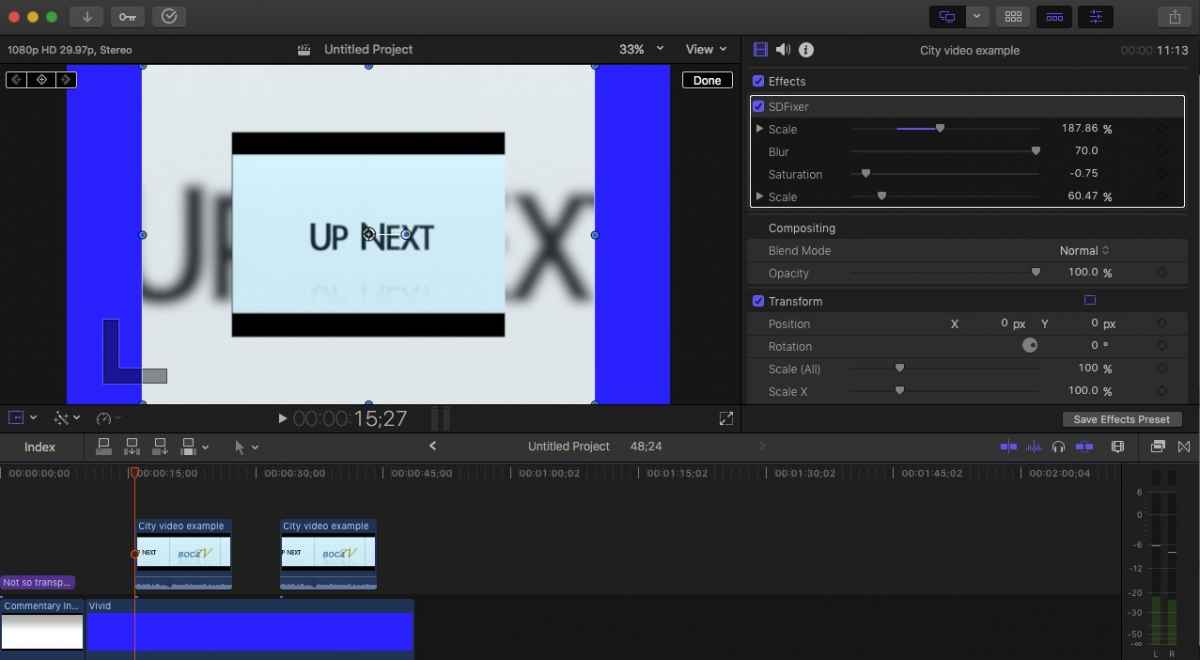
I see from your SDFixer effect that you have two clones of the Effect Source versus my one. I reimplemented my effect with that technique and my reimplementation and your SDFixer both have the same original problem:
In FCP, if the source SD footage is not expanded to fill the frame left to right, everything done in Motion is pillar boxed/cropped no matter the scaling of any layer in Motion. It must be scaled in FCP to fill the frame..
Please Log in to join the conversation.
- Karsten Schlüter
-
- Offline
- Moderator
-
Less
More
- Posts: 3790
- Thank you received: 718
19 Oct 2017 04:29 #91192
by Karsten Schlüter
hmm, not exactly - you have to 'tell' FCPX, "handle this SD-clip as a HD-clip" …
have a look:

inserted a 4:3/PAL/letterboxed clip to a 16:9 timeline …
then, opt-G, I compound this single clip (!) => this puts the clip into a new 'wrapper' << this is probably technically not exactly what happens, but it works
Now, drag version 2 of the SDfixer onto it:

=> background filled without borders; to make the letterbox disappear check the Crop-checkbox … (open in Motion how this is rigged)
that dirty workaround 'compounding a single clip' is used by many plugins, even commercial ones (coremelt, if I'm correct)…
(for a full-flavoured plugin, OSC, drop-shadow etc still missing … me lazy :whistle: )
Replied by Karsten Schlüter on topic NEWBIE: Background layer misbehaving using Clone Layer for PIP effect.
LesWilson wrote: …It must be scaled in FCP to fill the frame. …
hmm, not exactly - you have to 'tell' FCPX, "handle this SD-clip as a HD-clip" …
have a look:
inserted a 4:3/PAL/letterboxed clip to a 16:9 timeline …
then, opt-G, I compound this single clip (!) => this puts the clip into a new 'wrapper' << this is probably technically not exactly what happens, but it works
Now, drag version 2 of the SDfixer onto it:
=> background filled without borders; to make the letterbox disappear check the Crop-checkbox … (open in Motion how this is rigged)
that dirty workaround 'compounding a single clip' is used by many plugins, even commercial ones (coremelt, if I'm correct)…
(for a full-flavoured plugin, OSC, drop-shadow etc still missing … me lazy :whistle: )
Please Log in to join the conversation.
19 Oct 2017 22:00 - 19 Oct 2017 22:00 #91210
by LesWilson
Replied by LesWilson on topic NEWBIE: Background layer misbehaving using Clone Layer for PIP effect.
Thanks Karsten. That does fix it at the annoyance of mixing compound clips with normal clips. Adding a transition before and after the SD clip causes all the clips to be put into a container (which I'm not up on enough to know the FCP X term for or know how to leverage them so they are just annoying). Thanks for the help.
Last edit: 19 Oct 2017 22:00 by LesWilson.
Please Log in to join the conversation.
