


- Posts: 6
- Thank you received: 0
3 Post Moderation Rule for New Boarders (25 Jan 2021)
New boarders will have their posts moderated - Don't worry if you cannot see your post immediately.
How to create new Text Behaviors?
- Abercrombie
-
 Topic Author
- Offline
- New Member
-

Less
More
08 Sep 2017 10:02 #90372
by Abercrombie
How to create new Text Behaviors? was created by Abercrombie
Hey guys!
In my opinion, Motion 5 is lacking the essentials » 12 basic principles of animation « in its text sequence behaviours. I tried to mimic them by adding oscillator behaviors, but that's a lot of work repeated every day.
So I asked myself, is there any chance to modify the existing behaviors or create new ones. I found them at
Some of them are .motn and can be edited other are .molo which are XML (!DOCTYPE ozxmlscene).
I tried to finde some documentation about the .molo but did not find anything. I guess it will be possible to gather some information from the given files, but maybe Apple has some documentation I did not find. Did you try to do something similar?
There are a lot of good plugins for AE for this, but I don't want to use AE
Kind regards
Abercrombie
In my opinion, Motion 5 is lacking the essentials » 12 basic principles of animation « in its text sequence behaviours. I tried to mimic them by adding oscillator behaviors, but that's a lot of work repeated every day.
So I asked myself, is there any chance to modify the existing behaviors or create new ones. I found them at
Code:
/Applications/Motion.app/Contents/LibraryContent/Behaviors.localized/
I tried to finde some documentation about the .molo but did not find anything. I guess it will be possible to gather some information from the given files, but maybe Apple has some documentation I did not find. Did you try to do something similar?
There are a lot of good plugins for AE for this, but I don't want to use AE
Kind regards
Abercrombie
Please Log in to join the conversation.
- Karsten Schlüter
-

- Offline
- Moderator
-

Less
More
- Posts: 3790
- Thank you received: 718
10 Sep 2017 09:54 #90427
by Karsten Schlüter
I can not answer your questions… Motion seems to be some sort of 'secret roadwork'… only Apple-source I'm aware of is
developer.apple.com/library/content/docu...PlugSDKOverview.html
… which is way above my head (me no engineer, just a mouse-pusher ) And the way, Cupertino handles Motion, my assumption is, it's a 'hobby' …
A 'workaround' is a lil' known feature of Motion, to illustrate:
I created a new group, a circle, applied a Move-To, and some keyframed 'squeeze'n move' animation…
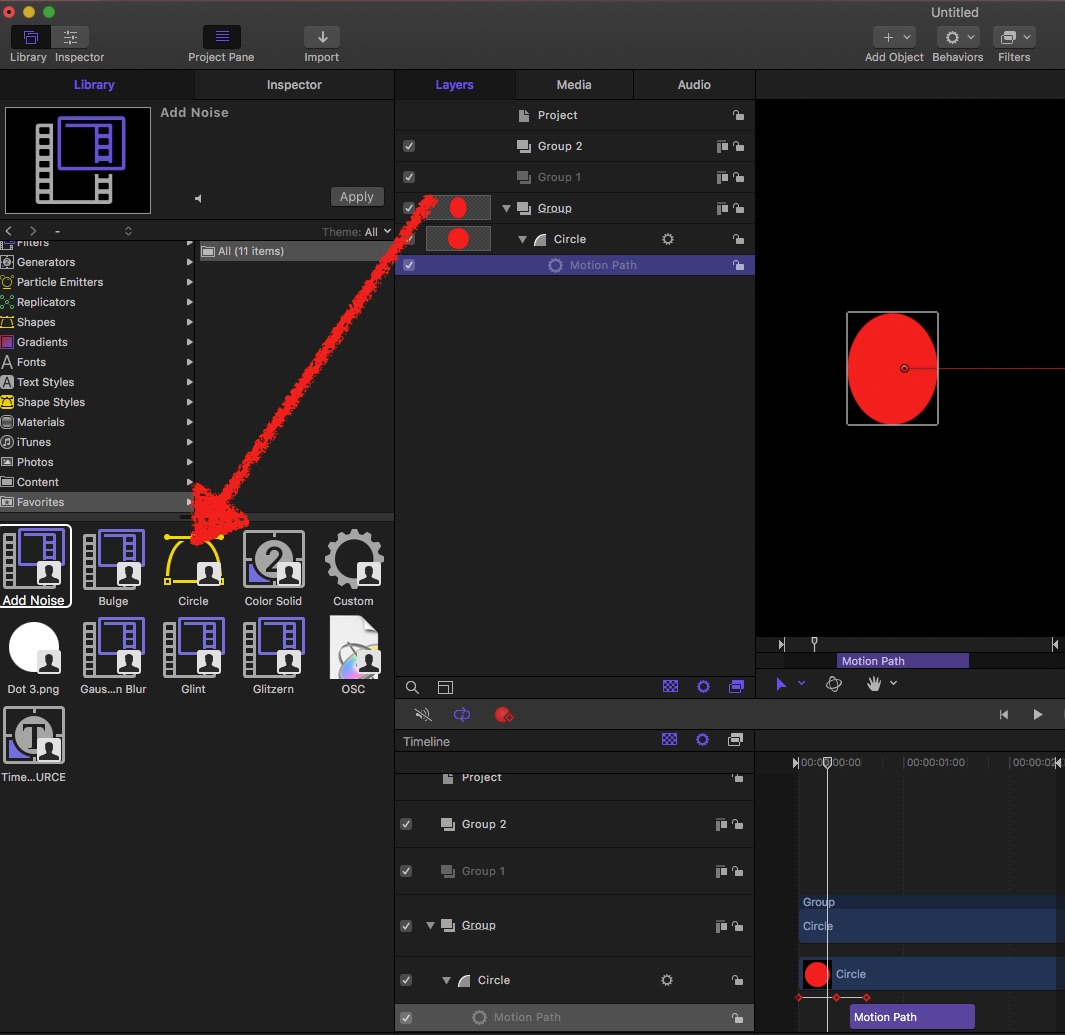
You can drag the whole group into the Favourites Folder in the Lib.
It's listed there as a 'shape'… what is not the whole truth:
That 'circle' is the whole animation.
Drag it into any new project - and it is my complete animation.
Real-life example:
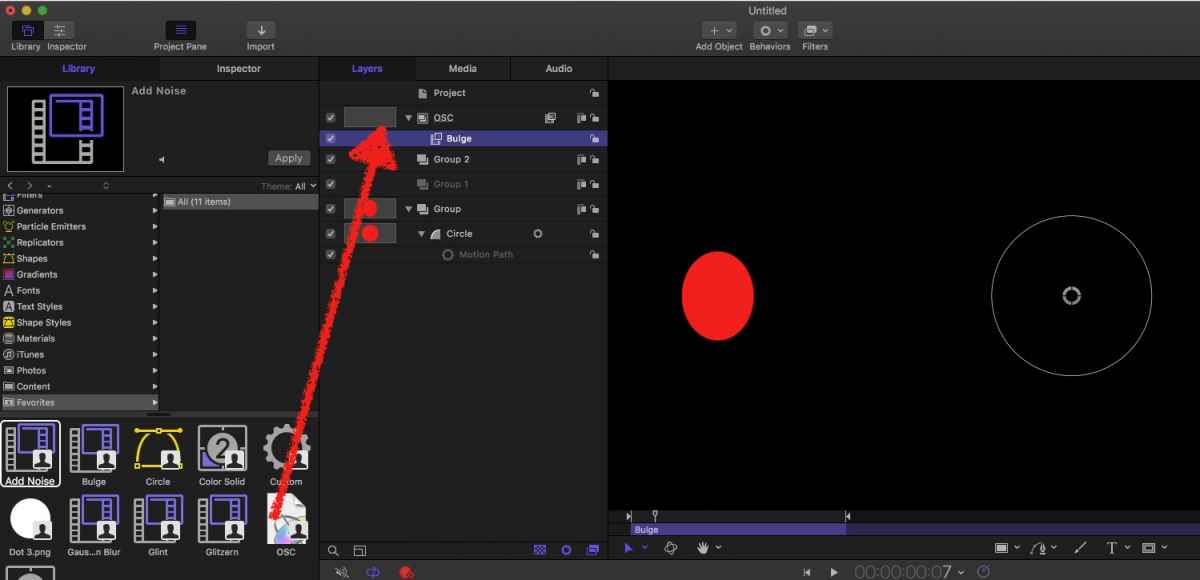
Because I frequently need OSCs, based upon an 'abused' Bulge-filter, I made me a group, and dragged that into my Favourites…
Not exactly, perhaps not even close to a 'Behaviour' - but … handy
Replied by Karsten Schlüter on topic How to create new Text Behaviors?
Abercrombie wrote: …
So I asked myself, is there any chance to modify the existing behaviors or create new ones.
…
I tried to finde some documentation about the .molo but did not find anything. … maybe Apple has some documentation I did not find. Did you try to do something similar?…
I can not answer your questions… Motion seems to be some sort of 'secret roadwork'… only Apple-source I'm aware of is
developer.apple.com/library/content/docu...PlugSDKOverview.html
… which is way above my head (me no engineer, just a mouse-pusher
) And the way, Cupertino handles Motion, my assumption is, it's a 'hobby' …A 'workaround' is a lil' known feature of Motion, to illustrate:
I created a new group, a circle, applied a Move-To, and some keyframed 'squeeze'n move' animation…
You can drag the whole group into the Favourites Folder in the Lib.
It's listed there as a 'shape'… what is not the whole truth:
That 'circle' is the whole animation.
Drag it into any new project - and it is my complete animation.
Real-life example:
Because I frequently need OSCs, based upon an 'abused' Bulge-filter, I made me a group, and dragged that into my Favourites…
Not exactly, perhaps not even close to a 'Behaviour' - but … handy
Please Log in to join the conversation.
- Abercrombie
-
Topic Author
- Offline
- New Member
-
Less
More
- Posts: 6
- Thank you received: 0
10 Sep 2017 11:04 #90429
by Abercrombie
Replied by Abercrombie on topic How to create new Text Behaviors?
Hey Karsten!
Thank you for that tip, I guess it will speed up a few of me frequent tasks
Maybe I'll have a look into the .molo in the coming days. If anybody want's to help: feel free to contact me
Kind regards
Abercrombie
Thank you for that tip, I guess it will speed up a few of me frequent tasks
Maybe I'll have a look into the .molo in the coming days. If anybody want's to help: feel free to contact me
Kind regards
Abercrombie
Please Log in to join the conversation.
- Karsten Schlüter
-
- Offline
- Moderator
-
Less
More
- Posts: 3790
- Thank you received: 718
10 Sep 2017 11:13 #90431
by Karsten Schlüter
… just to mention:
when you animate the Group/Layer, and not that circle in my example, those .molos act like a 'drop zone', you can create 'generic animations' (sort-of Behaviour… sort-of!) , ready to use (hint: use smart descriptions)
Just drag it from the Favourites into any Project, apply content/shapes/stills/movs - done.
… for sure, the RippleTwins offer advice on this topic
looking forward to your findings!
Replied by Karsten Schlüter on topic How to create new Text Behaviors?
Abercrombie wrote: …Thank you for that tip, I guess it will speed up a few of me frequent tasks …
… just to mention:
when you animate the Group/Layer, and not that circle in my example, those .molos act like a 'drop zone', you can create 'generic animations' (sort-of Behaviour… sort-of!) , ready to use (hint: use smart descriptions)
Just drag it from the Favourites into any Project, apply content/shapes/stills/movs - done.
… for sure, the RippleTwins offer advice on this topic
looking forward to your findings!
Please Log in to join the conversation.
