


- Posts: 213
- Thank you received: 19
3 Post Moderation Rule for New Boarders (25 Jan 2021)
New boarders will have their posts moderated - Don't worry if you cannot see your post immediately.
Align To, Link and Mask
20 Jul 2017 19:38 #89526
by bobmax48
Align To, Link and Mask was created by bobmax48
In my testing a mask can be Align TO and Linked to text so the the mask grows as more text is added. What I would like to do is also move the mask so that it reveals or hides the text. So far I haven't been able to do move the mask independently of the text or a rectangle behind the text. I assume that there is no way using Align To and Link to also move the mask as I would like to.
Please Log in to join the conversation.
- undeFallen
-

- Offline
- New Member
-

Less
More
- Posts: 1
- Thank you received: 0
21 Jul 2017 02:17 #89527
by undeFallen
Replied by undeFallen on topic Align To, Link and Mask
seems you need to build a link library
Please Log in to join the conversation.
- Karsten Schlüter
-

- Offline
- Moderator
-

Less
More
- Posts: 3790
- Thank you received: 718
21 Jul 2017 03:46 - 21 Jul 2017 03:59 #89528
by Karsten Schlüter
Replied by Karsten Schlüter on topic Align To, Link and Mask
Not sure, what you try to accomplish:
for sure, you can resize the Mask according to the Titles size: Link the masks Width with the titles Width.
And for sure, you can move the mask (e.g. to unveil the text) by ramping its X-position. (or ramping its width by adjusting the Scale in the Link behaviour.
What NOT works is, to add a AlignTo AND 'override' that alignment (e.g. by using a Custom behaviour) … aligned to left border means aligned to left border....
So, post some screenshots, what's your plan ....
oh, and one more thing: don't forget, Masks do have Anchor Points too!
setting the AP on the far right of the mask and changing its Width makes it grow just to the left …
for sure, you can resize the Mask according to the Titles size: Link the masks Width with the titles Width.
And for sure, you can move the mask (e.g. to unveil the text) by ramping its X-position. (or ramping its width by adjusting the Scale in the Link behaviour.
What NOT works is, to add a AlignTo AND 'override' that alignment (e.g. by using a Custom behaviour) … aligned to left border means aligned to left border....
So, post some screenshots, what's your plan ....
oh, and one more thing: don't forget, Masks do have Anchor Points too!
setting the AP on the far right of the mask and changing its Width makes it grow just to the left …
Last edit: 21 Jul 2017 03:59 by Karsten Schlüter.
Please Log in to join the conversation.
24 Jul 2017 13:34 #89548
by bobmax48
Replied by bobmax48 on topic Align To, Link and Mask
Attached is the title that I am working with from inspiration from Simon Ubsell, the Ripple guys and you. I am now using a guide so I know where to have line breaks in the text. But instead I want to have the mask to grow with the length of the text. I haven't had much time to work on this but will try to figure it out this week sometime between taping sessions.
Please Log in to join the conversation.
- Karsten Schlüter
-
- Offline
- Moderator
-
Less
More
- Posts: 3790
- Thank you received: 718
25 Jul 2017 04:46 #89552
by Karsten Schlüter
Replied by Karsten Schlüter on topic Align To, Link and Mask
sorry, Bob,, dl your Project - still don't get it:
why Align-To, why 'adopting' the width of the text?
Look:
this is your preset:

Mask has the same width of the text area.
but…
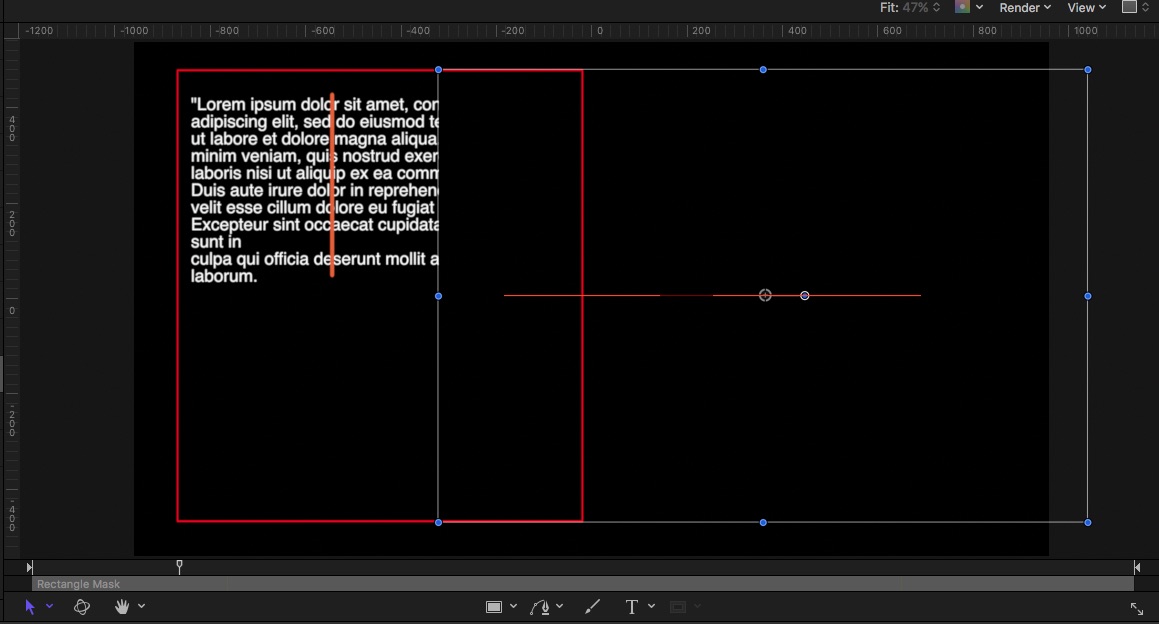
… when you use a Mask size of the full-screen, it uncovers the same! The left border of the Mask - that is where the action starts, independently of size of Mask.
And when the text gets wider/longer, the uncovering starts on the left anyhow …
I don't see the need of AlignTo and adopting Width… :huh: ?
why Align-To, why 'adopting' the width of the text?
Look:
this is your preset:
Mask has the same width of the text area.
but…
… when you use a Mask size of the full-screen, it uncovers the same! The left border of the Mask - that is where the action starts
, independently of size of Mask.And when the text gets wider/longer, the uncovering starts on the left anyhow …
I don't see the need of AlignTo and adopting Width… :huh: ?
Please Log in to join the conversation.
25 Jul 2017 14:00 #89557
by bobmax48
Replied by bobmax48 on topic Align To, Link and Mask
Yes you are right about the mask. That title is not a good representation of what I was wanting to do. Probably if I wanted more text to show I could rig the mask to move more to the right on X. Thank you for your help,
Please Log in to join the conversation.
- Karsten Schlüter
-
- Offline
- Moderator
-
Less
More
- Posts: 3790
- Thank you received: 718
25 Jul 2017 14:18 #89558
by Karsten Schlüter
sorry for being stubborn, but …
hmm? when the Mask covers the full screen, and moves completely to the right - the Width of the text doesn't matter :S
A smaller text gets as uncovered as an all-across-the-screen one .....
Still don't see a need of a 'flexible' mask (for your task, and as I understand it) - a mask covers only content of that Layer it is applied to.
No?
(just tryin' to help…)
Replied by Karsten Schlüter on topic Align To, Link and Mask
bobmax48 wrote: …if I wanted more text to show I could rig the mask to move more to the right on X. ,
sorry for being stubborn, but …
hmm? when the Mask covers the full screen, and moves completely to the right - the Width of the text doesn't matter :S
A smaller text gets as uncovered as an all-across-the-screen one .....
Still don't see a need of a 'flexible' mask (for your task, and as I understand it) - a mask covers only content of that Layer it is applied to.
No?
(just tryin' to help…)
Please Log in to join the conversation.
18 Aug 2017 15:59 - 18 Aug 2017 16:03 #89973
by bobmax48
Replied by bobmax48 on topic Align To, Link and Mask
Sorry I haven't been back to this posting. I had to finish 26 videos.
Now I am back to this process and have dropped the idea of a variable size mask. When I was using this title on the latest projects I had to manually move the line down according to how many lines of text there was as a Title. Then I would use the Last Point Offset to change the length of the line. With the new version of this title I have made a Pop Up rig to select where the top of the line is positioned according to how many lines there are to the title. The problem I have run into is that only one of the Last Point Offset will work on the Pop Up. It does not work on the other Pop Up selections. I tried linking the Last Point Offset but there was not any Compatible Parameters that would work . So I am at that point of knowing what to do to make the Last Point Offset work with each section in the rig.

Sorry for the double posting.
Now I am back to this process and have dropped the idea of a variable size mask. When I was using this title on the latest projects I had to manually move the line down according to how many lines of text there was as a Title. Then I would use the Last Point Offset to change the length of the line. With the new version of this title I have made a Pop Up rig to select where the top of the line is positioned according to how many lines there are to the title. The problem I have run into is that only one of the Last Point Offset will work on the Pop Up. It does not work on the other Pop Up selections. I tried linking the Last Point Offset but there was not any Compatible Parameters that would work . So I am at that point of knowing what to do to make the Last Point Offset work with each section in the rig.
Sorry for the double posting.
Last edit: 18 Aug 2017 16:03 by bobmax48.
Please Log in to join the conversation.
18 Aug 2017 15:59 #89974
by bobmax48
Replied by bobmax48 on topic Align To, Link and Mask
Sorry I haven't been back to this posting. I had to finish 26 videos.
Now I am back to this process and have dropped the idea of a variable size mask. When I was using this title on the latest projects I had to manually move the line down according to how many lines of text there was as a Title. Then I would use the Last Point Offset to change the length of the line. With the new version of this title I have made a Pop Up rig to select where the top of the line is positioned according to how many lines there are to the title. The problem I have run into is that only one of the Last Point Offset will work on the Pop Up. It does not work on the other Pop Up selections. I tried linking the Last Point Offset but there was not any Compatible Parameters that would work . So I am at that point of knowing what to do to make the Last Point Offset work with each section in the rig.
Now I am back to this process and have dropped the idea of a variable size mask. When I was using this title on the latest projects I had to manually move the line down according to how many lines of text there was as a Title. Then I would use the Last Point Offset to change the length of the line. With the new version of this title I have made a Pop Up rig to select where the top of the line is positioned according to how many lines there are to the title. The problem I have run into is that only one of the Last Point Offset will work on the Pop Up. It does not work on the other Pop Up selections. I tried linking the Last Point Offset but there was not any Compatible Parameters that would work . So I am at that point of knowing what to do to make the Last Point Offset work with each section in the rig.
Please Log in to join the conversation.
18 Aug 2017 20:06 #89982
by bobmax48
Replied by bobmax48 on topic Align To, Link and Mask
I solved the problem.
Please Log in to join the conversation.
- Karsten Schlüter
-
- Offline
- Moderator
-
Less
More
- Posts: 3790
- Thank you received: 718
19 Aug 2017 07:52 #89994
by Karsten Schlüter
in terms of community, would be nice if you share how …
And, I don't get your original post together with your last pic … :blink:
Do you want to reveal the text block, line by line? And the triangle 'hops' karaoke like? And the orange line corresponds to the lines of text? …
Replied by Karsten Schlüter on topic Align To, Link and Mask
bobmax48 wrote: I solved the problem.
in terms of community, would be nice if you share how …
And, I don't get your original post together with your last pic … :blink:
Do you want to reveal the text block, line by line? And the triangle 'hops' karaoke like? And the orange line corresponds to the lines of text? …
Please Log in to join the conversation.
21 Aug 2017 13:41 #90033
by bobmax48
Replied by bobmax48 on topic Align To, Link and Mask
I gave up trying to make a mask grow or shrink according to how much text is used. Instead I decided to make the vertical line line up to the 1st line of text after the title of the subject. Using opacity and a pop up widget I was able to have the top of the line even with 1 to 4 lines of text. When I started using the original title I created on a bunch of videos I spent a lot of time adjusting the top of the line. So now in the second version of the title I will only have to adjust the bottom of the line using the last offset. Here is a copy of the title for anyone to download and modify.
Please Log in to join the conversation.
