


- Posts: 228
- Thank you received: 16
3 Post Moderation Rule for New Boarders (25 Jan 2021)
New boarders will have their posts moderated - Don't worry if you cannot see your post immediately.
Move an object / fade in
12 Jun 2017 09:39 #88756
by Schnurr
Move an object / fade in was created by Schnurr
Hi,
I would like to move in a group from the right and adjust the final position. I tried to use the "von rechts rein" method guess called something like "fade in from right" but unfortunately the Position 1 X can't be published or linked to an OSC.
Any idea how to accomplish that ? Of course I could keyframe and publish a parameter X but would like to do it with an OSC. Linking an OSC to a keyframe point doesn't work as the last point is set to both (start/end) point.

I would like to move in a group from the right and adjust the final position. I tried to use the "von rechts rein" method guess called something like "fade in from right" but unfortunately the Position 1 X can't be published or linked to an OSC.
Any idea how to accomplish that ? Of course I could keyframe and publish a parameter X but would like to do it with an OSC. Linking an OSC to a keyframe point doesn't work as the last point is set to both (start/end) point.
Please Log in to join the conversation.
- Karsten Schlüter
-

- Offline
- Moderator
-

Less
More
- Posts: 3790
- Thank you received: 718
13 Jun 2017 05:43 #88766
by Karsten Schlüter
hmm, no such Behaviour here …
How I would accomplish that:
Step #1
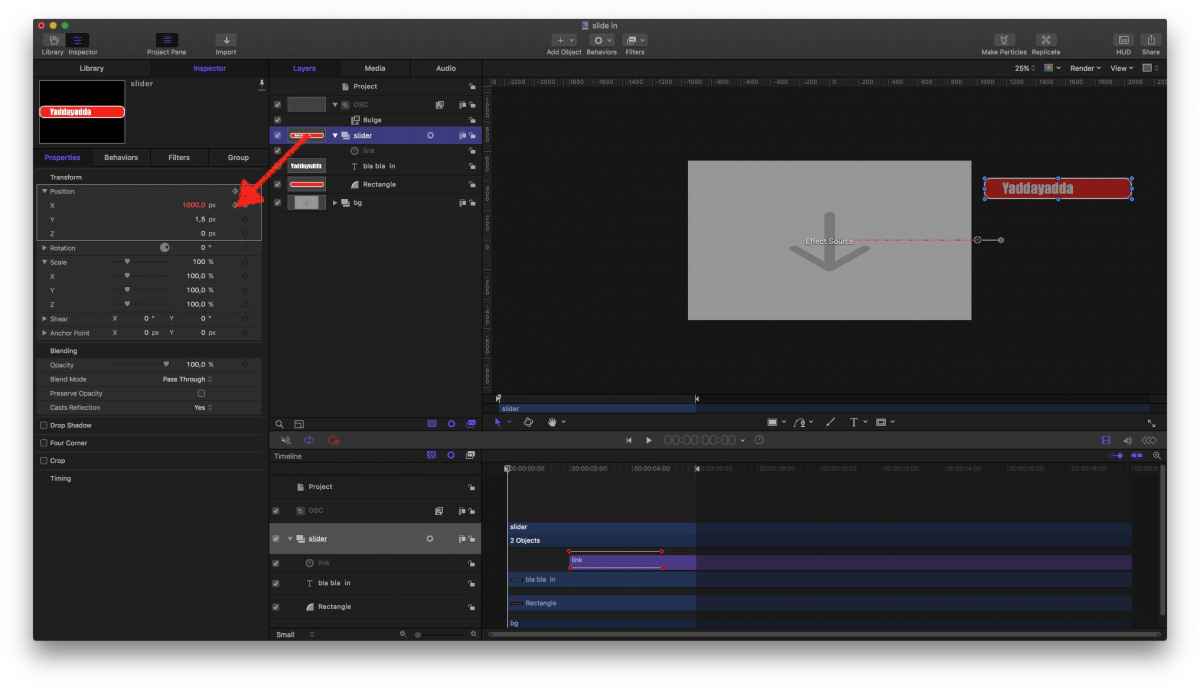
My Project (should be a 'Title', no 'Effect', hit wrong button …anyhow )
as you can see, the Group meant to slide-in is positioned way out the canvas
Step #2

I link the x-Position of this group to my OSC …
set 'Replace with source' (mit Quelle ersetzen)
Aaaand:
I keyframe the Custom Mix, from 0-100%
Step #3
… no step 3. Dependently where I put the OSC, the graphic/title slide from its native, off-screen position to its newly adviced X ....

… klarsoweit?
Replied by Karsten Schlüter on topic Move an object / fade in
Schnurr wrote: … tried to use the "von rechts rein" method guess called something like "fade in from right" …
hmm, no such Behaviour here …
How I would accomplish that:
Step #1
My Project (should be a 'Title', no 'Effect', hit wrong button …anyhow )
as you can see, the Group meant to slide-in is positioned way out the canvas
Step #2
I link the x-Position of this group to my OSC …
set 'Replace with source' (mit Quelle ersetzen)
Aaaand:
I keyframe the Custom Mix, from 0-100%
Step #3
… no step 3. Dependently where I put the OSC, the graphic/title slide from its native, off-screen position to its newly adviced X ....
… klarsoweit?
Please Log in to join the conversation.
13 Jun 2017 07:45 #88769
by Schnurr
Replied by Schnurr on topic Move an object / fade in
Klar  ) Great.
keyframe custom mix was/is the trick. TX but okay trying you to challenge you a bit more...
Request is that user wants to decide whether
a) the element should then fade out as well to the right or
b) stay at the position where it faded in and then just to loose opacity to 0%
I realised that with three links

1st. Your great advice with custom mix 0-1
2nd. Leave custom mix at 1 in order to display the object
3rd. Link to a Rig in order to allow the user selection either custom mix 1-0 or leave custom mix at 1 and reduce opacity.
Hope its clear
would you solve it in the same way? by the way sometime your screenshots are difficult to see due to high compressions.
) Great.keyframe custom mix was/is the trick. TX but okay trying you to challenge you a bit more...
Request is that user wants to decide whether
a) the element should then fade out as well to the right or
b) stay at the position where it faded in and then just to loose opacity to 0%
I realised that with three links
1st. Your great advice with custom mix 0-1
2nd. Leave custom mix at 1 in order to display the object
3rd. Link to a Rig in order to allow the user selection either custom mix 1-0 or leave custom mix at 1 and reduce opacity.
Hope its clear
would you solve it in the same way? by the way sometime your screenshots are difficult to see due to high compressions.
Please Log in to join the conversation.
- Karsten Schlüter
-
- Offline
- Moderator
-
Less
More
- Posts: 3790
- Thank you received: 718
13 Jun 2017 08:12 #88770
by Karsten Schlüter
Replied by Karsten Schlüter on topic Move an object / fade in
just as a quick answer :
why not creating three groups, all simultaneously, each with diff. animations, and rig the opacity of each group?
why not creating three groups, all simultaneously, each with diff. animations, and rig the opacity of each group?
Please Log in to join the conversation.
13 Jun 2017 08:27 #88771
by Schnurr
Replied by Schnurr on topic Move an object / fade in
okay but thats even more lines of code )
will leave with the three linkages as this works.
Thanks again Karsten
)will leave with the three linkages as this works.
Thanks again Karsten
Please Log in to join the conversation.
- Karsten Schlüter
-
- Offline
- Moderator
-
Less
More
- Posts: 3790
- Thank you received: 718
13 Jun 2017 12:30 - 13 Jun 2017 17:40 #88773
by Karsten Schlüter
challenge accepted…
Time for all mighty CUSTOM behaviour (Behaviour/Parameter/Custom aka Eigene)
Have a look:

For the second part of that animation, I applied two instances of the Custom Behaviour. Keep in mind: Custom 'adds' to any parameter…
So, I have one Custom X, which will add 1000pixels = Graphic off the canvas. And to make it move, that 1000p has its own Behaviour, a Ramp = makes that number 'grow'
And a second Custom Opacity, which adds -100 to the opacity, again controlled by a Ramp = makes the graphic fade-out
Both Rates are controlled in a Rig, since you want to select 'go back', or 'fade-out'. Or stand still…

to see it in action, I have attached a .zip of this Motion Project.
NOTE! This is NO working. plugin!
I wrongly choose Effect! Should be a Title…
The OSC is still functional…
And the Rig is not published… nor the text… just meant for illustration and exploration in Motion...........
Replied by Karsten Schlüter on topic Move an object / fade in
Schnurr wrote: okay but thats even more lines of code
challenge accepted…
Time for all mighty CUSTOM behaviour (Behaviour/Parameter/Custom aka Eigene)
Have a look:
For the second part of that animation, I applied two instances of the Custom Behaviour. Keep in mind: Custom 'adds' to any parameter…
So, I have one Custom X, which will add 1000pixels = Graphic off the canvas. And to make it move, that 1000p has its own Behaviour, a Ramp = makes that number 'grow'
And a second Custom Opacity, which adds -100 to the opacity, again controlled by a Ramp = makes the graphic fade-out
Both Rates are controlled in a Rig, since you want to select 'go back', or 'fade-out'. Or stand still…
to see it in action, I have attached a .zip of this Motion Project.
NOTE! This is NO working. plugin!
I wrongly choose Effect! Should be a Title…
The OSC is still functional…
And the Rig is not published… nor the text… just meant for illustration and exploration in Motion...........
Last edit: 13 Jun 2017 17:40 by Karsten Schlüter. Reason: adapt text to what's shown in the pics…
Please Log in to join the conversation.
14 Jun 2017 09:15 #88786
by Schnurr
Replied by Schnurr on topic Move an object / fade in
thanks but failed by copying your elements to mine because the opacity under "custom oppacity" didn't show up and couldn't link it as such will use my method with the three links.
by the way do you have sometimes as well the issue that you can't figure out which element was published ? And can't even delete it either.
Clicking with right mouse on "Stil" there is no way to show the original parameter nor a way to "reverse publication" of "Stil"
see below screenshot

any idea ?
by the way do you have sometimes as well the issue that you can't figure out which element was published ? And can't even delete it either.
Clicking with right mouse on "Stil" there is no way to show the original parameter nor a way to "reverse publication" of "Stil"
see below screenshot
any idea ?
Please Log in to join the conversation.
14 Jun 2017 09:15 #88787
by Schnurr
Replied by Schnurr on topic Move an object / fade in
thanks but failed by copying your elements to mine because the opacity under "custom oppacity" didn't show up and couldn't link it as such will use my method with the three links.
by the way do you have sometimes as well the issue that you can't figure out which element was published ? And can't even delete it either.
Clicking with right mouse on "Stil" there is no way to show the original parameter nor a way to "reverse publication" of "Stil"
see below screenshot

any idea ?
by the way do you have sometimes as well the issue that you can't figure out which element was published ? And can't even delete it either.
Clicking with right mouse on "Stil" there is no way to show the original parameter nor a way to "reverse publication" of "Stil"
see below screenshot
any idea ?
Please Log in to join the conversation.
- Karsten Schlüter
-
- Offline
- Moderator
-
Less
More
- Posts: 3790
- Thank you received: 718
14 Jun 2017 10:14 #88788
by Karsten Schlüter
Replied by Karsten Schlüter on topic Move an object / fade in
Custom Opacity… in German is:
You apply a Custom Behaviour to the graphics Group.

then >> HinzufügenEigenschaften/Füllmethode/Deckkraft…
That is an easy one:
For me unknown reasons, the 'SubCategories' offer a 'publishing' - but that publishes only the 'headline', not the parameters:

So, for example 'Stil' is for texts = check any 'Stil' for any text; then right-click an select 'unpublish' …
…room for improvement…
You apply a Custom Behaviour to the graphics Group.
then >> HinzufügenEigenschaften/Füllmethode/Deckkraft…
Schnurr wrote: … by the way do you have sometimes as well the issue that you can't figure out which element was published ? And can't even delete it either.
Clicking with right mouse on "Stil" there is no way to show the original parameter nor a way to "reverse publication" of "Stil"…
That is an easy one:
For me unknown reasons, the 'SubCategories' offer a 'publishing' - but that publishes only the 'headline', not the parameters:
So, for example 'Stil' is for texts = check any 'Stil' for any text; then right-click an select 'unpublish' …
…room for improvement…
Please Log in to join the conversation.
