


- Posts: 213
- Thank you received: 19
3 Post Moderation Rule for New Boarders (25 Jan 2021)
New boarders will have their posts moderated - Don't worry if you cannot see your post immediately.
OSCs for destination
21 Apr 2017 13:09 #87405
by bobmax48
OSCs for destination was created by bobmax48
I have AddMotion and all of the Ripple Training titles and most times they do what I want. This time though I want to have a paragraph fly in and off screen. If I were able to modify either of the purchased titles then I could get what I want for this project, but I can not modify those titles and effects.
So what I am looking for is how do I make an OSC that will allow me to have the paragraph move on and off screen. I only want to go either horizontal or vertical. AddMotion seems to have two OSCs with a line connecting them together. What research I have been able to find is that this can only be done with some programming and I am programming ignorant. So is there anyway to create this title/effect using just Motion and no keyframming?
So what I am looking for is how do I make an OSC that will allow me to have the paragraph move on and off screen. I only want to go either horizontal or vertical. AddMotion seems to have two OSCs with a line connecting them together. What research I have been able to find is that this can only be done with some programming and I am programming ignorant. So is there anyway to create this title/effect using just Motion and no keyframming?
Please Log in to join the conversation.
- Karsten Schlüter
-

- Offline
- Moderator
-

Less
More
- Posts: 3790
- Thank you received: 718
22 Apr 2017 06:17 #87438
by Karsten Schlüter
No, wrong info: you can utilise many other OSCs without any programming (I can't program either), for example in my TCV tool , I use a 'box' to position and size an effect ....
Motion-Master Mahoney explains in his 3part series about the 'Mysteries of OSCs'
www.fcp.co/final-cut-pro/tutorials/1842-...eries-of-oscs-part-3
For your task, the DIRECTIONAL BLUR offers a two-dots-connected interface:

x/y of both dots are available …
Replied by Karsten Schlüter on topic OSCs for destination
bobmax48 wrote: … AddMotion seems to have two OSCs with a line connecting them together. What research I have been able to find is that this can only be done with some programming … So is there anyway to create this title/effect using just Motion and no keyframming?
No, wrong info: you can utilise many other OSCs without any programming (I can't program either), for example in my TCV tool , I use a 'box' to position and size an effect ....
Motion-Master Mahoney explains in his 3part series about the 'Mysteries of OSCs'
www.fcp.co/final-cut-pro/tutorials/1842-...eries-of-oscs-part-3
For your task, the DIRECTIONAL BLUR offers a two-dots-connected interface:
x/y of both dots are available …
Please Log in to join the conversation.
22 Apr 2017 18:09 #87445
by bobmax48
Replied by bobmax48 on topic OSCs for destination
Thank you for the suggestion of the Gradient Blur to use as an OSC. Problem is that I can not get it to link so that I can move the box using the OSC. Back to the drawing board.
Please Log in to join the conversation.
- Karsten Schlüter
-
- Offline
- Moderator
-
Less
More
- Posts: 3790
- Thank you received: 718
23 Apr 2017 03:53 #87450
by Karsten Schlüter
easy like that:
attached a 'sketch' of your project ....
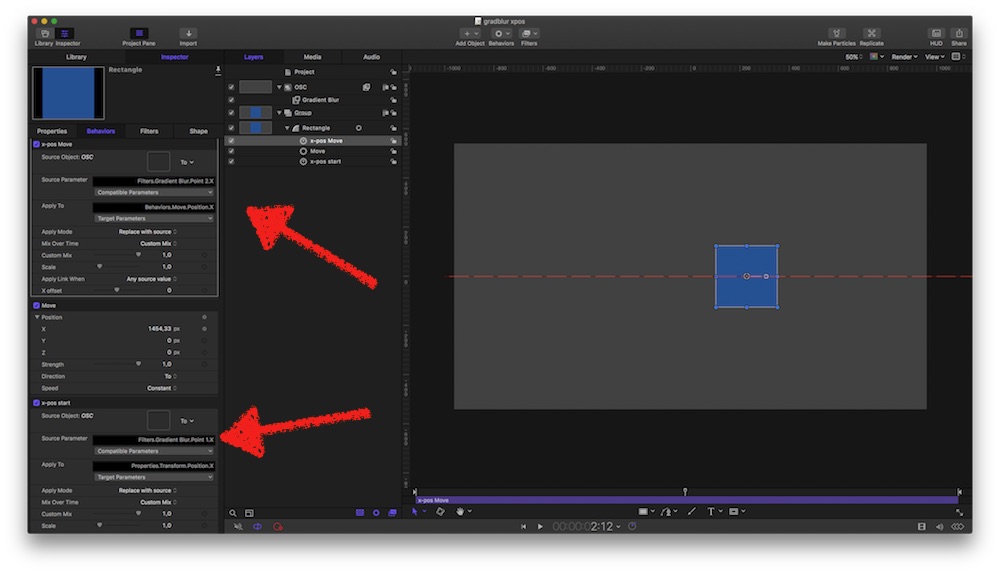
probably, usage of a Custom-behaviour would be better (?)
Replied by Karsten Schlüter on topic OSCs for destination
bobmax48 wrote: T… Gradient Blur to use as an OSC. … can not get it to link so that I can move the box using the OSC. Back to the drawing board.
easy like that:
attached a 'sketch' of your project ....
probably, usage of a Custom-behaviour would be better (?)
Please Log in to join the conversation.
26 Apr 2017 18:44 #87581
by bobmax48
Replied by bobmax48 on topic OSCs for destination
Sorry been a few days, I had to finish seven videos. I ended up using AddMotion on a title I made. The title is aligned and linked to a box so that the box grows according to the text entered. Adding AddMotion to the title and creating a compound clip gave me the same action that I wanted for the title. I would apply the title compound clip then break apart the clips. In my case I have the box coming down on the Y axis. That worked perfect. So I studied your xposgrad project and tried to apply similar Links, Behaviors and OSC to my title. I have not been successful in getting the box and text to move with the OSC. What I want to ask you in your project you have the Rectangle with two links and a behavior, are you creating links to the Move behavior X axis? I tried linking to the Y axis of the Move behavior but the Box still would only move along the X axis. How do you know after the fact what you parameter you linked to? I am always trying to create something I can imagine in my head but can not actually create. Once again for your help.
Please Log in to join the conversation.
- Karsten Schlüter
-
- Offline
- Moderator
-
Less
More
- Posts: 3790
- Thank you received: 718
26 Apr 2017 20:03 #87586
by Karsten Schlüter
Replied by Karsten Schlüter on topic OSCs for destination
I don't own AddMotion - so, no idea what it does …
And let's forget for a minute your titles design…
What you want is something like this?
Then, try attached Motion file… Tried to name everything properly.
There are three elements:
a link to Starting points X; a link to End points X; and a Ramp behaviour which controls the mix=movement form A to B
and…
same three elements for Y…
hope, you understand what I've built....
And let's forget for a minute your titles design…
What you want is something like this?
Then, try attached Motion file… Tried to name everything properly.
There are three elements:
a link to Starting points X; a link to End points X; and a Ramp behaviour which controls the mix=movement form A to B
and…
same three elements for Y…
hope, you understand what I've built....
Please Log in to join the conversation.
27 Apr 2017 20:09 #87626
by bobmax48
Replied by bobmax48 on topic OSCs for destination
Thank you for all of your help. Using your A to B project and adding the Ripple Training's idea of using the Align To behavior creates what I am wanted. A few other things that I would like to figure out but they are not showstoppers is how to lock the OSC so that they are only moving vertically or horizontally. In this version I turned off the X axis. With a rig I think I might be able to accomplish so I can lock to either direction. Here is a copy of the project if you would like to look at it.
Please Log in to join the conversation.
- Karsten Schlüter
-
- Offline
- Moderator
-
Less
More
- Posts: 3790
- Thank you received: 718
28 Apr 2017 07:13 - 28 Apr 2017 07:13 #87631
by Karsten Schlüter
Replied by Karsten Schlüter on topic OSCs for destination
Thank YOU for feedback and sharing your version...!
conc. 'no x' - apply CLAMP behaviours to the OSC/filters X/Y-points, and rig the min/max parameters.
Doing so, you could create a drop.down 'no X/no Y/free X/ free Y/ free X&Y' …
… meant as a suggestion …
conc. 'no x' - apply CLAMP behaviours to the OSC/filters X/Y-points, and rig the min/max parameters.
Doing so, you could create a drop.down 'no X/no Y/free X/ free Y/ free X&Y' …
… meant as a suggestion …
Last edit: 28 Apr 2017 07:13 by Karsten Schlüter.
Please Log in to join the conversation.
