


- Posts: 138
- Thank you received: 9
3 Post Moderation Rule for New Boarders (25 Jan 2021)
New boarders will have their posts moderated - Don't worry if you cannot see your post immediately.
Continue editing bezier with pen tool
28 Mar 2017 16:01 #86783
by Schwyhart
Continue editing bezier with pen tool was created by Schwyhart
How do I do this? Whenever I zoom into the footage to mask I have to use the hand tool to move the viewer around screen. Whenever I do so, the pen tool deactivates and when I try continuing the line it creates a new one. So, how do I continue a line?
Please Log in to join the conversation.


28 Mar 2017 17:05 #86787
by JoeEditor
Replied by JoeEditor on topic Continue editing bezier with pen tool
Only one tool can be active at a time. I zoom in/out and pan/tilt with an Apple Magic Trackpad 2. Love it because I can use gestures to do it all, just like on an iPad. Then I can leave my important work tools active.
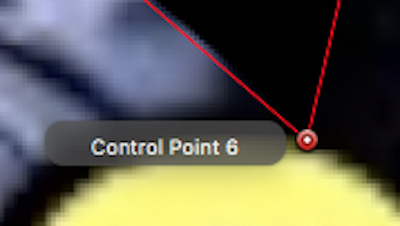
But to your point, using a mouse, when you switch from either the Zoom or Pan tool, to the Edit Points tool, be sure you see the tool-tip that shows you the control point name. If you don't see that, you're not over that exact point.
But I can't really duplicate what you're experiencing. If you're zooming in enough, it shouldn't be a problem.
But to your point, using a mouse, when you switch from either the Zoom or Pan tool, to the Edit Points tool, be sure you see the tool-tip that shows you the control point name. If you don't see that, you're not over that exact point.
But I can't really duplicate what you're experiencing. If you're zooming in enough, it shouldn't be a problem.
Please Log in to join the conversation.
28 Mar 2017 17:52 - 28 Mar 2017 17:53 #86789
by Schwyhart
Replied by Schwyhart on topic Continue editing bezier with pen tool
Say you started a bezier curve and for whatever reason you deactivated the pen tool. All you want to do is continue editing the bezier curve you were working on. As far as I can tell, the only option is to restart from the beginning.
Tell me I'm wrong.
EDIT: I understand that I can add points to a curve and move them around, but what if I didn't close the curve or I want to continue extended the curve with each click, not add points to what is currently there.
Tell me I'm wrong.
EDIT: I understand that I can add points to a curve and move them around, but what if I didn't close the curve or I want to continue extended the curve with each click, not add points to what is currently there.
Last edit: 28 Mar 2017 17:53 by Schwyhart.
Please Log in to join the conversation.
- Karsten Schlüter
-

- Offline
- Moderator
-

Less
More
- Posts: 3790
- Thank you received: 718
29 Mar 2017 00:20 #86797
by Karsten Schlüter
Replied by Karsten Schlüter on topic Continue editing bezier with pen tool
easy like that 
Step#1

you paint something, using the Bezier tool … and do something else, e.g. with the Hand tool
Step#2
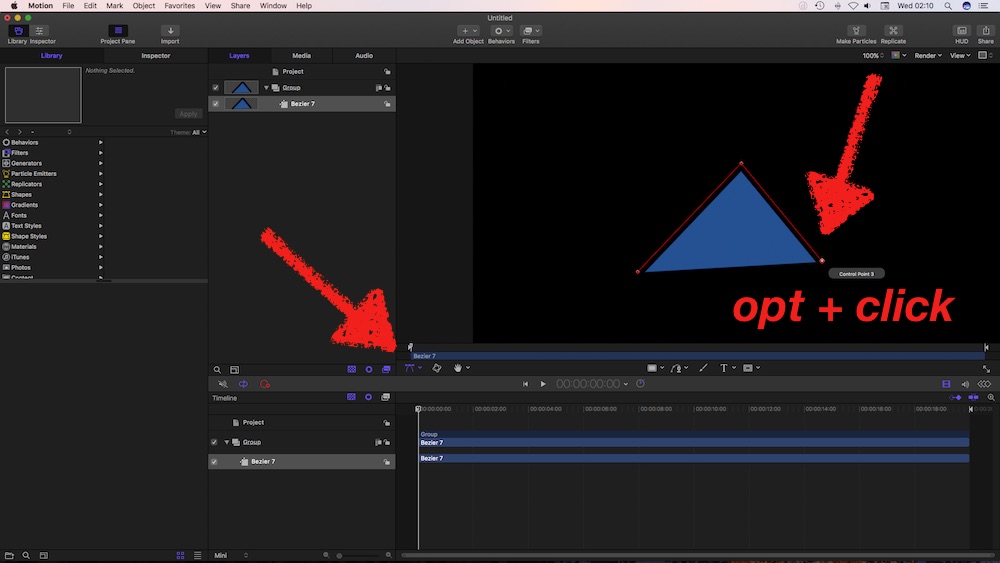
now, you like to carry on with your Bezier:
Select the 'Edit Points' tool (lower left) and bring your mouse in proximity to the last point = point gets some inner white (or wotever , my eyes are too old)
hold the Opt-key and click on that last point
continue bezier-ing
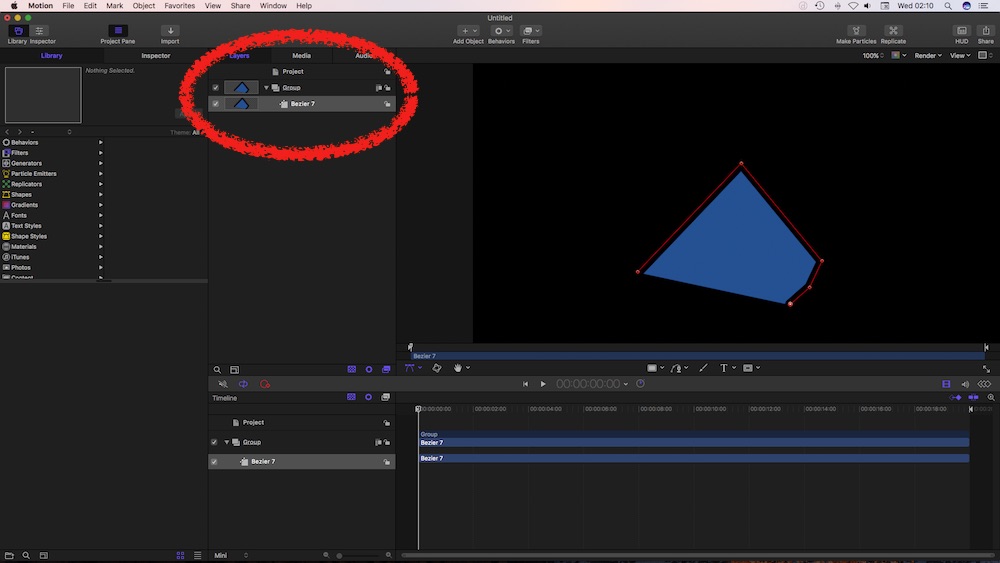
Step#1
you paint something, using the Bezier tool … and do something else, e.g. with the Hand tool
Step#2
now, you like to carry on with your Bezier:
Select the 'Edit Points' tool (lower left) and bring your mouse in proximity to the last point = point gets some inner white (or wotever , my eyes are too old)
hold the Opt-key and click on that last point
continue bezier-ing
Please Log in to join the conversation.
- Bernard Black
-

- Offline
- Junior Member
-

Less
More
- Posts: 34
- Thank you received: 5
06 Apr 2017 19:48 #87020
by Bernard Black
Replied by Bernard Black on topic Continue editing bezier with pen tool
When zoomed in, don't switch to the Hand tool. Press and hold spacebar to temporarily switch to the hand tool. It'll switch back to the last used tool when you let go.
To continue to add points after the last point you can hold the Option key and continue to click to add points.
If you already closed your shape, you can right click on the point and open it again.
More on working with advanced shapes in the Manual.
help.apple.com/motion/mac/5.3/#/motn173b6ec6
To continue to add points after the last point you can hold the Option key and continue to click to add points.
If you already closed your shape, you can right click on the point and open it again.
More on working with advanced shapes in the Manual.
help.apple.com/motion/mac/5.3/#/motn173b6ec6
Please Log in to join the conversation.
