


- Posts: 2
- Thank you received: 0
3 Post Moderation Rule for New Boarders (25 Jan 2021)
New boarders will have their posts moderated - Don't worry if you cannot see your post immediately.
Paint stroke/write on as rectangle???
- mrkrstoffa
-
 Topic Author
- Offline
- New Member
-

Less
More
17 Feb 2017 12:11 #85833
by mrkrstoffa
Paint stroke/write on as rectangle??? was created by mrkrstoffa
Greetings folks,
I'm sure this is super basic, however, I'm going out of my mind here!
I have a logo that I just want a simple 'write on' effect on for a client... constant speed, etc,.
www.mediafire.com/file/xff4w273b3yblx4/Logo_write_on_test.mov
This is the general idea of what I'm after just done with paint stroke - but how on earth can I get the edges squared off so that it just does a smooth journey around the logo without those little rounded edgy bits!
Thanks in advance for any help.
Chris
I'm sure this is super basic, however, I'm going out of my mind here!
I have a logo that I just want a simple 'write on' effect on for a client... constant speed, etc,.
www.mediafire.com/file/xff4w273b3yblx4/Logo_write_on_test.mov
This is the general idea of what I'm after just done with paint stroke - but how on earth can I get the edges squared off so that it just does a smooth journey around the logo without those little rounded edgy bits!
Thanks in advance for any help.
Chris
Please Log in to join the conversation.
- Karsten Schlüter
-

- Offline
- Moderator
-

Less
More
- Posts: 3790
- Thank you received: 718
18 Feb 2017 08:49 #85854
by Karsten Schlüter
Replied by Karsten Schlüter on topic Paint stroke/write on as rectangle???
Welcome, Chris, to fcp.co 
I'm assuming, you're using a write-on bezier as an image mask?
Then, in it's Shape setting, set Join, Start and End to square.
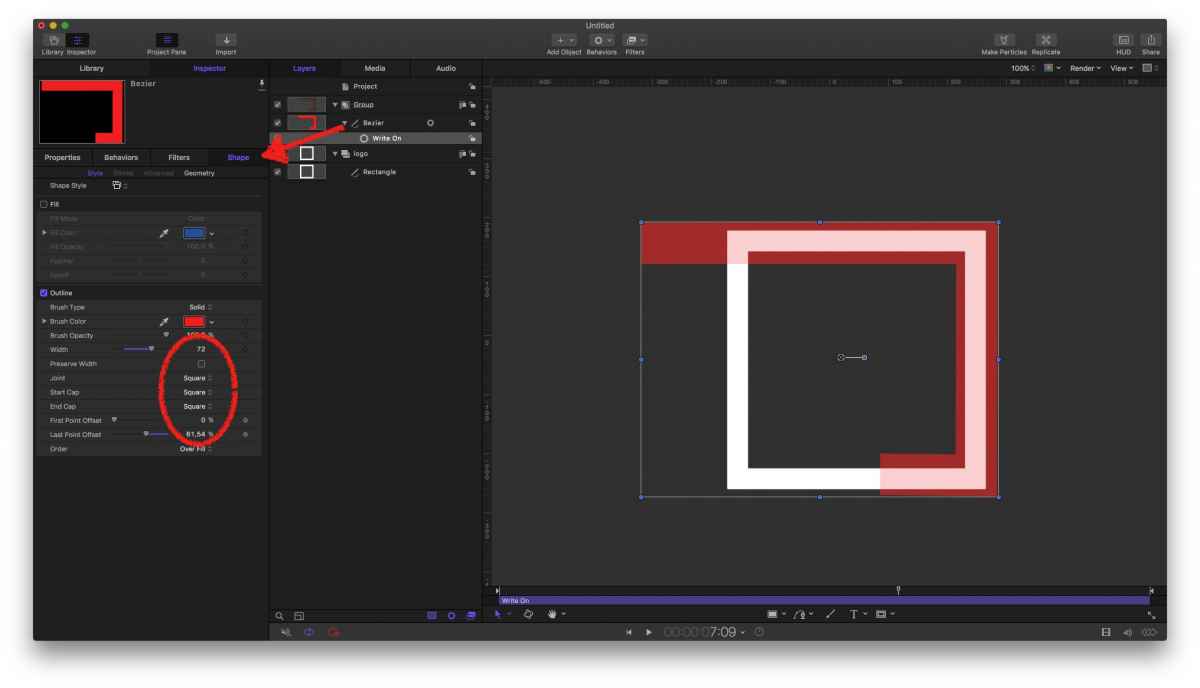
I'm assuming, you're using a write-on bezier as an image mask?
Then, in it's Shape setting, set Join, Start and End to square.
Please Log in to join the conversation.
- mrkrstoffa
-
Topic Author
- Offline
- New Member
-
Less
More
- Posts: 2
- Thank you received: 0
19 Feb 2017 10:32 #85882
by mrkrstoffa
Replied by mrkrstoffa on topic Paint stroke/write on as rectangle???
Karsten, thank you so much for the kind welcome, and the helpful response!
I got around it the other day through trial and error by drawing 5 rectangles and using first/last point offset and manually automating them to be in time (long!!!) however your suggested method is exactly what I'm looking for.
Thanks so much again,
Chris
I got around it the other day through trial and error by drawing 5 rectangles and using first/last point offset and manually automating them to be in time (long!!!) however your suggested method is exactly what I'm looking for.
Thanks so much again,
Chris
Please Log in to join the conversation.
