


- Posts: 265
- Thank you received: 7
3 Post Moderation Rule for New Boarders (25 Jan 2021)
New boarders will have their posts moderated - Don't worry if you cannot see your post immediately.
Can't use Keyframe Editor for a shapes Control Points?
- bradywurtz
-
 Topic Author
- Offline
- Elite Member
-

Less
More
15 Feb 2017 21:50 #85764
by bradywurtz
Can't use Keyframe Editor for a shapes Control Points? was created by bradywurtz
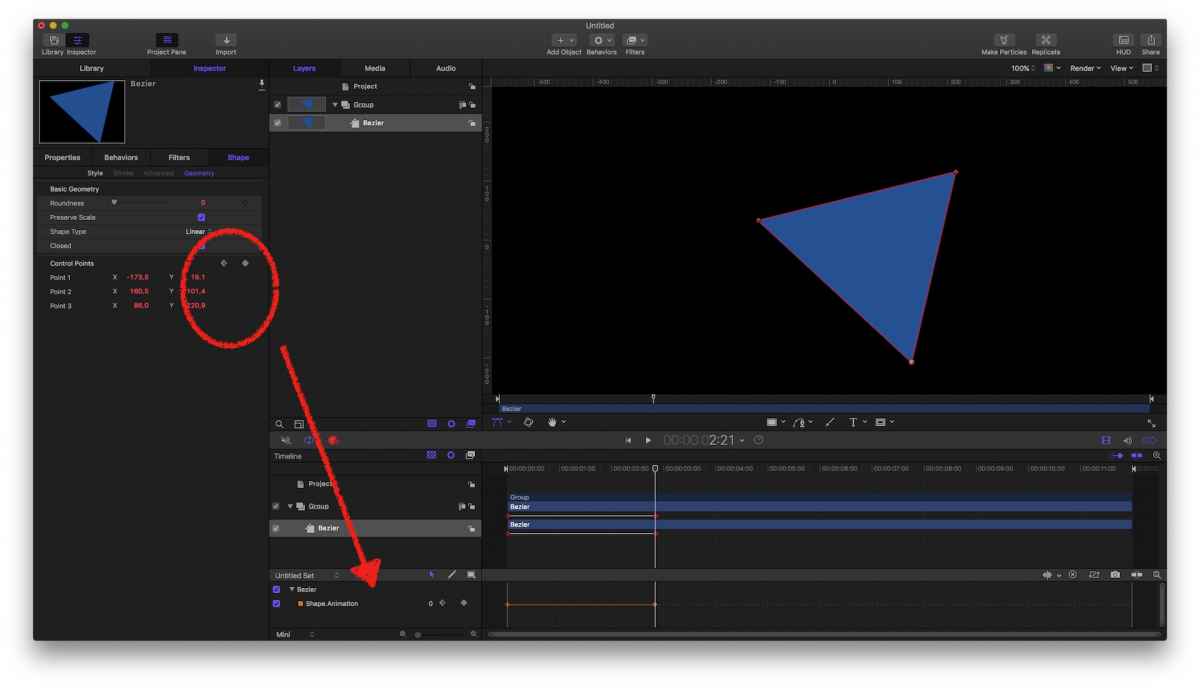
So i'm in Motion 5.3.1 and I created a Bezier shape. I wanted to animated it over time (30 frames) to take on a new shape. So i hit the keyframe marker for the Control Points on the shape, go forward 30 seconds, hit keyframe, then go and manually change the shape. Done. Animates nicely
But then i decide i want to look at the Keyframe Editor on the bottom of the screen to see all 7 points of my shape being keyframed so I can visually see them and make changes to the Interpolation, and even some timing. However, when go to to the Keyframe Editor, it just has one bar. 'Shape.Animation', and it has one keyframe on one bar. It does not let me see a bar for all my 7 points so I can change them easily. I know I can still do what I need to do, but it just seems like a wasted feature that I can't see all my points on the keyfame editor.
Am i doing something wrong? Is this a bug? Is this just a missing feature? Or is this something no one really needs and I'm just crazy?
But then i decide i want to look at the Keyframe Editor on the bottom of the screen to see all 7 points of my shape being keyframed so I can visually see them and make changes to the Interpolation, and even some timing. However, when go to to the Keyframe Editor, it just has one bar. 'Shape.Animation', and it has one keyframe on one bar. It does not let me see a bar for all my 7 points so I can change them easily. I know I can still do what I need to do, but it just seems like a wasted feature that I can't see all my points on the keyfame editor.
Am i doing something wrong? Is this a bug? Is this just a missing feature? Or is this something no one really needs and I'm just crazy?
Please Log in to join the conversation.
- Karsten Schlüter
-

- Offline
- Moderator
-

Less
More
- Posts: 3790
- Thank you received: 718
16 Feb 2017 05:38 #85769
by Karsten Schlüter
yep. The control points of a shape don't offer individual key-framing:
… except in the TrackPoints Behaviour .
Enhancement request:
www.apple.com/feedback/motion.html
Replied by Karsten Schlüter on topic Can't use Keyframe Editor for a shapes Control Points?
bradywurtz wrote: … just a missing feature?…
yep. The control points of a shape don't offer individual key-framing:
… except in the TrackPoints Behaviour .
Enhancement request:
www.apple.com/feedback/motion.html
Please Log in to join the conversation.
- bradywurtz
-
Topic Author
- Offline
- Elite Member
-
Less
More
- Posts: 265
- Thank you received: 7
16 Feb 2017 19:41 #85810
by bradywurtz
Replied by bradywurtz on topic Can't use Keyframe Editor for a shapes Control Points?
submitted! Hopefully the add it. I don't see why it isn't already in there. Thanks!
Please Log in to join the conversation.

18 Feb 2017 16:42 #85861
by VidGreg
Replied by VidGreg on topic Can't use Keyframe Editor for a shapes Control Points?
Hi Brady
There is a work around of sorts, I think
You let Motion do all the work of generating the changes in the shape so you will not have intermediate keyframes.
If you go back and "edit" the keyframes in the Timeline where you want to control the shape differently this should create new keyframe points that you can then alter or move forward to another point in Timeline and move around. This is just like "rotoscoping" where you are changing the shape keyframes quite often. You can also do this from the beginning of a new project.
This will however also affect the timing of the auto generated movement from the start to the edited section and each section thereafter. Especially apparent with certain ease-in/out parameters.
Hope this helps and makes sense, Greg
There is a work around of sorts, I think
You let Motion do all the work of generating the changes in the shape so you will not have intermediate keyframes.
If you go back and "edit" the keyframes in the Timeline where you want to control the shape differently this should create new keyframe points that you can then alter or move forward to another point in Timeline and move around. This is just like "rotoscoping" where you are changing the shape keyframes quite often. You can also do this from the beginning of a new project.
This will however also affect the timing of the auto generated movement from the start to the edited section and each section thereafter. Especially apparent with certain ease-in/out parameters.
Hope this helps and makes sense, Greg
Please Log in to join the conversation.
