




- Posts: 119
- Thank you received: 6
3 Post Moderation Rule for New Boarders (25 Jan 2021)
New boarders will have their posts moderated - Don't worry if you cannot see your post immediately.
Animation help in motion?
12 Dec 2016 20:14 #83929
by Suzero
Animation help in motion? was created by Suzero
I have a very simple animation I'd like to create.
If you check out this video: vimeo.com/195352045 you'll see that I am moving some old people right to left across the screen. They are kinda moonwalking right now because it's all so smooth.
I don't have time to cut up the drawings to puppet animate the legs etc. so I want to perhaps have them 'bounce' or waddle a little as they cross the screen. Think South Park / Monty Python style.
Is there a way in Motion to make them bounce without having to keyframe every 5 frames?
Any tips much appreciated!
If you check out this video: vimeo.com/195352045 you'll see that I am moving some old people right to left across the screen. They are kinda moonwalking right now because it's all so smooth.
I don't have time to cut up the drawings to puppet animate the legs etc. so I want to perhaps have them 'bounce' or waddle a little as they cross the screen. Think South Park / Monty Python style.
Is there a way in Motion to make them bounce without having to keyframe every 5 frames?
Any tips much appreciated!
Please Log in to join the conversation.


12 Dec 2016 20:49 #83930
by Deyson
Replied by Deyson on topic Animation help in motion?
You could use either behaviors to animate some random movement and oscillating loops.
Or you could take one image and add all the animation you need to it that will be looped. Then clone that layer. In the cloned layer go into timing, change end condition to loop and then trim out that clone layer and you will see your original layer loop.
Let me know if you have any questions and I can make a quick tutorial tomorrow. Have an amazing day!
Or you could take one image and add all the animation you need to it that will be looped. Then clone that layer. In the cloned layer go into timing, change end condition to loop and then trim out that clone layer and you will see your original layer loop.
Let me know if you have any questions and I can make a quick tutorial tomorrow. Have an amazing day!
Please Log in to join the conversation.

12 Dec 2016 21:33 - 12 Dec 2016 22:13 #83931
by rjvddoes
Replied by rjvddoes on topic Animation help in motion?
Hi Suzanna,
Since you already animated the cut-out charcters across the screen, you just have to add some randomness on top of that.
1- Select the Anchor Point Tool and move the anchor point of each cut out to the feet of the cut-out character
2- In the Inspector click on the Properties Tab end twirl open the Transform>Position properties
3- Right-click on the Y parameter and from the dropdown menu select Add Parameter Behavior>Wriggle
4-Twirl open the Rotation properties
5- Right-click on the Z parameter and from the dropdown menu select Add Parameter Behavior>Wriggle
6- Click on the Behaviors Tab. Here you see the two Wriggle behaviors: the one on top is named Wriggle 1 and it is for the last behavior added, which is Rotation.Z and the one on the bottom is Wriggle, without a number and this one is for Position.Y.
7- In Wriggle 1 set Amount to 2 degrees
8- Apply mode to Add and Subtract
9- Frequency to 8
10 Noisiness to 0,2
11- In Wriggle (without the number) set Amount to 25 px
12- Apply mode to Add
13- Frequency to 8
14- Noisiness to 0,2
Adjust to taste
Succes,
Robbert-Jan
Since you already animated the cut-out charcters across the screen, you just have to add some randomness on top of that.
1- Select the Anchor Point Tool and move the anchor point of each cut out to the feet of the cut-out character
2- In the Inspector click on the Properties Tab end twirl open the Transform>Position properties
3- Right-click on the Y parameter and from the dropdown menu select Add Parameter Behavior>Wriggle
4-Twirl open the Rotation properties
5- Right-click on the Z parameter and from the dropdown menu select Add Parameter Behavior>Wriggle
6- Click on the Behaviors Tab. Here you see the two Wriggle behaviors: the one on top is named Wriggle 1 and it is for the last behavior added, which is Rotation.Z and the one on the bottom is Wriggle, without a number and this one is for Position.Y.
7- In Wriggle 1 set Amount to 2 degrees
8- Apply mode to Add and Subtract
9- Frequency to 8
10 Noisiness to 0,2
11- In Wriggle (without the number) set Amount to 25 px
12- Apply mode to Add
13- Frequency to 8
14- Noisiness to 0,2
Adjust to taste
Succes,
Robbert-Jan
Last edit: 12 Dec 2016 22:13 by rjvddoes.
Please Log in to join the conversation.
- Karsten Schlüter
-

- Offline
- Moderator
-

Less
More
- Posts: 3790
- Thank you received: 718
13 Dec 2016 05:59 - 14 Dec 2016 11:04 #83944
by Karsten Schlüter
Replied by Karsten Schlüter on topic Animation help in motion?
Excellent advice/recipe, Robbert!
… couldn't resist to make it a plug-in, includes a slider to set an amount of wiggleness
Roughly slammed together, no installer, etc. Just create, after dl and unzipping, a subfolder 'ks' (or whatever) in ~/Movies/Motion Templates/Effects, and drag the unzipped folder into it; relaunch FCPX…
… couldn't resist to make it a plug-in, includes a slider to set an amount of wiggleness
Roughly slammed together, no installer, etc. Just create, after dl and unzipping, a subfolder 'ks' (or whatever) in ~/Movies/Motion Templates/Effects, and drag the unzipped folder into it; relaunch FCPX…
Last edit: 14 Dec 2016 11:04 by Karsten Schlüter. Reason: new installation advice
Please Log in to join the conversation.
13 Dec 2016 08:19 #83946
by Suzero
Replied by Suzero on topic Animation help in motion?
Thanks all for the great tips and even a plug-in Karsten!
Please Log in to join the conversation.
13 Dec 2016 15:31 #83958
by Suzero
Replied by Suzero on topic Animation help in motion?
For some reason it is not showing up in my Effects list in FCPX. I unzipped and moved to Movies/Motion Templates/Effects to no avail.
Am I overlooking something?
Am I overlooking something?
Please Log in to join the conversation.
13 Dec 2016 17:31 #83962
by rjvddoes
Replied by rjvddoes on topic Animation help in motion?
Hi Suzanna,
You can do a search in the effect browser for Wiggler and it will show up.
To overcome this you can go to your Movies>Motion Templates>Effects folder, create a new folder inside this folder and give it any name you like, for instance "Downloaded Effects", or "Karstens Effects". Drag the Wiggler folder inside this newly created folder and in FCPX will be a new Effects category with the name of the folder you just created. Inside this category you will find the Wiggler.
Cheers!
You can do a search in the effect browser for Wiggler and it will show up.
To overcome this you can go to your Movies>Motion Templates>Effects folder, create a new folder inside this folder and give it any name you like, for instance "Downloaded Effects", or "Karstens Effects". Drag the Wiggler folder inside this newly created folder and in FCPX will be a new Effects category with the name of the folder you just created. Inside this category you will find the Wiggler.
Cheers!
Please Log in to join the conversation.
- Karsten Schlüter
-
- Offline
- Moderator
-
Less
More
- Posts: 3790
- Thank you received: 718
14 Dec 2016 05:53 - 14 Dec 2016 05:57 #83971
by Karsten Schlüter
sorry for replying late - for mysterious reasons Xmas this year is on 24th, which creates a ultra tight schedule making my (video) gifts!
checked the plugin, slammed too fast together?
No fully functioning here:
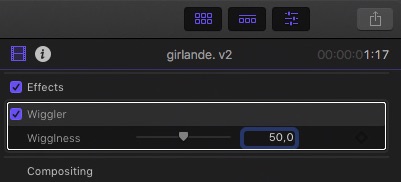
… which leads to: What version of FCPX you're using?
I'm a daredevil, always the latest versions - and plugins made in M5_3 do NOT work In FCPX 10_2 ...
Replied by Karsten Schlüter on topic Animation help in motion?
Suzero wrote: … Am I overlooking something?
sorry for replying late - for mysterious reasons Xmas this year is on 24th, which creates a ultra tight schedule making my (video) gifts!
checked the plugin, slammed too fast together?
No fully functioning here:
… which leads to: What version of FCPX you're using?
I'm a daredevil, always the latest versions - and plugins made in M5_3 do NOT work In FCPX 10_2 ...
Last edit: 14 Dec 2016 05:57 by Karsten Schlüter.
Please Log in to join the conversation.
14 Dec 2016 08:56 #83976
by rjvddoes
Replied by rjvddoes on topic Animation help in motion?
Hi Karsten,
I installed you plugin first by unzipping and putting it movies>motion templates>effects and then I couldn't find it at first either.
But a search for it in the search field brought it up, so it had to be there.
Then I realised that it wasn't in a category folder, so it was hard to find.
Placing the Wiggler folder inside a descriptive catgory folder solved that.
I guessed Suzanna experienced the same.
I did work though
Robbert-Jan
I installed you plugin first by unzipping and putting it movies>motion templates>effects and then I couldn't find it at first either.
But a search for it in the search field brought it up, so it had to be there.
Then I realised that it wasn't in a category folder, so it was hard to find.
Placing the Wiggler folder inside a descriptive catgory folder solved that.
I guessed Suzanna experienced the same.
I did work though
Robbert-Jan
Please Log in to join the conversation.
- Karsten Schlüter
-
- Offline
- Moderator
-
Less
More
- Posts: 3790
- Thank you received: 718
14 Dec 2016 11:01 #83978
by Karsten Schlüter
Replied by Karsten Schlüter on topic Animation help in motion?
Hi Robbert, …
Now that is an interesting find!
I put all my home-brewn stuff into some sub-folder, ks/test/wotever.
Wasn't aware, when you put a plugin's folder on 'top level' of a category, it isn't listed - just tried the other minute: in Movies/MotionTemplates/Effects = hidden, in Movies/MotionTemplates/Effects/ks = at hand.
Will correct my installation advices; usually, I use an Installer which creates a 'ks' folder on its own.
THANKS for focussing me on that …
rjvddoes wrote: …
Then I realised that it wasn't in a category folder, so it was hard to find.
Placing the Wiggler folder inside a descriptive catgory folder solved that.
…
Now that is an interesting find!
I put all my home-brewn stuff into some sub-folder, ks/test/wotever.
Wasn't aware, when you put a plugin's folder on 'top level' of a category, it isn't listed - just tried the other minute: in Movies/MotionTemplates/Effects = hidden, in Movies/MotionTemplates/Effects/ks = at hand.
Will correct my installation advices; usually, I use an Installer which creates a 'ks' folder on its own.
THANKS for focussing me on that …
Please Log in to join the conversation.
14 Dec 2016 11:02 #83979
by Suzero
Replied by Suzero on topic Animation help in motion?
Thanks, that did the trick, Robbert-Jan!
Thanks Karsten!
Thanks Karsten!
Please Log in to join the conversation.
