


- Posts: 14
- Thank you received: 3
3 Post Moderation Rule for New Boarders (25 Jan 2021)
New boarders will have their posts moderated - Don't worry if you cannot see your post immediately.
Share current frame problem
18 Dec 2011 18:26 #2658
by benco
Share current frame problem was created by benco
Hello
I'm trying to export/share a frame as png or tiff image. Motion 5 create a file, but when I open the image to see it. it shows nothing. Empty.
I tried using Compressor too, but it gives me an error.
I tried the same in Motion 4 and it works fine.
The strange thing is that if I save the file as a template in M5 it creates an image in png format.
It's a work around for me by now, but I would like to solve the problem
Thanks in advance
B
I'm trying to export/share a frame as png or tiff image. Motion 5 create a file, but when I open the image to see it. it shows nothing. Empty.
I tried using Compressor too, but it gives me an error.
I tried the same in Motion 4 and it works fine.
The strange thing is that if I save the file as a template in M5 it creates an image in png format.
It's a work around for me by now, but I would like to solve the problem
Thanks in advance
B
Please Log in to join the conversation.

20 Dec 2011 10:13 #2672
by BenB
Replied by BenB on topic Re: Share current frame problem
How are you configuring your Render options in the export?
Please Log in to join the conversation.
20 Dec 2011 19:39 #2678
by benco
Replied by benco on topic Re: Share current frame problem
Hello
Thanks for the respond.
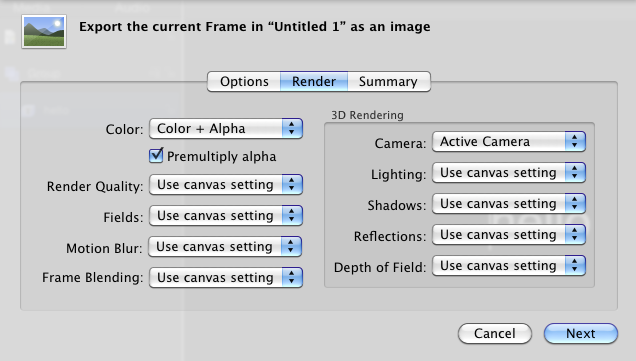
I inserted an image of my configuration in render menu.
I also tried with Color only, but it didn't work,same problem
I use OS X 10.6.8
Thanks for the respond.
I inserted an image of my configuration in render menu.
I also tried with Color only, but it didn't work,same problem
I use OS X 10.6.8
Please Log in to join the conversation.
20 Dec 2011 19:49 #2679
by BenB
Replied by BenB on topic Re: Share current frame problem
But what are the Render settings in your project?
What does the resulting PNG file look like?
What does the resulting PNG file look like?
Please Log in to join the conversation.
20 Dec 2011 19:55 #2680
by benco
Replied by benco on topic Re: Share current frame problem
Hello
I attached 2 images -- render settings and final result after share
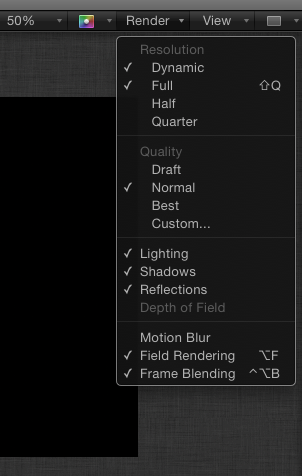

I attached 2 images -- render settings and final result after share
Please Log in to join the conversation.
20 Dec 2011 19:57 #2681
by benco
Replied by benco on topic Re: Share current frame problem
here is the image after share
Please Log in to join the conversation.
- Mikeybouchereau
-

- Offline
- Elite Member
-

Less
More
- Posts: 201
- Thank you received: 81
21 Dec 2011 01:06 #2685
by Mikeybouchereau
Replied by Mikeybouchereau on topic Re: Share current frame problem
Benco,
I've been having the same problem. It worked once then the next 5 attempts did not work. I have also noticed that particle emitters are really sluggish as of late, but in motion 4 I have no problem.
I've been having the same problem. It worked once then the next 5 attempts did not work. I have also noticed that particle emitters are really sluggish as of late, but in motion 4 I have no problem.
Please Log in to join the conversation.
21 Dec 2011 02:29 #2690
by BenB
Replied by BenB on topic Re: Share current frame problem
Not sure, I can't replicate the issue.
As for performance, see this thread.
www.fcp.co/forum/6-motion-5/2667-motion-running-so-slowly#2689
As for performance, see this thread.
www.fcp.co/forum/6-motion-5/2667-motion-running-so-slowly#2689
Please Log in to join the conversation.
