


- Posts: 1080
- Thank you received: 106
3 Post Moderation Rule for New Boarders (25 Jan 2021)
New boarders will have their posts moderated - Don't worry if you cannot see your post immediately.
How to make an effect available to both FCPX and Motion
17 Nov 2016 20:42 - 17 Nov 2016 20:42 #82918
by Redifer
How to make an effect available to both FCPX and Motion was created by Redifer
I have created a cool filter and published it, however it is only available to be used in FCPX. Motion doesn't see the finished filter nor its category at all. How do I make it so that it is available to be used as a filter in Motion as well?
Last edit: 17 Nov 2016 20:42 by Redifer.
Please Log in to join the conversation.
19 Nov 2016 19:38 #82994
by Redifer
Replied by Redifer on topic How to make an effect available to both FCPX and Motion
I take it from the amount of views of this thread without reply that this is IMPOSSIBLE?
Please Log in to join the conversation.


19 Nov 2016 20:39 #82995
by archhill
Replied by archhill on topic How to make an effect available to both FCPX and Motion
Didn't you Publish it with Motion?
Please Log in to join the conversation.

19 Nov 2016 22:09 #82996
by JoeEditor
Replied by JoeEditor on topic How to make an effect available to both FCPX and Motion
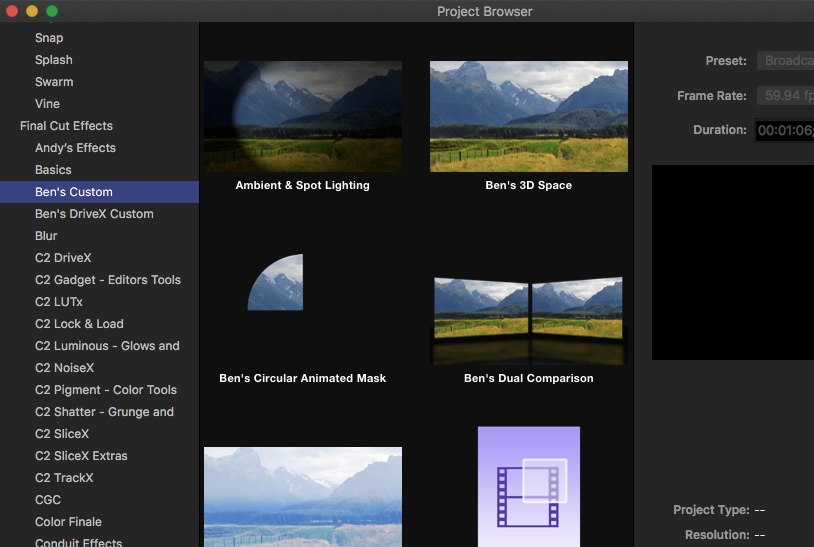
It should show up in the Template browser, when you first launch Motion. All of mine do.
Please Log in to join the conversation.
20 Nov 2016 02:57 - 20 Nov 2016 03:00 #82997
by Redifer
Yeah it's there but I want to use it as a filter IN a Motion project. If I open it the way you show, it opens as the raw deal (ie: it's very own project). I can't apply it as a filter to a clip if I'm working on a different project in Motion. I'm guessing that this is absolutely impossible and can only be used as a filter in FCPX. Please let me know if I'm not being clear.
Replied by Redifer on topic How to make an effect available to both FCPX and Motion
Yep! Created it entirely in Motion as a "Final Cut Effect"archhill wrote: Didn't you Publish it with Motion?
BenB wrote: It should show up in the Template browser, when you first launch Motion. All of mine do.
Yeah it's there but I want to use it as a filter IN a Motion project. If I open it the way you show, it opens as the raw deal (ie: it's very own project). I can't apply it as a filter to a clip if I'm working on a different project in Motion. I'm guessing that this is absolutely impossible and can only be used as a filter in FCPX. Please let me know if I'm not being clear.
Last edit: 20 Nov 2016 03:00 by Redifer.
Please Log in to join the conversation.
20 Nov 2016 13:21 #83005
by JoeEditor
Replied by JoeEditor on topic How to make an effect available to both FCPX and Motion
Ah, I see what you want now. No, a Motion Project is not a plug-in. A true Filter would been to be coded. BUT, you can open that Motion project, open a new one, and copy/paste between the two. Perhaps a better option for you is to save stuff as Favorites.
help.apple.com/motion/mac/5.2/#/motn11e73722
help.apple.com/motion/mac/5.2/#/motn11e73722
Please Log in to join the conversation.
- ronny courtens
-

- Offline
- Moderator
-

Less
More
- Posts: 4455
- Thank you received: 962
20 Nov 2016 14:03 #83010
by ronny courtens
Replied by ronny courtens on topic How to make an effect available to both FCPX and Motion
The Filters browser in Motion 5 only shows FXPlug filters, not Final Cut Effects templates (which are not Filters, but Motion project files).
- If you want to create a custom Filter that you want to use in Motion and in FCP X, you should create the Filter using the FxPlug SDK:
developer.apple.com/library/content/docu...d/TP40002180-CH5-SW1
- If you have created a custom version from an existing Filter in Motion, you can save your custom Filter as a Favorite (as Ben says), so you will be able to re-use this custom Filter in Motion.
- Ronny
- If you want to create a custom Filter that you want to use in Motion and in FCP X, you should create the Filter using the FxPlug SDK:
developer.apple.com/library/content/docu...d/TP40002180-CH5-SW1
- If you have created a custom version from an existing Filter in Motion, you can save your custom Filter as a Favorite (as Ben says), so you will be able to re-use this custom Filter in Motion.
- Ronny
Please Log in to join the conversation.
20 Nov 2016 23:55 #83028
by Redifer
Replied by Redifer on topic How to make an effect available to both FCPX and Motion
All very interesting, thanks! The main reason why I wanted to do it is to offer anyone I give my FCPX Effect to to be able to use it in Motion as well. I think doing a proper FXPlug is a bit over my skill level as I haven't coded for anything since the Apple IIe.
Please Log in to join the conversation.


11 Dec 2016 04:30 #83883
by sc_fox
Replied by sc_fox on topic How to make an effect available to both FCPX and Motion
You can use your Motion effect in Motion, but it is a practical waste of time.
The Effect Source is a placeholder for whatever exists in the FCPX storyline when the effect is applied. It's also a drop zone in Motion. You can put any media you want in it (*see note below). You will have to manually adjust your project to the length of the media (check the duration in the Media tab), Motion will not do that for you. You also run the risk of accidentally saving the project which will change the FCPX Effect template you have created (current settings will be saved as the defaults, etc.). You could make a duplicate project for use in Motion... but it will still exist in your collection of FCPX effects.
*Note: As of Motion 5.3, you cannot drag and drop media onto the Effect Source/Drop Zone since the File Browser pane no longer exists. You can, however, drag and drop media directly from the Finder onto the Effect Source. There is no other way to add media to that placeholder in Motion.
The Effect Source is a placeholder for whatever exists in the FCPX storyline when the effect is applied. It's also a drop zone in Motion. You can put any media you want in it (*see note below). You will have to manually adjust your project to the length of the media (check the duration in the Media tab), Motion will not do that for you. You also run the risk of accidentally saving the project which will change the FCPX Effect template you have created (current settings will be saved as the defaults, etc.). You could make a duplicate project for use in Motion... but it will still exist in your collection of FCPX effects.
*Note: As of Motion 5.3, you cannot drag and drop media onto the Effect Source/Drop Zone since the File Browser pane no longer exists. You can, however, drag and drop media directly from the Finder onto the Effect Source. There is no other way to add media to that placeholder in Motion.
Please Log in to join the conversation.
