


- Posts: 228
- Thank you received: 16
3 Post Moderation Rule for New Boarders (25 Jan 2021)
New boarders will have their posts moderated - Don't worry if you cannot see your post immediately.
How to create a "shining" effect over a drop zone?
12 Nov 2016 12:28 - 12 Nov 2016 12:30 #82609
by Schnurr
How to create a "shining" effect over a drop zone? was created by Schnurr
Hi
being new to Motion I would like to create over a drop zone a kind of "shining or reflection" effect that moves over the DZ.

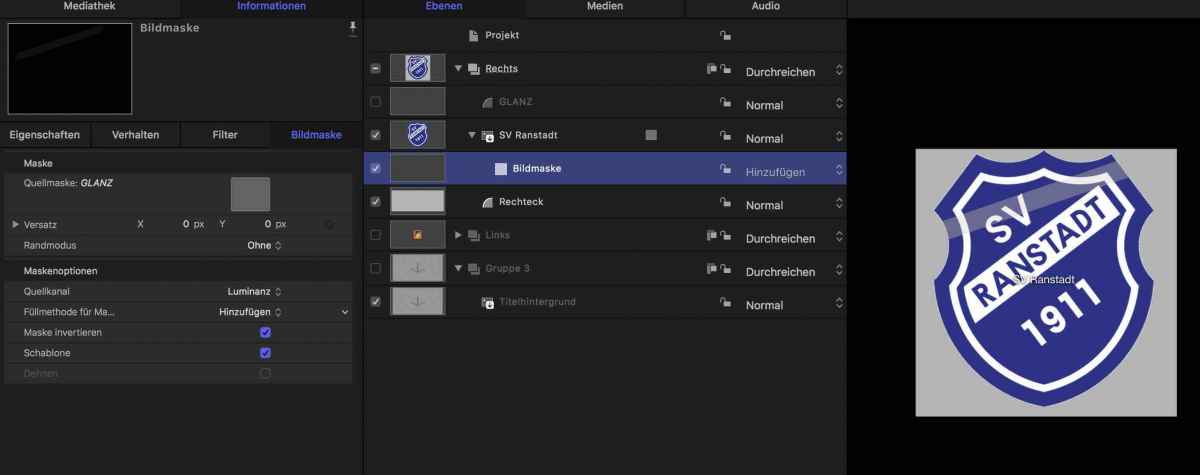
As such I created a white rectangle and changed the opacity. Then I created a mask over the DZ and thought I could apply the rectangle to the mask and turn the rectangle off.
Doing so the effect gets reduced and/or the color is used from a rectangle that is behind the DZ (grey box)
Leaving the rectangle turned-on, the light covers more then DZ element which is not the effect that I wanted to achieve.
I appreciate any idea/hint what I doing wrong or how I could create the effect.
Tobias
dl.dropboxusercontent.com/u/2197991/Shining%20effect.zip
being new to Motion I would like to create over a drop zone a kind of "shining or reflection" effect that moves over the DZ.
As such I created a white rectangle and changed the opacity. Then I created a mask over the DZ and thought I could apply the rectangle to the mask and turn the rectangle off.
Doing so the effect gets reduced and/or the color is used from a rectangle that is behind the DZ (grey box)
Leaving the rectangle turned-on, the light covers more then DZ element which is not the effect that I wanted to achieve.
I appreciate any idea/hint what I doing wrong or how I could create the effect.
Tobias
dl.dropboxusercontent.com/u/2197991/Shining%20effect.zip
Last edit: 12 Nov 2016 12:30 by Schnurr.
Please Log in to join the conversation.

12 Nov 2016 12:38 #82611
by Deyson
Replied by Deyson on topic How to create a "shining" effect over a drop zone?
Hello.
I actually think the easiest way it to create a white rectangle but place it behind the camera and then move it around or move the camera around. Make sure to turn on reflection on your DZ or image.
I took it a step further here and actually attached the reflector to it, but you can get an idea of what I mean:
motionmastertemplates.com/portfolio/appl...dd-reflector-camera/
P.S. Did you get my email responses?
I actually think the easiest way it to create a white rectangle but place it behind the camera and then move it around or move the camera around. Make sure to turn on reflection on your DZ or image.
I took it a step further here and actually attached the reflector to it, but you can get an idea of what I mean:
motionmastertemplates.com/portfolio/appl...dd-reflector-camera/
P.S. Did you get my email responses?
Please Log in to join the conversation.
12 Nov 2016 13:11 #82614
by Schnurr
Replied by Schnurr on topic How to create a "shining" effect over a drop zone?
Hi Deyson,
yes thanks (was in the spam folder) ) Ahh the trick is to work with "camera"... Thanks for sharing that knowledge. Will check it out.
Tobias
yes thanks (was in the spam folder)
) Ahh the trick is to work with "camera"... Thanks for sharing that knowledge. Will check it out.Tobias
Please Log in to join the conversation.
- Karsten Schlüter
-

- Offline
- Moderator
-

Less
More
- Posts: 3790
- Thank you received: 718
12 Nov 2016 13:22 #82617
by Karsten Schlüter
Replied by Karsten Schlüter on topic How to create a "shining" effect over a drop zone?
like that?

apply the GLINT filter to the rectangle and tweak with the many settings.
to make the glow appear exclusively on the graphic, set 'preserve opacity' in the Blending settings…
apply the GLINT filter to the rectangle and tweak with the many settings.
to make the glow appear exclusively on the graphic, set 'preserve opacity' in the Blending settings…
Please Log in to join the conversation.
12 Nov 2016 13:30 #82618
by Deyson
Replied by Deyson on topic How to create a "shining" effect over a drop zone?
I have found it is easier to use reflection to create reflections and use lights to create shadows.
Also, there is a sense of realism, the way you had wanted to do it above is great, but once you move that camera or images around you may lose the realism.
Plus by using reflections you get added control like blurs and falloffs.
You are very welcome and please let me know if you have any questions. Now I have to figure out why my email went to your Spam.
Also, there is a sense of realism, the way you had wanted to do it above is great, but once you move that camera or images around you may lose the realism.
Plus by using reflections you get added control like blurs and falloffs.
You are very welcome and please let me know if you have any questions. Now I have to figure out why my email went to your Spam.
Please Log in to join the conversation.
- Karsten Schlüter
-
- Offline
- Moderator
-
Less
More
- Posts: 3790
- Thank you received: 718
12 Nov 2016 13:44 #82620
by Karsten Schlüter
hmm?
/see attached demo, incl a cam sweep)
Replied by Karsten Schlüter on topic How to create a "shining" effect over a drop zone?
Deyson wrote: … once you move that camera or images around you may lose the realism. …
hmm?
/see attached demo, incl a cam sweep)
Please Log in to join the conversation.
12 Nov 2016 14:00 #82621
by Schnurr
Replied by Schnurr on topic How to create a "shining" effect over a drop zone?
Thanks a lot to both of you but still struggling with both ways
"preserve opacity' in the Blending settings" ->Leo.org ufff muss man doch mit Masken.. ahh need to check the thread #1234 how to change M5 to english setting
"preserve opacity' in the Blending settings" ->Leo.org ufff muss man doch mit Masken.. ahh need to check the thread #1234 how to change M5 to english setting
Please Log in to join the conversation.
12 Nov 2016 14:01 #82622
by Deyson
Replied by Deyson on topic How to create a "shining" effect over a drop zone?
Sorry. I should have explained better. By using the reflections they replicate what happens in the real world. When the camera moves the reflections on the object moves according to the cameras or the objects movement, without the need of additional keyframing.
The way you have shown is not wrong as I have done it many times in the past. I just have found it a lot easier using reflections, especially when we are trying to replicate the way reflections work in the real world or make changes to our animation. I guess similar to how we create 3D reflections we see in high-end animations we see done in 3D apps.
I made this video to explain what I had meant:
quick.as/rqmiadyq
The way you have shown is not wrong as I have done it many times in the past. I just have found it a lot easier using reflections, especially when we are trying to replicate the way reflections work in the real world or make changes to our animation. I guess similar to how we create 3D reflections we see in high-end animations we see done in 3D apps.
I made this video to explain what I had meant:
quick.as/rqmiadyq
Please Log in to join the conversation.
12 Nov 2016 14:04 #82624
by Deyson
Replied by Deyson on topic How to create a "shining" effect over a drop zone?
Hello Tobias:
I have added a part 2 to help answer your questions:
motionmastertemplates.com/portfolio/appl...dd-reflector-camera/
I have added a part 2 to help answer your questions:
motionmastertemplates.com/portfolio/appl...dd-reflector-camera/
Please Log in to join the conversation.
- Karsten Schlüter
-
- Offline
- Moderator
-
Less
More
- Posts: 3790
- Thank you received: 718
12 Nov 2016 14:16 #82626
by Karsten Schlüter
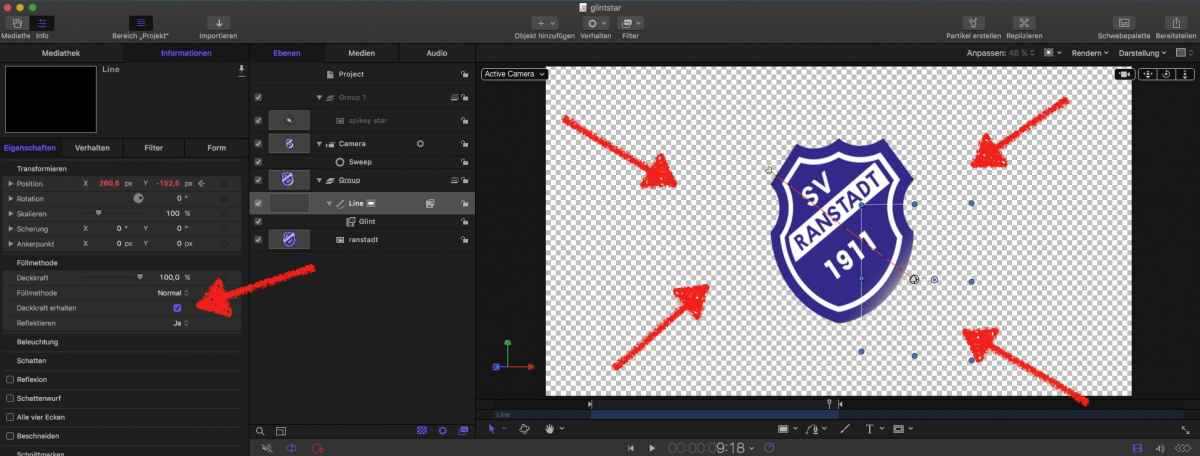
'Deckkraft erhalten' is the name of that knob/checkbox…
And I should have mentioned, that I 'knock out' (=freistellen) the logo BEFORE usage in Motion. So, no masks involved.
Replied by Karsten Schlüter on topic How to create a "shining" effect over a drop zone?
Schnurr wrote: … "preserve opacity' in the Blending settings" ->Leo.org ufff muss man doch mit Masken.. ahh need to check the thread #1234 how to change M5 to english setting
'Deckkraft erhalten' is the name of that knob/checkbox…
And I should have mentioned, that I 'knock out' (=freistellen) the logo BEFORE usage in Motion. So, no masks involved.
Please Log in to join the conversation.
12 Nov 2016 14:21 - 12 Nov 2016 14:30 #82627
by Schnurr
Replied by Schnurr on topic How to create a "shining" effect over a drop zone?
Looks very very cool Karsten.
Would you mind to attach the Motion file (in case you saved that). Ahh see that right now (screen above)..
Checked 'preserve opacity' in blending mode but still the flash covers other areas and of course would love to do that with drop zone to use it for other soccer games too as such applied mask (in case thats right) maybe thats the reason for my problems and why it doesn't work...
Tobias
Would you mind to attach the Motion file (in case you saved that). Ahh see that right now (screen above)..
Checked 'preserve opacity' in blending mode but still the flash covers other areas and of course would love to do that with drop zone to use it for other soccer games too as such applied mask (in case thats right)
maybe thats the reason for my problems and why it doesn't work...Tobias
Last edit: 12 Nov 2016 14:30 by Schnurr.
Please Log in to join the conversation.
- Karsten Schlüter
-
- Offline
- Moderator
-
Less
More
- Posts: 3790
- Thank you received: 718
12 Nov 2016 14:31 #82631
by Karsten Schlüter
You want all my secrets :evil:
attached it; before using it in FCPX, clear the drop zone; and that blinking star is just a joke; camera sweep was just to demo the look 'in action' ..........
Replied by Karsten Schlüter on topic How to create a "shining" effect over a drop zone?
Schnurr wrote: …Would you mind to attach the Motion file (in case you saved that). …
You want all my secrets :evil:
attached it; before using it in FCPX, clear the drop zone; and that blinking star is just a joke; camera sweep was just to demo the look 'in action' ..........
Please Log in to join the conversation.
- Karsten Schlüter
-
- Offline
- Moderator
-
Less
More
- Posts: 3790
- Thank you received: 718
12 Nov 2016 15:00 #82635
by Karsten Schlüter
Replied by Karsten Schlüter on topic How to create a "shining" effect over a drop zone?
@Deyson
… played around with your method, linking the highlight with the cam movement/position - nice!
But when you set the 'reflection'-group to 2D/no links, you get a very similar looking effect, don't you? :huh:
… played around with your method, linking the highlight with the cam movement/position - nice!
But when you set the 'reflection'-group to 2D/no links, you get a very similar looking effect, don't you? :huh:
Please Log in to join the conversation.
12 Nov 2016 15:01 #82636
by Deyson
Replied by Deyson on topic How to create a "shining" effect over a drop zone?
Tobias, I had recreated your animation so you can see what I had meant and sent it to you through email. I also recorded an instructional video so you see what I mean.
Remember this is just a different way of doing things. I just believe that this offers me more control, realism, and flexibility, especially as we play around with our animation.
Here is the video explainer of what I mean: quick.as/rwdsbbgw
Please let me know if you have any questions. Have an amazing day!
Remember this is just a different way of doing things. I just believe that this offers me more control, realism, and flexibility, especially as we play around with our animation.
Here is the video explainer of what I mean: quick.as/rwdsbbgw
Please let me know if you have any questions. Have an amazing day!
Please Log in to join the conversation.
12 Nov 2016 15:04 #82637
by Deyson
Replied by Deyson on topic How to create a "shining" effect over a drop zone?
You are correct. The reason I had linked it to the camera in my original tutorial is because I had the camera flying to many different drop zones. So instead of having 7 different reflectors, I just have one that follows the camera.
But, if you only one object or DZ there is no need to attach to the camera, that is me trying to make my life easier
But, if you only one object or DZ there is no need to attach to the camera, that is me trying to make my life easier
Please Log in to join the conversation.
- Karsten Schlüter
-
- Offline
- Moderator
-
Less
More
- Posts: 3790
- Thank you received: 718
12 Nov 2016 15:22 - 12 Nov 2016 15:29 #82638
by Karsten Schlüter
Save the planet - recycle ! Even used reflections ....
Now, Deyson, I find your concept even smarter - in real life, a reflection is 'attached' to the subject. In software, you can attach to the camera.
Just to mention: the 3D tools in Motion offer VERY nice and dynamic reflections:

from my still-under-construction project, a title generator called "MuscleCar' …
==edit==
just to mention it: to create a pic like the above, it is just two simple layers in Motion5:
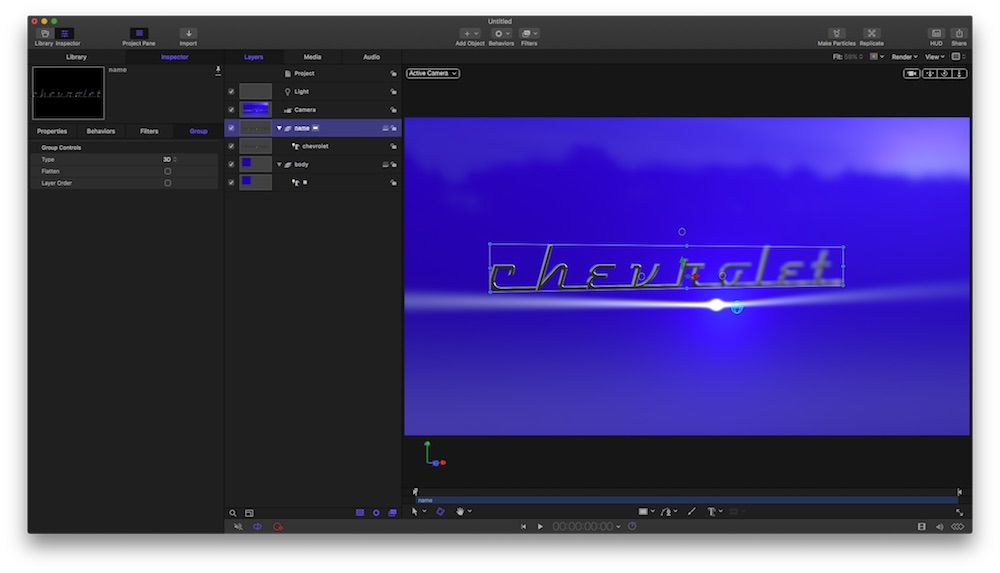
… the tricky part is to make it a universal working plugin, and the camera work (pans, sweeps, DoF, lights/shadows) …
Replied by Karsten Schlüter on topic How to create a "shining" effect over a drop zone?
Deyson wrote: … I had the camera flying to many different drop zones. So instead of having 7 different reflectors, I just have one that follows the camera.…
Save the planet - recycle ! Even used reflections ....
Now, Deyson, I find your concept even smarter - in real life, a reflection is 'attached' to the subject. In software, you can attach to the camera.
Just to mention: the 3D tools in Motion offer VERY nice and dynamic reflections:
from my still-under-construction project, a title generator called "MuscleCar' …
==edit==
just to mention it: to create a pic like the above, it is just two simple layers in Motion5:
… the tricky part is to make it a universal working plugin, and the camera work (pans, sweeps, DoF, lights/shadows) …
Last edit: 12 Nov 2016 15:29 by Karsten Schlüter.
Please Log in to join the conversation.
12 Nov 2016 16:06 #82646
by Deyson
Replied by Deyson on topic How to create a "shining" effect over a drop zone?
Yes, in software we can get away with some cheats compared to real life.
I like your still it looks great. For Pans, Sweeps and DOF I use hidden objects to control the camera and it Focus and framing. I try to use Null Objects as much as possible and little to no animations are done on the camera itself. Plus it makes it super easy to change my mind or rig different camera animations.
So many tricks!!
I look forward to see your animation.
I like your still it looks great. For Pans, Sweeps and DOF I use hidden objects to control the camera and it Focus and framing.
I try to use Null Objects as much as possible and little to no animations are done on the camera itself. Plus it makes it super easy to change my mind or rig different camera animations.So many tricks!!
I look forward to see your animation.
Please Log in to join the conversation.
- Karsten Schlüter
-
- Offline
- Moderator
-
Less
More
- Posts: 3790
- Thank you received: 718
12 Nov 2016 16:27 #82647
by Karsten Schlüter
yeah, plus Behaviours (e.g. point-at), null/nil-objects are a lifesaver …
btw: null or nil?? or doesn't matter? 'null' is German, so for me 'nil' sounds … so damn cool :silly:
Thanks for the flowers - until now, 90% is done by Motion:

All I have done is selection of font, cam position/DoF and lighting of scene …
Actually combining that with my advice of 'pre rigged cam movements' ( link ) … hum, well, 'actually doing that' is a lie ... LOL
Replied by Karsten Schlüter on topic How to create a "shining" effect over a drop zone?
Deyson wrote: … I like your still it looks great. For Pans, Sweeps and DOF I use hidden objects to control the camera and it Focus and framing.
yeah, plus Behaviours (e.g. point-at), null/nil-objects are a lifesaver …
btw: null or nil?? or doesn't matter? 'null' is German, so for me 'nil' sounds … so damn cool :silly:
Thanks for the flowers - until now, 90% is done by Motion:
All I have done is selection of font, cam position/DoF and lighting of scene …
Actually combining that with my advice of 'pre rigged cam movements' ( link ) … hum, well, 'actually doing that' is a lie ... LOL
Please Log in to join the conversation.
12 Nov 2016 16:33 #82648
by Deyson
Replied by Deyson on topic How to create a "shining" effect over a drop zone?
The important thing is that it works. I will watch your video later to see what new things I can learn. There is always something to learn
Please Log in to join the conversation.
12 Nov 2016 16:58 #82649
by Deyson
Replied by Deyson on topic How to create a "shining" effect over a drop zone?
I had created another new tutorial on how to create a light sweep in Motion using reflections.
motionmastertemplates.com/portfolio/fun-...ht-reflection-sweep/
motionmastertemplates.com/portfolio/fun-...ht-reflection-sweep/
Please Log in to join the conversation.
