




- Posts: 83
- Thank you received: 236
3 Post Moderation Rule for New Boarders (25 Jan 2021)
New boarders will have their posts moderated - Don't worry if you cannot see your post immediately.
Animated Callouts + 12 Free Templates
31 Jul 2016 15:24 #78919
by Denice
Animated Callouts + 12 Free Templates was created by Denice
Check out my new video! Enjoy, guys! 
Please Log in to join the conversation.
- Karsten Schlüter
-

- Offline
- Moderator
-

Less
More
- Posts: 3790
- Thank you received: 718
31 Jul 2016 17:48 #78924
by Karsten Schlüter
Replied by Karsten Schlüter on topic Animated Callouts + 12 Free Templates
Very nice, excellent animations, I like that!
Have you considered to transform it into a regular title-plugin, nice dropdown menus for design-options, on-screen-controls for positioning et al?
And:
#1 asks for an 'Alan Walker.mp3' which, for sure, is not included ... you should fix that.-
Have you considered to transform it into a regular title-plugin, nice dropdown menus for design-options, on-screen-controls for positioning et al?
And:
#1 asks for an 'Alan Walker.mp3' which, for sure, is not included ... you should fix that.-
Please Log in to join the conversation.
01 Aug 2016 00:46 #78941
by Denice
Replied by Denice on topic Animated Callouts + 12 Free Templates
Ooops! Thank you for letting me know! I've fixed the #1 error.
I'd love to transform it into a regular title-plugin like you said, but I am actually still learning how to use Motion 5, and have no idea how to do that.
Would you mind teaching me how to transform it into a title-plugin? I'll be very appreciated!
I'd love to transform it into a regular title-plugin like you said, but I am actually still learning how to use Motion 5, and have no idea how to do that.
Would you mind teaching me how to transform it into a title-plugin? I'll be very appreciated!
Please Log in to join the conversation.
- Karsten Schlüter
-
- Offline
- Moderator
-
Less
More
- Posts: 3790
- Thank you received: 718
01 Aug 2016 04:19 #78943
by Karsten Schlüter
well, teaching, still a learner either (you find my plugins here at fcp.co) ... in the Tutorial sectionof this board, a real master, f.mahoney, publishes tuts about the mysteries of OSC, ... but it needs a while to understand that in toto ... I needed quiet a time, still scratching my head :lol:
Later, I'll upload here a 'customized' version of one of your call-outs here (if this is ok for you?) - you can then study it and perhaps copy/paste some stuff ....
Replied by Karsten Schlüter on topic Animated Callouts + 12 Free Templates
gracias20 wrote: … Would you mind teaching me how to transform it into a title-plugin? I'll be very appreciated!
well, teaching, still a learner either (you find my plugins here at fcp.co) ... in the Tutorial sectionof this board, a real master, f.mahoney, publishes tuts about the mysteries of OSC, ... but it needs a while to understand that in toto ... I needed quiet a time, still scratching my head :lol:
Later, I'll upload here a 'customized' version of one of your call-outs here (if this is ok for you?) - you can then study it and perhaps copy/paste some stuff ....
Please Log in to join the conversation.
- Karsten Schlüter
-
- Offline
- Moderator
-
Less
More
- Posts: 3790
- Thank you received: 718
01 Aug 2016 12:30 #78950
by Karsten Schlüter
Replied by Karsten Schlüter on topic Animated Callouts + 12 Free Templates
so, here we go ...
Your CallOut as a FCPX Title plugin ...
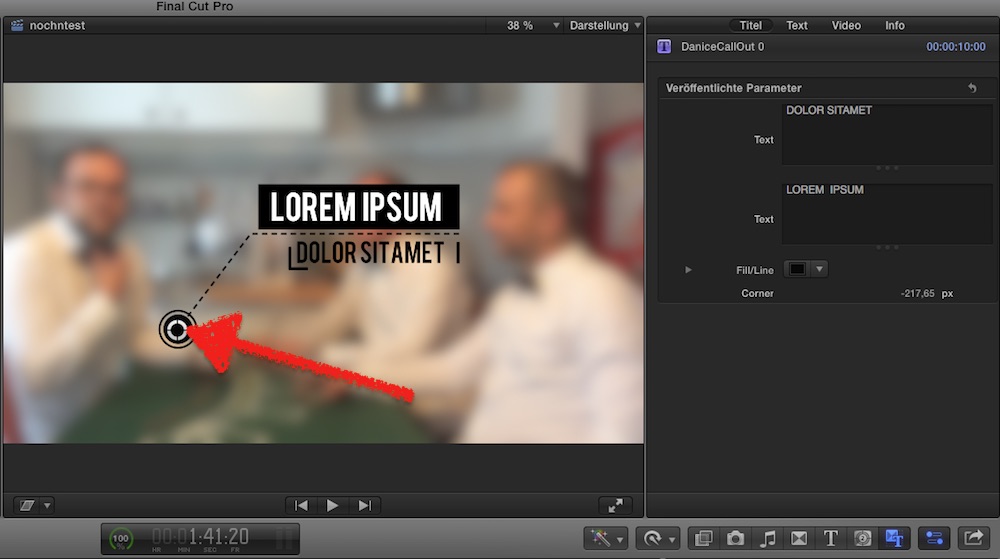
Two things to focus on:
• there's an OnScreenController to position the title
• and there are a few published parameters, so the editor has the main settings at hand...
How did I do that?
In M5, I choose New Title Project
out-of-the-box, is a backgound dropzone = when you drop the title onto some clip, the clip will be shown
And a generic title - we don't need that, deleted.
There are your 3 elements/groups, I put all into a new group called 'everything'
And a new group called OSC; how ro create an OSC is best explained in F.Mahoneys tut about Mysteries of OSCs.
I slavishly followed his advice: applied the Poke filter, gave the group a length and a fixed resultion.
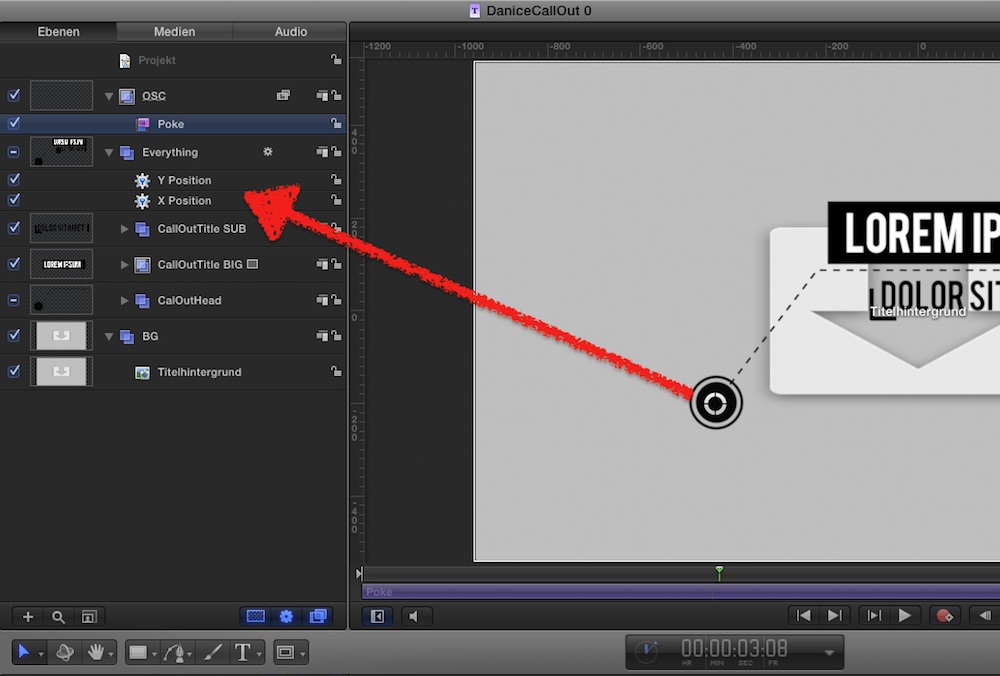
Then, in the Inspector of the 'Everything' group, I add the X-coordinate a Link behaviour: linked to the OSC group.
Same for Y-position.
Finally, check Pokes OSC is set to publish, for 'cosmetics' I published the two titles, and the x-positon of the tiny corner element (to adjust it to the title).
And, finally, to demo that Link is not only for numbers/coordinates, I linked the color of the dot and the dotted line; so, changing the dots color automatically changes the lines too ...
The 'pimped' version of your CallOut is attached here, after dl/unzip you can install it in ~/Movies/Motion Templates/Titles.
Or, to learn how it's done, open it with Motion5.
Tried to give everything a useful English name.....
If you have further questions, post here
Your CallOut as a FCPX Title plugin ...
Two things to focus on:
• there's an OnScreenController to position the title
• and there are a few published parameters, so the editor has the main settings at hand...
How did I do that?
In M5, I choose New Title Project
out-of-the-box, is a backgound dropzone = when you drop the title onto some clip, the clip will be shown
And a generic title - we don't need that, deleted.
There are your 3 elements/groups, I put all into a new group called 'everything'
And a new group called OSC; how ro create an OSC is best explained in F.Mahoneys tut about Mysteries of OSCs.
I slavishly followed his advice: applied the Poke filter, gave the group a length and a fixed resultion.
Then, in the Inspector of the 'Everything' group, I add the X-coordinate a Link behaviour: linked to the OSC group.
Same for Y-position.
Finally, check Pokes OSC is set to publish, for 'cosmetics' I published the two titles, and the x-positon of the tiny corner element (to adjust it to the title).
And, finally, to demo that Link is not only for numbers/coordinates, I linked the color of the dot and the dotted line; so, changing the dots color automatically changes the lines too ...
The 'pimped' version of your CallOut is attached here, after dl/unzip you can install it in ~/Movies/Motion Templates/Titles.
Or, to learn how it's done, open it with Motion5.
Tried to give everything a useful English name.....
If you have further questions, post here
Please Log in to join the conversation.


01 Aug 2016 14:01 #78953
by dgwvideo
Creating history....one edit at a time !
Replied by dgwvideo on topic Animated Callouts + 12 Free Templates
Very nice design and great tutorial on how you made them.
Creating history....one edit at a time !
Please Log in to join the conversation.
02 Aug 2016 01:51 #78954
by Denice
Replied by Denice on topic Animated Callouts + 12 Free Templates
Wow thank you soooo much, Karsten! This is really helpful!
Please Log in to join the conversation.
- alexthecat
-

- Offline
- New Member
-

- - Hi my name is Alex and I like to lick porcupines too... - Hi Alex!
03 Aug 2016 12:19 - 03 Aug 2016 13:29 #78973
by alexthecat
Replied by alexthecat on topic Animated Callouts + 12 Free Templates
These callouts are very nice and I'm trying to make them as FCPX titles following the tutorial by Karsten.
I think that there is an important thing that could be added but I don't know how.
The ability to move the line and the starting dot of the callout around the text so you can point it where you want.
So you'll have 2 OSC, one for the text and one for the dot+line.
Very good job anyway. Thanks!
Alex
I think that there is an important thing that could be added but I don't know how.
The ability to move the line and the starting dot of the callout around the text so you can point it where you want.
So you'll have 2 OSC, one for the text and one for the dot+line.
Very good job anyway. Thanks!
Alex
Last edit: 03 Aug 2016 13:29 by alexthecat.
Please Log in to join the conversation.
- Karsten Schlüter
-
- Offline
- Moderator
-
Less
More
- Posts: 3790
- Thank you received: 718
03 Aug 2016 14:03 #78974
by Karsten Schlüter
tried that, following f.mahoney advice in Miracles of OSCS/Shapes - but somehow, my Motion got corrupted, see my post about Shapepoint not tracked when airbrushed (???)...
theoretically:
• create inside the Everything group another OSCgroup/Poke2
• link the callOutHead position to that Poke2 => you can move the dot byits own OSC
• apply Track point behavior to leaderline, select callOutHead as 'tracker', select joint#1 to move ....
.. in theory, that should work.
Practically it doesn't , at last here.... something kaputt ...
fingers crossed, fox' join the party .........................
Replied by Karsten Schlüter on topic Animated Callouts + 12 Free Templates
alexthecat wrote: …I think that there is an important thing that could be added but I don't know how.
The ability to move the line and the starting dot of the callout around the text so you can point it where you want.
…
tried that, following f.mahoney advice in Miracles of OSCS/Shapes - but somehow, my Motion got corrupted, see my post about Shapepoint not tracked when airbrushed (???)...
theoretically:
• create inside the Everything group another OSCgroup/Poke2
• link the callOutHead position to that Poke2 => you can move the dot byits own OSC
• apply Track point behavior to leaderline, select callOutHead as 'tracker', select joint#1 to move ....
.. in theory, that should work.
Practically it doesn't , at last here.... something kaputt ...
fingers crossed, fox' join the party .........................
Please Log in to join the conversation.
- Karsten Schlüter
-
- Offline
- Moderator
-
Less
More
- Posts: 3790
- Thank you received: 718
04 Aug 2016 15:24 #78995
by Karsten Schlüter
Replied by Karsten Schlüter on topic Animated Callouts + 12 Free Templates
...just as Proof-of-Concept (not as beautiful as the original):
you can apply two OSCs, one for moving the title, one for moving the shape/callOutHead + line

And contrary to my post about a Bug with 'Airbrushed shapes':
with lotsof trickery&tweaking I made a dotted line ... kinda ...
you can apply two OSCs, one for moving the title, one for moving the shape/callOutHead + line
And contrary to my post about a Bug with 'Airbrushed shapes':
with lotsof trickery&tweaking I made a dotted line ... kinda ...
Please Log in to join the conversation.
- alexthecat
-
- Offline
- New Member
-
- - Hi my name is Alex and I like to lick porcupines too... - Hi Alex!
05 Aug 2016 09:56 #78999
by alexthecat
Replied by alexthecat on topic Animated Callouts + 12 Free Templates
Great! I think we are close. Can you share your template? Do you think that is possible to apply to the original templates your upgrade or is better to star from scratch?
Tnks!
Alex
Tnks!
Alex
Please Log in to join the conversation.
- Karsten Schlüter
-
- Offline
- Moderator
-
Less
More
- Posts: 3790
- Thank you received: 718
05 Aug 2016 13:32 #79004
by Karsten Schlüter
hmm, in my experience, copy/pasting OSCs and esp. Link behaviours 'confuse' Motion... no good. Better to start from scratch.
Don't forget to add 'mandatory markers'!
Attached the Two-OSC demo with lots of trickery to create a solid-dotted line :woohoo:
Lacks all the nice design elements of the original....
Maybe I find the time and calmness to make a final version... if done, I publish it in the plugin section .....
happy tinkering!
Replied by Karsten Schlüter on topic Animated Callouts + 12 Free Templates
alexthecat wrote: …Do you think that is possible to apply to the original templates your upgrade or is better to star from scratch?...
hmm, in my experience, copy/pasting OSCs and esp. Link behaviours 'confuse' Motion... no good. Better to start from scratch.
Don't forget to add 'mandatory markers'!
Attached the Two-OSC demo with lots of trickery to create a solid-dotted line :woohoo:
Lacks all the nice design elements of the original....
Maybe I find the time and calmness to make a final version... if done, I publish it in the plugin section .....
happy tinkering!
Please Log in to join the conversation.
29 Jan 2017 10:41 #85289
by Denice
Replied by Denice on topic Animated Callouts + 12 Free Templates
A reversed version of these 12 callouts is now available for you to download for free guys :silly: :
Please Log in to join the conversation.
