


- Posts: 3790
- Thank you received: 718
3 Post Moderation Rule for New Boarders (25 Jan 2021)
New boarders will have their posts moderated - Don't worry if you cannot see your post immediately.
big fun - made my first Animation Rig!
- Karsten Schlüter
-
 Topic Author
- Offline
- Moderator
-

Less
More
12 Jul 2016 17:07 #78543
by Karsten Schlüter
big fun - made my first Animation Rig! was created by Karsten Schlüter
have to share my excitements, the Motion-Silverbacks may be gentle to me:
For my latest project, a Birthday video, I need an animated toon character, a slightly modded Senor Rossi (Italian TV, 70ies?)
Soooo...
made a multi-layer Photoshop file (that costs the most time), to seperate the diff. elements, body, cap, arms etc , dropped that into Motion, created a new DropDown Rig, hit Edit Rig, hit REC ...
all changes and keyframes get stored in that rig.
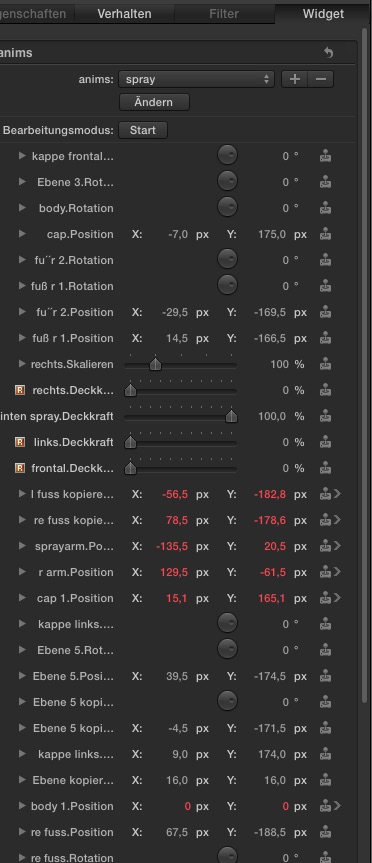
The resulting rigs look insane complex - but I don't have to care, Motion records alll my adjustements I do in the canvas, automatically.
In FCPX I have a simple menu, and the action takes place with the push of a single button.... Just have to place the lil' guy into scenery, or keyframe the looped generator to make him walk across the screen....
Motion makes animations dramatically simple! And fast, the prepping of the pics needed about 2h, the animations less than an hour ... ok, far from broadcast, but, hey, for a hobby project??? :lol:
For my latest project, a Birthday video, I need an animated toon character, a slightly modded Senor Rossi (Italian TV, 70ies?)
Soooo...
made a multi-layer Photoshop file (that costs the most time), to seperate the diff. elements, body, cap, arms etc , dropped that into Motion, created a new DropDown Rig, hit Edit Rig, hit REC ...
all changes and keyframes get stored in that rig.
The resulting rigs look insane complex - but I don't have to care, Motion records alll my adjustements I do in the canvas, automatically.
In FCPX I have a simple menu, and the action takes place with the push of a single button.... Just have to place the lil' guy into scenery, or keyframe the looped generator to make him walk across the screen....
Motion makes animations dramatically simple! And fast, the prepping of the pics needed about 2h, the animations less than an hour ... ok, far from broadcast, but, hey, for a hobby project??? :lol:
Please Log in to join the conversation.


12 Jul 2016 21:16 #78544
by thinkfilm
Replied by thinkfilm on topic big fun - made my first Animation Rig!
Karsten,
I think that is awesome. I wish half the editors I've met had the ambition and enthusiasm to dive into Motion as you do.
You are my new idol
I think that is awesome. I wish half the editors I've met had the ambition and enthusiasm to dive into Motion as you do.
You are my new idol
Please Log in to join the conversation.
- Karsten Schlüter
-
Topic Author
- Offline
- Moderator
-
Less
More
- Posts: 3790
- Thank you received: 718
13 Jul 2016 06:04 - 13 Jul 2016 06:06 #78545
by Karsten Schlüter
haha, thanks for the flowers, there are other, better suited ones.
guess I made it not clear enough: you need NO diving into Motion!
It's two clicks: Edit Rig, then Rec
You do the animation completely in the canvas, classical keyframing:
position playhead, move object, next.
When you stopped Recording and Edit Rig, this monster of settings in the Rig get AUTOMATICALLY created.
So I created 4 selections, walk left, walk right, jump, spray.
For each you do one recording - that's all, done 'in minutes'
What is timeconsuming is the creation of the .psd with its many layers ..
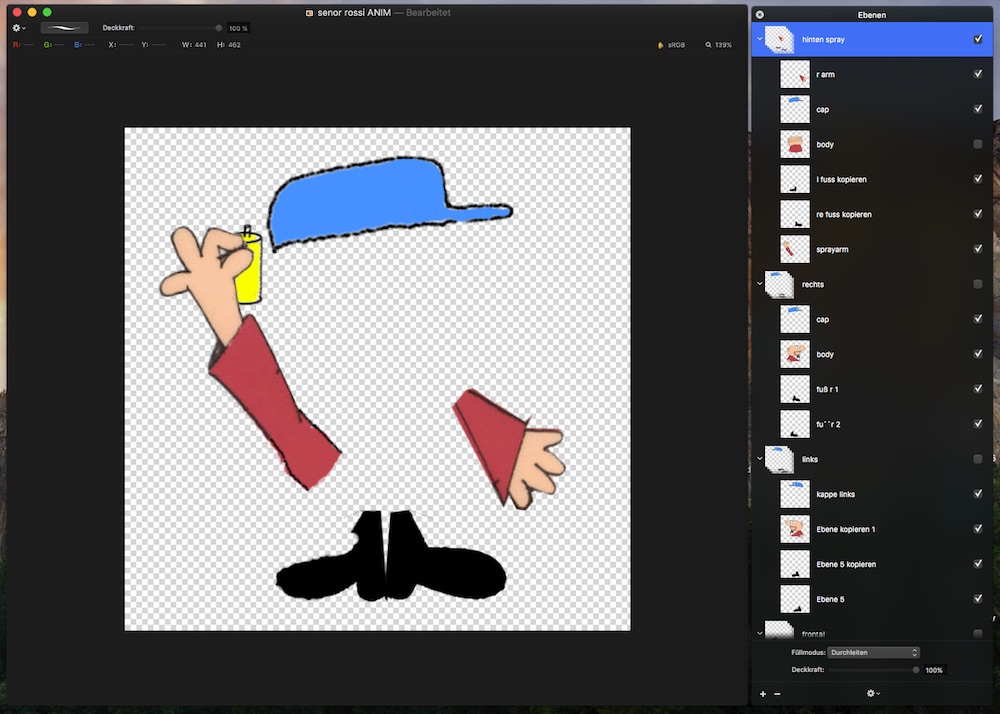
but in Motion, it's really super-easy ... two clicks.
works, btw, with camera movements too, so, e.g. you could apply cam-presets to titles ...
Replied by Karsten Schlüter on topic big fun - made my first Animation Rig!
thinkfilm wrote: ..
…You are my new idol
haha, thanks for the flowers, there are other, better suited ones.
thinkfilm wrote: ...wish half the editors I've met had the ambition and enthusiasm to dive into Motion as you do.…
guess I made it not clear enough: you need NO diving into Motion!
It's two clicks: Edit Rig, then Rec
You do the animation completely in the canvas, classical keyframing:
position playhead, move object, next.
When you stopped Recording and Edit Rig, this monster of settings in the Rig get AUTOMATICALLY created.
So I created 4 selections, walk left, walk right, jump, spray.
For each you do one recording - that's all, done 'in minutes'
What is timeconsuming is the creation of the .psd with its many layers ..
but in Motion, it's really super-easy ... two clicks.
works, btw, with camera movements too, so, e.g. you could apply cam-presets to titles ...
Last edit: 13 Jul 2016 06:06 by Karsten Schlüter.
Please Log in to join the conversation.
- Karsten Schlüter
-
Topic Author
- Offline
- Moderator
-
Less
More
- Posts: 3790
- Thank you received: 718
13 Jul 2016 09:26 #78559
by Karsten Schlüter
Replied by Karsten Schlüter on topic big fun - made my first Animation Rig!
… to demo how Rigs in M5 work like a 'recorder', I made a lil' tut, here for camera psotions and movements:
www.fcp.co/fcp-forum/7-fcpx-how-to-tutor...video-tutorial#78558
www.fcp.co/fcp-forum/7-fcpx-how-to-tutor...video-tutorial#78558
Please Log in to join the conversation.
