


- Posts: 64
- Thank you received: 5
3 Post Moderation Rule for New Boarders (25 Jan 2021)
New boarders will have their posts moderated - Don't worry if you cannot see your post immediately.
STOP AND START MOTION PATH
02 Jun 2016 11:15 #77368
by maclamb
STOP AND START MOTION PATH was created by maclamb
I have to spheres one rotating around the other simulating earth orbit round the sun. This is made with a motion path behavior. Here and there I want to stop "The earth" and later on let it continue its orbit. Is there a way to stop and start a motion path from moving ? I have tried to apply the stop behavior but it does not work. I am working in motion 5.
Please Log in to join the conversation.
- MarkNelsonMovies
-

- Offline
- Elite Member
-

Less
More
- Posts: 256
- Thank you received: 48
02 Jun 2016 15:38 #77382
by MarkNelsonMovies
Replied by MarkNelsonMovies on topic STOP AND START MOTION PATH
Set the 'speed' parameter to custom, then keyframe the 'custom speed' slider to set the position along the path over time.
Also, have you thought about using the 'orbit around' behavior, or the spin behavior with an offset anchor point? as one of those may work better over time.
Hope this helps,
-Mark
Also, have you thought about using the 'orbit around' behavior, or the spin behavior with an offset anchor point? as one of those may work better over time.
Hope this helps,
-Mark
Please Log in to join the conversation.
- Karsten Schlüter
-

- Offline
- Moderator
-

Less
More
- Posts: 3790
- Thank you received: 718
02 Jun 2016 15:48 - 02 Jun 2016 15:59 #77383
by Karsten Schlüter
Replied by Karsten Schlüter on topic STOP AND START MOTION PATH
Hi Jan,
several ways lead to Rome
board member fox_m once published a very tricky construct, by cloning the whole solar system, making it a replicator with just one instance, finally use the replicators start condition and ... I'm lost :woohoo:
my suggestion is a bit simpler, look:
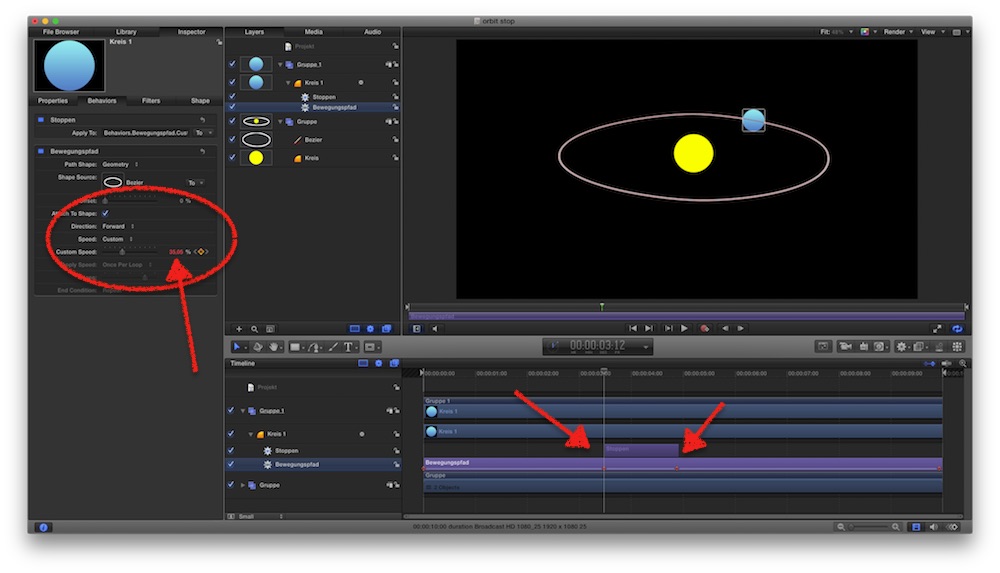
same as yours; the blue dot follows a motionpath/bezier
under SPEED I selected 'Custom' - which instantly added two keyframes, 0 - 100%
now, at that point The Earth Stood Still, I applied a STOP behaviour .... like you. But: mine stops
BUT ...
at the end of the Stop behaviour, the blue dot 'jumps' to a position where it would be without stop....
So, you have to check at the beginning of the Stop the speed%, here 34.05%
At the end of the stop, apply keyframe to Motionpath and type in Speed 34.05.
Or wotever .....
.... happy orbiting :silly:
// found that from fox_m: discussions.apple.com/message/29653801#29653801 //
several ways lead to Rome
board member fox_m once published a very tricky construct, by cloning the whole solar system, making it a replicator with just one instance, finally use the replicators start condition and ... I'm lost :woohoo:
my suggestion is a bit simpler, look:
same as yours; the blue dot follows a motionpath/bezier
under SPEED I selected 'Custom' - which instantly added two keyframes, 0 - 100%
now, at that point The Earth Stood Still, I applied a STOP behaviour .... like you. But: mine stops
BUT ...
at the end of the Stop behaviour, the blue dot 'jumps' to a position where it would be without stop....
So, you have to check at the beginning of the Stop the speed%, here 34.05%
At the end of the stop, apply keyframe to Motionpath and type in Speed 34.05.
Or wotever .....
.... happy orbiting :silly:
// found that from fox_m: discussions.apple.com/message/29653801#29653801 //
Last edit: 02 Jun 2016 15:59 by Karsten Schlüter.
Please Log in to join the conversation.

02 Jun 2016 17:10 #77392
by BenB
Replied by BenB on topic STOP AND START MOTION PATH
Remember to play with the Offset parameters on various behaviors.
Please Log in to join the conversation.
