


3 Post Moderation Rule for New Boarders (25 Jan 2021)
New boarders will have their posts moderated - Don't worry if you cannot see your post immediately.
Converting images to fonts


28 May 2016 21:05 #77223
by BenB
Converting images to fonts was created by BenB
I know this information is buried in a thread here somewhere, and Ripple mentioned options somewhere, but having trouble finding specifics. What are y'all using to convert graphics to a font, for use as 3D images in Motion 5?
Please Log in to join the conversation.
- Steve McGarrigle
-

- Offline
- Premium Member
-

28 May 2016 21:28 #77225
by Steve McGarrigle
Replied by Steve McGarrigle on topic Converting images to fonts
I've personally been using Typetool 3 very effectively.
old.fontlab.com/font-editor/typetool/
It's very easy to use. Here's a link to a tutorial that should give you a bit of an insight as to what it's like to work with. I've not actually watched this video all the way through but It kind of starts of as an absolute beginners guide explaining the difference between vectors and bitmaps so just skip past that vimeo.com/56488640
It's very easy to use. Here's a link to a tutorial that should give you a bit of an insight as to what it's like to work with. I've not actually watched this video all the way through but It kind of starts of as an absolute beginners guide explaining the difference between vectors and bitmaps so just skip past that
vimeo.com/56488640
Please Log in to join the conversation.
29 May 2016 00:13 - 29 May 2016 00:15 #77227
by BenB
Replied by BenB on topic Converting images to fonts
I got TypeTool, but was told by someone that their ScanFont was necessary to do it all with, and ScanFont won't run on any OS X version past Leopard. And even then with a workaround that they charge more for.
But if I could figure out how to do it with TypeTool alone, that'd be great.
I remember seeing mention somewhere of one or two online services that do this, too.
I'll check out the link, thanks tons for posting.
But if I could figure out how to do it with TypeTool alone, that'd be great.
I remember seeing mention somewhere of one or two online services that do this, too.
I'll check out the link, thanks tons for posting.
Last edit: 29 May 2016 00:15 by BenB.
Please Log in to join the conversation.
- Karsten Schlüter
-

- Offline
- Moderator
-

Less
More
- Posts: 3790
- Thank you received: 718
29 May 2016 05:14 #77229
by Karsten Schlüter
Replied by Karsten Schlüter on topic Converting images to fonts
Please Log in to join the conversation.

29 May 2016 08:21 #77232
by sc_fox
Replied by sc_fox on topic Converting images to fonts
Hey Ben,
There's a free type tool here: www.cr8software.net/typelight.html
Typelight 3 or Typelight FREE (it's referred to both ways).
I've got to say though, if you already have an app that can export SVG, that's all you need. Save out each character as a separate SVG and then go to icomoon.io/app or glyphter.com and upload the individual SVG files to those web apps. If you don't have an SVG app, download iVinci Express from the app store. It's also free. It's small (6.5MB) and fairly barebones. It does have a grid and snapping and supports layers which helps designing "models" that need to have parts that fit together.
For best results try to fit your illustration "parts" in the "font space" vertically ("width" should be oriented vertically and length horizontally!) In other words, try to make the illustrations as large as possible to fit into the font space. The reason is Motion doesn't deal with small shapes very well in 3D.
Make sure you set Preferences on the SVG-TTF sites (there are actually several) to set the EM square (or UPM) to the maximum allowed (which on icomoon is 8192 and I'm pretty sure that it is the same on Glyphter.) Most of the time it won't make much of a difference until you get into small pieces.
This image shows the difference between a lo-res font (1000 EM square) and higher res (8000):
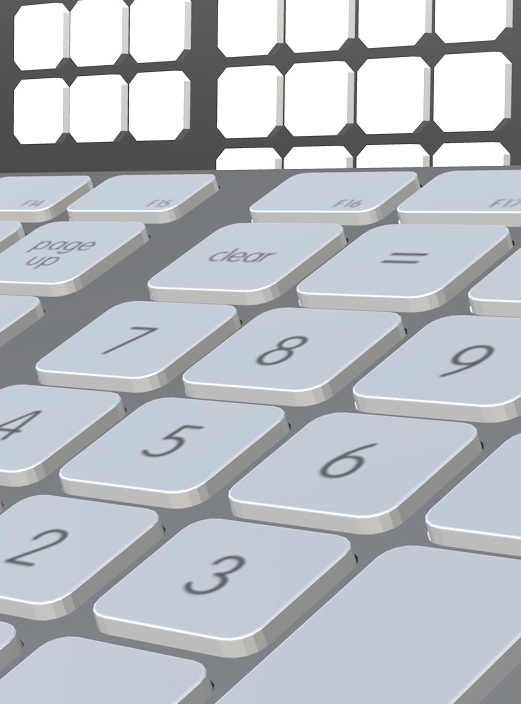
Even at the higher res, notice the curved corners of the keys are still stepped. [That little bit of info took me quite awhile to figure out.] So if (and when) you run into what seems to be bizarre behavior in Motion, scale your parts up in larger in the font, and bring the point size down in Motion.
If you avail yourself of a font making app, center your models around the Basepoint (major point of convenience when assembling parts in Motion). If you really get serious about the process for Motion, I can't recommend Fontographer enough. It has the lowest learning curve of any of the similar apps I've tried (FontForge, FontLab, even TypeLight and a few others I won't bother to mention.) If you can remember Illustrator from the early days (v.1.1), Fontographer was "the" model for vector illustration and Adobe seemed to pretty much follow their example. However, Fontographer is $400 and you can get by very well without it.
If you're looking for an Autotrace feature, I can't recommend it. Motion will not deal with characters that are "too complicated" (and it will tell you so!) [If the autotrace has a "simplify" or minimize points feature, it might be worth a try.] Otherwise, you can fit any curve between two points where there is either a vertical tangent and/or another vertical or horizontal tangent. Circles need 4 points. One on each tangent. Set points on a vertical or horizontal and constrain the control points to that vertical or horizontal and you can fit any shape curve between the two (99.99% of the time...there always seems to be an exception every so often so I'm leaving myself a little wiggle room on that claim.) At the very least: you always get the best results from the fewest possible points (Adobe had to resort to hinting to take care of a lot of issues with their fonts on the old LaserWriter due to overuse of points in a lot of their early fonts.)
Last words: start out with a vector app and SVG. I can very easily recommend iVinci Express to icommoon.io/app. When you install your fonts in Font Book, you need to keep Font Book open and copy/paste characters into Motion (their character codes start at 0xE900, well into the unicode space - Private Use area to be accurate) and so they won't be accessible from the keyboard. Motion is smart enough to know which font you are copying and pasting usually, so that helps. If you paste one character and duplicate the object, then copy/paste the next to the duplicated object, you'll notice the new character lines up exactly as you designed it in the vector app. Just continue until you've copied all the characters into Motion then work on the project. It all goes rather quickly unless your "model" is dozens of characters or more! It is possible to copy multiple characters at once (as strings) in Font Book, and paste them all at once in Motion, but most models substances vary from character to character, so... the practicality of doing that needs to be weighed.
If you have any questions, you probably know where to find me I'm more on apple communities than here.
There's a free type tool here: www.cr8software.net/typelight.html
Typelight 3 or Typelight FREE (it's referred to both ways).
I've got to say though, if you already have an app that can export SVG, that's all you need. Save out each character as a separate SVG and then go to icomoon.io/app or glyphter.com and upload the individual SVG files to those web apps. If you don't have an SVG app, download iVinci Express from the app store. It's also free. It's small (6.5MB) and fairly barebones. It does have a grid and snapping and supports layers which helps designing "models" that need to have parts that fit together.
For best results try to fit your illustration "parts" in the "font space" vertically ("width" should be oriented vertically and length horizontally!) In other words, try to make the illustrations as large as possible to fit into the font space. The reason is Motion doesn't deal with small shapes very well in 3D.
Make sure you set Preferences on the SVG-TTF sites (there are actually several) to set the EM square (or UPM) to the maximum allowed (which on icomoon is 8192 and I'm pretty sure that it is the same on Glyphter.) Most of the time it won't make much of a difference until you get into small pieces.
This image shows the difference between a lo-res font (1000 EM square) and higher res (8000):
Even at the higher res, notice the curved corners of the keys are still stepped. [That little bit of info took me quite awhile to figure out.] So if (and when) you run into what seems to be bizarre behavior in Motion, scale your parts up in larger in the font, and bring the point size down in Motion.
If you avail yourself of a font making app, center your models around the Basepoint (major point of convenience when assembling parts in Motion). If you really get serious about the process for Motion, I can't recommend Fontographer enough. It has the lowest learning curve of any of the similar apps I've tried (FontForge, FontLab, even TypeLight and a few others I won't bother to mention.) If you can remember Illustrator from the early days (v.1.1), Fontographer was "the" model for vector illustration and Adobe seemed to pretty much follow their example. However, Fontographer is $400 and you can get by very well without it.
If you're looking for an Autotrace feature, I can't recommend it. Motion will not deal with characters that are "too complicated" (and it will tell you so!) [If the autotrace has a "simplify" or minimize points feature, it might be worth a try.] Otherwise, you can fit any curve between two points where there is either a vertical tangent and/or another vertical or horizontal tangent. Circles need 4 points. One on each tangent. Set points on a vertical or horizontal and constrain the control points to that vertical or horizontal and you can fit any shape curve between the two (99.99% of the time...there always seems to be an exception every so often so I'm leaving myself a little wiggle room on that claim.) At the very least: you always get the best results from the fewest possible points (Adobe had to resort to hinting to take care of a lot of issues with their fonts on the old LaserWriter due to overuse of points in a lot of their early fonts.)
Last words: start out with a vector app and SVG. I can very easily recommend iVinci Express to icommoon.io/app. When you install your fonts in Font Book, you need to keep Font Book open and copy/paste characters into Motion (their character codes start at 0xE900, well into the unicode space - Private Use area to be accurate) and so they won't be accessible from the keyboard. Motion is smart enough to know which font you are copying and pasting usually, so that helps. If you paste one character and duplicate the object, then copy/paste the next to the duplicated object, you'll notice the new character lines up exactly as you designed it in the vector app. Just continue until you've copied all the characters into Motion then work on the project. It all goes rather quickly unless your "model" is dozens of characters or more! It is possible to copy multiple characters at once (as strings) in Font Book, and paste them all at once in Motion, but most models substances vary from character to character, so... the practicality of doing that needs to be weighed.
If you have any questions, you probably know where to find me
I'm more on apple communities than here. Please Log in to join the conversation.
- Steve McGarrigle
-
- Offline
- Premium Member
-
29 May 2016 09:01 #77234
by Steve McGarrigle
Replied by Steve McGarrigle on topic Converting images to fonts
You can definitely work at a basic level without Fontscan ( I just checked that Typetool still works under 10.11.05 and made a passable Arri logo in Motion ) Looking at what Fontscan does, I can see how it could be useful as translation can at times be an issue and cleaning up an image sometimes fiddly ). I'm lucky in having alternative options with mObject and Element 3D ( for AE ) so I've never needed to push that hard against Typetools or Motions limitations when doing this. Reading other peoples suggestions on here with great interest as Typetool is the only thing I've tried so far.
Please Log in to join the conversation.
29 May 2016 13:35 - 29 May 2016 13:37 #77237
by BenB
Replied by BenB on topic Converting images to fonts
Fantastic information, guys! Thanks for all the contributions, and for those yet to come.
Personal update; FontLab Support is refunding me for ScanFont 5, and support is supposed to send me step by step instructions to convert a set of graphic files into a font set, specifically. I'll post if/when they send me that info. I wanted to purchase an app as I suddenly was thrust into a position of having to do 3D with a number of logos and small graphics over time, and don't want to have to take it all into Modo (which I am a hobbiest with) to do extrudes and the like, and use mObject. As much as I love mObject, with the number of simple graphics I'll be working with over the summer, I'd like to have a faster, easier way to do this. And FontTool seems to be what I need. I'll check out the other options, too. See what speeds up my workflow.
I figure I'll create a font family for this specific job, and group the graphics for each of my client's clients in there some how. Then when this specific job is done, I can just trash that font family, and move forward.
Again, great info, and keep it coming!
Personal update; FontLab Support is refunding me for ScanFont 5, and support is supposed to send me step by step instructions to convert a set of graphic files into a font set, specifically. I'll post if/when they send me that info. I wanted to purchase an app as I suddenly was thrust into a position of having to do 3D with a number of logos and small graphics over time, and don't want to have to take it all into Modo (which I am a hobbiest with) to do extrudes and the like, and use mObject. As much as I love mObject, with the number of simple graphics I'll be working with over the summer, I'd like to have a faster, easier way to do this. And FontTool seems to be what I need. I'll check out the other options, too. See what speeds up my workflow.
I figure I'll create a font family for this specific job, and group the graphics for each of my client's clients in there some how. Then when this specific job is done, I can just trash that font family, and move forward.
Again, great info, and keep it coming!
Last edit: 29 May 2016 13:37 by BenB.
Please Log in to join the conversation.
