


- Posts: 112
- Thank you received: 7
3 Post Moderation Rule for New Boarders (25 Jan 2021)
New boarders will have their posts moderated - Don't worry if you cannot see your post immediately.
3d text reflection
21 May 2016 09:20 #76996
by Endoh935
3d text reflection was created by Endoh935
I know how to create a, 'text' reflection using a 'colour solid". But how do you create a reflection of your text in a video?
Any good tutorials on this? ta.
Any good tutorials on this? ta.
Please Log in to join the conversation.

21 May 2016 12:24 #76999
by BenB
Replied by BenB on topic 3d text reflection
Exactly what do you mean? The color solid thing works just fine with 2D and 3D text. Do you mean reflection of text, in a video that is in a Drop Zone? Use a Drop Zone instead of a color shape.
Please Log in to join the conversation.
21 May 2016 21:47 #77006
by Endoh935
Replied by Endoh935 on topic 3d text reflection
Heya Ben,
O.k.. I've not used a 'drop zone' in M5.
So what's the steps to do when using a 'drop zone'?
O.k.. I've not used a 'drop zone' in M5.
So what's the steps to do when using a 'drop zone'?
Please Log in to join the conversation.
21 May 2016 23:07 #77007
by Endoh935
Replied by Endoh935 on topic 3d text reflection
ben, check this out at 7 minutes onwards..it's what i mean, kind of..it's just that it's not a reflection of the text..or a shadow of the letters.
their must be an easier way ..hahaha
their must be an easier way ..hahaha
Please Log in to join the conversation.
22 May 2016 03:41 #77012
by BenB
Replied by BenB on topic 3d text reflection
What he's doing is pretty easy. That's pretty much how I'd do it for that specific situation.
Please Log in to join the conversation.
- Karsten Schlüter
-

- Offline
- Moderator
-

Less
More
- Posts: 3790
- Thank you received: 718
22 May 2016 11:01 - 22 May 2016 11:08 #77014
by Karsten Schlüter
Replied by Karsten Schlüter on topic 3d text reflection
@Endoh
a German Motion tut, yeah! Quote "… das war jetzt schlecht erklärt"/"…bad explanation…" ja, why on earth don't you edit that part of your chitchat???
arrgh, we Krauts and tutorials...... :evil:
that part is about Enviroments... trouble is: Motion has no raytracer, look:
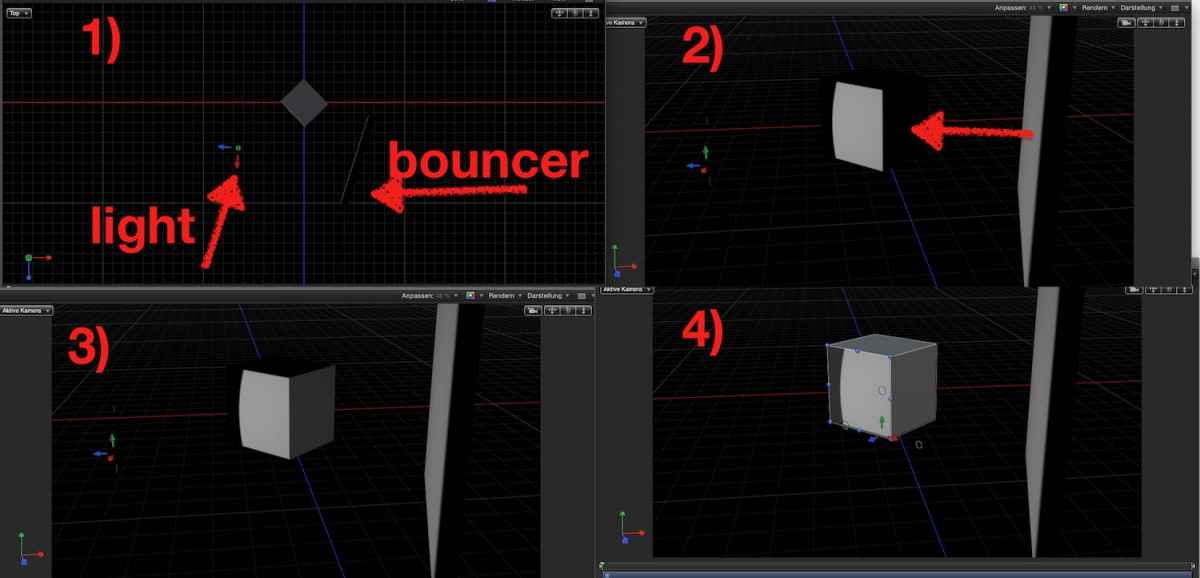
1) the set up:
a cube, a light, a bouncer
2) this is what M5 delivers: light on the cube. light on the bouncer. NO bounced light on the cube!
3) ... I put a 2nd light IN the bouncer, dim it a bit, point it to the cube .... har har, fake enviroment
4) added an Ambient light .... hmmmm ... not convincing. Had a lil' chat about this topic with Mark Spencer, lights in M5 is limited, I suggested he should make a tutorial about that (RT has one for cameras...)...
What the settings in EnvIroment/Umgebung do, is a kind of projection aka texture-mapping, onto the surfaces.... tricky to fake that, I published a plugin to apply any texture to 3D fonts
www.fcp.co/forum/text-titles/25174-free-...o-title-title-plugin
maybe by doubleing the objects with diff. textures you can create some sorts of enviroments - never tried myself....
tipp:
the rotation dial has a dramatic effect on looks!
a German Motion tut, yeah! Quote "… das war jetzt schlecht erklärt"/"…bad explanation…" ja, why on earth don't you edit that part of your chitchat???
arrgh, we Krauts and tutorials...... :evil:
that part is about Enviroments... trouble is: Motion has no raytracer, look:
1) the set up:
a cube, a light, a bouncer
2) this is what M5 delivers: light on the cube. light on the bouncer. NO bounced light on the cube!
3) ... I put a 2nd light IN the bouncer, dim it a bit, point it to the cube .... har har, fake enviroment
4) added an Ambient light .... hmmmm ... not convincing. Had a lil' chat about this topic with Mark Spencer, lights in M5 is limited, I suggested he should make a tutorial about that (RT has one for cameras...)...
What the settings in EnvIroment/Umgebung do, is a kind of projection aka texture-mapping, onto the surfaces.... tricky to fake that, I published a plugin to apply any texture to 3D fonts
www.fcp.co/forum/text-titles/25174-free-...o-title-title-plugin
maybe by doubleing the objects with diff. textures you can create some sorts of enviroments - never tried myself....
tipp:
the rotation dial has a dramatic effect on looks!
Last edit: 22 May 2016 11:08 by Karsten Schlüter.
Please Log in to join the conversation.
22 May 2016 17:49 #77021
by Endoh935
Replied by Endoh935 on topic 3d text reflection
@Karsten,
hahaha..I couldn't understand the tutorial at all, I was going by what i was seeing.
Thanks though Karsten..Btw, I liked that link for adding images to the 3d text..Nice!!
hahaha..I couldn't understand the tutorial at all, I was going by what i was seeing.
Thanks though Karsten..Btw, I liked that link for adding images to the 3d text..Nice!!
Please Log in to join the conversation.
- Karsten Schlüter
-
- Offline
- Moderator
-
Less
More
- Posts: 3790
- Thank you received: 718
22 May 2016 18:37 #77023
by Karsten Schlüter
boohoo, me sad!
no, kiddin!
in a few words:
in real life, everything reflects light. Photography, 3rd lesson. Painting too, search for Rembrandt Lighting.
so, in my 'set', the one spotlight points to one face of the cube.
BUT from the 'wall' on the right, in real life, light should be bounced to the dark side of the cube too.
Not so in Motion. pic#2
because the internal renderer, or shader, doesn't calculate bouncing light = called "ray tracing" (in use for Hollywood CGI)
so, the enviroments 'mimic' bouncing light .... but not real.... and to mimic it manually is even more triky.
Replied by Karsten Schlüter on topic 3d text reflection
Endoh935 wrote: @Karsten,
hahaha..I couldn't understand the tutorial at all, ....
boohoo, me sad!
no, kiddin!
in a few words:
in real life, everything reflects light. Photography, 3rd lesson. Painting too, search for Rembrandt Lighting.
so, in my 'set', the one spotlight points to one face of the cube.
BUT from the 'wall' on the right, in real life, light should be bounced to the dark side of the cube too.
Not so in Motion. pic#2
because the internal renderer, or shader, doesn't calculate bouncing light = called "ray tracing" (in use for Hollywood CGI)
so, the enviroments 'mimic' bouncing light .... but not real.... and to mimic it manually is even more triky.
Please Log in to join the conversation.

23 May 2016 07:11 #77030
by Pielle
Replied by Pielle on topic 3d text reflection
Nothing to do, reflection is only for 2D surfaces, but with a Trick we can make a 3D text object appears as a 2D.
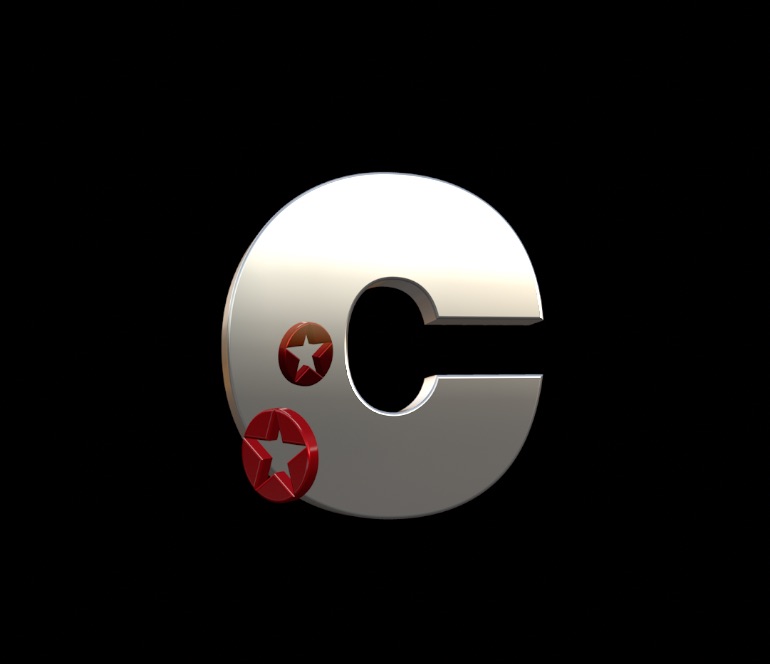
Go to group of the 3D text > inspector>group and active flatten, then under properties active reflection ok done. Now you have a 3D Text with a reflecting surface, because now it is 2D.
:lol: Pielle
Go to group of the 3D text > inspector>group and active flatten, then under properties active reflection ok done. Now you have a 3D Text with a reflecting surface, because now it is 2D.
:lol: Pielle
Please Log in to join the conversation.
- Karsten Schlüter
-
- Offline
- Moderator
-
Less
More
- Posts: 3790
- Thank you received: 718
23 May 2016 08:04 #77031
by Karsten Schlüter
No...?
Have a look:
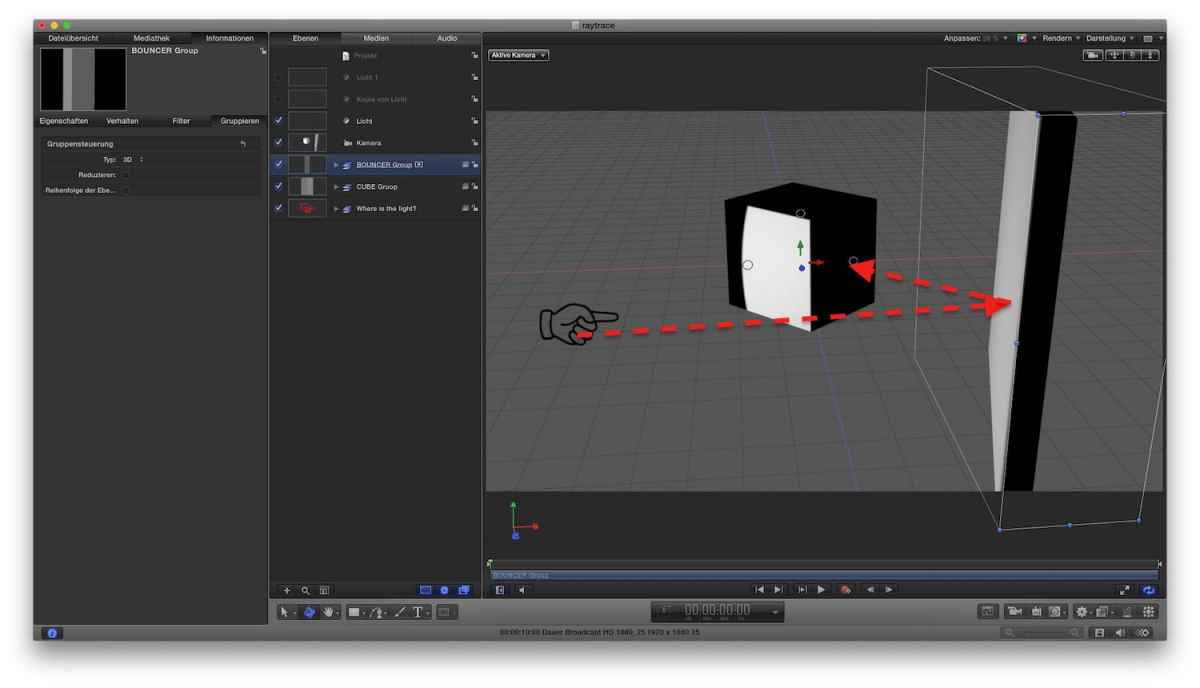
What I want is that light (the Hand is just to illustrate position of spotlight) bounces from the 'wall' to the Cube.
When I set the 'wall' goup to 2D is gives.. that odd situation:
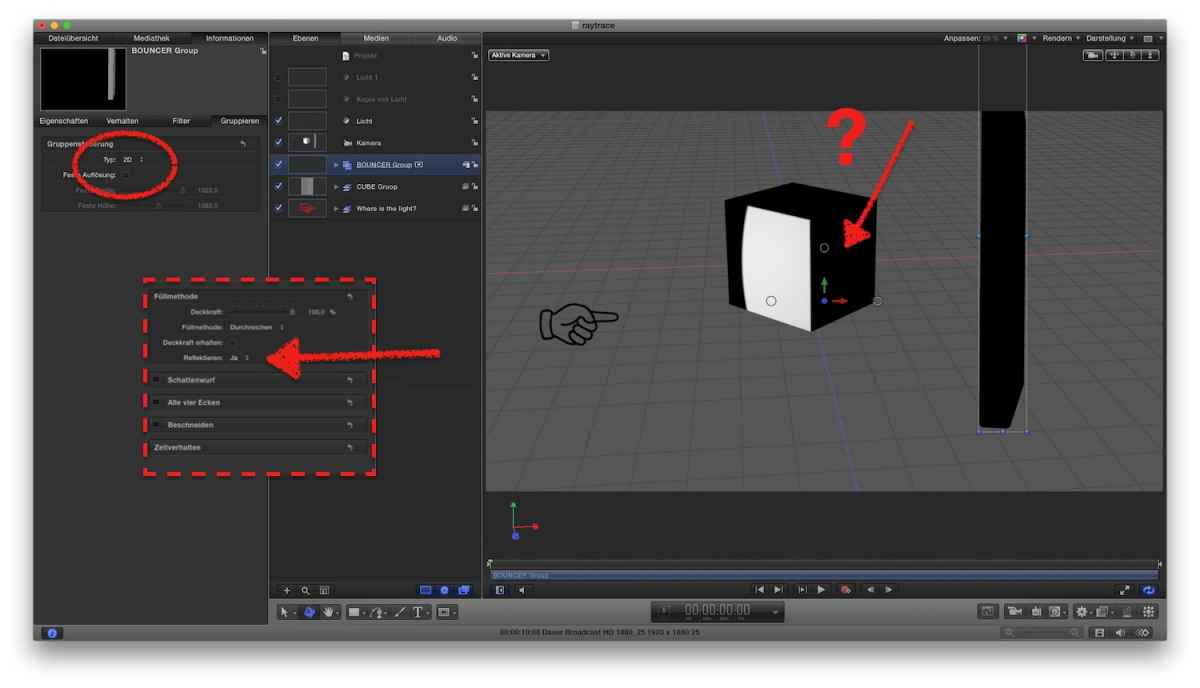
(plus, I have no clue how to position/rotate the bouncer in space?? nor can I position the camera to see, if my spotlight hits the bouncer at all)
attached, the project file of that generic set-up.
If you can manage to bounce light from an 'object', I owe you a beer LOL
Replied by Karsten Schlüter on topic 3d text reflection
Pielle wrote: … Now you have a 3D Text with a reflecting surface, because now it is 2D.
:lol: Pielle
No...?
Have a look:
What I want is that light (the Hand is just to illustrate position of spotlight) bounces from the 'wall' to the Cube.
When I set the 'wall' goup to 2D is gives.. that odd situation:
(plus, I have no clue how to position/rotate the bouncer in space?? nor can I position the camera to see, if my spotlight hits the bouncer at all)
attached, the project file of that generic set-up.
If you can manage to bounce light from an 'object', I owe you a beer LOL
Please Log in to join the conversation.
23 May 2016 11:42 #77035
by Pielle
Replied by Pielle on topic 3d text reflection
Hello Karsten! I found a little time to test your project. I did a bit of fixes. Now you can control the light beam with the published parameters and the index finger will move to indicate the right direction. The flattening trick only works if you build font on the frontal plane and extrude on z plane, the preset flattens the z axis. However there seems to be no real reflection. a false appearance is obtained in the order that I have set: the spot illuminates the cube and it shows on the reflecting plane of the flattened fonts.
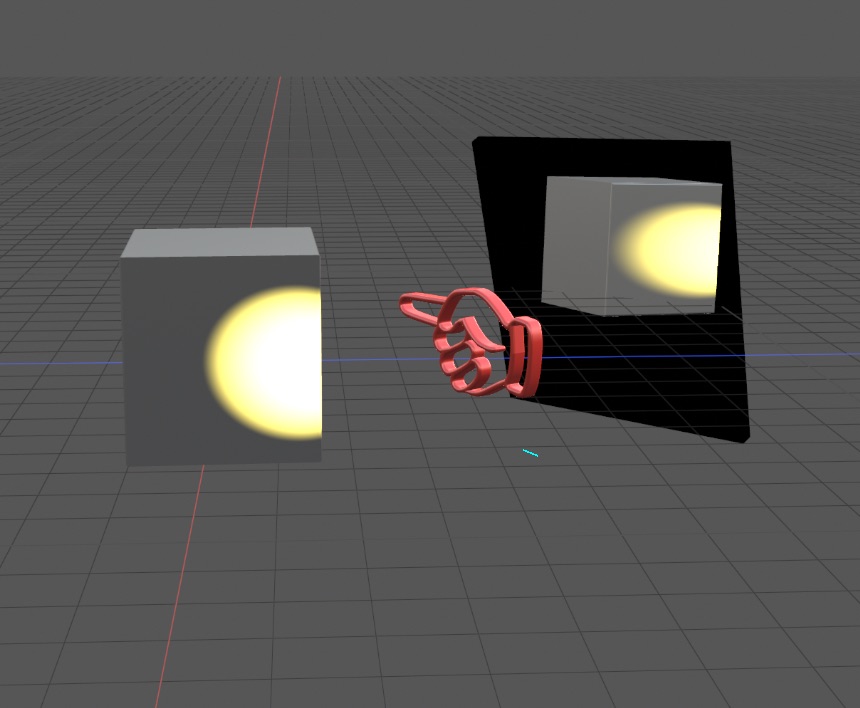
We may think that there is no real raytracing. However, the effect of the spot is cute don’t you think?
We may think that there is no real raytracing. However, the effect of the spot is cute don’t you think?
Please Log in to join the conversation.
- Karsten Schlüter
-
- Offline
- Moderator
-
Less
More
- Posts: 3790
- Thank you received: 718
23 May 2016 15:06 #77039
by Karsten Schlüter
Replied by Karsten Schlüter on topic 3d text reflection
hmmm, lamguage problem, lost in translation LOL
I don't need a mirror, although nice set-up, Luigi...
No, it's about bouncing light ... that is a term in photography:
You don't point with a spot directly onto the subject but use e.g. a huge white piece of styro to ... bounce the light. I don't know any other nor better word for it...
Have a look in my last screen grab:
the dotted arrows mark the way of a light-beam from the spot, to the bouncer, to the cube ...
With a raytracer, one face of the cube would look like now, partially lighted by the spot, and another face of the cube would be greyish lit, see my sketch #3 above ....
so, you have no solution either?
saw in a Nurbz robo demo 'bounced light', but he fakes it too, with additional spots ....
and, mentioned before, Mark Spencer had also no better idea ...
hmmm..... Motion is no 'real' 3D app ... I know, you don't like that, Luigi!
Thanks for the nice inspiration of the mirror scene!!!
I don't need a mirror, although nice set-up, Luigi...
No, it's about bouncing light ... that is a term in photography:
You don't point with a spot directly onto the subject but use e.g. a huge white piece of styro to ... bounce the light. I don't know any other nor better word for it...
Have a look in my last screen grab:
the dotted arrows mark the way of a light-beam from the spot, to the bouncer, to the cube ...
With a raytracer, one face of the cube would look like now, partially lighted by the spot, and another face of the cube would be greyish lit, see my sketch #3 above ....
so, you have no solution either?
saw in a Nurbz robo demo 'bounced light', but he fakes it too, with additional spots ....
and, mentioned before, Mark Spencer had also no better idea ...
hmmm..... Motion is no 'real' 3D app ... I know, you don't like that, Luigi!
Thanks for the nice inspiration of the mirror scene!!!
Please Log in to join the conversation.
23 May 2016 20:51 #77045
by Pielle
Replied by Pielle on topic 3d text reflection
No Karsten there is nothing lost in translation I agree with you. In my answer i wrote: “However there seems to be no real reflection - We may think that there is no real raytracing”. The solution proposed was called by me “ False appearance”.
Perhaps in the rush to reply I was not clear but my sentences were related to your scheme, If you notice I turned off but left there your diffusion screen and I added one mirror from scratch to create a different situation from that impossible to achieve.
I'm not surprised about this result, because I consider Apple Motion a 2.5 D software with the addition of a 3D title generator that would need a thorough rewriting of old pieces of code as I wrote in the topic "When will Motion get some love?". How do you know for true 3D jobs I prefer to work with software like Blackmagic Fusion , Blender ,sketchup DAZStudio but I love doing things with Motion and sqeeze it like a lemon. Anyway you can talk freely about photography an video with me, my knowledge in this field and my practice in the dark room and on the field, it is more than forty years
Post scriptum : The ability or not to have a raytracing does not indicate to be more or less 3D, because ray tracing is one thing that makes the rendering engine, which is very often, a standalone application.
with friendship Luigi
Perhaps in the rush to reply I was not clear but my sentences were related to your scheme, If you notice I turned off but left there your diffusion screen and I added one mirror from scratch to create a different situation from that impossible to achieve.
I'm not surprised about this result, because I consider Apple Motion a 2.5 D software with the addition of a 3D title generator that would need a thorough rewriting of old pieces of code as I wrote in the topic "When will Motion get some love?". How do you know for true 3D jobs I prefer to work with software like Blackmagic Fusion , Blender ,sketchup DAZStudio but I love doing things with Motion and sqeeze it like a lemon. Anyway you can talk freely about photography an video with me, my knowledge in this field and my practice in the dark room and on the field, it is more than forty years
Post scriptum : The ability or not to have a raytracing does not indicate to be more or less 3D, because ray tracing is one thing that makes the rendering engine, which is very often, a standalone application.
with friendship Luigi
Please Log in to join the conversation.
