


- Posts: 14
- Thank you received: 0
3 Post Moderation Rule for New Boarders (25 Jan 2021)
New boarders will have their posts moderated - Don't worry if you cannot see your post immediately.
replicator question...
27 Jan 2016 17:41 #72617
by Zismation
replicator question... was created by Zismation
Hey All-
Hopefully a simple solution to this. The n00b is back...
So I've got a keyframed animation that's simply a graphic with scaling and opacity keyed to make it pop on screen.
I've been trying, in vain, to use the replicator to make a bunch of these animations pop up on screen. The thing is I want to stagger the appearance of these objects over time. I've managed to add the sequence replicator behavior and get a line, rectangle, wave, etc of these objects to appear and play their keyframes simultaneously but I can't seem to figure how to stagger the start time of the objects using the sequence replicator. I've been playing with the "sequencing: from" in the sequence replicator but I can't seem to get these objects to appear and animate over time, just all animating simultaneously.
I'd thought the replicator was the way to do this but I guess the replicator and/or sequence replicator is just for simulatneously animating a group. I'd like these objects to appear and play through keyframes over time. ie: object 1 pops up at 1 second, playes it's keyframes, object 2 begins at 3 seconds and play's its keyframes, etc,
I'm new to motion but I've done a lot of keyframe animation and I've been working with FCP since version 1...
Hopefully someone can help sort me!
Hopefully a simple solution to this. The n00b is back...
So I've got a keyframed animation that's simply a graphic with scaling and opacity keyed to make it pop on screen.
I've been trying, in vain, to use the replicator to make a bunch of these animations pop up on screen. The thing is I want to stagger the appearance of these objects over time. I've managed to add the sequence replicator behavior and get a line, rectangle, wave, etc of these objects to appear and play their keyframes simultaneously but I can't seem to figure how to stagger the start time of the objects using the sequence replicator. I've been playing with the "sequencing: from" in the sequence replicator but I can't seem to get these objects to appear and animate over time, just all animating simultaneously.
I'd thought the replicator was the way to do this but I guess the replicator and/or sequence replicator is just for simulatneously animating a group. I'd like these objects to appear and play through keyframes over time. ie: object 1 pops up at 1 second, playes it's keyframes, object 2 begins at 3 seconds and play's its keyframes, etc,
I'm new to motion but I've done a lot of keyframe animation and I've been working with FCP since version 1...
Hopefully someone can help sort me!
Please Log in to join the conversation.

27 Jan 2016 18:06 #72628
by BenB
Replied by BenB on topic replicator question...
Using a replicator, key frame the original source object. Then set how often replicants appear. Not sure that will do it, but that'd be the only way, using a replicator.
You may try Clone Layers.
Create the first, original object, animate it.
Make a clone layer of it, move the clone layer in the timeline to where you want it chonologicalky, then move its position in canvas.
You may try Clone Layers.
Create the first, original object, animate it.
Make a clone layer of it, move the clone layer in the timeline to where you want it chonologicalky, then move its position in canvas.
Please Log in to join the conversation.
27 Jan 2016 18:37 #72637
by Zismation
Replied by Zismation on topic replicator question...
So I had done what you said; keyframed source, applied the replicator and then added sequence replicator in behaviors...but I'm not clear on how to set how often replicants appear. I know how to set how many replicants appear but the how often part is my problem.
I've also created a clone layer of the animation and then replicated that. Are you saying manually cloning and placing the object on the timeline a number of times instead of using the replicator?
I've also created a clone layer of the animation and then replicated that. Are you saying manually cloning and placing the object on the timeline a number of times instead of using the replicator?
Please Log in to join the conversation.
28 Jan 2016 04:39 #72679
by BenB
Replied by BenB on topic replicator question...
If you keyframe the original, don't add the Sequence behavior.
Applying the Rate parameter behavior to the Replicator's "Points" parameter, can achieve the staggered appearance.
Now that I'm at my desk, I see the original object's keyframes apply to all replicants equally in time, not staggered. Not sure how to achieve that. Will have to explore it later...
Applying the Rate parameter behavior to the Replicator's "Points" parameter, can achieve the staggered appearance.
Now that I'm at my desk, I see the original object's keyframes apply to all replicants equally in time, not staggered. Not sure how to achieve that. Will have to explore it later...
Please Log in to join the conversation.
03 Feb 2016 17:24 #72889
by Zismation
Replied by Zismation on topic replicator question...
Hey thanks for the response. I'm sorry it's taken me a few days to get back to you. I've had some personal/family stuff come up unexpectedly.
Anyways, yes, I'm seeing the replicator seems to only trigger objects simultaneously. I guess it's time to start exploring particles and seeing if I can skin the cat that way. Cross my fingers that this won't eat up too many more days...
Anyways, yes, I'm seeing the replicator seems to only trigger objects simultaneously. I guess it's time to start exploring particles and seeing if I can skin the cat that way. Cross my fingers that this won't eat up too many more days...
Please Log in to join the conversation.


04 Feb 2016 02:50 #72896
by sc_fox
Replied by sc_fox on topic replicator question...
If your replicator has a section that contains "Play Frames", then setting the Source Frame Offset parameter to a higher number will delay (offset actually) the start frame of each object by that number of frames... so timing would be important.
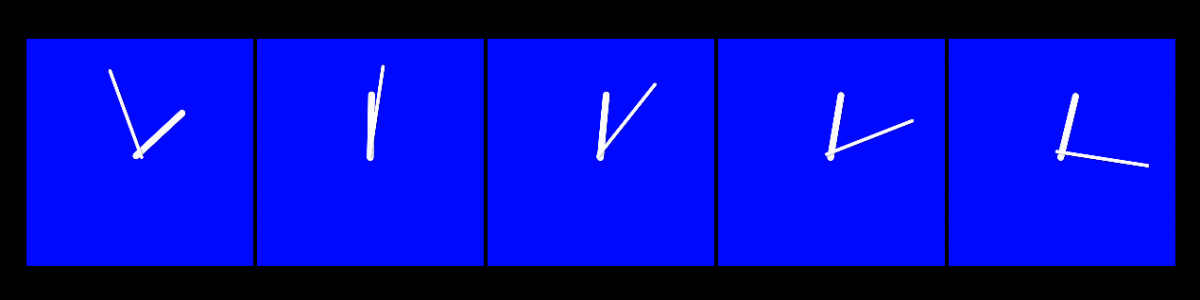
Simple animation Cloned. Clone replicated. Source Frame Offset set to 25.
Depending on the replicator pattern, you might want to set the Origin and Build Style accordingly.
Simple animation Cloned. Clone replicated. Source Frame Offset set to 25.
Depending on the replicator pattern, you might want to set the Origin and Build Style accordingly.
Please Log in to join the conversation.
04 Feb 2016 18:16 #72931
by Zismation
Replied by Zismation on topic replicator question...
Hey sc_fox
Are you replicating a video clip or objects in motion? Right now I'm working with objects and I'm not getting play frames and source frame offset. I've tried both with the orignial keyframed object (a layered PSD) and with making a clone of that and replicating the clone. If I add a sequence replicator I get sequencing: and can select from keyframes along with source: use source animation. I haven't got a very clear understanding of the Unit size: and down parameters under sequence replicator behavior.
I kind of remember watching motion tutorials and them explaining that with video replicators you can select the start frame, and offset of those frames within replicator. That's great but I've got motion objects and I don't think Apple's added that functionality to non-video replicators.
I'm still banging it around, will keep the forum posted...
Are you replicating a video clip or objects in motion? Right now I'm working with objects and I'm not getting play frames and source frame offset. I've tried both with the orignial keyframed object (a layered PSD) and with making a clone of that and replicating the clone. If I add a sequence replicator I get sequencing: and can select from keyframes along with source: use source animation. I haven't got a very clear understanding of the Unit size: and down parameters under sequence replicator behavior.
I kind of remember watching motion tutorials and them explaining that with video replicators you can select the start frame, and offset of those frames within replicator. That's great but I've got motion objects and I don't think Apple's added that functionality to non-video replicators.
I'm still banging it around, will keep the forum posted...
Please Log in to join the conversation.
04 Feb 2016 18:36 #72934
by sc_fox
Replied by sc_fox on topic replicator question...
I'm replicating "objects" -- with a hitch: I group the animation and with the Group level selected, I (K)Clone the group and replicate that. Cloning creates a "flattened movie" (of sorts) of the cloned object(s), and the Play Frames section in the replicator should appear.
Please Log in to join the conversation.
