


- Posts: 164
- Thank you received: 0
3 Post Moderation Rule for New Boarders (25 Jan 2021)
New boarders will have their posts moderated - Don't worry if you cannot see your post immediately.
Lower third - How to link 2 text layers
- Schwalbach
-
 Topic Author
- Offline
- Elite Member
-

Less
More
27 Jan 2016 09:18 #72597
by Schwalbach
Lower third - How to link 2 text layers was created by Schwalbach
Hi,
In this lower third I am creating, I have two layers of text for the same "text"/
Layer 1 is the original text and layer 2 is an effected layer with a different color, masked and keyframes to move across the original text.
I need to have these 2 layers of text linked so that when I edit the text in FCPX it changes both layers.
How do I achieve this?
Thanks
In this lower third I am creating, I have two layers of text for the same "text"/
Layer 1 is the original text and layer 2 is an effected layer with a different color, masked and keyframes to move across the original text.
I need to have these 2 layers of text linked so that when I edit the text in FCPX it changes both layers.
How do I achieve this?
Thanks
Please Log in to join the conversation.

27 Jan 2016 12:07 #72599
by lichinho
Replied by lichinho on topic Lower third - How to link 2 text layers
I believe what you are looking for is achievable by creating a clone layer.
Here is a rough idea. I only tested it with a small example, and it seems to be working as expected.
1) Make a clone layer of the text object
2) Apply all the behaviors, effects, etc, to the clone layer
3) Publish the title.
When you change the text it is changed in both instances.
Here is a rough idea. I only tested it with a small example, and it seems to be working as expected.
1) Make a clone layer of the text object
2) Apply all the behaviors, effects, etc, to the clone layer
3) Publish the title.
When you change the text it is changed in both instances.
Please Log in to join the conversation.

27 Jan 2016 12:10 #72602
by BenB
Replied by BenB on topic Lower third - How to link 2 text layers
Beat me to it, clone layer is the way to go.
Please Log in to join the conversation.
- Schwalbach
-
Topic Author
- Offline
- Elite Member
-
Less
More
- Posts: 164
- Thank you received: 0
27 Jan 2016 13:27 #72604
by Schwalbach
Replied by Schwalbach on topic Lower third - How to link 2 text layers
Thank you both. Will try that.
Please Log in to join the conversation.
- Schwalbach
-
Topic Author
- Offline
- Elite Member
-
Less
More
- Posts: 164
- Thank you received: 0
28 Jan 2016 07:13 #72683
by Schwalbach
Replied by Schwalbach on topic Lower third - How to link 2 text layers
BenB,
Unfortunately the clone layer doesn't work because I am not able to change the color of the text in the cloned layer. Somehow you loose the TEXT tab when you clone a text layer. Weird...
Unfortunately the clone layer doesn't work because I am not able to change the color of the text in the cloned layer. Somehow you loose the TEXT tab when you clone a text layer. Weird...
Please Log in to join the conversation.
- Karsten Schlüter
-

- Offline
- Moderator
-

Less
More
- Posts: 3790
- Thank you received: 718
28 Jan 2016 07:53 #72684
by Karsten Schlüter
hm, not so ...
You are not duplicating that layer but clone it … in a duplicate you do have access to all controls, you duplicate the controls too sotospeak - unfortunatelly, when you apply changes to the original = type text, this doesn't get copied to the duplicate layer...
so:
to change the color of a (clone) layer apply the Color Filter - that simple.
Replied by Karsten Schlüter on topic Lower third - How to link 2 text layers
Schwalbach wrote: …Weird...
hm, not so ...
You are not duplicating that layer but clone it … in a duplicate you do have access to all controls, you duplicate the controls too sotospeak - unfortunatelly, when you apply changes to the original = type text, this doesn't get copied to the duplicate layer...
so:
to change the color of a (clone) layer apply the Color Filter - that simple.
Please Log in to join the conversation.
- Schwalbach
-
Topic Author
- Offline
- Elite Member
-
Less
More
- Posts: 164
- Thank you received: 0
28 Jan 2016 08:47 #72686
by Schwalbach
Replied by Schwalbach on topic Lower third - How to link 2 text layers
Karsten,
Can you please elaborate on how to apply color with the filters? Which color filter exactly must I use?
thanks
Can you please elaborate on how to apply color with the filters? Which color filter exactly must I use?
thanks
Please Log in to join the conversation.
- Karsten Schlüter
-
- Offline
- Moderator
-
Less
More
- Posts: 3790
- Thank you received: 718
28 Jan 2016 09:05 #72687
by Karsten Schlüter
Replied by Karsten Schlüter on topic Lower third - How to link 2 text layers
sorry, I thought it's called 'color' in English, it's 'colorize' ....
look:
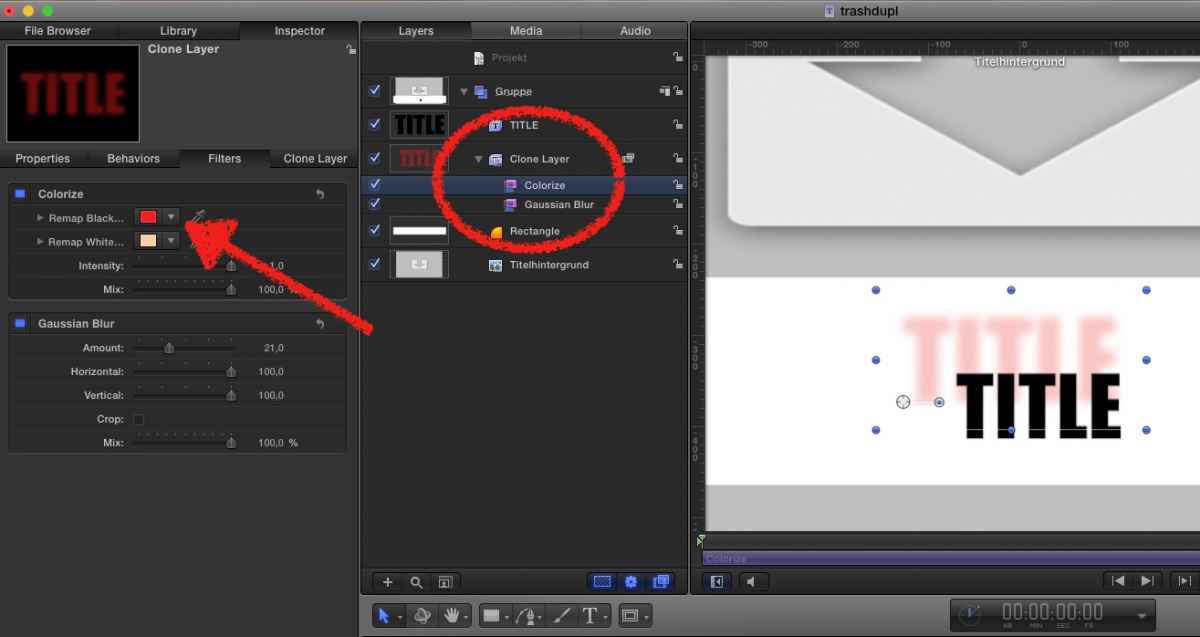
A Title-project, a rectangle for as lower-third background, a title << will be published to allow typing in FCPX, a Clone of that layer
Now, I did move the layer to a new position, re-sized it, applied a Gaussian and the COLORIZE filer: the black of the 'mother' gets replaced by red in the clone layer.
look:
A Title-project, a rectangle for as lower-third background, a title << will be published to allow typing in FCPX, a Clone of that layer
Now, I did move the layer to a new position, re-sized it, applied a Gaussian and the COLORIZE filer: the black of the 'mother' gets replaced by red in the clone layer.
Please Log in to join the conversation.
- Schwalbach
-
Topic Author
- Offline
- Elite Member
-
Less
More
- Posts: 164
- Thank you received: 0
28 Jan 2016 09:44 #72688
by Schwalbach
Replied by Schwalbach on topic Lower third - How to link 2 text layers
Thank you!!! That did it.
Please Log in to join the conversation.
28 Jan 2016 12:38 #72697
by BenB
Replied by BenB on topic Lower third - How to link 2 text layers
Make your text white. Then apply the Colorize to each layer, publish the controls from those two copies of the filter, for end users to change.
Please Log in to join the conversation.
