


- Posts: 45
- Thank you received: 1
3 Post Moderation Rule for New Boarders (25 Jan 2021)
New boarders will have their posts moderated - Don't worry if you cannot see your post immediately.
Publish and animate shape points to FCPX
08 Jan 2016 11:28 #72023
by dorin
Publish and animate shape points to FCPX was created by dorin
Hello everyone,
I have a very big question for all you Motion guru artists:
- How to publish and animate shape points to FCPX?
The track points method is not working because dos not allow keyframe animation in FCPX.
I need to have a simple shape line, to be able to control both end points in FCPX and keyframe the position for each end individually. I know it can be done because I have seen this type of animation but I can not figure it out how it was done.
Can someone help?
Thank You.
I have a very big question for all you Motion guru artists:
- How to publish and animate shape points to FCPX?
The track points method is not working because dos not allow keyframe animation in FCPX.
I need to have a simple shape line, to be able to control both end points in FCPX and keyframe the position for each end individually. I know it can be done because I have seen this type of animation but I can not figure it out how it was done.
Can someone help?
Thank You.
Please Log in to join the conversation.
08 Jan 2016 13:42 #72028
by Pielle
Replied by Pielle on topic Publish and animate shape points to FCPX
Sorry. you may be more clear about what you want to do? An example would help
Please Log in to join the conversation.
08 Jan 2016 14:34 #72030
by dorin
Replied by dorin on topic Publish and animate shape points to FCPX
Hello,
I need to create something like this.
Mark Spencer has one tutorial on animating shape points but only with behaviors not keyframes.
Another example here.
The examples above are created with Motion so it must be a way of doing it.
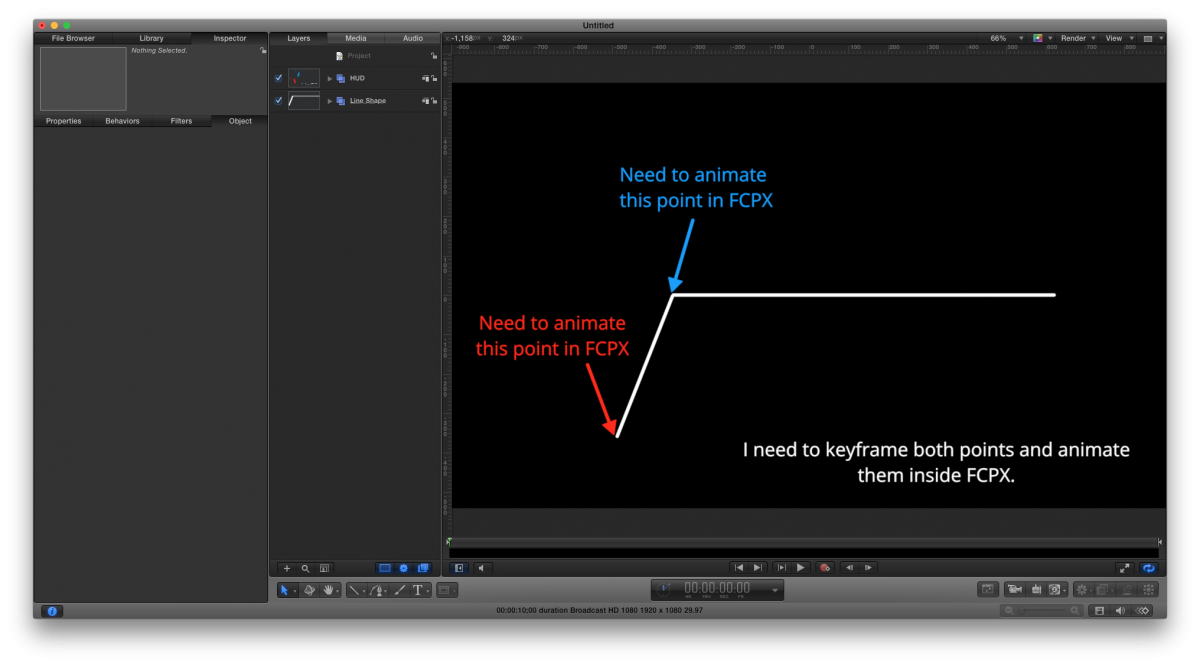
I need to create something like this.
Mark Spencer has one tutorial on animating shape points but only with behaviors not keyframes.
Another example here.
The examples above are created with Motion so it must be a way of doing it.
Please Log in to join the conversation.

08 Jan 2016 16:28 #72032
by BenB
Replied by BenB on topic Publish and animate shape points to FCPX
Can't be done with Motion. You'd have to script it with FXPlug, AFAIK.
TrackX may do something like this.
TrackX may do something like this.
Please Log in to join the conversation.
08 Jan 2016 17:10 #72033
by dorin
Replied by dorin on topic Publish and animate shape points to FCPX
Why the simplest actions need to be made with FXPlug in Motion? I'm a designer not a coder, when my client requests some feature / animation I need to use the built in Motion tools to deliver. Is no other way of achieving that functionality or something similar? Do you have some good resources where I can start learning how to create FCPlug tools?
Please Log in to join the conversation.
- MarkNelsonMovies
-

- Offline
- Elite Member
-

Less
More
- Posts: 256
- Thank you received: 48
08 Jan 2016 19:05 #72036
by MarkNelsonMovies
Replied by MarkNelsonMovies on topic Publish and animate shape points to FCPX
Shape points cannot be published from motion to FCPX.
The only way I know of to make something like this animatable in FCPX with just motion 5, is to make each line a separate object, and then set the lines anchor points to where they join each other. Then you can animate using the position, rotation, and scale parameters. if you need more consolidated controls you can use rigs and linking to combine multiple parameters into one control.
Hope this helps,
Mark
The only way I know of to make something like this animatable in FCPX with just motion 5, is to make each line a separate object, and then set the lines anchor points to where they join each other. Then you can animate using the position, rotation, and scale parameters. if you need more consolidated controls you can use rigs and linking to combine multiple parameters into one control.
Hope this helps,
Mark
Please Log in to join the conversation.
08 Jan 2016 19:12 - 08 Jan 2016 19:12 #72037
by dorin
Replied by dorin on topic Publish and animate shape points to FCPX
Thank you Mark.
I have used the track points method with a png file combined with on screen controls. It is a great method for adjusting shape points in FCPX, only I can not animate them. I will try another approach with the anchor point.
I have used the track points method with a png file combined with on screen controls. It is a great method for adjusting shape points in FCPX, only I can not animate them. I will try another approach with the anchor point.
Last edit: 08 Jan 2016 19:12 by dorin.
Please Log in to join the conversation.
- Karsten Schlüter
-

- Offline
- Moderator
-

Less
More
- Posts: 3790
- Thank you received: 718
09 Jan 2016 13:29 #72048
by Karsten Schlüter
Replied by Karsten Schlüter on topic Publish and animate shape points to FCPX
reminds me of a feature in my plug-in
www.fcp.co/forum/generators/23254-callout-dotlinedot#63690
download it and adjust it to yor needs .....
www.fcp.co/forum/generators/23254-callout-dotlinedot#63690
download it and adjust it to yor needs .....
Please Log in to join the conversation.
09 Jan 2016 13:41 #72049
by dorin
Replied by dorin on topic Publish and animate shape points to FCPX
This is exactly what I need. Looks like your project can be keyframed with no problem in FCPX. Thank You very much Mr. Schlüter.
Please Log in to join the conversation.
10 Jan 2016 10:05 - 10 Jan 2016 10:15 #72066
by BenB
Replied by BenB on topic Publish and animate shape points to FCPX
FYI, DriveX does this with the new track Shape Track Outline that was in the November update. It can be used to create shapes where you can keyframe animate the individual points in FCP X. Just a bit more flexibility and customization and control. Depends on how far you want to take it.
www.coremelt.com/products/drivex-powered-by-mocha.html
www.coremelt.com/products/drivex-powered-by-mocha.html
Last edit: 10 Jan 2016 10:15 by BenB.
Please Log in to join the conversation.


25 Jan 2016 10:03 #72513
by sc_fox
Replied by sc_fox on topic Publish and animate shape points to FCPX
I've solved this problem for your particular request.
I don't spend a lot of time here. I don't particularly like this UI and pretty much hate the online editor. It thinks that Eight-right parenthesis is the Joe Cool emoticon... and there's no image insert in the toolbar (adding them as attachments... ) and if you Preview, your only options are Cancel - which deletes everything written (won't get THAT hour back) or Submit which I wasn't ready to do yet.
I spent an hour writing out a step by step... not doing it again. Download the TextTrackOSCs.zip file and install it as a generator for FCPX. It's going to look "ugly" when you set keyframes beyond the first one, but as soon as you move the playhead, everything should snaps back to alignment (multiple inter-keyframes might not look pretty) and should (at least) play correctly. I've labelled things fairly clearly in the project and if you have any questions, I'll try to answer them. Otherwise, a brief overview:
One OSC controls a group containing your lines. One end of one line should be "anchored" at the center point of the 2D Fixed Res group. The other end is controlled by another OSC within the same group as the line. When the Center point gets moved, everything moves with it -- including the secondary OSC -- it doesn't make any difference in the end result. You can only move/keyframe one point of a shape (for some unknown reason) but that's enough for this effect to work.
Since I don't use this online "tool" very much, if I've screwed it up and you don't get the attached files, let me know - I'll post a direct link.
—I've had enough — I'm goin' to bed. I'm hitting Submit now -- Good luck!
I don't spend a lot of time here. I don't particularly like this UI and pretty much hate the online editor. It thinks that Eight-right parenthesis is the Joe Cool emoticon... and there's no image insert in the toolbar (adding them as attachments...
) and if you Preview, your only options are Cancel - which deletes everything written (won't get THAT hour back) or Submit which I wasn't ready to do yet.I spent an hour writing out a step by step... not doing it again. Download the TextTrackOSCs.zip file and install it as a generator for FCPX. It's going to look "ugly" when you set keyframes beyond the first one, but as soon as you move the playhead, everything should snaps back to alignment (multiple inter-keyframes might not look pretty) and should (at least) play correctly. I've labelled things fairly clearly in the project and if you have any questions, I'll try to answer them. Otherwise, a brief overview:
One OSC controls a group containing your lines. One end of one line should be "anchored" at the center point of the 2D Fixed Res group. The other end is controlled by another OSC within the same group as the line. When the Center point gets moved, everything moves with it -- including the secondary OSC -- it doesn't make any difference in the end result. You can only move/keyframe one point of a shape (for some unknown reason) but that's enough for this effect to work.
Since I don't use this online "tool" very much, if I've screwed it up and you don't get the attached files, let me know - I'll post a direct link.
—I've had enough — I'm goin' to bed. I'm hitting Submit now -- Good luck!
Please Log in to join the conversation.
25 Jan 2016 10:17 - 25 Jan 2016 10:20 #72514
by dorin
Replied by dorin on topic Publish and animate shape points to FCPX
Thank you for your effort. Appreciate it. Your project works great. The keyframing option is working as expected in FCPX. Thank You.
Last edit: 25 Jan 2016 10:20 by dorin.
Please Log in to join the conversation.
