


- Posts: 233
- Thank you received: 6
3 Post Moderation Rule for New Boarders (25 Jan 2021)
New boarders will have their posts moderated - Don't worry if you cannot see your post immediately.
2 Sided Drop Zone
- damiangrady
-
 Topic Author
- Offline
- Elite Member
-

Less
More
14 Aug 2015 09:42 #67425
by damiangrady
2 Sided Drop Zone was created by damiangrady
Anyone know how to create a 2 sided drop zone? I need to flip a square with one drop zone on one side and a separate one for the back.
Any help would be appreciated.
Any help would be appreciated.
Please Log in to join the conversation.
- Karsten Schlüter
-

- Offline
- Moderator
-

Less
More
- Posts: 3790
- Thank you received: 718
14 Aug 2015 10:00 - 14 Aug 2015 10:00 #67426
by Karsten Schlüter
Replied by Karsten Schlüter on topic 2 Sided Drop Zone
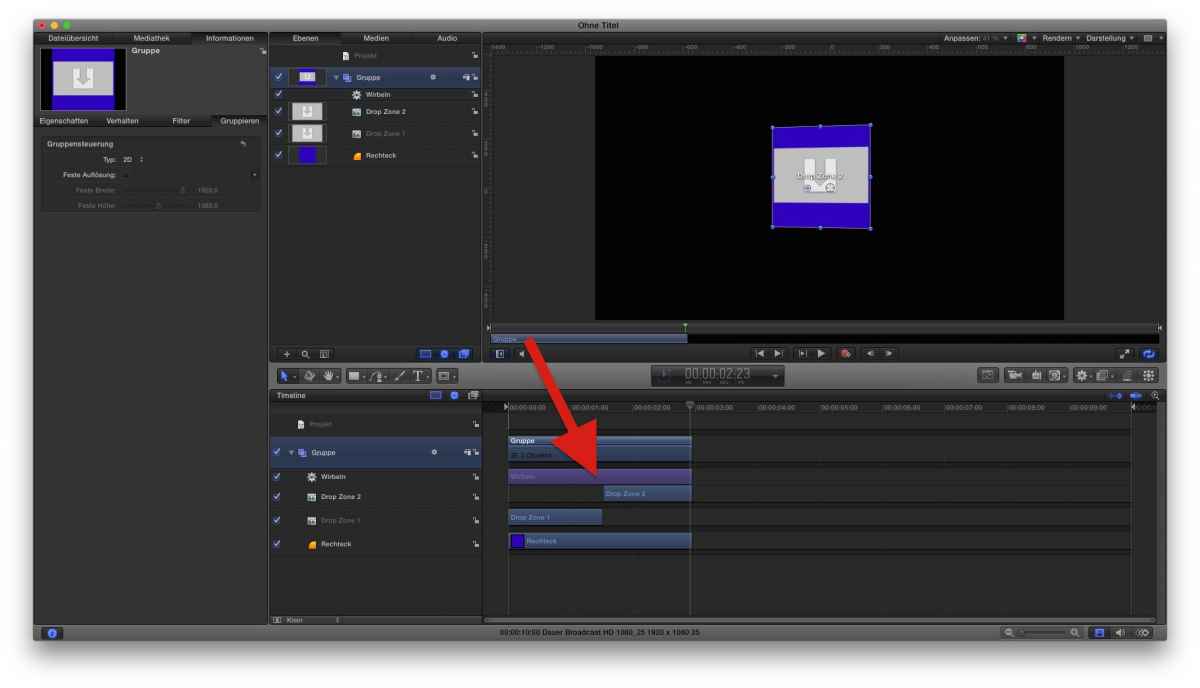
like that?
(see attached pic)
Two Dropzones, and when the rotating square passes the 'zero line', you set DZ1 off, and DZ2 on ....
(see attached pic)
Two Dropzones, and when the rotating square passes the 'zero line', you set DZ1 off, and DZ2 on ....
Last edit: 14 Aug 2015 10:00 by Karsten Schlüter.
Please Log in to join the conversation.
- damiangrady
-
Topic Author
- Offline
- Elite Member
-
Less
More
- Posts: 233
- Thank you received: 6
14 Aug 2015 10:30 #67427
by damiangrady
Replied by damiangrady on topic 2 Sided Drop Zone
Clever! Thanks Karsten.
What's the behaviour you've used? I can't make it out.
What's the behaviour you've used? I can't make it out.
Please Log in to join the conversation.
- Karsten Schlüter
-
- Offline
- Moderator
-
Less
More
- Posts: 3790
- Thank you received: 718
14 Aug 2015 11:26 #67432
by Karsten Schlüter
ja, for the screenshot I haven't switched to English interface, ... sorry!
That's Behaviors/Basic Motion/Spin
I LOVE using Behaviors - even complex, intricated motions are instantly in real time avail....
Glad I could help
Replied by Karsten Schlüter on topic 2 Sided Drop Zone
damiangrady wrote: Clever!…What's the behaviour you've used? I can't make it out.
ja, for the screenshot I haven't switched to English interface, ... sorry!
That's Behaviors/Basic Motion/Spin
I LOVE using Behaviors - even complex, intricated motions are instantly in real time avail....
Glad I could help
Please Log in to join the conversation.

14 Aug 2015 11:32 - 14 Aug 2015 11:35 #67433
by BenB
Replied by BenB on topic 2 Sided Drop Zone
Not sure what turning layers off and on is about, that overly complicates things, no need at all. Keep it short and simple.
Two drop zones in one 3D Group, must be 3D. You rotate the Group. But place one drop zone a pixel behind the other. If one is at X:0, Y:0, Z:0, the back side will be same coordinates but Z:-1. Then just rotate the group as needed. Works great.
You may have to rotate your rear Drop Zone 180 degrees to make it appear right-side-up when the Group rotates.
In this example (should be self-explanatory), I used a Rate parameter behavior for the rotation X parameter on the Group layer.
www.bbalser.com/video/FCPXguruFiles/DoubleSidedDropZone.mp4
Two drop zones in one 3D Group, must be 3D. You rotate the Group. But place one drop zone a pixel behind the other. If one is at X:0, Y:0, Z:0, the back side will be same coordinates but Z:-1. Then just rotate the group as needed. Works great.
You may have to rotate your rear Drop Zone 180 degrees to make it appear right-side-up when the Group rotates.
In this example (should be self-explanatory), I used a Rate parameter behavior for the rotation X parameter on the Group layer.
www.bbalser.com/video/FCPXguruFiles/DoubleSidedDropZone.mp4
Last edit: 14 Aug 2015 11:35 by BenB.
Please Log in to join the conversation.
- damiangrady
-
Topic Author
- Offline
- Elite Member
-
Less
More
- Posts: 233
- Thank you received: 6
14 Aug 2015 14:34 - 14 Aug 2015 14:47 #67445
by damiangrady
Replied by damiangrady on topic 2 Sided Drop Zone
Thanks BenB. That's another great way of doing it.
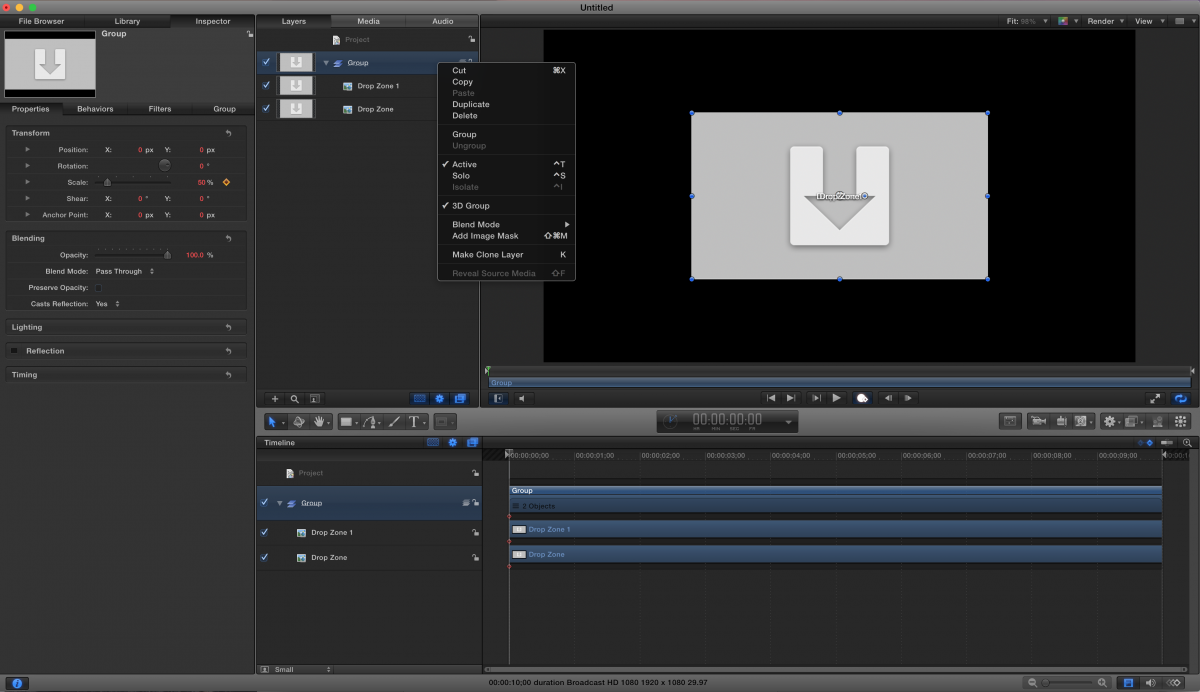
However, for some reason, I've made a group 3D but don't get a Z transform property. See attached.
EDIT. Sussed it. I was being an idiot.
However, for some reason, I've made a group 3D but don't get a Z transform property. See attached.
EDIT. Sussed it. I was being an idiot.
Last edit: 14 Aug 2015 14:47 by damiangrady.
Please Log in to join the conversation.
